N7201A652E.pdf - 第157页
NPM- TT2 EJM1EE-MB -02O-04 2-5-2 -8 Preparatio n D E Material F The barco de-scan ned nozzle serial numbe r ‘- - -(Hyphen)’: Yet to be measu red Failed to read Serial The barco de-scan ned extra nozzle information ‘- - -…
NPM-TT2 EJM1EE-MB-02O-04
Individu-
al
prepara-
tion
Replacing the nozzle 4
2-5-2-7
Operating procedure
2-5-2
A B C D E F
1
2
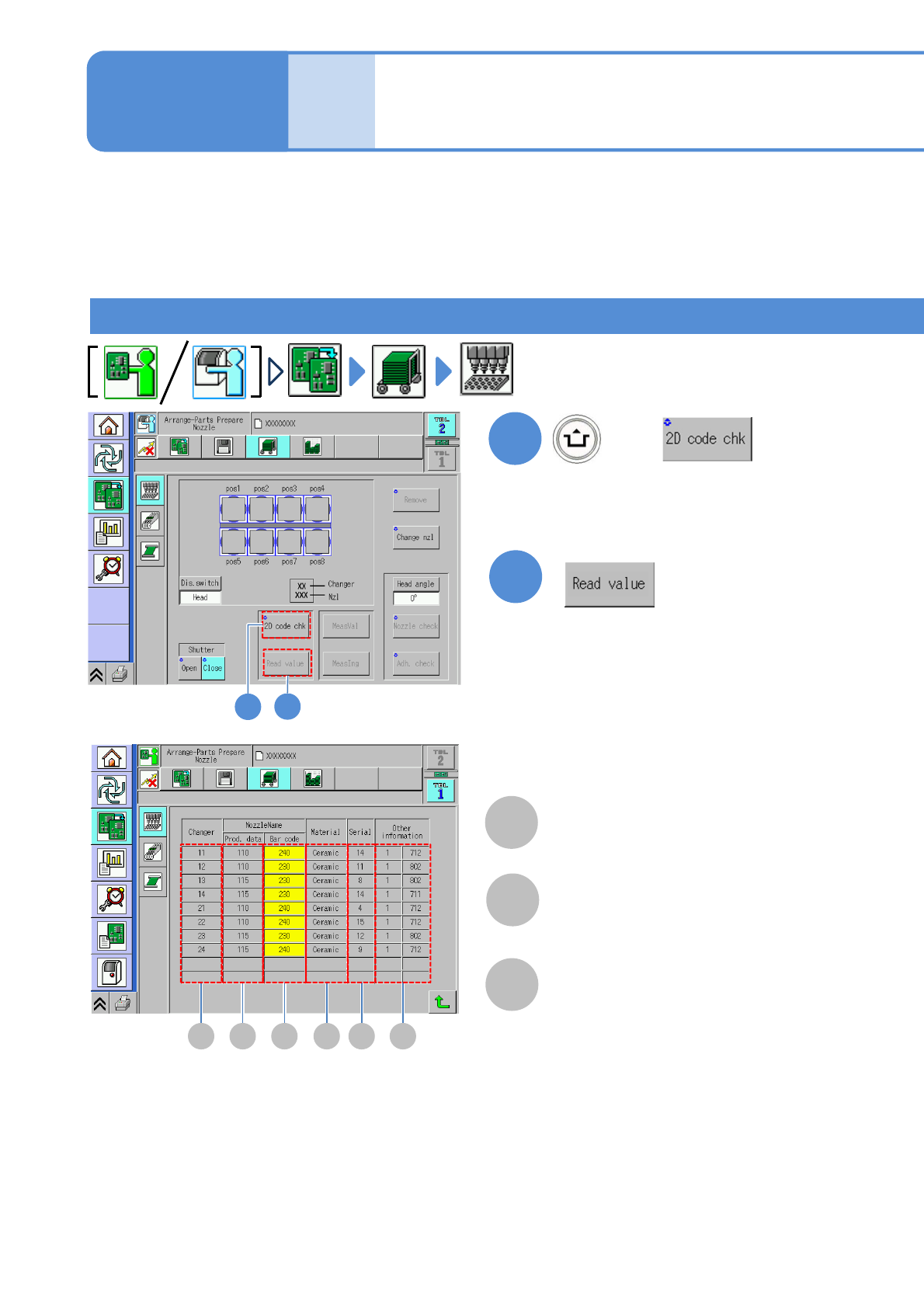
Nozzle 2D code recognition
The nozzle 2D recognition is carried out, and its results are displayed on the screen.
This is used to prevent miss setting of the nozzles. At the start of automatic operation, the nozzle 2D code
recognition is carried out so as to detect a nozzle(s) being miss set.
The [2D code chk] and [Read value] buttons are active only when the nozzle 2D code recognition is ON in
the unit setting.
The screens for 8-nozzle heads are used here as an example to illustrate; however, the same procedure is
also applicable to 3-nozzle heads.
1
<2D code recognition result> screen
(All nozzles are returned to the changer,
and the 2D codes of all the nozzles
within the changer are recognized)
2
(2D code recognition results are displayed)
A
The nozzle changer number
Changer
B
The nozzle number in production data
Nozzle Name Prod. data
C
The barcode-scanned nozzle number
‘- - -(Hyphen)’:
Yet to be scanned
Failed to read
Yellow frame:
The nozzle number differs from the
one in production data.
Nozzle Name Bar code
+

NPM-TT2 EJM1EE-MB-02O-04
2-5-2-8
Preparation
D
E
Material
F
The barcode-scanned nozzle serial number
‘- - -(Hyphen)’:
Yet to be measured
Failed to read
Serial
The barcode-scanned extra nozzle information
‘- - -(Hyphen)’:
Yet to be measured
Failed to read
Other information
The barcode-scanned nozzle material
‘- - -(Hyphen)’:
Yet to be measured
Failed to read
NPM-TT2 EJM1EE-MB-02O-04
ACTIVATION
ACTIVATION
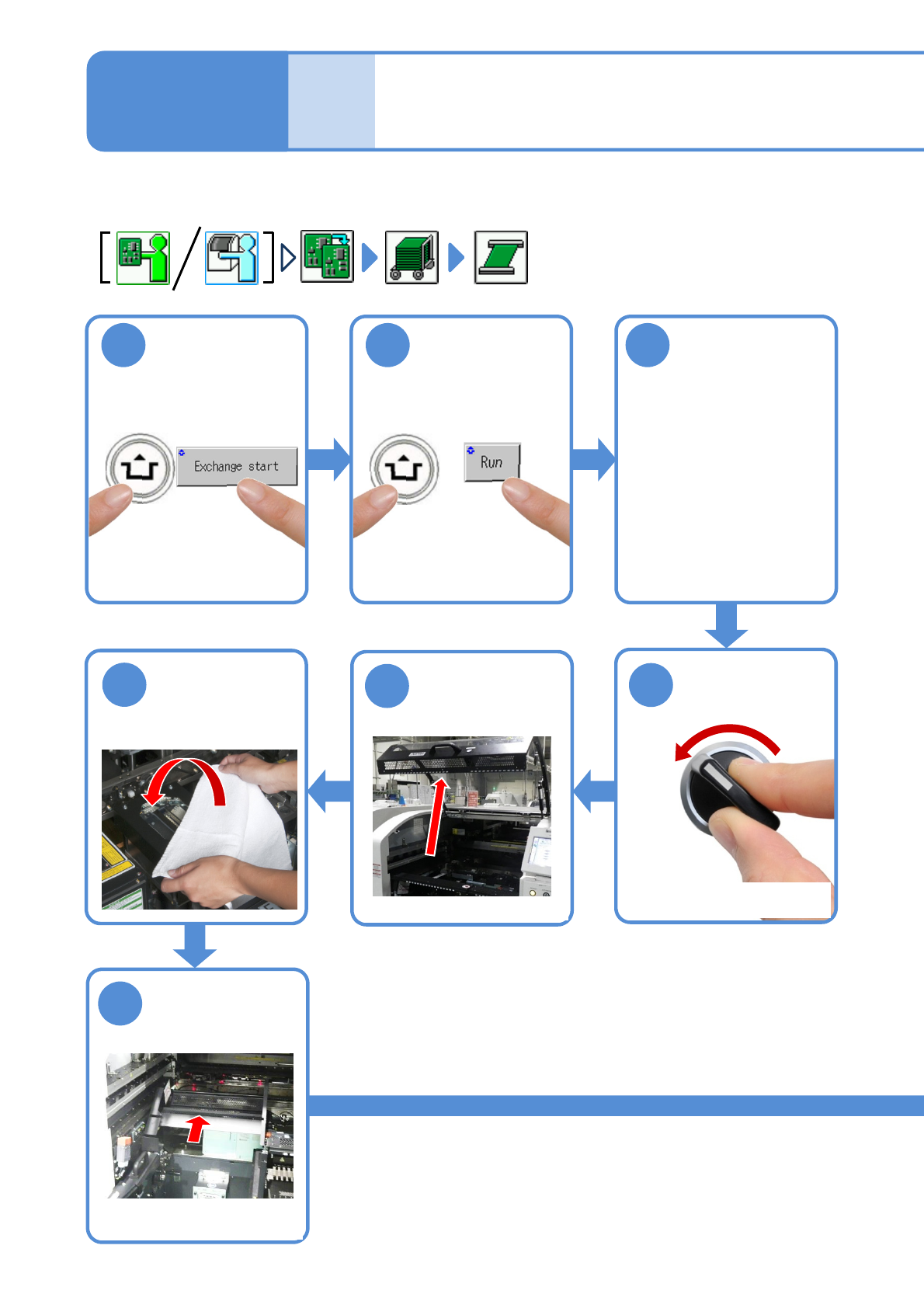
2-5-3-1
1
After removing
PCBs
2 3
Cover the line
camera with the
lint-free cloth
Individu-
al
prepara-
tion
Operating procedure
2-5-3
●The PCB support block
raises
Detach the tray
feeder or the feeder
cart
●For a tray feeder
(→[Maintenance] P.14-8)
●For a feeder cart
(→[Maintenance] P.3-2)
OFF
SERVO
5
4
7
6
●Only for the exchange cart
Hold the feeder
table cover to
the back
●Only for the exchange cart
●Only for the exchange cart
Setting support pins 1