N7201A652E.pdf - 第400页
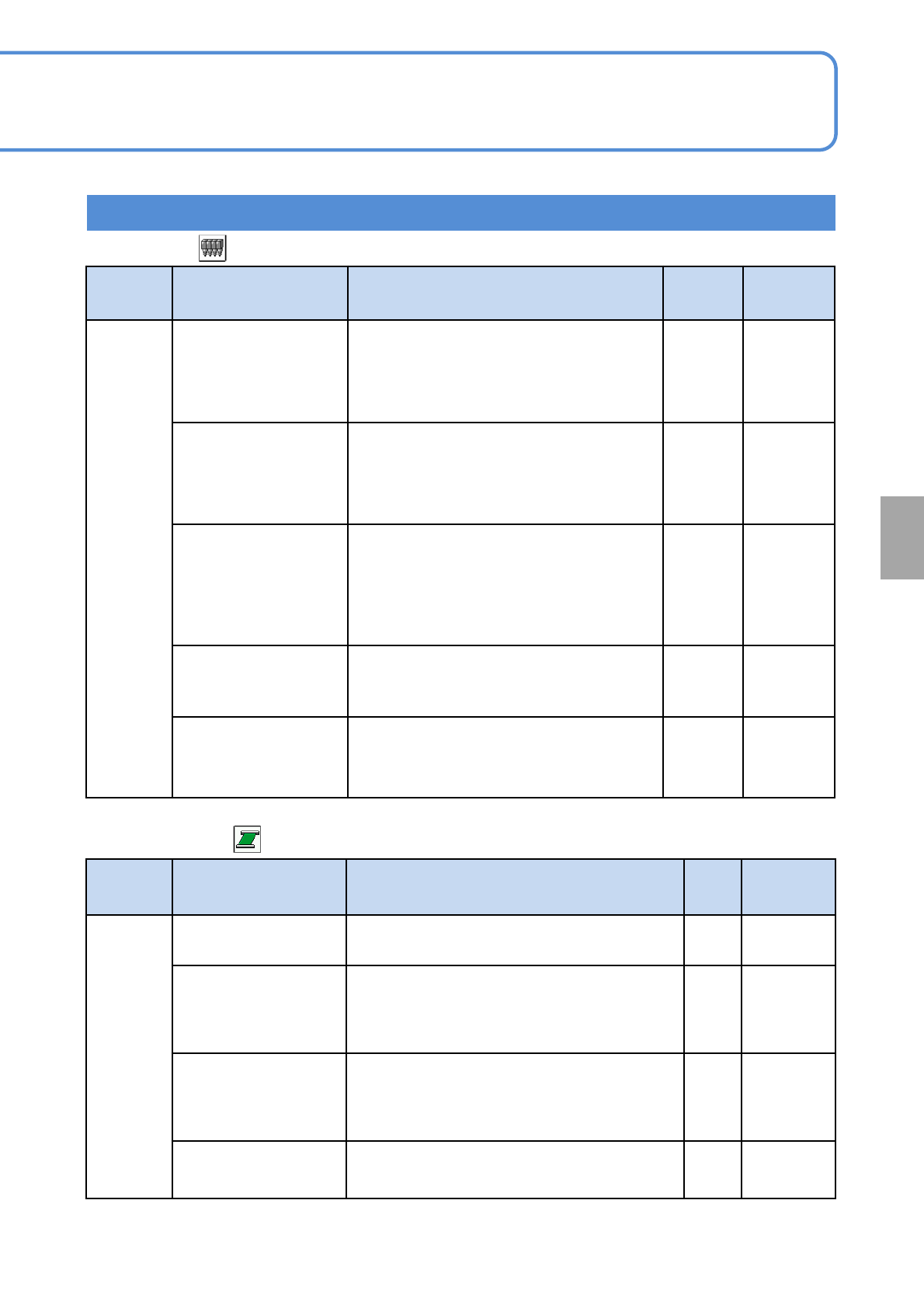
NPM- TT2 EJM1E E-MB-05O-05 Unit setting Action par ameter setting 3 5-1-2 -5 Setting information 4 Operating procedure 5-1-2 ■ Conveyor(2/4) Type Item Description Initial value Setting range Timer PCB in confirm time [s]…
NPM-TT2 EJM1EE-MB-05O-05
5-1-2-4
Setting information 3
System
administration
Type Item Description Initial
value
Setting
range
Determine
8-nozzle head filter
clogging detection
Value
This is a criterion for detecting filter clogging.
If, in filter clogging check, the vacuum
sensor value has exceeded this value, the
filter is determined to be clogged.
●For 8-nozzle head only
-84 -100 to 0
3-nozzle head filter
clogging detection
Value
This is a criterion for detecting filter clogging.
If, in filter clogging check, the vacuum
sensor value has exceeded this value, the
filter is determined to be clogged.
●For 3-nozzle head only
-90 -100 to 0
After ejecting adhesion
check parts size
After component is ejected, if the larger
component size of either L or W is less than
the value, and if it is reflection component,
the ejection OK component is checked for
multi-recognition camera adhesion to detect
ejection error.
0.0
0.0 to
150.0
Threshold value of
rotate center check[mm]
This value sets the range for rotation center
check to be made when correcting changes
over time.
0.0 0.0 to 0.50
Reflective nozzle
diameter check
threshold [%]
This is a threshold value for determining an
error in reflective nozzle diameter check.
25 5 to 30
■Head (2/2)
■Conveyor(1/4)
Type Item Description Initial
value
Setting
range
Mechanic
PcbRecogErrInchingVa
lue[mm]
The area where the inching operation is
enabled on an PCB recognition error.
50to 20
Support pin keep
number[pin/Lane]
(Lane1)
The number of support pins being present in
the machine (Lane1)
●Displayed when automatic change
specifications are selected for the support pin.
00 to 30
Support pin keep
number[pin/Lane]
(Lane2)
The number of support pins being present in
the machine (Lane2)
●Displayed when automatic change
specifications are selected for the support pin.
00 to 30
Decelerate adjust
value[mm]
Set this value if a PCB is easy to slip out during
transport due to PCB material matter.
0 0 to 100
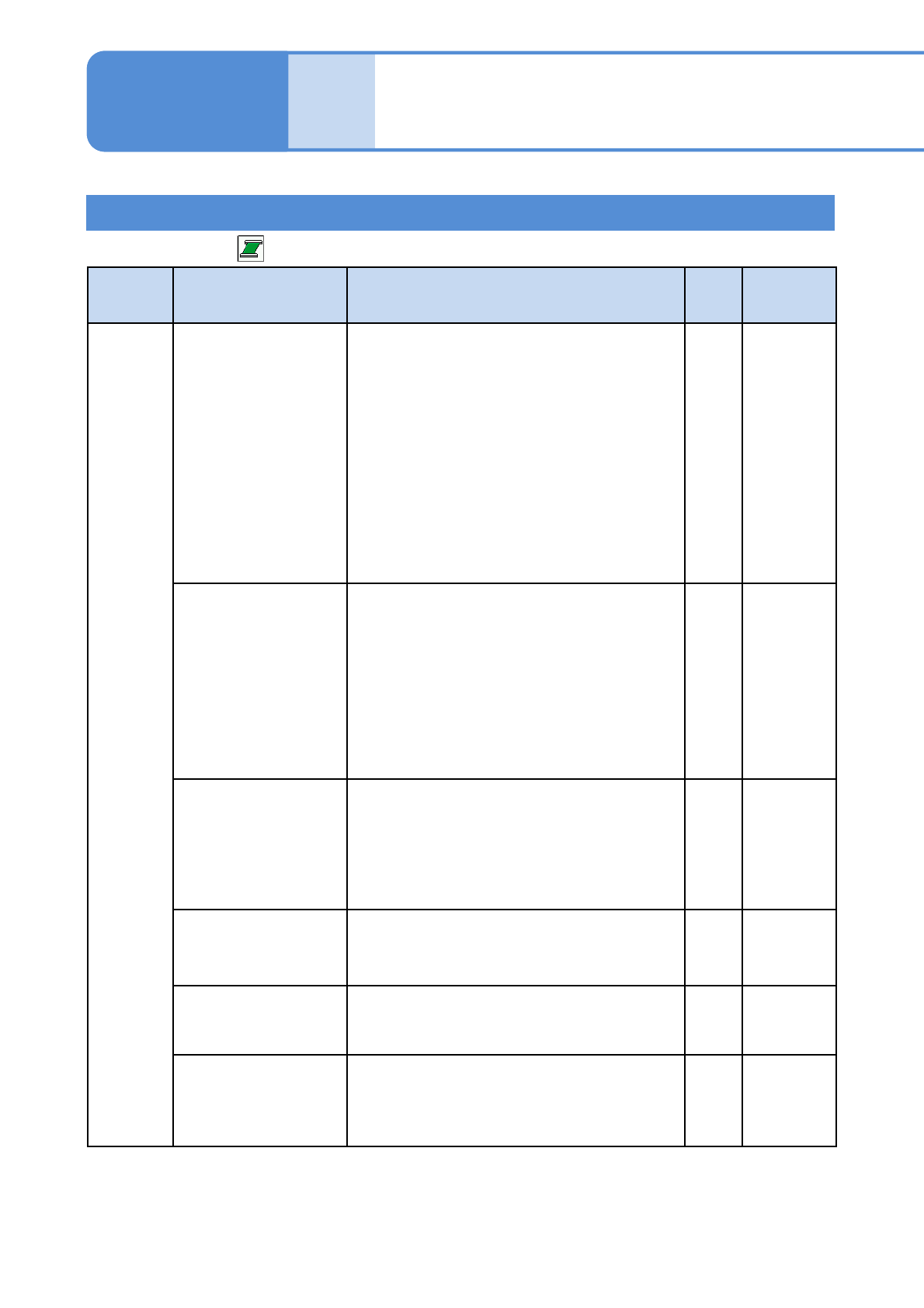
NPM-TT2 EJM1EE-MB-05O-05
Unit
setting
Action parameter
setting 3
5-1-2-5
Setting information 4
Operating procedure
5-1-2
■Conveyor(2/4)
Type Item Description Initial
value
Setting
range
Timer
PCB in confirm time [s]
If, keeping the PCB request signal sent to the
upstream equipment, the machine comes to a
single stop during production, it drops the
request signal and stops loading a PCB of
certain size that cannot be loaded to the
standby position.
Taking into account the possible presence of a
PCB being unloaded, this sets the time for
loading confirmation after dropping of the
request signal.
When single stop is detected in large board
transport, convey is ended if it has not reached
the tip sensor after READY-OFF.
10 to 5
PCB eject waiting
time(After Require Off)
[s]
The time that elapses after the PCB request
signal from the downstream equipment is
turned off and before the conveyor stops during
the PCB ejection process.
After post process equipment has READY-OFF,
move to the carry-out completion process after
setting time.
●It is the ability to extend the READY-ON time
after post process equipment in a simulated
manner.
0 0 to 100
PCB eject waiting
time(Require Off) [s]
The time limit that elapses after the start of
PCB ejection and before the PCB request
signal is turned off.
After post process equipment has READY-OFF,
it is judged as time out if the carry-out process
does not complete even over setting time.
10 5 to 100
PCB in waiting time
[s]
The time limit that elapses after the start of
PCB loading and before a PCB sits at the PCB
standby position.
10 5 to 100
PCB move waiting
time [s]
The time limit for a PCB to travel inside the
machine.
10 5 to 100
Z-clamp release
waiting time [ms]
The minimum waiting time that elapses after
the Z clamp releases a PCB and before the
transfer motor spins.
0 0 to 5000
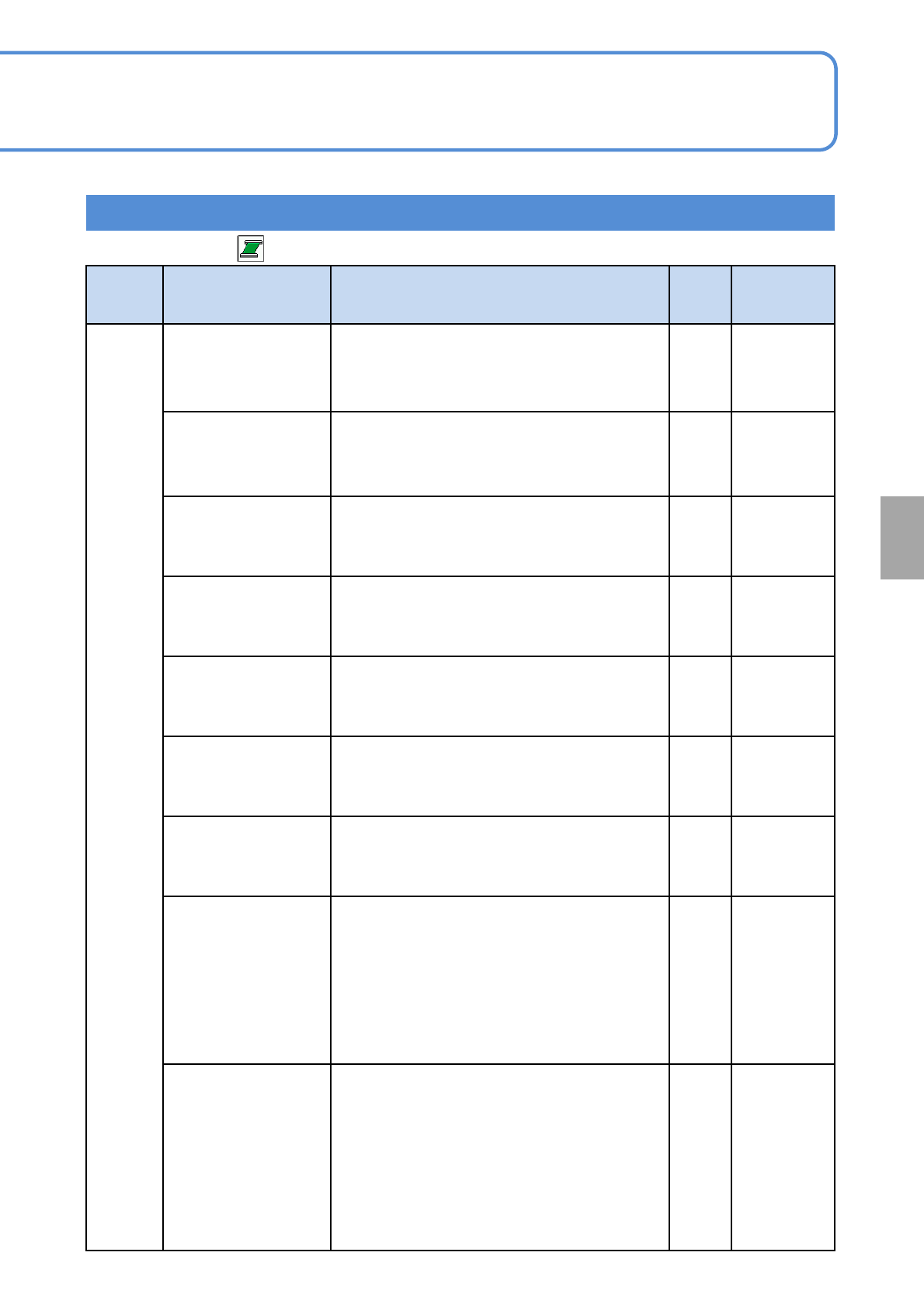
NPM-TT2 EJM1EE-MB-05O-05
5-1-2-6
Setting information 5
System
administration
Type Item Description Initial
value
Setting
range
Timer
At time of
simultaneous transfer
requested singnal
delayed time[ms]
Sets the time to delay the simultaneous
transfer PCB request signal. This is used
when the PCB clamp timing is adjusted
such as cutout PCB.
0 0 to 20000
F Y clamp start delay
timer [ms]
This is used when the start timing of PCB Y
clamp on the F lane is adjusted.
●This is available only when PCB Y clamp is
turned ON (option).
50 0 to 3000
F Y clamp forward
limit timer [ms]
This is used when the forward limit timing of
PCB Y clamp on the F lane is adjusted.
●This is available only when PCB Y clamp is
turned ON (option).
50 0 to 3000
F Y clamp backward
limit timer [ms]
This is used when the backward limit timing
of PCB Y clamp on the F lane is adjusted.
●This is available only when PCB Y clamp is
turned ON (option).
50 0 to 3000
R Y clamp start delay
timer [ms]
This is used when the start limit timing of
PCB Y clamp on the R lane is adjusted.
●This is available only when PCB Y clamp is
turned ON (option).
50 0 to 3000
R Y clamp forward
limit timer [ms]
This is used when the forward limit timing of
PCB Y clamp on the R lane is adjusted.
●This is available only when PCB Y clamp is
turned ON (option).
50 0 to 3000
R Y clamp backwa
This is used when the backward limit timing
of PCB Y clamp on the R lane is adjusted.
●This is available only when PCB Y clamp is
turned ON (option).
50 0 to 3000
Wait for pre process
count Invalid time [s]
When the pre process wait time is shorter than
the setting time, it is not included in the pre
process count. (Counted in production time)
●Normally, it is included in the pre process
count in such a case as when the loading
sensor being blocked from sensing the PCB
at the standby position for a brief time; so,
this can be used when you do not want to
take such a count.
00 to 10
Wait for post process
count Invalid time [s]
When the post process wait time is shorter
than the setting time, it is not included in the
pre process count. (Counted in production
time)
●Normally, it is included in the post process
count in such a case as when the loading
sensor being blocked from sensing the PCB
at the standby position for a brief time; so,
this can be used when you do not want to
take such a count.
00 to 10
■Conveyor(3/4)