Dek-265GSX-User-Manual.pdf.pdf - 第112页
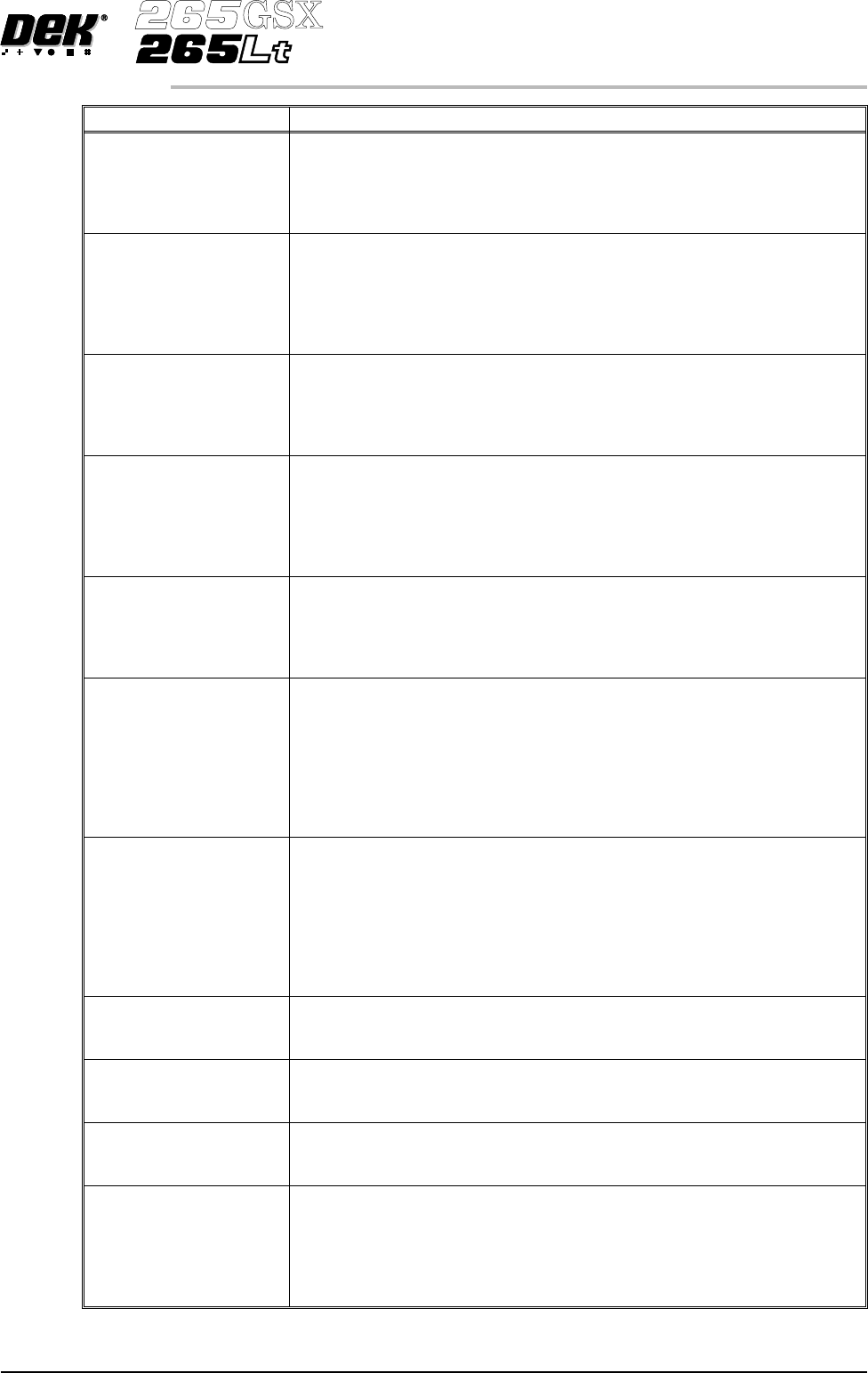
Parameter Definition Screen 1 Fiducial Type This determines the type of model to be used for this fiducial. Options are Circle; Rectangle; Diamond; Triangle; Double Square; Cross; Video model .See vision system Screen 2 …
Parameter Definition
Fiducial 1 Y coordinate Distance of the first fiducial from the front edge of the board.
Minimum 1mm
Maximum Board Width
Increment 0.1mm
Default 1mm
Fiducial 2 X coordinate Distance of second fiducial from the right or left hand edge of the board
(configuration dependent).
Minimum 1mm
Maximum Board Length
Increment 0.1mm
Default 1mm
Fiducial 2 Y coordinate Distance of the second fiducial from the front edge of the board.
Minimum 1mm
Maximum Board Width
Increment 0.1mm
Default 1mm
Fiducial 3 X coordinate Distance of third fiducial from the right or left hand edge of the board
(configuration dependent).
Minimum 1mm
Maximum Board Length
Increment 0.1mm
Default 1mm
Fiducial 3 Y coordinate Distance of the third fiducial from the front edge of the board.
Minimum 1mm
Maximum Board Width
Increment 0.1mm
Default 1mm
Select Mark X Distance of the select mark from the right or left hand edge of the board
(configuration dependent).
Minimum 0mm
Maximum Board Length
Increment 0.1mm
Default 148.5mm
NOTE
Only used while Selective Print/Pass is enabled in Set Preferences.
Select Mark Y Distance of the select mark from the front edge of the board (configuration
dependent).
Minimum 0mm
Maximum Board Width
Increment 0.1mm
Default 13mm
NOTE
Only used while Selective Print/Pass is enabled in Set Preferences.
Board 1 Fiducial Type This determines the type of model to be used for this fiducial. Options are
Circle; Rectangle; Diamond; Triangle; Double Square; Cross; Video model.
See vision system
Board 2 Fiducial Type This determines the type of model to be used for this fiducial. Options are
Circle; Rectangle; Diamond; Triangle; Double Square; Cross; Video model.
See vision system
Board 3 Fiducial Type This determines the type of model to be used for this fiducial. Options are
Circle; Rectangle; Diamond; Triangle; Double Square; Cross; Video model.
See vision system
Select Mark Type This determines the type of model to be used on the board for the select mark.
Options are Circle; Rectangle; Diamond; Triangle; Double Square; Cross;
Video model.
See vision system
NOTE
Only used while Selective Print/Pass is enabled in Set Preferences.
Software Version 6 User Manual 1.95
MACHINE PROGRAMMING
MENU PARAMETERS
Parameter Definition
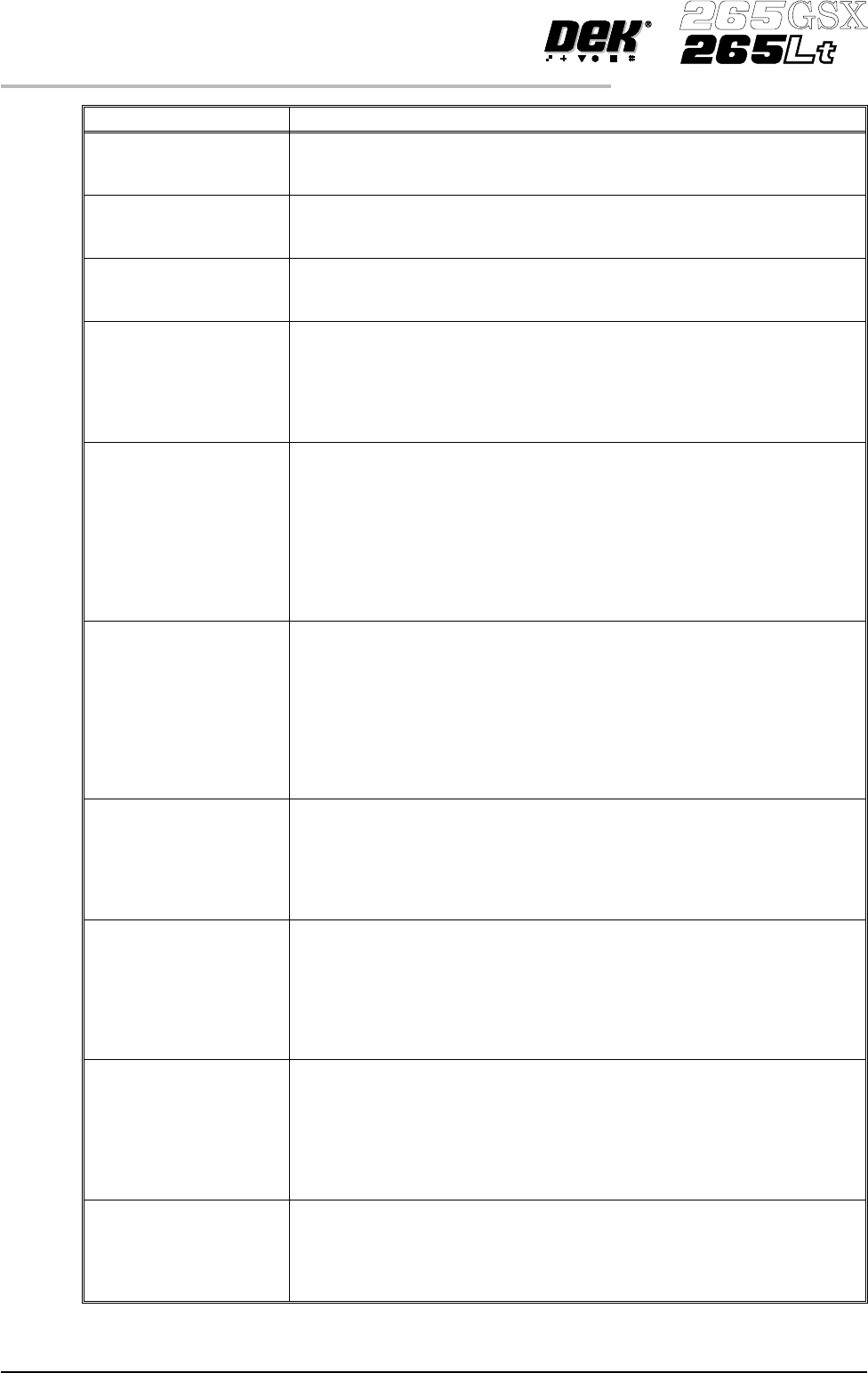
Screen 1 Fiducial Type This determines the type of model to be used for this fiducial. Options are
Circle; Rectangle; Diamond; Triangle; Double Square; Cross; Video model
.See vision system
Screen 2 Fiducial Type This determines the type of model to be used for this fiducial. Options are
Circle; Rectangle; Diamond; Triangle; Double Square; Cross; Video model.
See vision system
Screen 3 Fiducial Type This determines the type of model to be used for this fiducial. Options are
Circle; Rectangle; Diamond; Triangle; Double Square; Cross; Video model.
See vision system
Screen Image The position of the image in the screen frame. Options available are EDGE
justified and CENTRE Justified. Edge justified only is permitted for Sanyo
and Fuji frames.
NOTE
This parameter is not displayed, if Screen Size in Set Preferences has been
selected to Screen Library.
Custom Screen This option allows user definable screen image positions. Selection of this
parameter activates the Print Area Length, Print Area Width and Distance To
Image. Options are:
ENABLED; DISABLED
NOTE
The Custom Screen parameter is displayed on the 265Lt but is only available
on the 265GSX machine.
This parameter is not displayed, if Screen Size in Set Preferences has been
selected to Screen Library.
Distance To Image The meaning of this parameter varies, depending on whether an image is
centre or edge justified. For centre justified images, the dimension is the
distance from the outside rear of the screen frame to the centre of the image.
For edge justified images, the dimension is the distance from the outside rear
of the screen frame to the front edge of the board. This parameter field only
appears if Custom Screen has been selected
Minimum 306mm
Maximum 645mm
Increments 0.1mm
Print Area Length This is the maximum printable distance in the Y direction, ie the maximum
distance the squeegee can travel, front to back. This parameter field only
appears if Custom Screen has been selected.
Minimum 100mm
Maximum 508.5mm
Increments 0.1mm
Print Area Width This is the maximum length of squeegee that could be fitted to the printer,
taking into account screen frame and the amount of mesh surrounding the
mask. This is also the maximum length of paste that can be dispensed. This
parameter field only appears if Custom Screen has been selected
Minimum 100mm
Maximum 510mm
Increments 0.1mm
Screen Adapter The type of screen adapter needed, if any, for the screen to be used for this
product.
Options available are NONE, 255, SANYO, HERAEUS, 20 X 20 and 12
X12.
NOTE
This parameter is not displayed, if Screen Size in Set Preferences has been
selected to Screen Library.
Forward X offset Programmable offset of the print on the board when printing from the rear. A
positive offset moves the print to the right of the board.
Minimum -1.0mm
Maximum +1.0mm
Increment 0.004mm
1.96 User Manual Software Version 6
MACHINE PROGRAMMING
MENU PARAMETERS
Parameter Definition
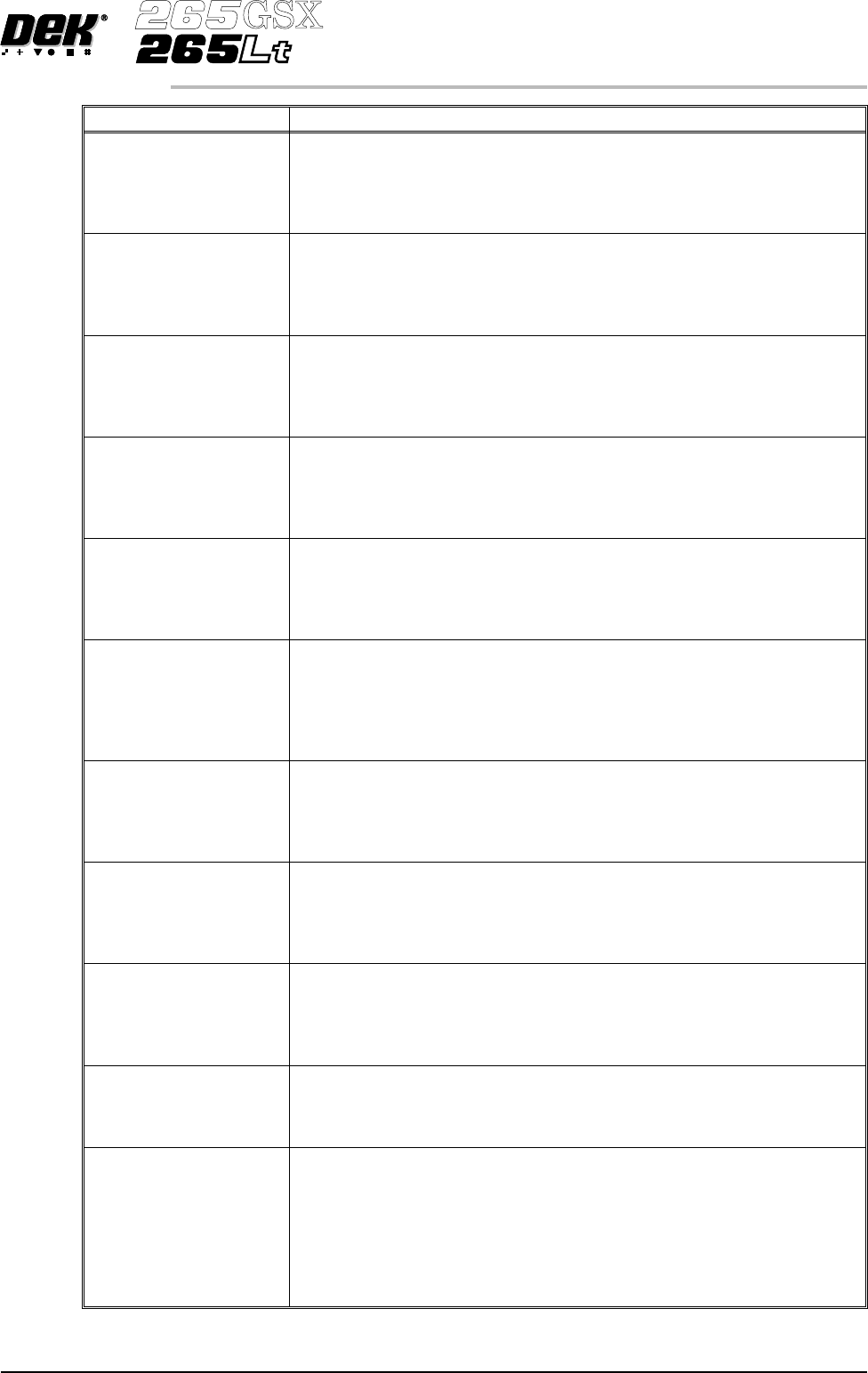
Forward Y offset Programmable offset of the print on the board when printing from the rear. A
positive offset moves the print to the rear of the board.
Minimum -1.0mm
Maximum +1.0mm
Increment 0.004mm
Forward θ offset
Programmable offset of the print on the board when printing from the rear. A
positive offset moves the print in a clockwise direction.
Minimum -1000 arc seconds
Maximum +1000 arc seconds
Increment 2 arc seconds
Reverse X offset Programmable offset of the print on the board when printing from the front.
A positive offset moves the print to the right of the board.
Minimum -1.0mm
Maximum +1.0mm
Increment 0.004mm
Reverse Y offset Programmable offset of the print on the board when printing from the front.
A positive offset moves the print to the rear of the board.
Minimum -1.0mm
Maximum +1.0mm
Increment 0.004mm
Reverse θ offset
Programmable offset of the print on the board when printing from the front.
A positive offset moves the print in a clockwise direction.
Minimum -1000 arc seconds
Maximum +1000 arc seconds
Increment 2 arc seconds
Print Mode This parameter sets the mode of operation of the machine. Available modes
are:
PRINT/PRINT, PRINT/FLOOD, FLOOD/PRINT, ADHESIVE.
The default is PRINT/PRINT.
Selecting Adhesive from this parameter opens the separation delay and print
vacuum mode.
Front Print Speed This parameter sets the speed across the screen when printing.
Minimum 2mm/sec
Maximum 150mm/sec
Increments 1mm/sec
Default 10mm/sec
Rear Print Speed This parameter sets the speed across the screen when printing.
Minimum 2mm/sec
Maximum 150mm/sec
Increments 1mm/sec
Default 10mm/sec
Front Pressure This parameter sets the force applied by the front squeegee during its print
stroke.
Minimum 0kg
Maximum 20Kg
Increments 0.2Kg
Knead Off-image This parameter sets whether ProFlow is to knead in an off-image area of the
stencil. Options are:
Enabled; Disabled
Default Enabled
Knead Before Printing This parameter sets ProFlow to knead before printing the first board and the
amount of boards to be printed between kneading.
Minimum 0 (disables knead before printing)
Maximum 100
Increment 1
Default 0
NOTE
This parameter is only displayed, if knead off-image is set to enabled.
Software Version 6 User Manual 1.97
MACHINE PROGRAMMING
MENU PARAMETERS