Dek-265GSX-User-Manual.pdf.pdf - 第188页
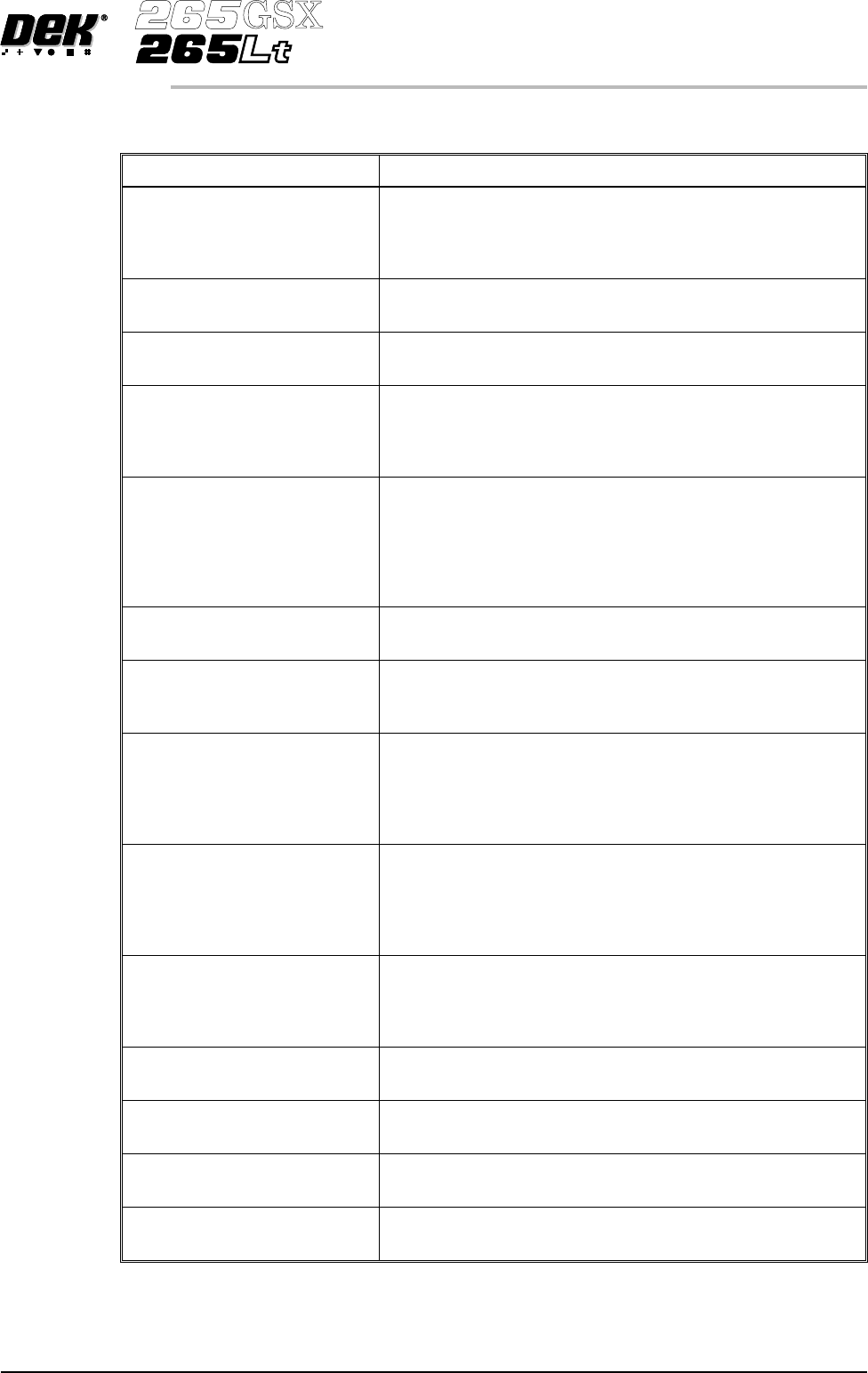
Error Message Intrepretation Command Timed Out (Belt Motors) This error reports if a board on the belt fails to move over the board at left/right sensor within the time period. Possible causes are: Home sensor fault, if …
ERROR MESSAGE LISTING
Error Message Intrepretation
Action Command Error This error reports that an undefined return status message from the
mint is received. A possible cause is :
Communication problems between the mint and the MOD801
card.
Alignment Out of Range This indicates that the actuator positions required to achieve a
satisfactory alignment are not achievable.
Alignment Close to Limit/Out of
Range
Actuator limit exceeded.
Autoflex Timed Out This error reports that with the autoflex tooling on high power and
the tooling pins up, the process time of 5 minutes has been
exceeded. When this message is displayed the power is also
switched to low.
Board Detected At Board Stop,
Print Terminated.
With the machine running in any mode, this error reports that the
board stop sensor has been activated out of sequence.
Possible causes are:
Board already loaded into the machine.
Sensor is detecting tooling.
Sensor is faulty.
Board Fiducial Not Found This error reports that the vision system has been unable to locate
the board fiducial.
Board Not Over Input Sensor This error reports a machine has stared without a board on the
rails. The user has ignored the message to place a board on the
rails and selects continue on the machine.
Board On Rails, Remove and
Continue
This error reports that a board has been sensed on the rails during
one of the following operations:
Initialization
Loading a new board file
Entering the rail system in diagnostics.
Board Stop Not Lowered This error reports that the board stop is up and has not lowered
within the time-out period of 3 seconds. The possible causes are:
Board stop sensor, enter diagnostics and check the sensor changes
state.
Air pressure failure to the board stop.
Board Stop Not Retracted This error reports that the board stop is down and has not retracted
within the time-out period of 3 seconds. A possible cause is:
Board stop sensor - enter diagnostics, digital inputs and check the
sensor changes state.
Board Stop Stuck This error reports that the board stop, which is housed in the
camera assembly has failed to lower or retract.
Board Stuck in Rails This error reports that the board has failed to either reach the board
stop or exit the machine after being printed.
Camera X Axis Error This error reports that the camera carriage has failed to reach its
home position in the X axis.
Camera Y Axis Error This error reports that the camera carriage has failed to reach its
home position in the Y axis.
Software Version 6 User Manual 4.3
ERROR MESSAGES
ERROR MESSAGE LISTING
Error Message Intrepretation
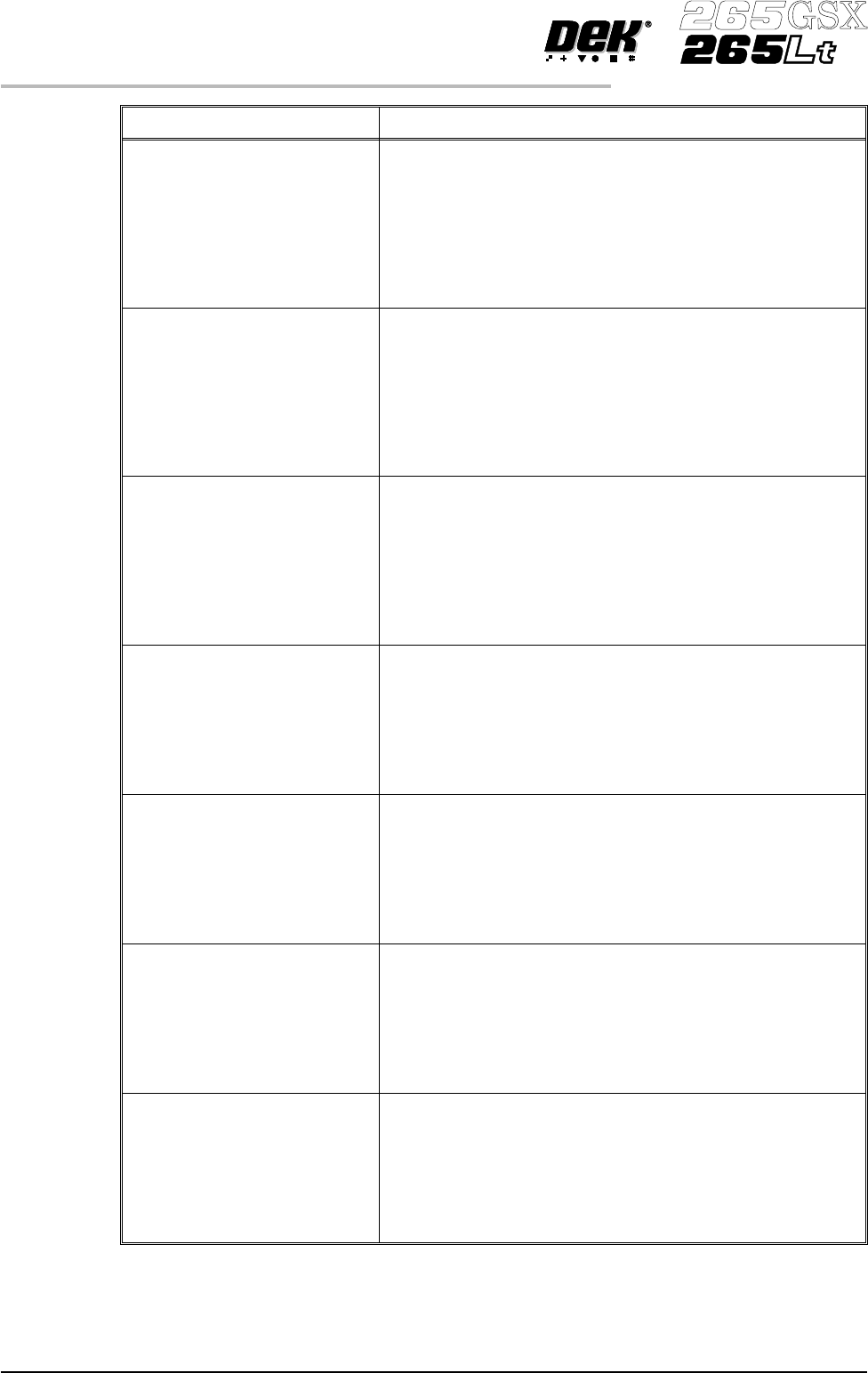
Command Timed Out
(Belt Motors)
This error reports if a board on the belt fails to move over the
board at left/right sensor within the time period. Possible causes
are:
Home sensor fault, if occurring during initialization.
Motor fault, if occurring during initialization.
Motor not running.
Mint card faulty.
Problem on the busy line from the mint card.
Command Timed Out
(Camera Axes)
This error reports that the camera has failed to move to the
demanded position within the time period. This error applies to
both the X and Y camera axis. Possible causes are:
Home sensor fault, if occurring during initialization.
Motor fault, if occurring during initialization.
Motor not running.
Mint card faulty.
Problem on the busy line from the mint card.
Command Timed Out
(Paste Dispense Carriage)
This error reports that the paste dispense carriage has failed to
move to the demanded position within the time period. Possible
causes are:
Home sensor fault, if occurring during initialization.
Motor fault, if occurring during initialization.
Motor not running.
Mint card faulty.
Problem on the busy line from the mint card.
Command Timed out
(Print Carriage)
This error reports that the print carriage has failed to move to the
demanded position within the time period. Possible causes are:
Home sensor fault, if occurring during initialization.
Motor fault, if occurring during initialization.
Motor not running.
Mint card faulty.
Problem on the busy line from the mint card.
Command Timed Out
(Print Head)
This error reports that the print head fails to move to the demanded
position within the time period. Possible causes are:
Home sensor fault, if occurring during initialization.
Motor fault, if occurring during initialization.
Motor not running.
Mint card faulty.
Problem on the busy line from the mint card.
Command Timed Out
(Proflow)
This error reports that the proflow unit has failed to move to the
demanded position within the time period. Possible causes are:
Home sensor fault, if occurring during initialization.
Motor fault, if occurring during initialization.
Motor not running.
Mint card faulty.
Problem on the busy line from the mint card.
Command Timed Out
(Rail System)
This error reports that the moving rail has failed to move to the
demanded position within the time period. Possible causes are:
Home sensor fault, if occurring during initialization.
Motor fault, if occurring during initialization.
Motor not running.
Mint card faulty.
Problem on the busy line from the mint card.
4.4 User Manual Software Version 6
ERROR MESSAGES
ERROR MESSAGE LISTING
Error Message Intrepretation
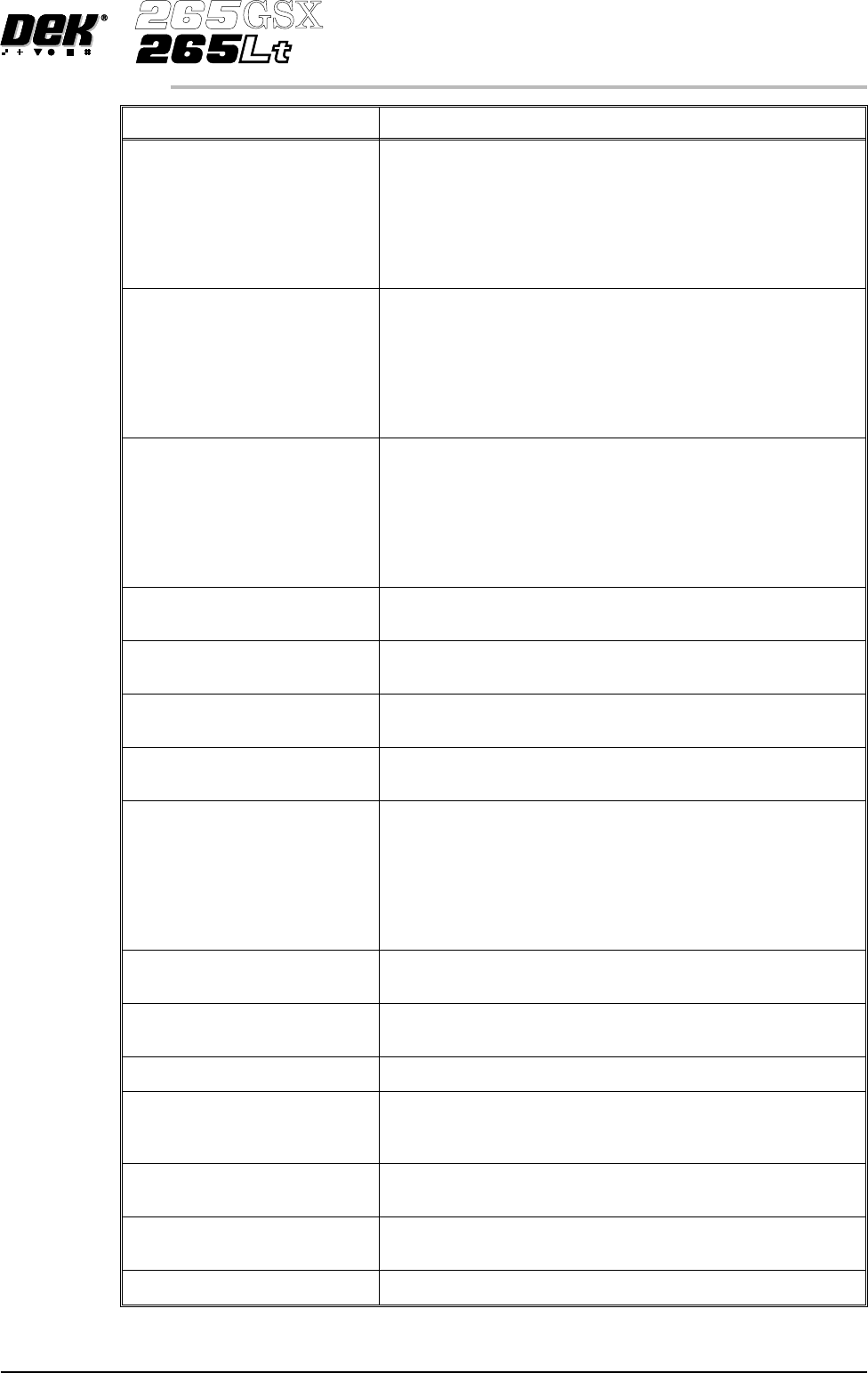
Command Timed Out
(Screen Actuators)
This error reports that the actuator has failed to move to the
demanded position within the time period. Possible causes are:
Home sensor fault, if occurring during initialization.
Motor fault, if occurring during initialization.
Motor not running.
Mint card faulty.
Problem on the busy line from the mint card.
Command Timed Out
(Screen Change)
This error reports that the screen change has failed to move to the
demanded position within the time period. Possible causes are:
Home sensor fault, if occurring during initialization.
Motor fault, if occurring during initialization.
Motor not running.
Mint card faulty.
Problem on the busy line from the mint card.
Command Timed Out
(Front/Rear Squeegee)
This error reports that the front/rear squeegee has failed to move to
the demanded position within the time period. Possible causes are:
Home sensor fault, if occurring during initialization.
Motor fault, if occurring during initialization.
Motor not running.
Mint card faulty.
Problem on the busy line from the mint card.
Downline Board Transfer Fault This error reports that the time the downline interface has waited
for a board has exceeded the time-out.
Downline Machine Not available This error reports that the downline machine is unavailable to
accept the next board.
Dual Shuttle Fault This error reports that the 20 seconds time-out period has been
exceeded when loading or unloading a screen.
Event File Open Error This error reports that there was a problem opening the event log
backup file.
Failed to Determine Tooling
Deviation
This error reports that while monitoring the tooling deviation, the
number of samples (pressure variations) during the print stroke
was less than 2 or the minimum value was zero. This error
message is only valid where tooling deviation is authorized and
enabled.
Check tooling support is sufficient.
Check underside components are clear of tooling.
Front Squeegee Error This error reports that the front squeegee has failed to reach its
fully up position.
Front Squeegee Pressure Error When this error is detected a new window displays the set pressure
reading and the actual pressure reading.
File Error (To be added when details available)
Have All Tooling Pins Been
Removed ?
This message appears for the user to confirm that all magnetic
tooling pins have been removed, before setting up the machine for
a new board file that uses autoflex tooling.
Invalid Calibration Data.
Recalibrate ProFlow Heights
This error reports that the ProFlow calibration data is corrupt or
invalid.
Invalid Calibration Data.
Recalibrate Squeegee Heights
This error reports that the squeegee calibration data is corrupt or
invalid.
Lid Bolt Fault This indicates that the lid bolt has failed to either open or close.
Software Version 6 User Manual 4.5
ERROR MESSAGES
ERROR MESSAGE LISTING