00196608-01_AI_Stationaere_Kamera_Typ33_36_de_en.pdf - 第112页
Installation Installation on X Series and D3 Machines Mechanical Assembly 112 Stationary Camera Type 33/36 Stationäre Kamera Typ 33/ 36 3.2.2.1 Installation with Set Screws (for Camera Type 33 up to Version 05, Type 36 u…
Installation
Mechanical Assembly Installation on X Series and D3 Machines
Stationary Camera Type 33/36 Stationäre Kamera Typ 33/36 111
3.2.2 Mechanical Assembly
NOTICE
Configuration X2, X4 and D3
► In the SIPLACE X2 the cameras can be configured in PA1 in the same way as they are in
PA2 of SIPLACE X3 machines. In this case, location 1 equates to location 3.
► In the SIPLACE X4 the cameras can be configured in PA2 in the same way as they are in
PA1 of SIPLACE X3 machines. In this case, location 1 equates to location 3.
► The SIPLACE D3 can be configured in exactly the same way as the SIPLACE X3.
CAUTION
Observe the installation height
When fitting the camera, observe the correct installation height. Otherwise there will be a risk
of head crash!
► Please also observe section "4.1 Installation Height of the Stationary Camera" [ ➙ 153].
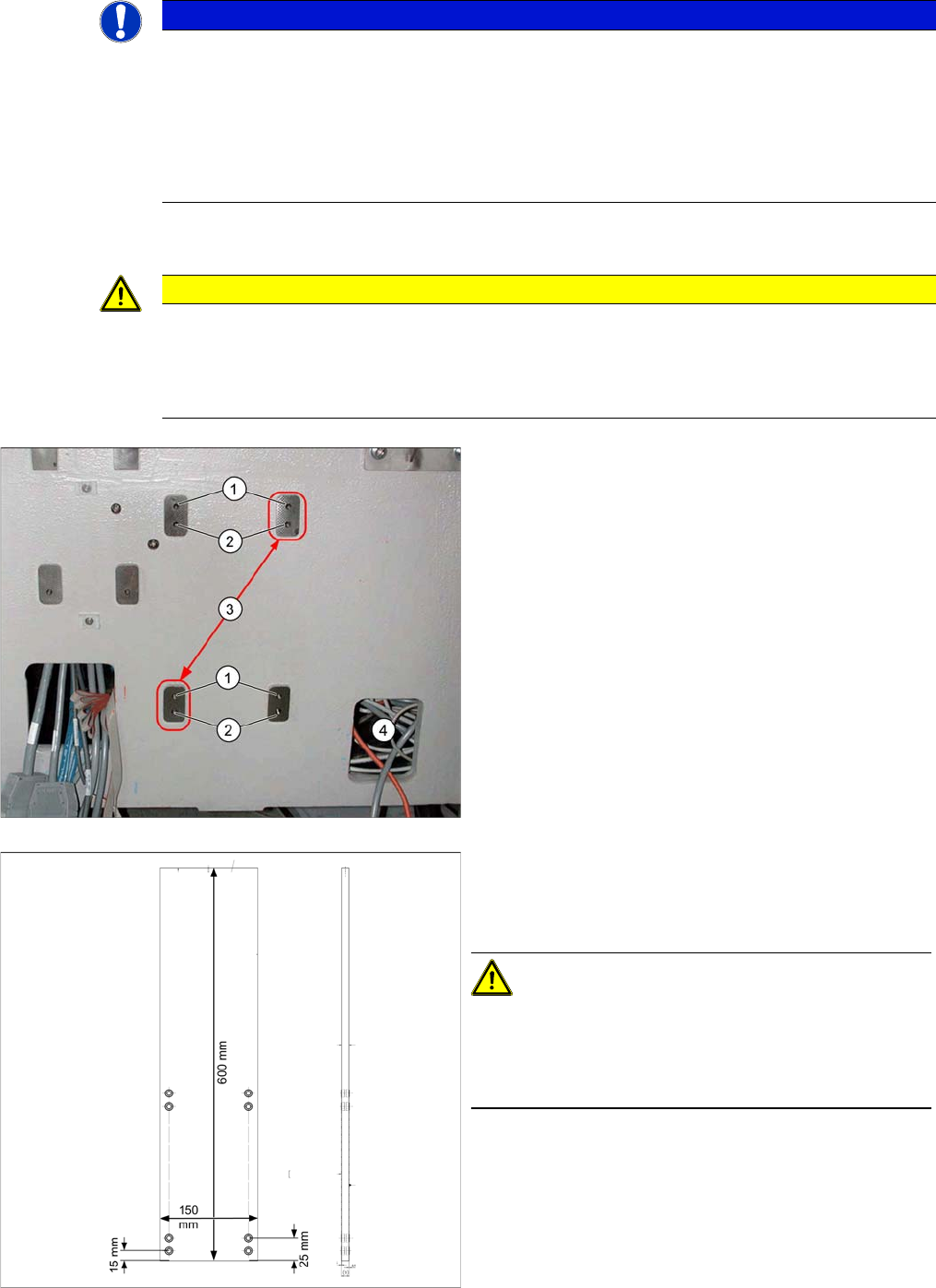
1. Upper position
2. Lower position
3. Position of grub screws for cameras up to FS05
4. Cable duct in machine base with camera cables
Fiducial sandwich plate [03022077-xx]
Suitable for IC camera type 33 and type 22
Use in SIPLACE X series, HF and D3 machines
CAUTION!
For assembly in X series and D3 machines, always use
the fiducial sandwich plate [03022077-xx]. If you do not,
machine accuracy will not be guaranteed and there is a
risk of a head crash occurring.
Installation
Installation on X Series and D3 Machines Mechanical Assembly
112 Stationary Camera Type 33/36 Stationäre Kamera Typ 33/36
3.2.2.1 Installation with Set Screws (for Camera Type 33 up to Version 05, Type 36 up to Version 03)
Camera in X series machine
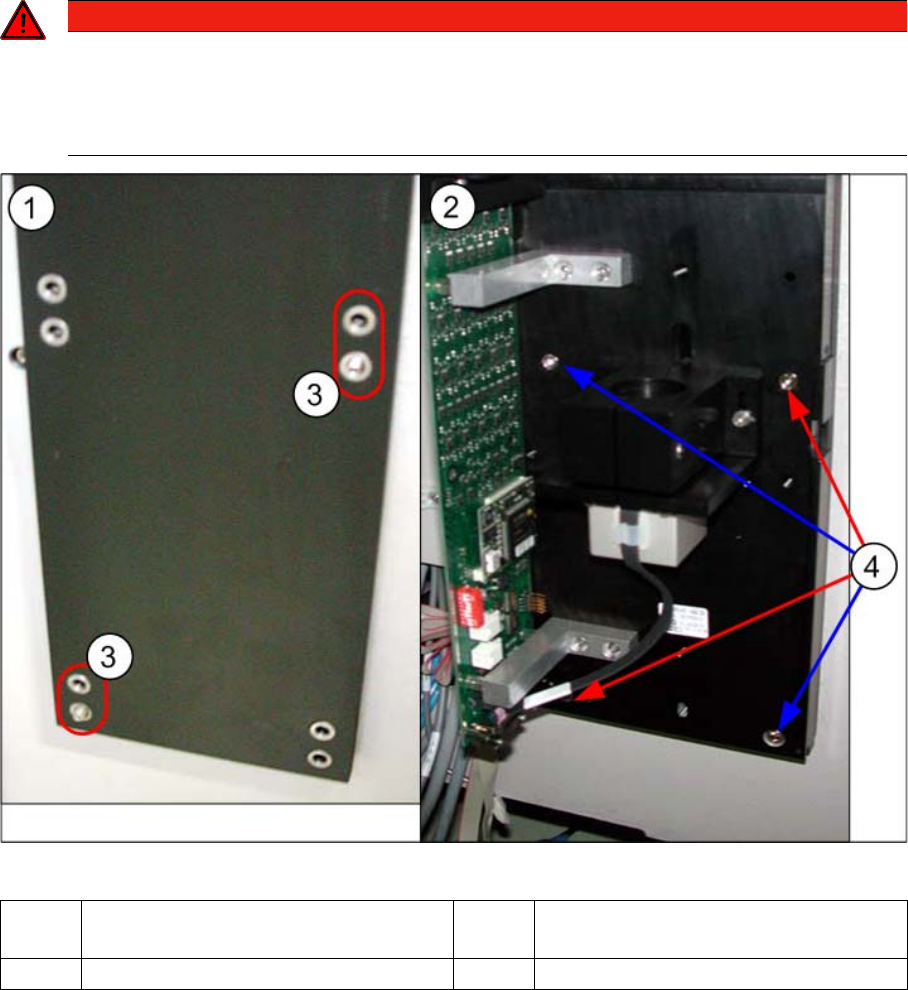
► Screw the two set screws DIN913-M6x50-ST [03005958-xx] - with the Allen key side on the outside
- as assembly aid into the holes marked in the diagram:
Top holes: without C&P placement head
Bottom holes: with C&P placement head
► Fit the "fiducial sandwich plate" [03022077-xx] onto the set screws. Make sure that all eight holes
match the holes drilled in the machine frame. The set screws must protrude from the fiducial plate
by about 5 mm.
► Fit the camera base plate onto the "fiducial sandwich plate", so that the two set screws can be
reached. Screw the camera together with the base plate (two screws DIN912-M6x35-8.8
[00845062-xx]).
► Replace the two set screws with screws. If this is not possible, you will need to first remove the cam-
era and then move the set screws accordingly. Make sure that there is no set screw left behind the
camera as this could prevent the camera from being fitted firmly into place.
► Check the horizontal alignment of the camera with the machine spirit level.
DANGER
Sandwich plate for fiducial
The "fiducial sandwich plate" is very heavy and, when fitted, only clamped between the camera
and machine base. It can easily fall down, especially during removal.
► To prevent it falling down, proceed as follows:
1 Diagram on left: fiducial plate – on set
screws.
2 Diagram on right: camera – on fiducial
plate and set screws.
3 Set screws 4 Positions of screws
Installation
Mechanical Assembly Installation on X Series and D3 Machines
Stationary Camera Type 33/36 Stationäre Kamera Typ 33/36 113
3.2.2.2 Installation with Keyhole (for Camera Type 33 from Version 06, Type 36 from Version 04)
WARNING!
Sandwich plate for fiducial
The "fiducial sandwich plate" is very heavy and, when fit-
ted, only clamped between the camera and machine
base. It can easily fall down, especially during removal.
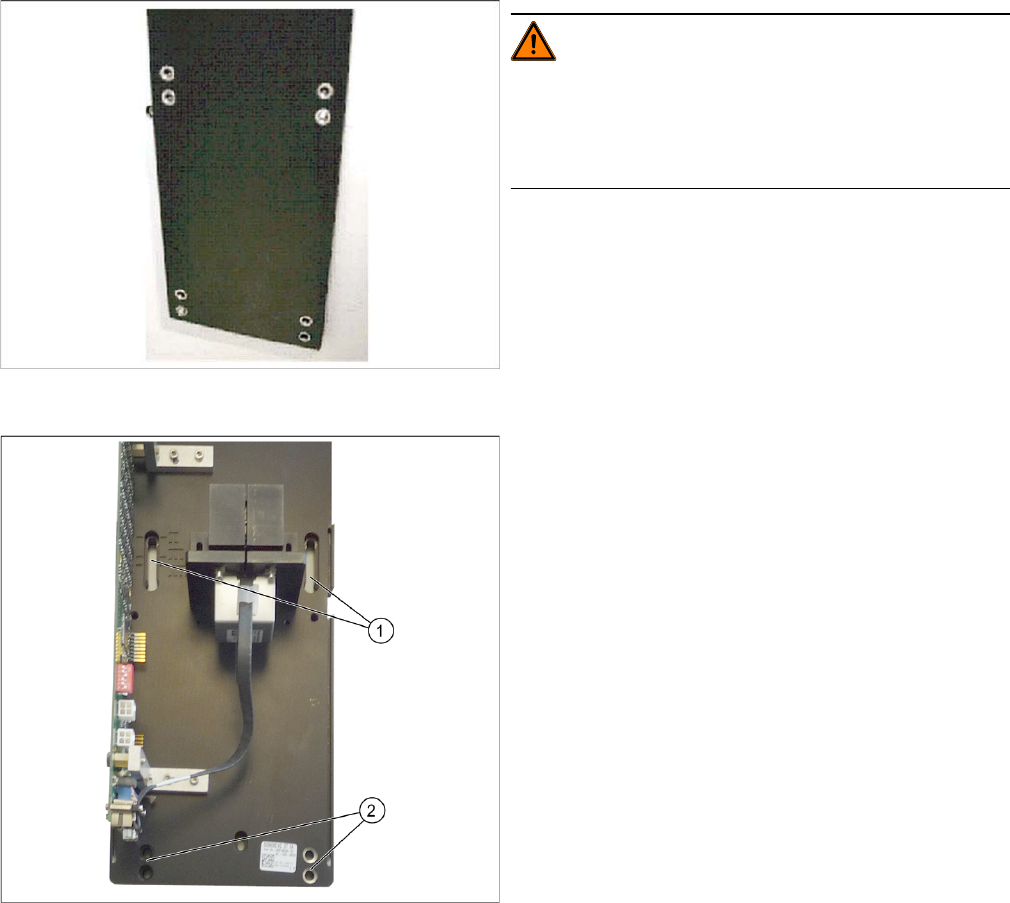
► Fix the fiducial plate with the top two screws, so that
the plate is aligned to match the arrangement of holes
drilled in the machine. Make sure that the fiducial
plate is turned correctly (see label).
Tighten the two screws until the shaft of the screws
protrudes approx. 15 mm over the fiducial plate.
When measuring, make sure that the fiducial plate is
flush against the machine frame!
► Hook the upper holes ((1) key holes) on the lower
section of the camera onto the two screws.
► Adjust the lower section of the camera to the correct
installation height, with the two lower screws (2) and
tighten all four screws. Please also observe section
"4.1 Installation Height of the Stationary Camera"
[ ➙ 153].
► Check the horizontal alignment of the camera with
the machine spirit level.