00196608-01_AI_Stationaere_Kamera_Typ33_36_de_en.pdf - 第141页
Installation Electrical Connections Installa tion on SX1/SX2 Machines Stationary Camera Typ e 33/36 Stationäre Kamera Typ 33/36 141 ► Fix the incoming cables (camera b us, CAN bus, pow er supply) wit h the fastenin g ele…
Installation
Installation on SX1/SX2 Machines Electrical Connections
140 Stationary Camera Type 33/36 Stationäre Kamera Typ 33/36
3.4.4 Electrical Connections
Direct connection to the machine
Connection to FC cameras (type 25 with version 05)
If there is a version 05 FC camera present, the IC camera will be connected to this. From this version
onwards, the FC camera has a multiplexer, which provides the connections for the IC and FC cameras.
This enables you to operate a placement area with up to four stationary cameras.
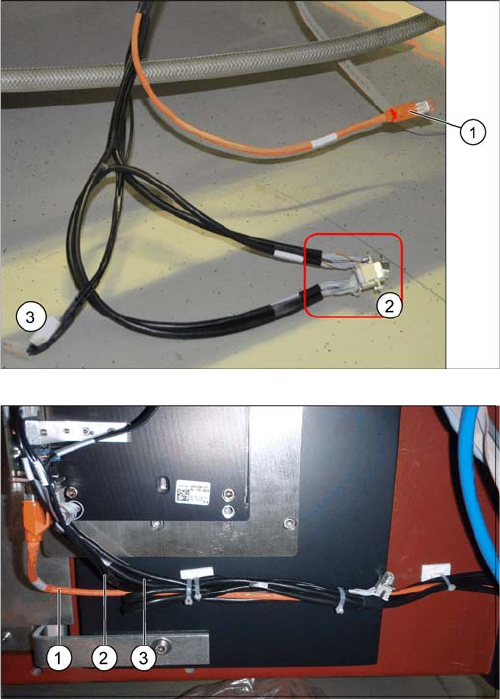
1. Camera cable (hotlink cable)
2. 2 x CAN bus cable (For IC and FC camera)
3. Power supply
The opening in the machine frame contains two CAN bus
cables (1), the camera cable (2) (hotlink cable) and the
power supply cable (3).
► Connect the camera cable (1), the CAN bus cable (2)
and the power supply cable (3) to the stationary cam-
era, according to the respective camera configura-
tion.
Installation
Electrical Connections Installation on SX1/SX2 Machines
Stationary Camera Type 33/36 Stationäre Kamera Typ 33/36 141
► Fix the incoming cables (camera bus, CAN bus, power supply) with the fastening element
[00316830-xx] and cable ties [00805141-xx] underneath the camera.
See also
3.5.3.1 Connecting the Hotlink Cable to the BoxPC [ ➙ 147]
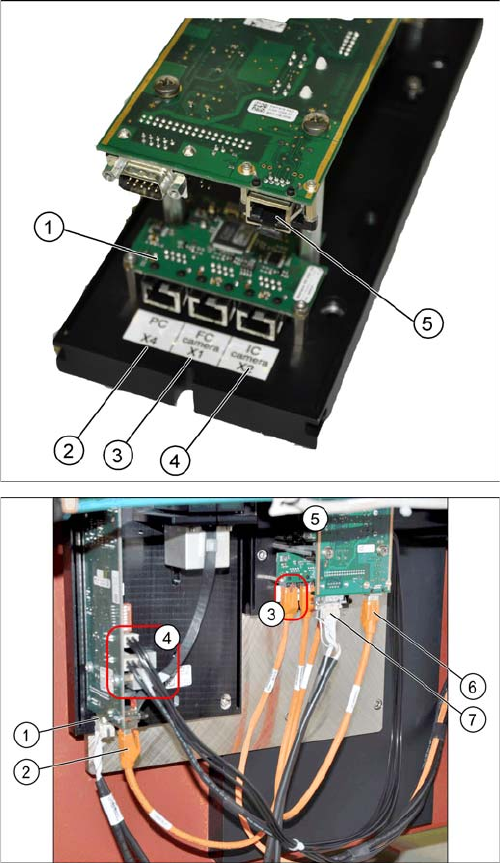
The multiplexer makes it possible to directly connect a
stationary camera (type 33/36) to the other stationary
camera (type 25).
1. Multiplexer
2. BoxPC input
3. Output for type 25 camera (FC camera)
4. Output for type 33/36 camera (IC camera)
5. Camera input
► Remove the upper part of the FC camera.
► Remove the FC camera housing.
► Disconnect the camera cable coming from the box
PC at the FC camera driver board (6) and reconnect
it to the multiplexer connection labeled PC.
► Underneath the FC camera you will find two unused,
short camera cables and the power supply cable
[03055298-xx], fixed with a cable tie to the support
plate. Use one short camera cable for the connection
between the multiplexer and the IC camera (2) and
the other one for the connection between the multi-
plexer and the FC camera driver board (6).
► Connect the power supply with the cable from the ret-
rofitting kit. To do this, connect the power supply ca-
ble [03055298-xx] to connection X4 or X5 on the IC
camera driver board (4) and to connection X4 on the
FC camera (5).
► Connect the CAN bus to connections (1) and (7).
Installation
Installation on SX1/SX2 Machines Electrical Connections
142 Stationary Camera Type 33/36 Stationäre Kamera Typ 33/36
3.4.4.1 Connecting the Hotlink Cable to the BoxPC
Two types of hotlink cards can be fitted in SX1/SX2 machines. When installed, these can only be differ-
entiated by looking at the order of camera input connections. See the following diagrams for an illustra-
tion of this.
► Connect your camera cable as follows:
CAUTION
Never connect a LAN cable to the hotlink card!
This could damage the hotlink card.
NOTICE
Connection for stationary cameras
► Observe section "4 Appendix" [ ➙ 153] and the latest circuit diagrams for your machine.
► When installed, the version of your hotlink card can only be determined by the position of
the camera connection label and the order of CAM connections.
► The stationary cameras are always connected to CAM2 or CAM3.
► The camera cables are labeled with their relevant connection details according to the pat-
tern X*p*.
CAUTION
Correctly connecting the camera cable
► Make sure that you connect the cameras correctly. Observe the labels on the hotlink cards
and therefore the type of hotlink card used. If you do not observe this, placement perfor-
mance may be adversely affected.
Pay particular attention to the different order of connections on the PCI-A24!
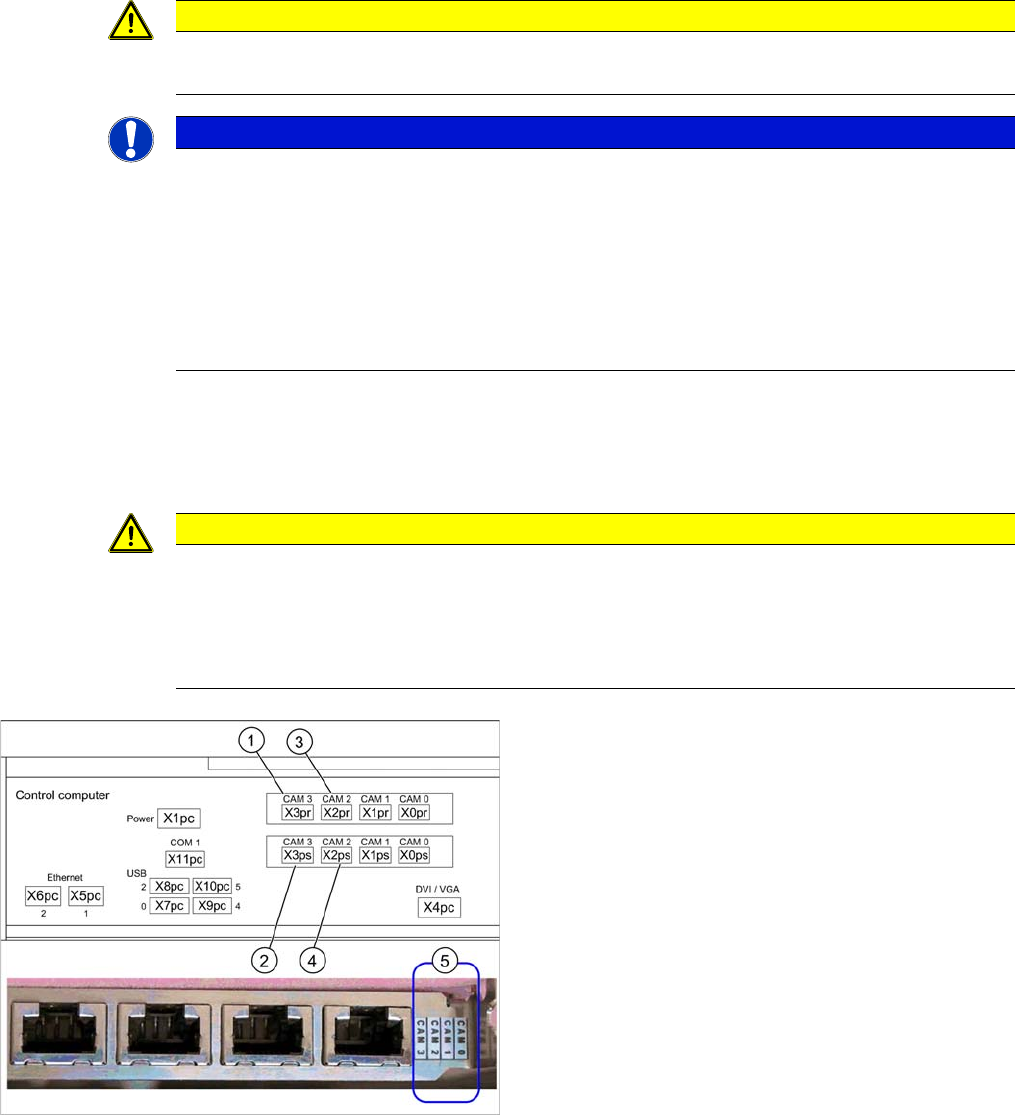
Hotlink card (PCI-A14 [03032343-xx])
This hotlink card is installed as a default in SX1/SX2 ma-
chines up to approx. machine serial number K200G.
When installed, the version of the hotlink cards can only
be seen on the label for the camera connections (5).
(1) and (3): Stationary cameras for placement area 1
(X2pr and X3pr)
(2) and (4): Stationary cameras for placement area 2
(X2ps and X3ps)