00196608-01_AI_Stationaere_Kamera_Typ33_36_de_en.pdf - 第147页
Installation Electrical Connections Installation on SX4 Machines Stationary Camera Typ e 33/36 Stationäre Kamera Typ 33/36 147 3.5.3.1 Connecting the Hotlink Cable to the BoxPC ► Connect y our camer a cable as follows: C…
Installation
Installation on SX4 Machines Electrical Connections
146 Stationary Camera Type 33/36 Stationäre Kamera Typ 33/36
Installation with set screws (for camera type 33 up to version 05, type 36 up to version 03)
3.5.3 Electrical Connections
► Pull the three connection cables for the IC camera through the opening and out of the machine
frame.
► Check the jumper setting. See also"4.2 Camera Coding and Connections" [ ➙ 155]
► To connect the camera, read section "4.2.1 Cameras Type 33 From Version 03 To 07, Cameras
Type 36 From Version 01" [ ➙ 155].
See also
3.5.3.1 Connecting the Hotlink Cable to the BoxPC [ ➙ 147]
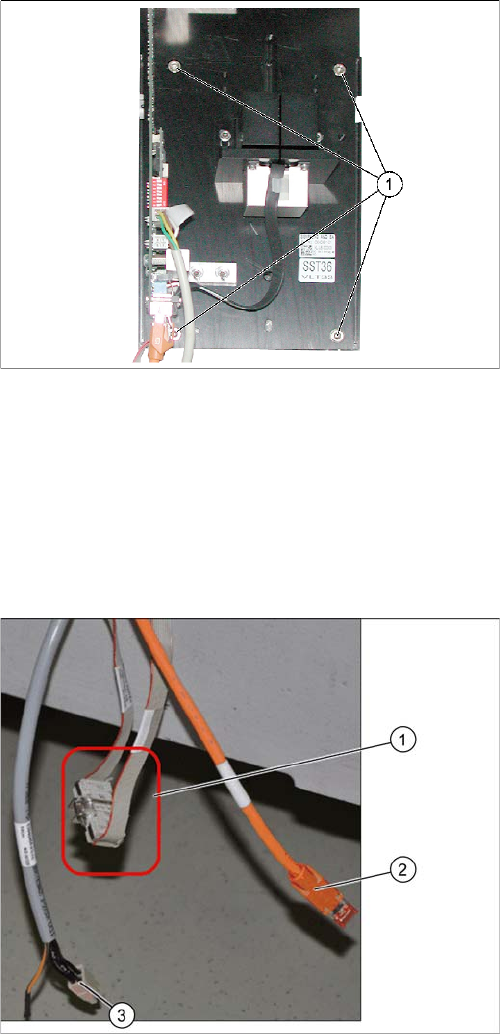
► Lift the lower section of the camera onto the two set
screws.
► Fix the lower section of the camera with 2 screws to
the unused screw openings (M6x35).
► Unscrew the two set screws again.
► Now fasten the right-hand side of the lower section of
the camera (in place of the two set screws). The low-
er section of the camera and the fiducial plate are
now fixed with four screws (1) to the machine frame.
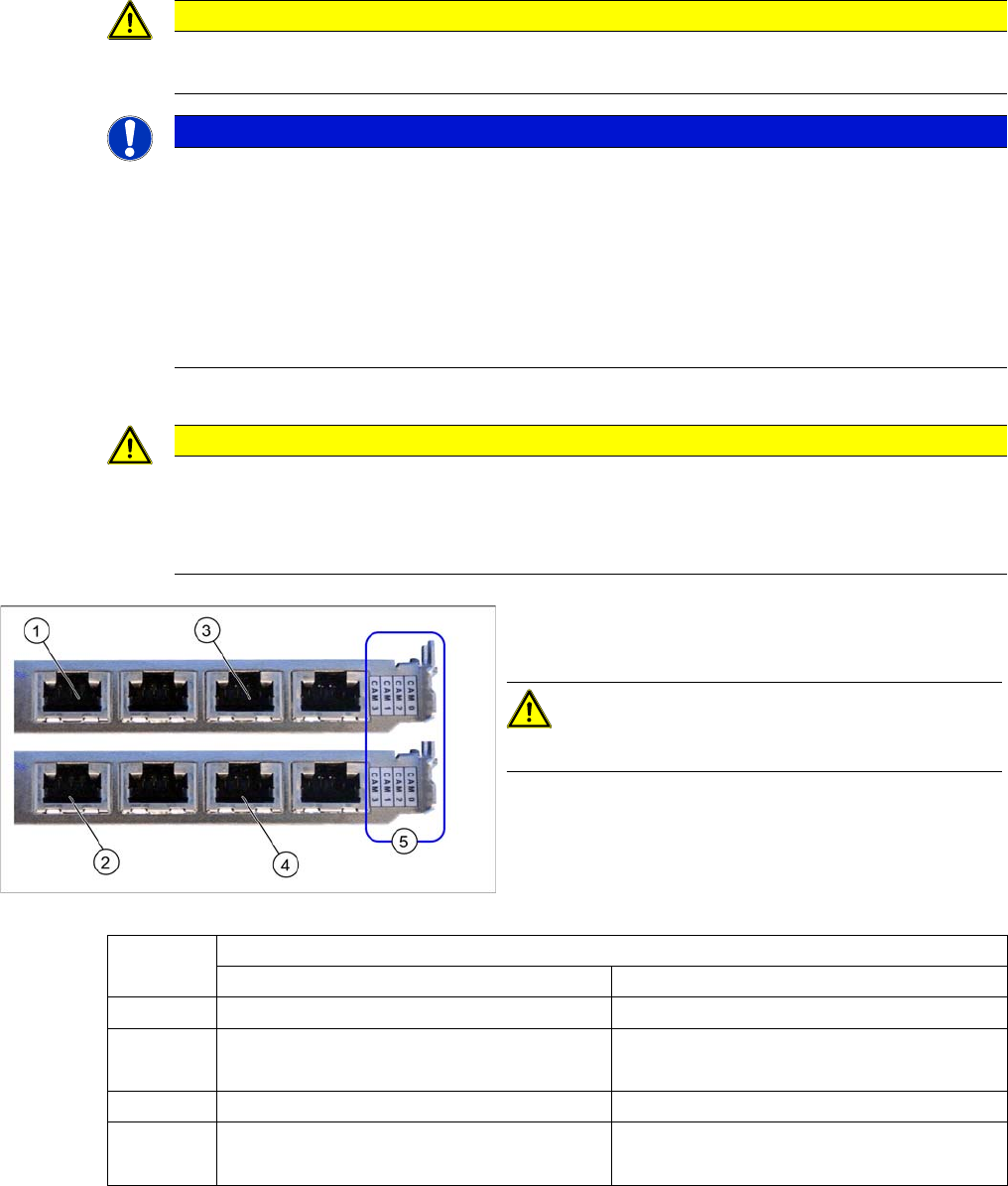
CAN bus connection (X series – from serial no. B326)
► Connect the CAN bus cable (1), camera bus (2) and
voltage supply (3) to the camera. See also"4.6 Circuit
Diagrams SX4" [ ➙ 166]
► The CAN bus cable (03050239-xx) supplied in the
retrofitting kit is used to connect the CAN bus cable to
the camera. Separate the CAN bus cables from one
another at the coupling (1). Connect the adapter ca-
ble [03050239-xx] in-between so that you have two
additional CAN connectors available for the two sta-
tionary cameras.
Installation
Electrical Connections Installation on SX4 Machines
Stationary Camera Type 33/36 Stationäre Kamera Typ 33/36 147
3.5.3.1 Connecting the Hotlink Cable to the BoxPC
► Connect your camera cable as follows:
CAUTION
Never connect a LAN cable to the hotlink card!
This could damage the hotlink card.
NOTICE
Connection for stationary cameras
► Observe section "4 Appendix" [ ➙ 153] and the latest circuit diagrams for your machine.
► When installed, the version of your hotlink card can only be determined by the position of
the camera connection label and the order of CAM connections.
► The stationary cameras are always connected to CAM2 or CAM3.
► The camera cables are labeled with their relevant connection details according to the pat-
tern X*p*.
CAUTION
Correctly connecting the camera cable
► Make sure that you connect the cameras correctly. Observe the labels on the hotlink cards.
If you do not observe this, placement performance may be adversely affected. Pay partic-
ular attention to the different order of connections on the PCI-A24!
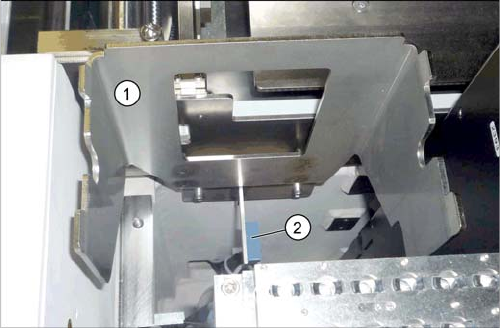
Hotlink card (PCI-A24 [03052135-xx])
The hotlink card is fitted in the SX4 as a default.
CAUTION!
Observe the order of camera connections (5)!
(1) and (3): Stationary cameras for placement area 1
(X2pr and X3pr)
(2) and (4): Stationary cameras for placement area 2
(X2ps and X3ps)
Hotlink cards
Card 1 (top) Card 2 (bottom)
CAM0 Gantry 1 - PCB/component camera Gantry 2 - PCB/component camera
CAM1 Not in use Gantry 2 - stationary cameras (IC/FC)
[03077048-xx] → cable X2ps
CAM2 Gantry 4 - PCB/component camera Gantry 3 - PCB/component camera
CAM3 Not in use Gantry 3 - stationary cameras (IC/FC)
[03077049-xx] → cable X3ps
Installation
Installation on SX4 Machines Final Work
148 Stationary Camera Type 33/36 Stationäre Kamera Typ 33/36
3.5.4 Final Work
► Fit the camera housing. (See also "3.6.1 Assembling the Camera" [ ➙ 149])
► If the reject bin sensor is present (2), you will need to fit this in a new position for the X series ma-
chine. For more information, refer to the relevant assembly instructions:
"Reject Bin Query X series/D3/SX4, DE+EN" [00194716-xx]
"Reject Bin Query SX1/SX2, DE+EN" [00196615-xx]
(See also "3.6.3 Fitting the Component Reject Bin" [ ➙ 150])
► Insert the "reject bin for TwinHead" [03072806-xx].
► Push the COT insert into its original position and screw tightly into place. Read the service manual
for your machine first.
► Hook the waste tape chute back into place.
► Fit the lower side cover. See alsoReplacing the Complete X Series Docking Unit [03015680-xx]
► Remove any objects from the travel range of the gantry and placement head.
► Start the machine and move the component trolley back into the machine.
► Calibrate the machine. (See also "3.6.2 Calibrating the Camera" [ ➙ 150])
Reject bin holder (example of X series shown)
► If not already present, fit the "reject bin holder" (1)
[03063283-xx] with two screws (DIN7984-M6x12-A2-
70) [03081847-xx].