00196608-01_AI_Stationaere_Kamera_Typ33_36_de_en.pdf - 第134页
Installation Installation on SX1/SX2 Machines Moving COT Insert in SX1/SX2 Ma chines 134 Stationary Camera Type 33/36 Stationäre Kamera Typ 33/ 36 3.4 Installation on SX1/SX2 Machines Required installation kits: See"…
Installation
Final Work Assembly in a D1 Machine
Stationary Camera Type 33/36 Stationäre Kamera Typ 33/36 133
3.3.4 Final Work
► Fit the camera housing. See also"3.6.1 Assembling the Camera" [➙149]
► Hook the waste tape chute back into place.
► Make sure that there are no objects in the travel area of the gantry and remove any which are.
► Start the machine and move the component trolley back into the machine.
► Calibrate the machine. See also"3.6.2 Calibrating the Camera" [➙150]
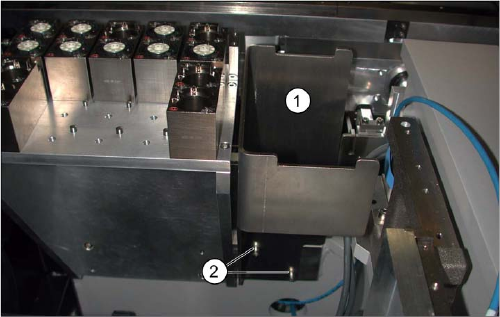
Reject bin (D1)
► If not already present, fit the "reject bin holder"
[03046974-xx] (1) with two screws "DIN912-M6x12"
[03045087-xx] (2). See also: "3.6.3 Fitting the Com-
ponent Reject Bin" [ ➙ 150]
► Insert the "reject bin for P&P head" [03041871-xx].
Installation
Installation on SX1/SX2 Machines Moving COT Insert in SX1/SX2 Machines
134 Stationary Camera Type 33/36 Stationäre Kamera Typ 33/36
3.4 Installation on SX1/SX2 Machines
Required installation kits:
See"2.3 Scope of Delivery" [ ➙ 102]
Installation kit: stationary camera type 33 for CPP head fitted in SX1/SX2 machines [00519902-xx]
The stationary camera (type 33) is already included in the HRK for TwinHead used in SX1/SX2 ma-
chines.
3.4.1 Moving COT Insert in SX1/SX2 Machines
To access the stationary camera installation position, you may need to loosen the cutter and COT insert
and push them forwards.
NOTICE
DX1/DX2
Installation of the camera in DX1/DX2 machines follows the same procedure as that used for
SX1/SX2 machines. Any differences will be mentioned explicitly.
CAUTION
Dismantling the COT insert
► Read the sections "Removing the Cutter" and "Replacing the COT Insert" in the service
manual for your machine!
NOTICE
Mark the positions of the screws
► Mark the positions of all screws, to make clear assignment easier later on.
Installation
Installation position for SX1/SX2 Machines Installation on SX1/SX2 Machines
Stationary Camera Type 33/36 Stationäre Kamera Typ 33/36 135
3.4.2 Installation position for SX1/SX2 Machines
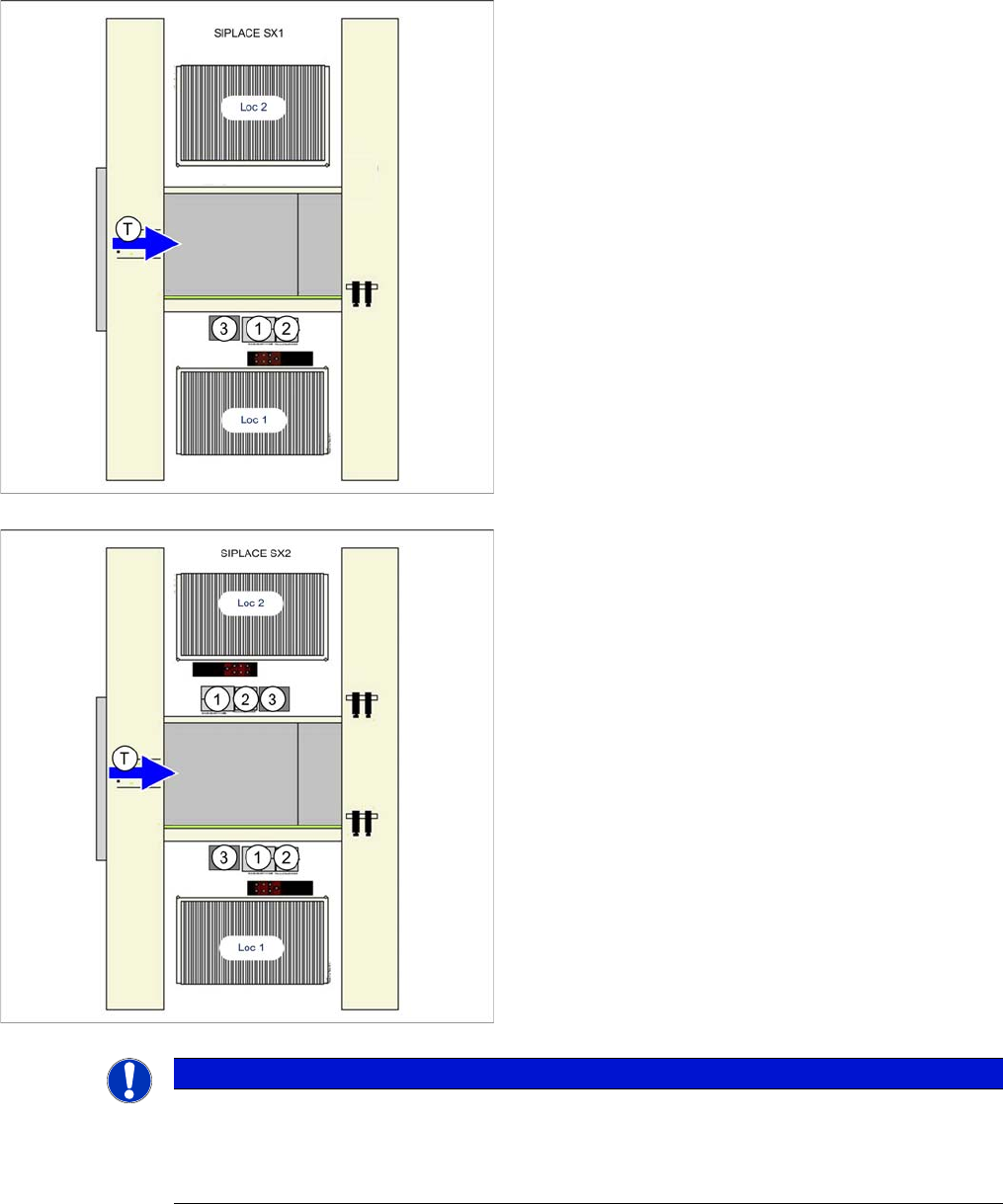
Installation position of camera in the SX1
1. IC camera
2. FC camera/3D coplan module
3. Component reject bin
Loc 1/2 = location 1/2
Installation position of camera in the SX2
1. IC camera
2. FC camera/3D coplan module
3. Component reject bin
Loc 1/2 = location 1/2
NOTICE
TwinHead
The FC camera and the 3D coplan module are only possible together with a TwinHead. Only
one of these options can be fitted at the same location, meaning that either the FC camera or
the 3D coplan module can be used.