00196608-01_AI_Stationaere_Kamera_Typ33_36_de_en.pdf - 第144页
Installation Installation on SX4 Machines Installation position for SX4 Machines 144 Stationary Camera Type 33/36 Stationäre Kamera Typ 33/ 36 3.5 Installation on SX4 Machines Required installation kits: See"2.3 Sco…
Installation
Final Work Installation on SX1/SX2 Machines
Stationary Camera Type 33/36 Stationäre Kamera Typ 33/36 143
3.4.5 Final Work
► Fit the camera housing. See also"3.6.1 Assembling the Camera" [➙149]
► Fit the COT insert if necessary. Read the service manual for your machine first.
► Hook the waste tape chute back into place.
► Fit the "reject bin holder" [03063283-xx] with two DIN912-M6x12 screws [03045087-xx]. See al-
so"3.6.3 Fitting the Component Reject Bin" [ ➙ 150]
► If the reject bin sensor is present, you will need to fit this in a new position for the SX series machine.
For more information, refer to the assembly instructions "Reject Bin Query SX1/SX2, DE+EN"
[00196615-xx].
► Insert the "reject bin for TwinHead" [03072806-xx].
► Make sure that there are no objects in the travel area of the gantry and remove any which are.
► Start the machine and move the component trolley back into the machine.
► Calibrate the machine. See also"3.6.2 Calibrating the Camera" [➙150]
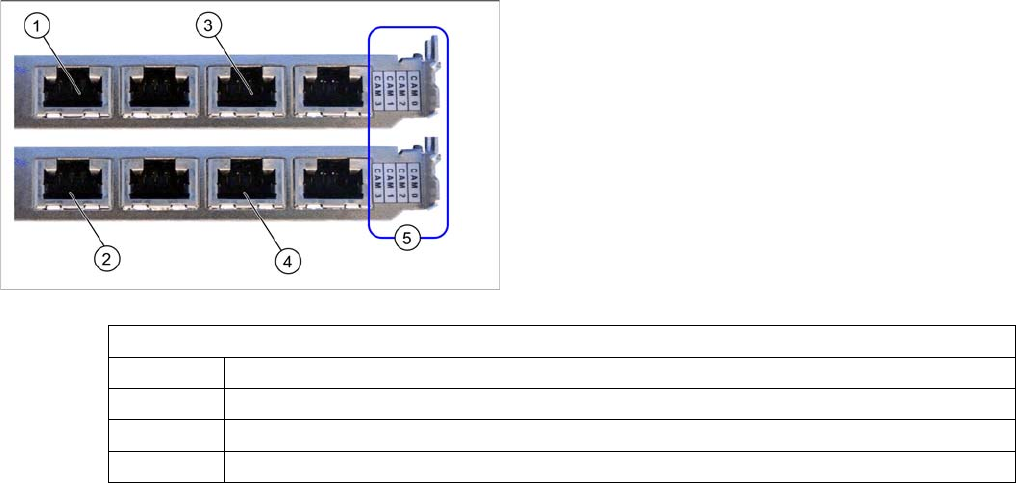
Hotlink card (PCI-A24 [03052135-xx])
This hotlink card is installed as a default in SX1/SX2 ma-
chines from approx. machine serial number K200G and
in DX1/DX2 machines.
When installed, the version of the hotlink cards can only
be seen on the label for the camera connections (5).
(1) and (3): Stationary cameras for placement area 1
(X2pr and X3pr)
(2) and (4): Stationary cameras for placement area 2
(X2ps and X3ps)
Hotlink card
CAM0 Gantry 1 - PCB/component camera
CAM1 Gantry 2 - PCB/component camera
CAM2 Gantry 1 - stationary cameras (IC/FC) → cable X2pr
CAM3 Gantry 2 - stationary cameras (IC/FC) → cable X3pr
Installation
Installation on SX4 Machines Installation position for SX4 Machines
144 Stationary Camera Type 33/36 Stationäre Kamera Typ 33/36
3.5 Installation on SX4 Machines
Required installation kits:
See"2.3 Scope of Delivery" [ ➙ 102]
Installation kit: stationary camera type 33 an SX4 [00519828-xx]
The stationary camera (type 33) is already included in the HRK for TwinHead used in SX4 machines.
3.5.1 Installation position for SX4 Machines
3.5.2 Mechanical Assembly
Fitting the mounts
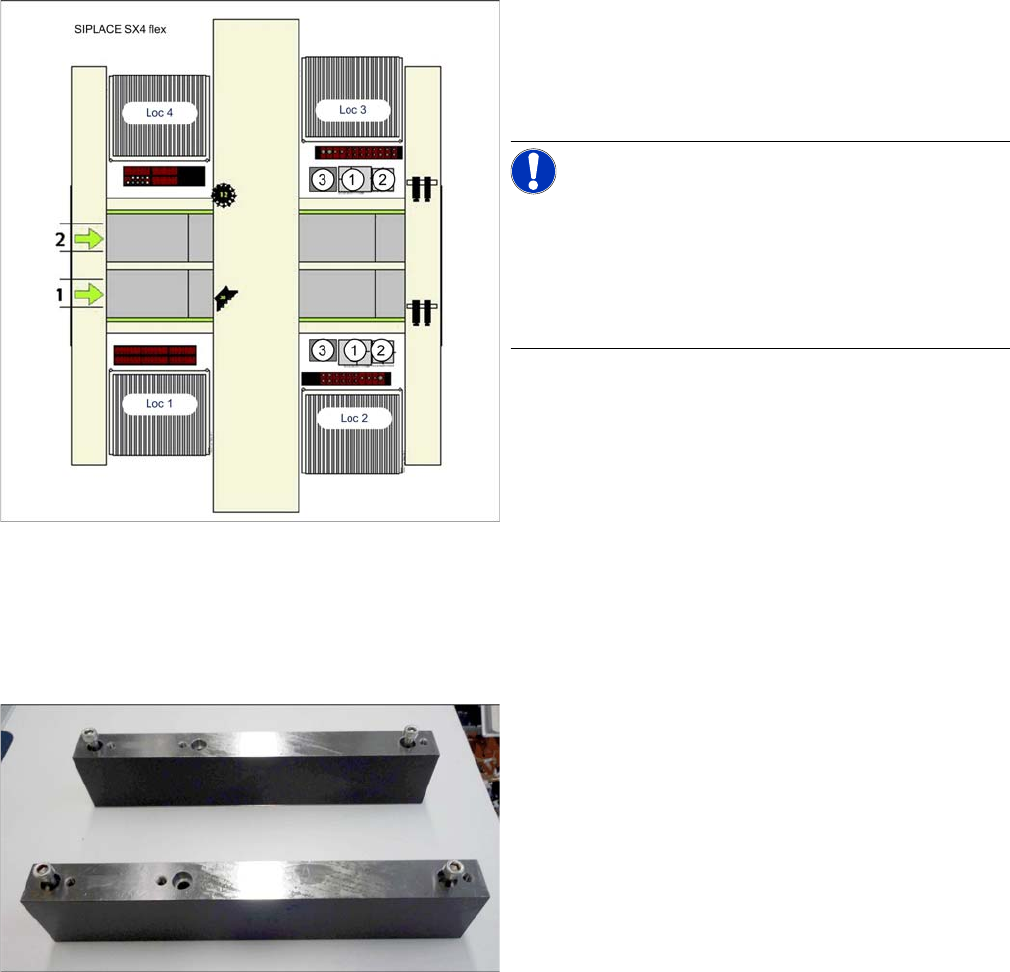
Installation position of cameras (SX4 flex)
1. IC camera, type 33
2. FC camera/3D coplan
3. Component reject bin
Loc 1 to Loc 4: location 1 to 4
NOTICE!
TwinHead
The FC camera and the 3D coplan module are only pos-
sible together with a TwinHead. Only one of these options
can be fitted at the same location, meaning that either the
FC camera or the 3D coplan module can be used.
Mounts for stationary cameras (SX4)
If not already present, you will need to fit the mounts for
the stationary cameras. Proceed as follows:
Installation
Mechanical Assembly Installation on SX4 Machines
Stationary Camera Type 33/36 Stationäre Kamera Typ 33/36 145
Installing the camera
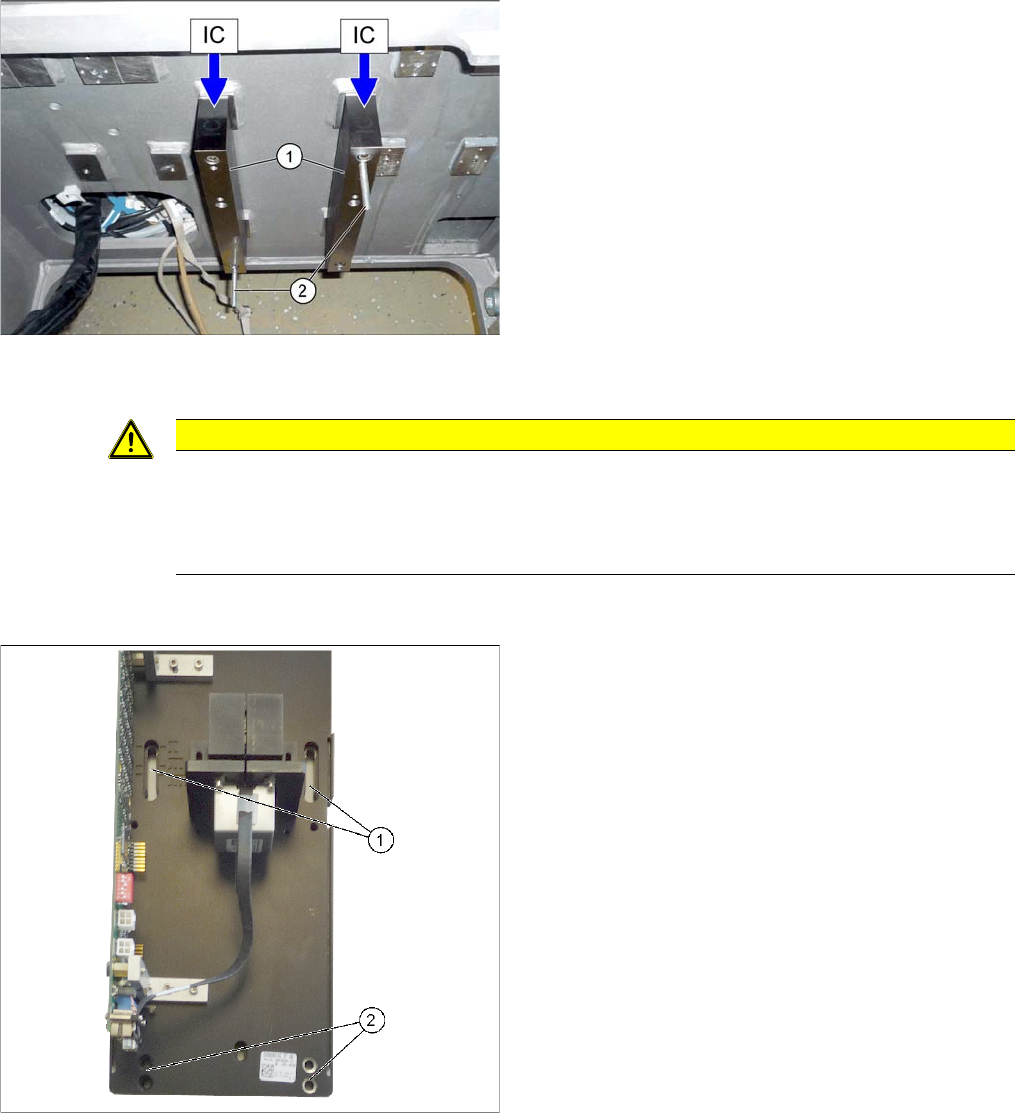
Installation with keyhole (for camera type 33 from version 06, type 36 from version 04)
► Fit the two mounts (1) with 2 screws each to the ma-
chine frame. Make sure that the side labeled "IC" is at
the top.
► For installation with set screws only (see below):
Screw two set screws (2) (with the Allen key side on
the outside) into the mounts as an assembly aid.
CAUTION
Observe the installation height
When fitting the camera, observe the correct installation height. Othwerwise there is a risk of
head crash!
► Please also observe section "4.1 Installation Height of the Stationary Camera" [ ➙ 153].
► Tighten the two top screws until the shaft of the
screws protrudes approx. 15 mm over the mount.
► Hook the upper holes ((1) key holes) on the lower
section of the camera onto these two screws.
► Adjust the lower section of the camera to the correct
installation height, with the two lower screws (2) and
tighten all four screws.