00196608-01_AI_Stationaere_Kamera_Typ33_36_de_en.pdf - 第157页
Appendix Cameras Type 33 From Version 03 To 07, Cameras Type 36 From Ver sion 01 Camera Coding and Connections Stationary Camera Typ e 33/36 Stationäre Kamera Typ 33/36 157 4.2.1.2 Coding the DIP Switch (8 Pin) * Not all…
Appendix
Camera Coding and Connections Cameras Type 33 From Version 03 To 07, Cameras Type 36 From Version 01
156 Stationary Camera Type 33/36 Stationäre Kamera Typ 33/36
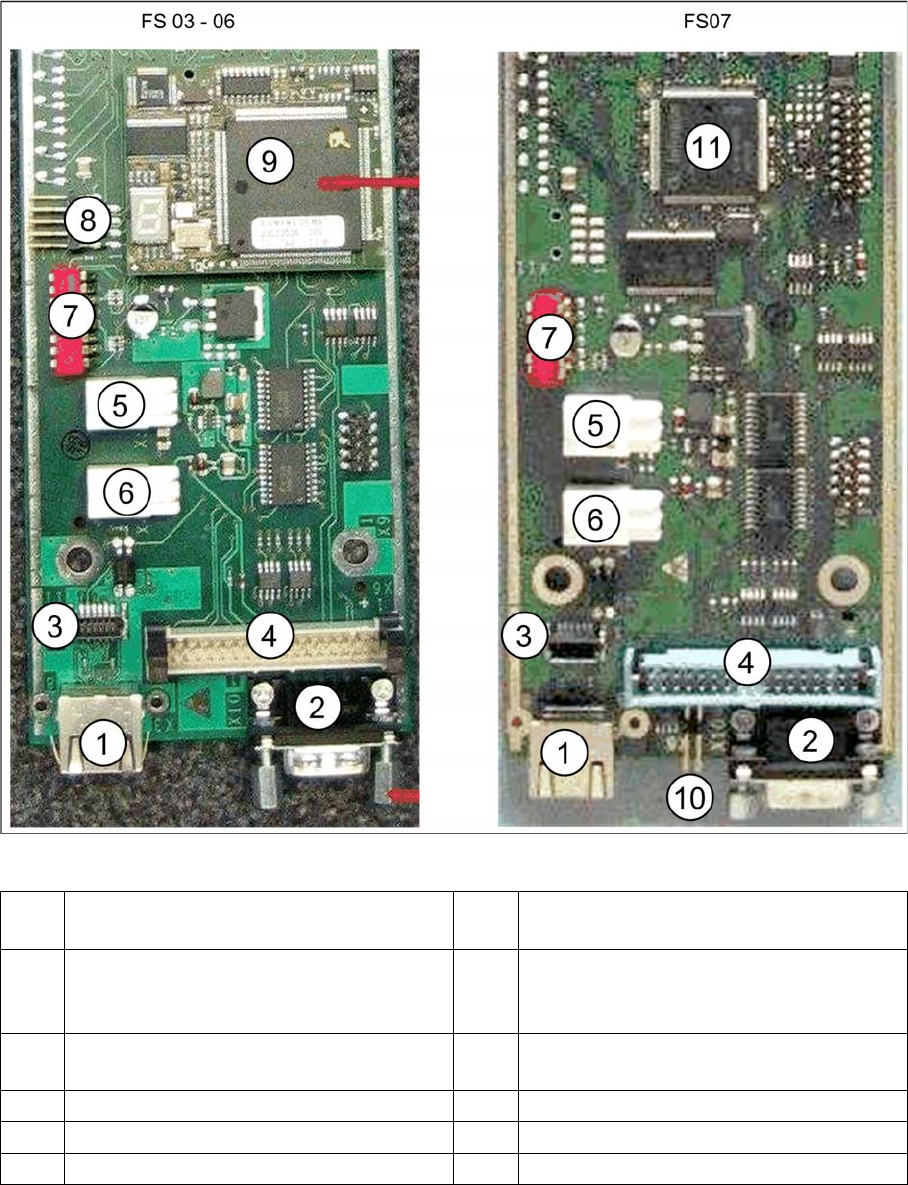
Vision LED driver board VLT33 from FS03
1 X3: Camera bus to station computer hotlink
card
2CAN bus
3 Not relevant 4 Vision cable 34-pin IC camera [03003439-
xx] to Vision controller
For machines up to serial number B326
5 X4: Cable for power supply 6 X5: Cable for power supply
Bridge to FC camera
7 DIP switch 8 Not relevant
9 Controller plug-in card FS03 to FS06 10 Not relevant
11 Controller onboard from FS07
Appendix
Cameras Type 33 From Version 03 To 07, Cameras Type 36 From Version 01 Camera Coding and Connections
Stationary Camera Type 33/36 Stationäre Kamera Typ 33/36 157
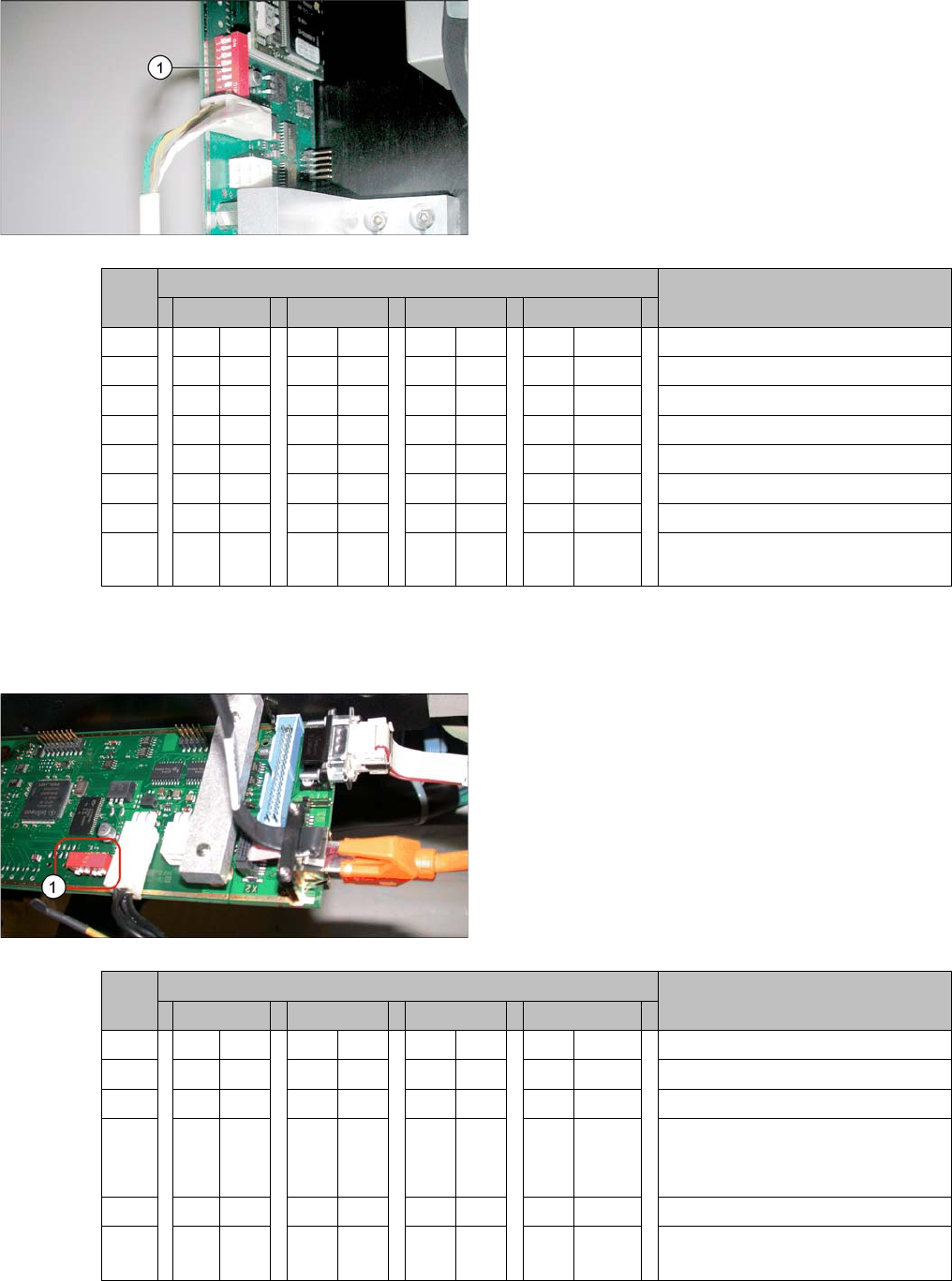
4.2.1.2 Coding the DIP Switch (8 Pin)
* Not all gantries may be available, depending on the machine type.
4.2.1.3 Coding the DIP Switch (6 Pin)
* Not all gantries may be available, depending on the machine type.
► Set the DIP switch (1) on the camera.
S Setting for gantry* Comments
1 2 3 4
1 OFF OFF OFF OFF Boot
2 OFF OFF OFF OFF Reset
3 OFF ON OFF ON Gantry ID 0
4OFFOFFONON Gantry ID 1
5 OFF OFF OFF OFF Test
6 OFF OFF OFF OFF CAN terminator
7ON ON ON ON 1 Mbit/s
8 xx xx xx x x x = OFF: FC camera (type 25)
x = ON: IC camera (type 33/36)
► Set the DIP switch (1) on the camera.
S Setting for gantry* Comments
1 2 3 4
1 OFF OFF OFF OFF Reset
2 OFF ON OFF ON Gantry ID 0
3OFFOFFONON Gantry ID 1
4 x x x x x x x x LED: This switch is delivered with
a fixed presetting. Do not change
this setting!
5 OFF OFF OFF OFF CAN terminator
6 x x x x x x x x x = OFF: FC camera (type 25)
x = ON: IC camera (type 33/36)
Appendix
Configuration of Stationary Camera with SIPLACE PRO Cameras Type 33 From Version 03 To 07, Cameras Type 36 From Version 01
158 Stationary Camera Type 33/36 Stationäre Kamera Typ 33/36
4.3 Configuration of Stationary Camera with SIPLACE PRO
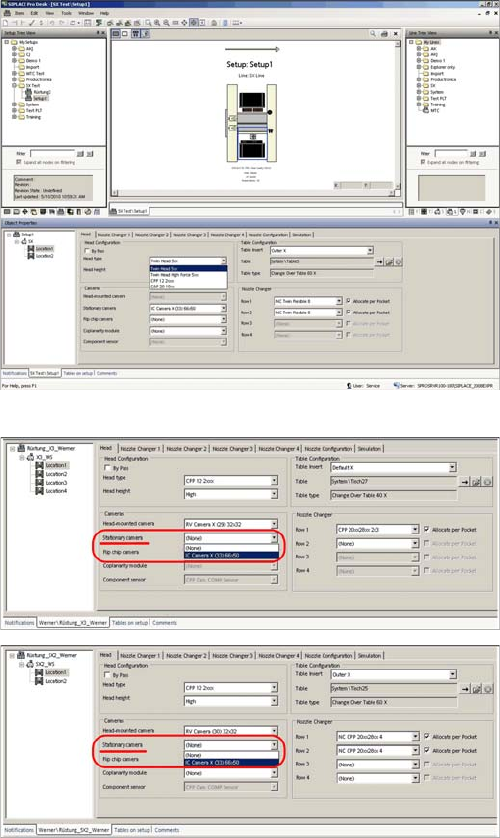
Configuration of stationary camera (using example of D1)
► Select Setup → Location → Head tab and enter the
P&P head.
► Re-optimize the setup in SIPLACE Pro.
SIPLACE Pro setup (using example of X3)
SIPLACE Pro setup (using example of SX2)