00197471-03_Service Manual Internal WPC5_6, EN_01-2019.pdf - 第53页
Service Manual In ternal WPC5 / WPC6 Page 3- 53 3.6.3.6 Repla ce the S ervo Am plifier f or the Non -Stop Module Spare Part • Servo amplifier T BS 200/3Z1 [03048005 -xx] for Non- Stop-Module Removal / Install ation ➢ M…

Service Manual Internal WPC5 / WPC6
Page 3-52
3.6.3.5 Replace the Servo Amplifier for the Lifting Axis and Feed Axis
Spare Parts
• Servo amplifier TBS 200/3Z1 [03048005-xx] for feed axis
• Servo amplifier TBS 200/10X1 [00344204-xx] für lifting axis
Removal / Installation
➢ Wear the ESD wristband.
➢ Loosen the 4 screws fastening the plexiglass cover and remove this.
➢ Press down the lock under the board of the relevant servo amplifier (see "3.6.3 Control Unit"
[➙ 3-48]).
➢ Carefully pull the servo amplifier out of the control unit.
➢ Make sure that the servo amplifier matches the relevant axis. Compare the part numbers of
the "old" servo amplifier with those of the new one.
➢ Carefully insert the new servo amplifier.
➢ Make sure that the servo amplifier engages properly.
➢ Refit the plexiglass cover and screw into place.
Settings
• No settings are required.
Service Manual Internal WPC5 / WPC6
Page 3-53
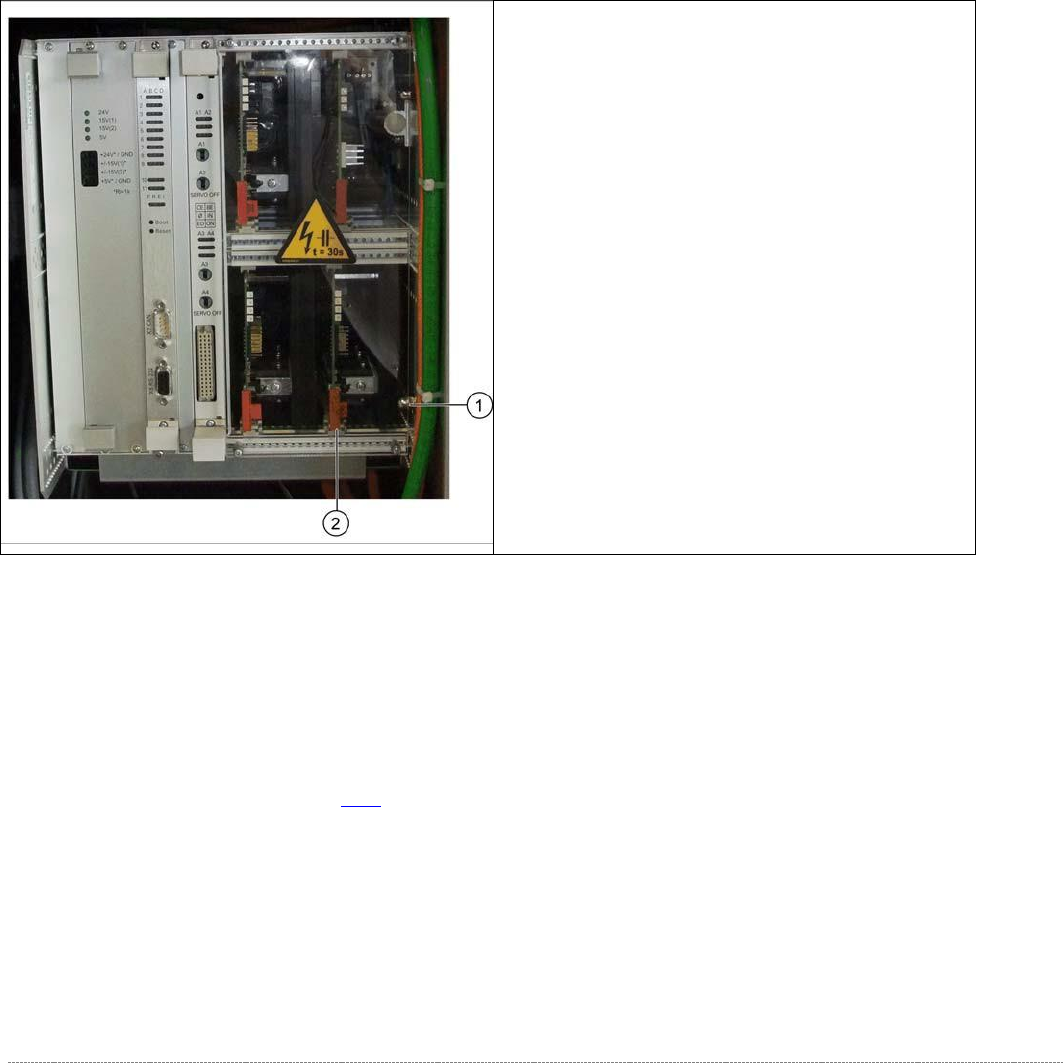
3.6.3.6 Replace the Servo Amplifier for the Non-Stop Module
Spare Part
• Servo amplifier TBS 200/3Z1 [03048005-xx] for Non-Stop-Module
Removal / Installation
➢ Move the tower into the refill position and switch the WPC off.
➢ Wear the ESD wristband.
➢ Remove the second side cover from the control unit side.
➢ Loosen the 4 screws fastening the plexiglass cover and remove this.
Settings
• No settings are required.
See also...
@
3.6.3
Control Unit [➙ 3-48]
➢ Loosen and remove the lower cap nut on the
slot unit (1).
➢ Loosen the counternut and pull the screw out
towards the back until you can remove the
servo amplifier.
➢ Press the lock under the board of the servo
amplifier (2).
➢ Carefully pull the servo amplifier out of the
control unit.
➢ Carefully insert the new servo amplifier.
➢ Make sure that the servo amplifier engages
properly.
➢ Tighten the cap nut and counternut.
➢ Refit the plexiglass cover and screw into place.

Service Manual Internal WPC5 / WPC6
Page 3-54
3.6.3.7 Replace the Ballast Circuit
Spare Part
• Ballast circuit LZS200/1000 [00344207-xx]
Removal / Installation
➢ Wear the ESD wristband.
➢ Loosen the 4 screws fastening the plexiglass cover and remove this.
➢ Press down the lock on the ballast circuit (see "3.6.3 Control Unit" [➙ 3-48]).
➢ Carefully pull the ballast circuit out of the control unit.
➢ Carefully insert the new ballast circuit.
➢ Make sure that the ballast circuit engages properly.
➢ Refit the plexiglass cover and screw into place.
Settings
• No settings are required.
NOTICE
Ballast circuit with integrated micro fuse
There is a micro fuse T 10A/440V on the ballast circuit.
Check this fuse for continuity with the help of a digital multimeter and replace if
necessary.
NOTICE
Braking resistor for lifting axis
The braking resistor for the lifting axis is 12 Ohm +- 10%
This can be measured on the back plane. To do this, first make sure that the WPC is
switched off and then remove the ballast card and the servo card for the feed axis.