00197471-03_Service Manual Internal WPC5_6, EN_01-2019.pdf - 第58页
Service Manual In ternal WPC5 / WPC6 Page 3- 58 3.6.3.9 Repla ce the Fa n Spare Parts • Axial fan [0031914 1- xx] Overview The fan (1) is located o n the underside of the control unit and is fi tted with the help of a …

Service Manual Internal WPC5 / WPC6
Page 3-57
Settings
➢
Check that the sensors have a correct cable assignment.
➢
To do this, open the station software menu at:
⇨ Manual Operations ⇨ Subsystems ⇨ WPC ⇨ Inputs/Outputs.
➢ Trigger the individual limit switches and sensors manually, to check whether the correct
input is activated.
NOTICE
Machine data and calibration
If you have also replaced the controller board or axis card, together with the control unit,
you will need to perform a firmware download (BIOS and application).
If there are no current machine data (*.xml) available, you will need to perform full
calibration of the WPC.
Service Manual Internal WPC5 / WPC6
Page 3-58
3.6.3.9 Replace the Fan
Spare Parts
• Axial fan [00319141-xx]
Overview
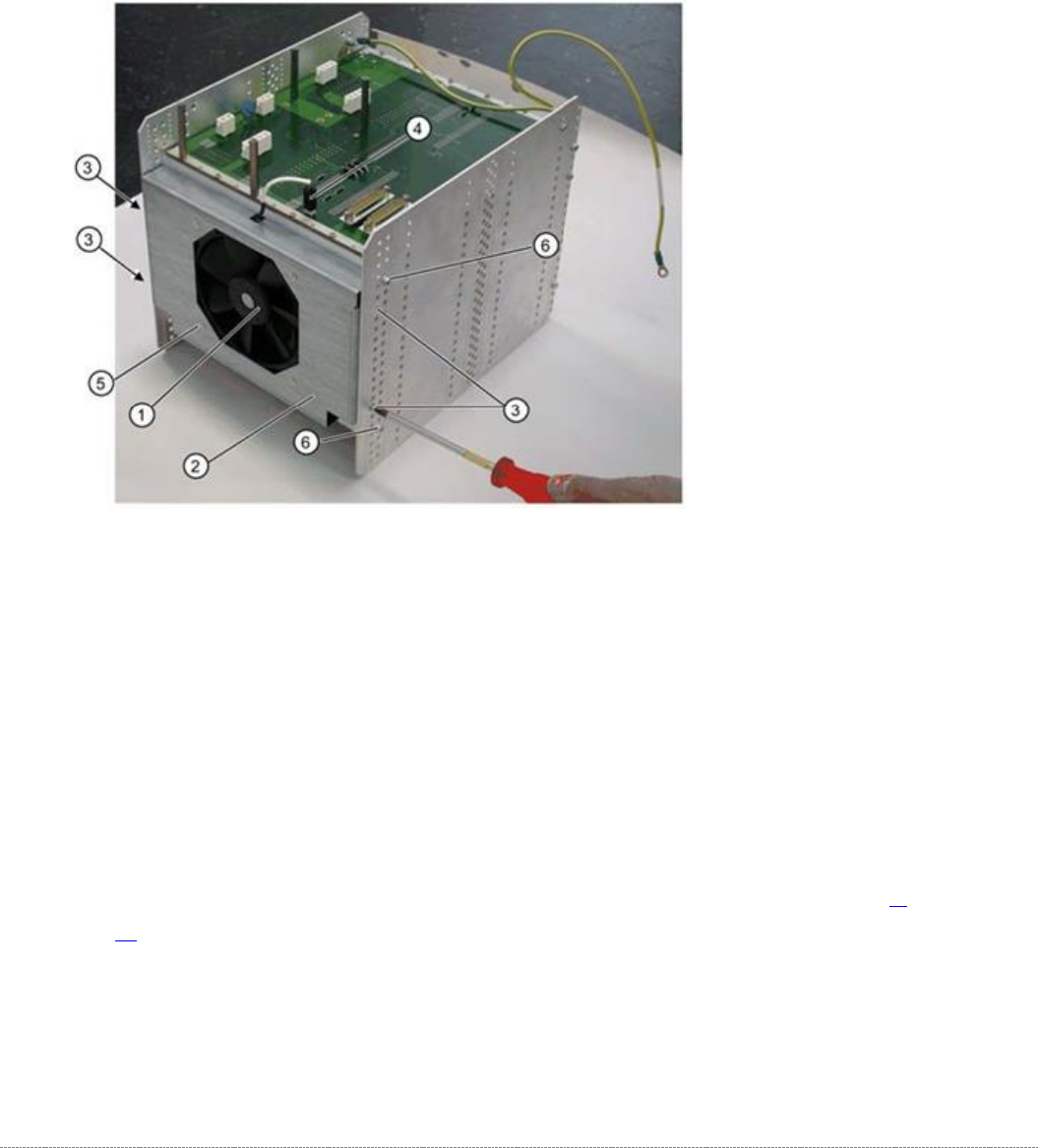
The fan (1) is located on the underside of the control unit and is fitted with the help of a mounting
frame (2).
1.
Fan
2. Mounting frame
3. 4 x mounting frame fastening screws
4. Electrical connection for fan
5. 4 x fastening screws for fan on mounting frame
Removal
➢ Dismantle the complete control unit (see "3.6.3.8 Replace the Complete Control Unit" [➙ 3-
55]).
➢ Unplug the connection cable (4) and the back plane X17.
➢ Mark the installation position of the mounting frame (2) on the relevant control unit holes.
➢ Loosen the 4 fastening screws (3) on the mounting frame (2).
➢
The mounting frame (2) can be levered more easily out of the holes, if you also loosen the 2
screws (6) on the control unit.

Service Manual Internal WPC5 / WPC6
Page 3-59
➢ Lever the mounting frame (2) out of the control unit holes with a suitable tool (e.g.
screwdriver).
➢ Remove the mounting frame with fan.
➢ Mark the installation position of the fan (1) in the mounting frame. Make a note of the
direction in which air is blown out! The fan takes in air from below and blows it into the inside
of the control unit.
➢ Loosen the 4 screws (5) fastening the fan (1) to the mounting frame.
➢ Remove the fan.
Installation
➢ Fit the fan in the mounting frame. Note the position of the connection cable.
➢ Carefully lever the mounting frame with its openings into the holes.
➢ Fit the mounting frame with the fan in the control unit.
➢ Tighten the two screws (6) on the control unit and reconnect to the power supply.
➢ Fit the complete control unit (see "3.6.3.8 Replace the Complete Control Unit" [➙ 3-55]).
Settings
➢ Check the flow of air from the fan. The fan takes in air from below and blows it into the
inside of the control unit.