SI-F130 Manual(EN)_jpg_ Rev1.pdf - 第111页
FF/FR Axis Z-Phase M atching HLF-10406-01 FF/FR A xis Z-Phase Match ing SHEET 2/3 5 Draw marking of f line on the motor pulley and feed body main body . Apply a marking off line to be as thin as possible. 6 T urn OFF the…
FF/FR Axis Z-Phase Matching
HLF-10406-01
FF/FR Axis Z-Phase Matching
SHEET
1/3
FF/FR Axis Z-Phase Matching
[Necessary jigs]
• Do not use jig.
[Procedure]
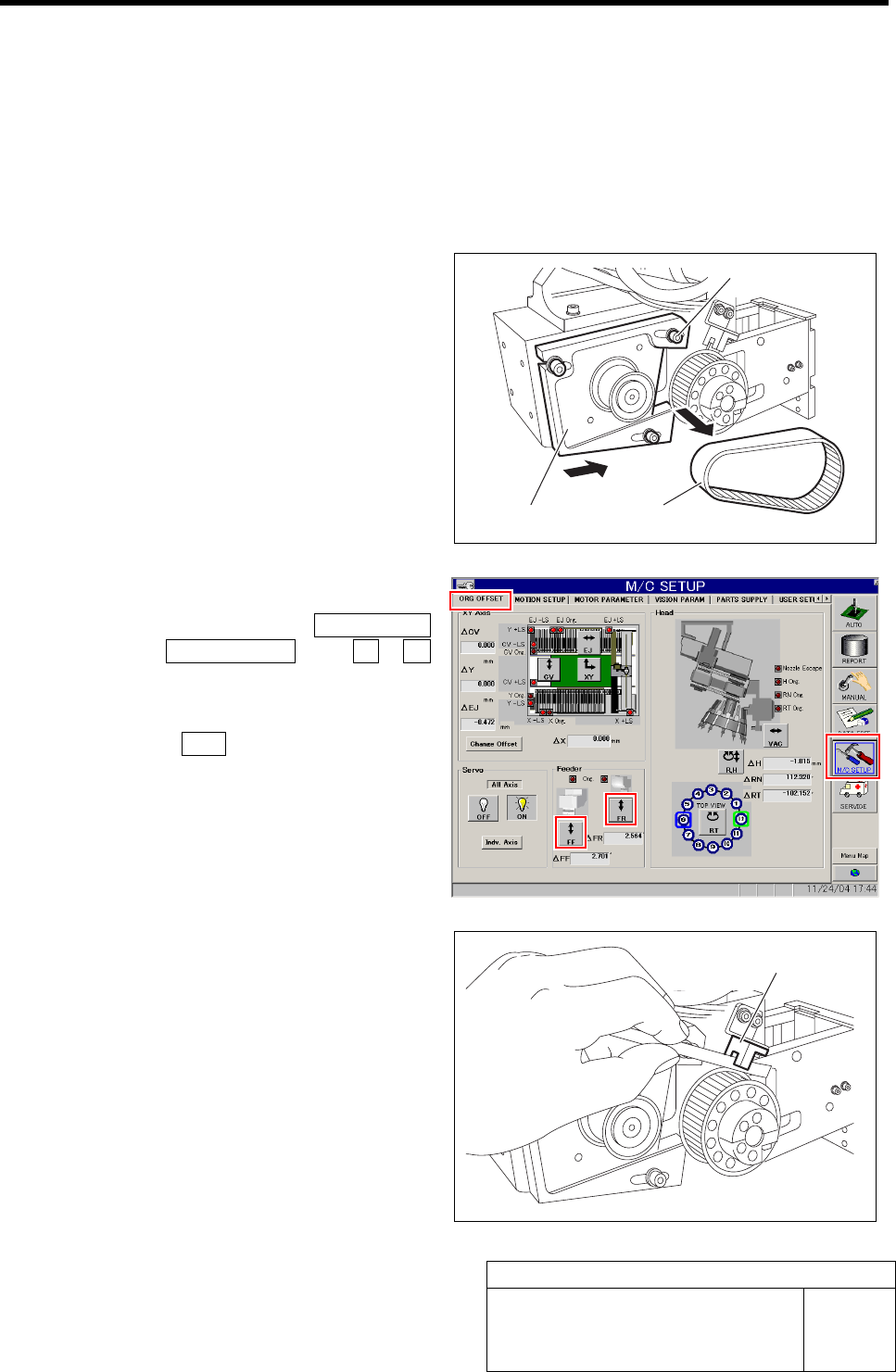
1 Loosen the cap screws (3-M4) on the F axis
motor mounting bracket.
2 Slide the bracket to the driven gear side to
remove the belt.
Temporarily fasten the cap screws for the
bracket.
3 Return the F axis to origin.
1. Click in an order of M/C SETUP
menuÎORG OFFSET tabÎFF / FR
button.
FF Axis or FR Axis screen is displayed.
2. Press the ORG button on the operation
panel with the FF Axis or FR Axis
screen being displayed
FF axis or FR axis returns to origin.
4 When the motor pulley starts to idle to return
to origin, obstruct the origin sensor with pa-
per.
The motor pulley slowly stoops with Z-phase after a
few seconds.
Cap screw
Bracket
Belt
Origin sensor
FF/FR Axis Z-Phase Matching
HLF-10406-01
FF/FR Axis Z-Phase Matching
SHEET
2/3
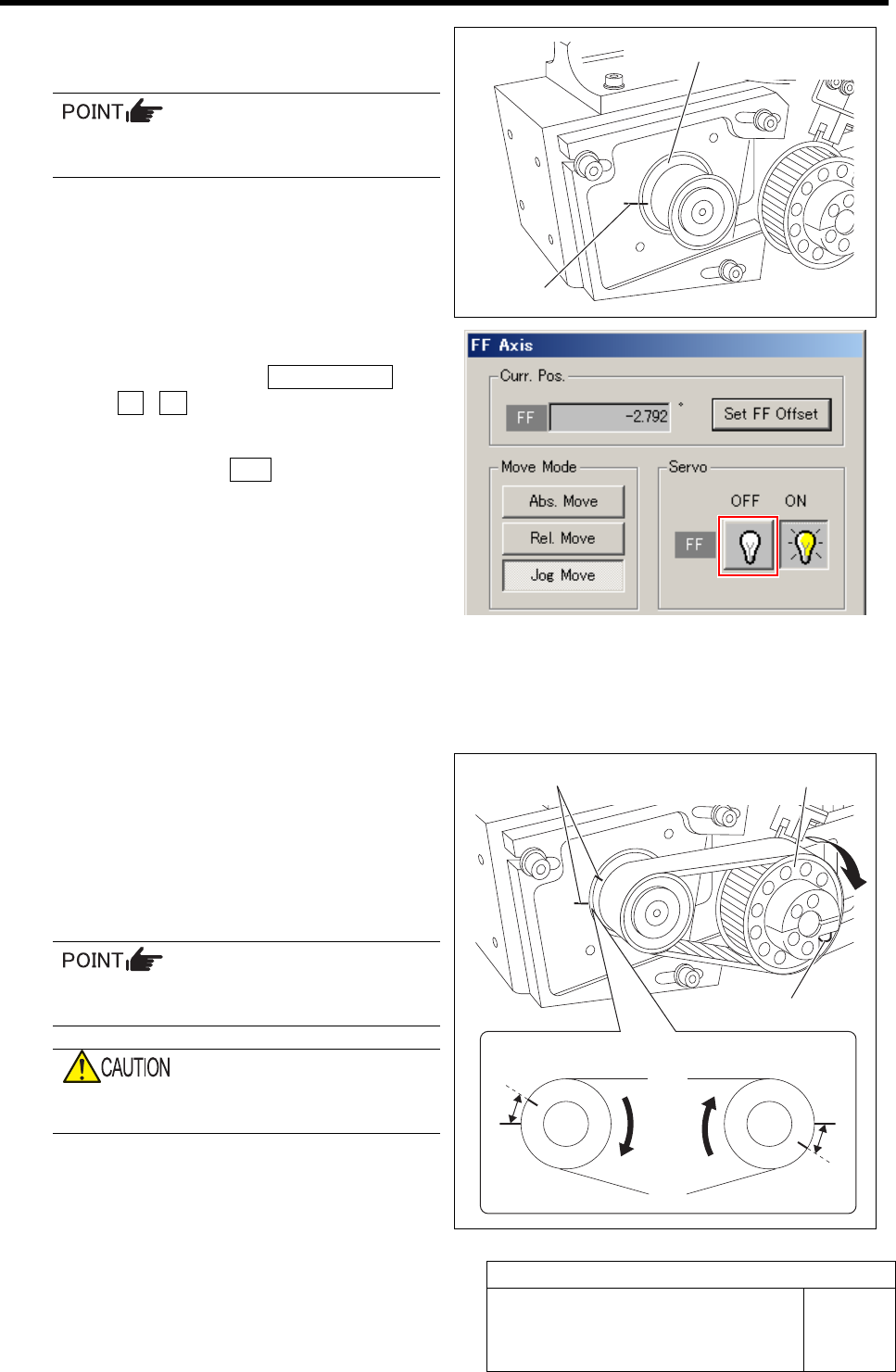
5 Draw marking off line on the motor pulley
and feed body main body.
Apply a marking off line to be as thin as
possible.
6 Turn OFF the servo for FF axis or FR axis.
1. Click in an order of ORG OFFSET tab
ÎFF / FR button.
FF Axis or FR Axis screen is displayed.
2. Click the servo OFF button for FF axis
or FR axis.
Servo for FF axis or FR axis is turned off.
7 Apply the belt to both gears.
The marking off lines on both the motor pulley and
the feed body should come to each other as close as
possible.
8 Loosen the split fastening screw of the
driven gear to make the pulley free.
9 Turn the free driven pulley clockwise to ad-
just the interval of the marking off lines on
the motor pulley and the feed body to
2.0±0.5 mm.
At this time, push up the roller to adhere it
to the cam follower beforehand.
When turning the driven gear, be careful not
to turn the axis together.
Marking off line
Motor pulley
Marking off line
Driven pulley
Split fastening screw
A
FF axis FR axis
A
A=2.0±0.5 mm
FF/FR Axis Z-Phase Matching
HLF-10406-01
FF/FR Axis Z-Phase Matching
SHEET
3/3
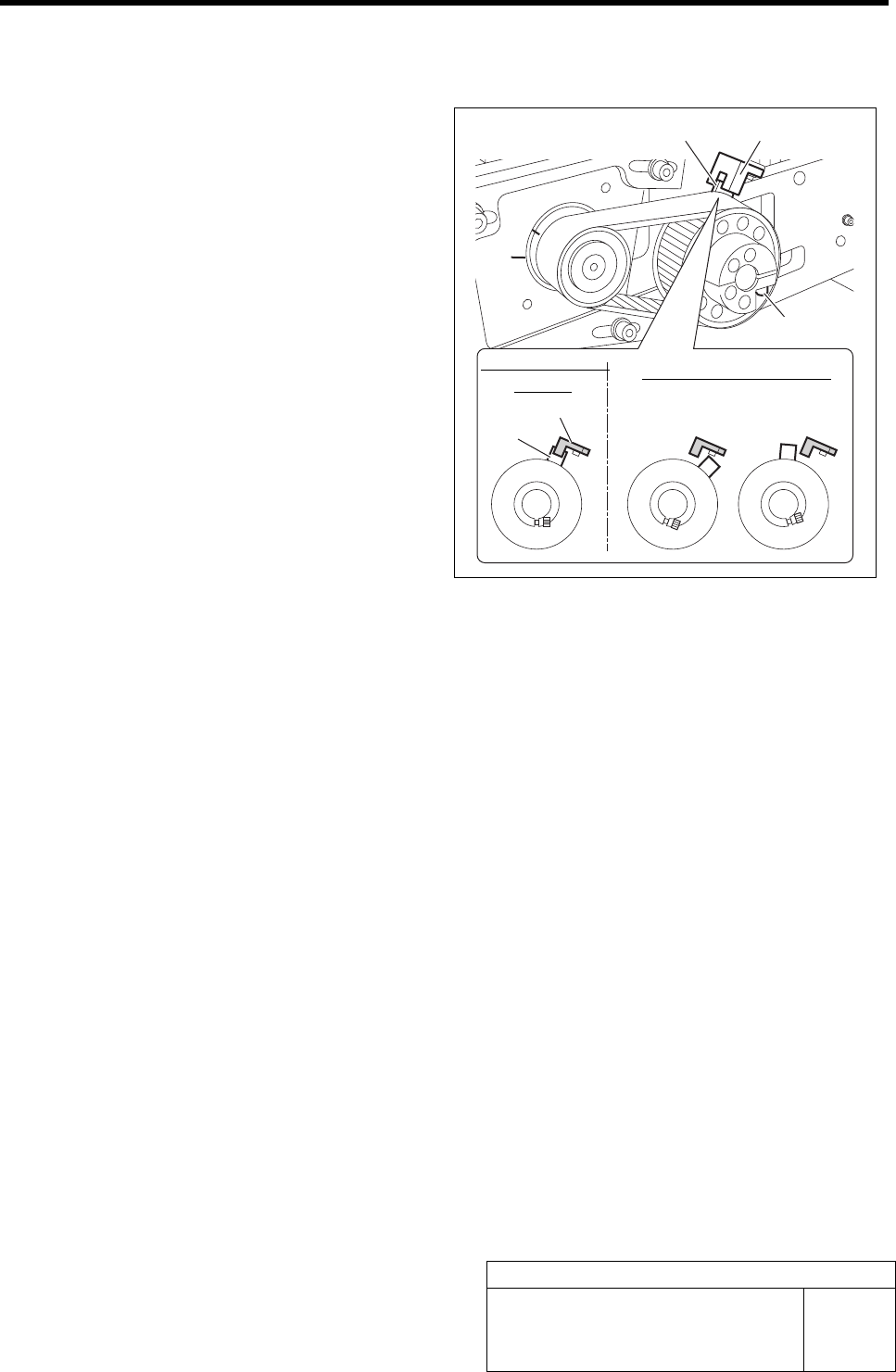
10 After adjusting the marking off line positions, fasten the split fastening screw of the driven pulley
temporarily to such an extent as to prevent the idling of the pulley.
11 Check that the dog position of the driven
pulley is coincided with sensing position of
the origin sensor.
12 Additionally tighten the split fastening screw
of the driven pulley with the dog coincided
with the sensing position.
13 If the dog is out of the sensing position, or if
the dog is found coincided nearly with the
sensing position, adjust the dog position in
the following procedure.
1. Loosen the split fastening screw of the
driven pulley.
2. After confirming the Z-phase marking
off line position, retighten the split
fastening screw.
3. Match the dog position to the origin
sensor.
Dog
Origin sensor
Origin sensor
Dog
Sensing enabled
position
Sensing disabled position
Split fastening screw