SI-F130 Manual(EN)_jpg_ Rev1.pdf - 第84页
Pickup Position Setup HLF-10314-01 Pickup Position Setup SHEET 6/7 3 Acquire the H position afte r positioning. 1. Click the Acq. Pos. button on the H screen to acquire H positi on of Z106. 2. Click the Close button to c…
Pickup Position Setup
HLF-10314-01
Pickup Position Setup
SHEET
5/7
H Position Data Teaching
[Procedure]
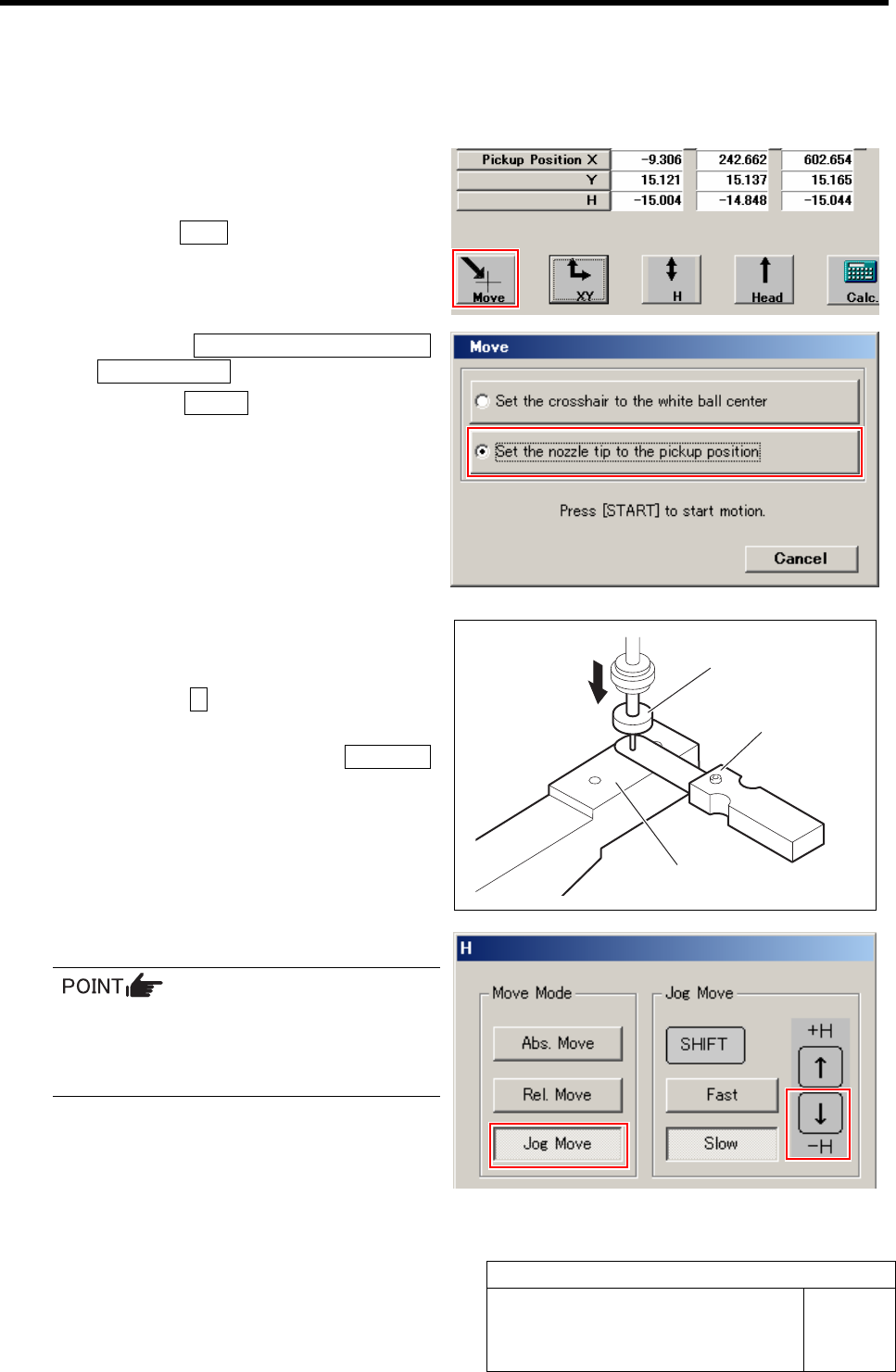
1 Move the length reference nozzle jig to the
pickup point.
1. Click the Move button on the Front/All
Cass. Pos. Teaching by Tools screen.
Move screen is displayed.
2. Click the Set the nozzle tip to the
pickup position button.
3. Press the START button on the opera-
tion panel.
Length reference nozzle jig of the turret No.1
automatically moves to the pickup point.
2 Lower the length reference nozzle jig to a
height of 0.03mm above the pickup point jig.
1. Click the H button on the Front/All
Cass. Pos. Teaching by Tools screen.
H screen is displayed.Click the Jog Move
button.
3. Press the downward cursor key to
lower the H axis until the gap between
the length reference nozzle jig and
pickup point jig becomes 0.03mm.
4. Check the gap using a thickness gauge
of 0.03mm.
• Use a thickness gauge with the same
thickness as the “spacer thickness” input
in the Front/All Cass. Pos. Teaching by
Tools screen.
Length reference
nozzle jig
Thickness gauge
Pickup point jig
Pickup Position Setup
HLF-10314-01
Pickup Position Setup
SHEET
6/7
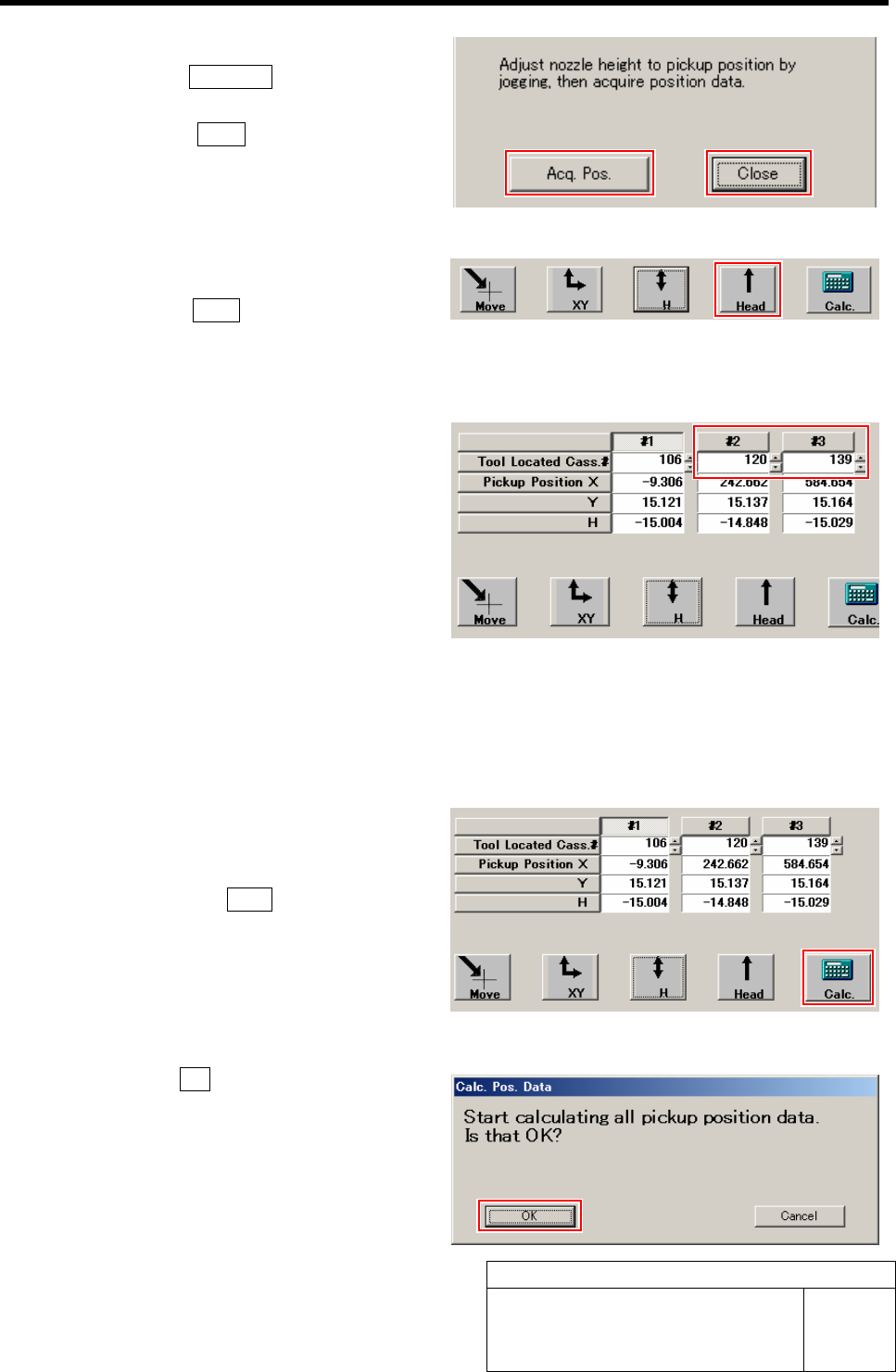
3 Acquire the H position after positioning.
1. Click the Acq. Pos. button on the H
screen to acquire H position of Z106.
2. Click the Close button to close H
screen.
4 Move the head away.
1. Click the Head button to move the
head away from the pickup position.
This completes acquiring H position data for
Z106.
5 Perform XY position data teaching and H
position data teaching at Z120 and Z139.
1. Move the pickup point jig to the posi-
tions of Z120 and Z139.
2. Input “120” to #2, “139” to #3 on the
Front/All Cass. Pos. Teaching by Tools
screen.
3. Acquire pickup position data of Z120
and Z139 in the same procedure as
those in the “XY Position Data Teach-
ing” and “H Position Data Teaching
(procedure 1 to 4).
6 Calculate the pickup position data.
1. After acquiring the pickup position
data at three points of Z106, Z120 and
Z139, click the Calc. button.
Confirmation window for calculating position
data.
2. Click the OK button.
Calculation for position data is performed.
Pickup Position Setup
HLF-10314-01
Pickup Position Setup
SHEET
7/7
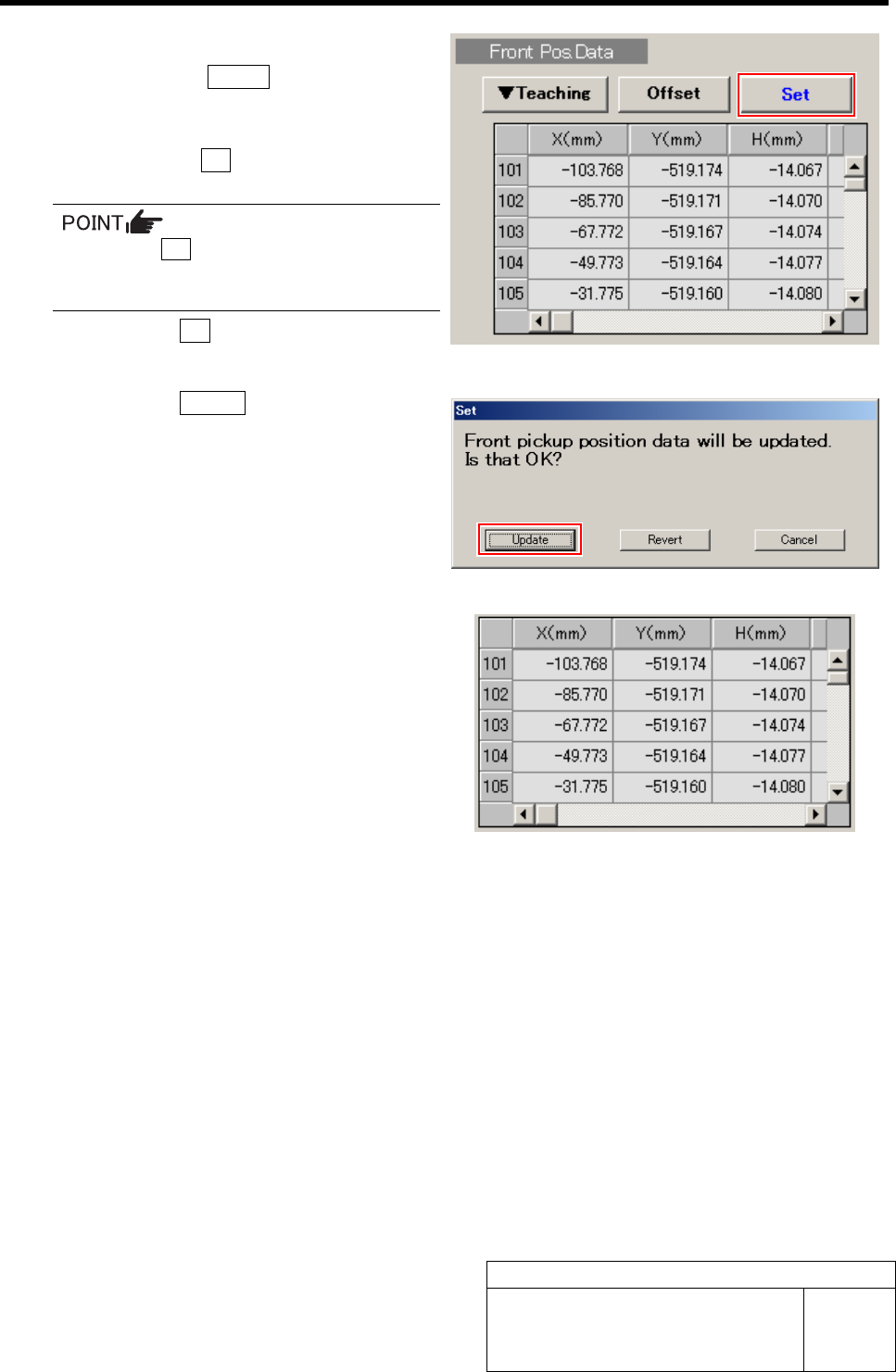
7 Set the calculated position data.
1. Click the Return button on the
Front/All Cass. Pos. Teaching by Tools
screen to close the screen.
2. Check the Set button for the Front
Pos. Data is displayed in blue letter.
Unless the Set button is displayed in blue,
position calculation is not performed.
Again, perform “Acq.Pos.” or “Calc.”.
3. Click the Set button.
Confirmation window for setting is displayed.
4. Click the Update button.
X, Y, H position data for parts pickup position is
updated.
5. Check that the front position data
value was updated.
8 Set up the rear position data in the same procedure as that for the front position data setup (XY
position data teaching, H position data teaching)
Measuring locations of the rear position data are “Z202” for #1, “Z220” for #2 and “Z235” for #3.