SI-F130 Manual(EN)_jpg_ Rev1.pdf - 第59页
Parts Camera Calibration HLF-10309-01 Parts Camera Calibration SHEET 1/3 Part s Camera Calibration [Necessary jigs] • Calibration plate jig • Jig positioning pin • Nozzle jig (AF80400) • Jig chip (t=3.4 mm, t=1.4 mm) [Pr…
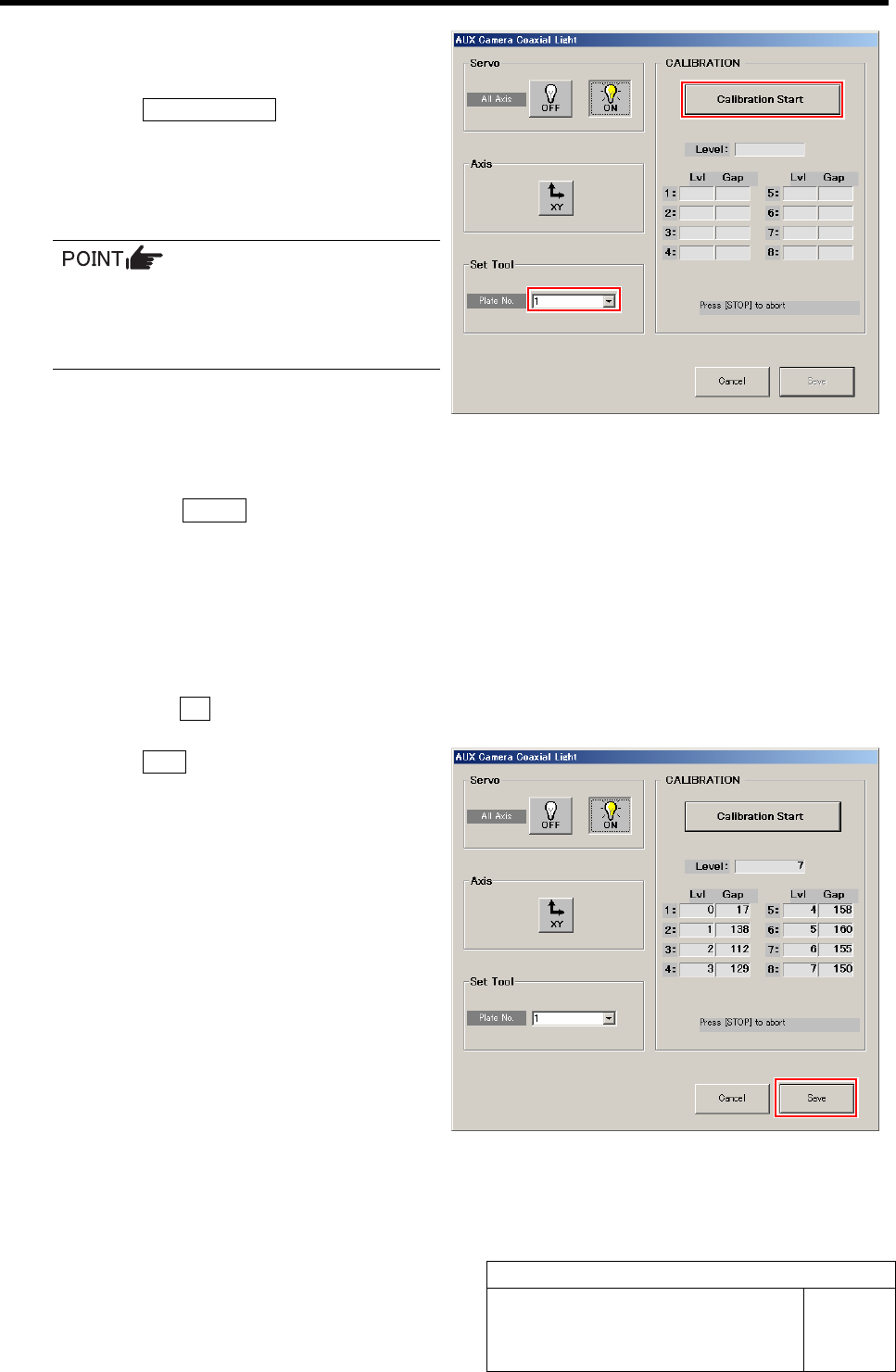
AUX Camera Coaxial Light Calibration
HLF-10308-01
AUX Camera Coaxial Light
Calibration
SHEET
2/2
2 Select jig No. of fixed camera light
calibration jig from the list box.
3 Click the Calibration Start button.
“Install calibration jig for fixed light. Press [START]
to start light calibration” is displayed on the message
screen.
Unless the fixed camera light calibration
jig is set, install it according to the proce-
dure 4 of the previous “Fixed Camera Up-
per Light Calibration”.
4 AUX camera coaxial light calibration is started.
1. Press the START button on the operation panel.
Calibration is started.
After a few minutes, the calibration ends, and “Remove calibration jig for fixed light” is displayed on the message
screen.
5 Remove the fixed camera light calibration jig.
1. Remove the fixed camera light calibration jig set on the fixed camera.
2. Click the OK button to close the message screen.
6 Click the Save button.
The Gap values of Lvl 1 to 8 are saved and the AUX
Camera Coaxial Light screen closes.
Parts Camera Calibration
HLF-10309-01
Parts Camera Calibration
SHEET
1/3
Parts Camera Calibration
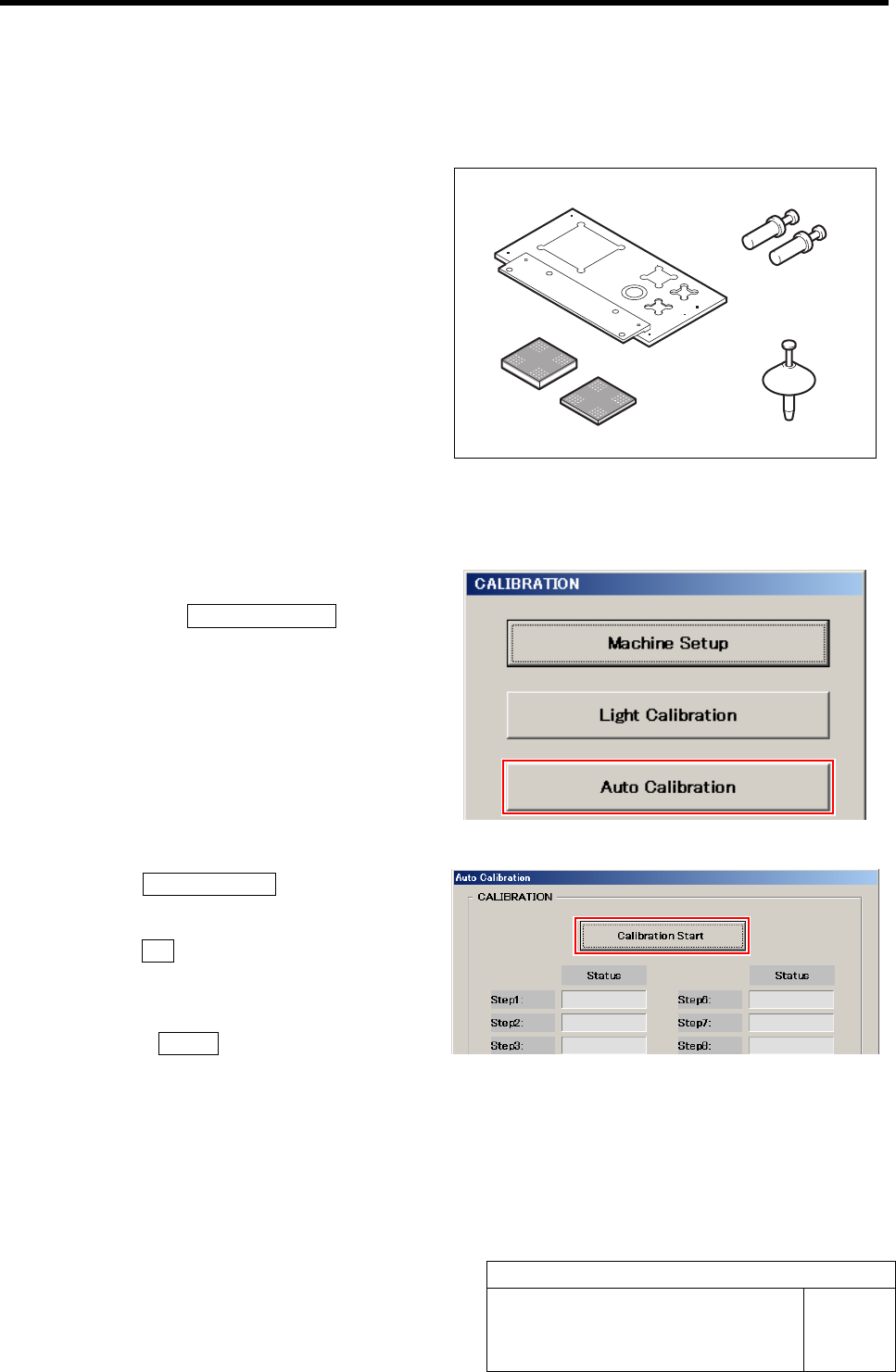
[Necessary jigs]
• Calibration plate jig
• Jig positioning pin
• Nozzle jig (AF80400)
• Jig chip (t=3.4 mm, t=1.4 mm)
[Procedure]
1 Display a Auto Calibration screen.
1. Click the Auto Calibration button on
the CALIBRATION screen.
Auto Calibration screen is displayed.
2 Click the Calibration Start button.
“Setup jig?” is displayed on the message screen.
3 Click the Yes button.
“Press [START] to move to nozzle installing position”
is displayed on the message screen.
4 Press the START button on the operation
panel.
Turrets No.1 to 4 move to the jig setup position.
Jig positioning pin
Calibration plate jig
Jig chip
(t=3.4 mm, t=1.4 mm)
Nozzle jig (AF80400)
Parts Camera Calibration
HLF-10309-01
Parts Camera Calibration
SHEET
2/3
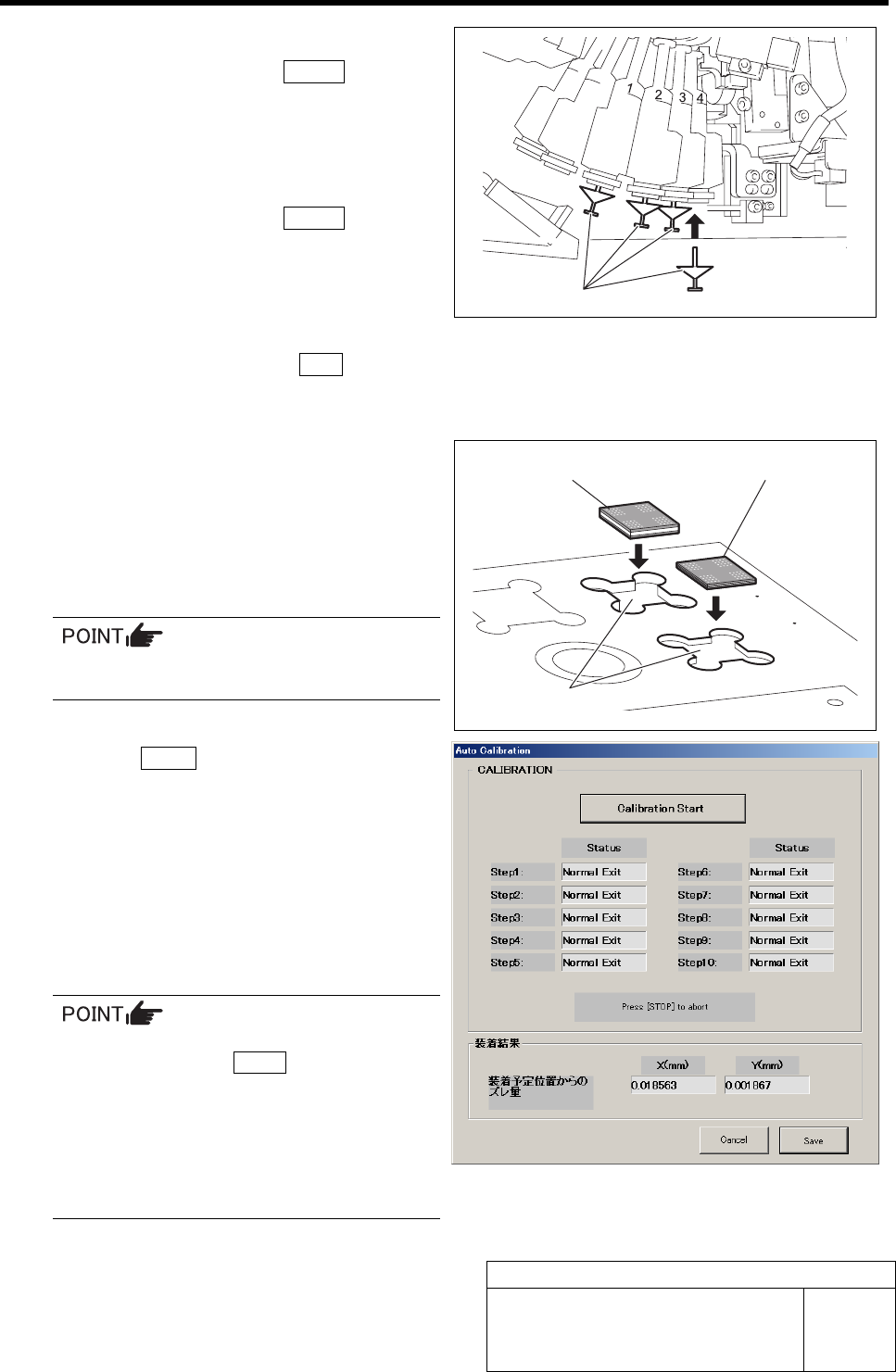
5 Install the nozzle jig (AF80400) to the turrets
No. 1 to 4 and press the START button on
the operation panel.
The turrets rotate and the turrets No.5 to 8 move to the
jig setup position.
6 Install the nozzle jig (AF80400) to the turrets
No. 5 to 8 and press the START button on
the operation panel.
The turrets rotate and the turrets No.9 to 12 move to
the jig setup position.
7 Install the nozzle jig (AF80400) to the turrets
No. 9 to 12 and press the ORG button on
the operation panel.
Origin position return of the unit is performed.
8 Set the jig chips to the tip insertion part on
the calibration plate jig.
1. Insert the jig chip (t=3.4 mm) into the
tip insertion part on the farther side.
2. Insert the jig chip (t=1.4 mm) into the
tip insertion part on the near side.
Set the jig chip as to be near on the right.
9 Press the START button on the operation panel.
Auto calibration is started.
If any error occurs in Step 1, re-perform unit reference
position setting.
If any error occurs in Step 2 to 10, perform the fol-
lowings and re-perform Auto calibration.
- Re-perform light calibration.
- Clean the jig chip with alcohol.
- Clean the mirror of the parts camera portion with alcohol.
•When stopping in course of Auto calibra-
tion, press the STOP button to stop
when the nozzle does not pick up the jig
chip, or after checking that the jig chip is
placed on the calibration plate jig.
•When stopping in course of Auto calibra-
tion, the calibration can not be re-started
from the halfway the step.
Auto calibration ends after approximately one hour.
Nozzle jig (AF80400)
Jig chip (t=1.4 mm)
Jig chip (t=3.4 mm)
Tip insertion part