编带机说明书-含图纸tm401.pdf - 第104页
5-2 TM-403 User’s Guide Quick Start: Vision Setup D292104.16.fm Quick Star t: Vision Setup The following is an outline of the basic step s required to configure inspection on the TM- 401. More det ailed instructions foll…

Chapter 5: Vision Setup
Contents
Quick Start: Vision Setup . . . . . . . . . . . . . . . . . . . . . . . . . . . . . . . . . . . . .5-2
Connect Vision. . . . . . . . . . . . . . . . . . . . . . . . . . . . . . . . . . . . . . . . . . . . . .5-3
Setup HMI . . . . . . . . . . . . . . . . . . . . . . . . . . . . . . . . . . . . . . . . . . . . . . . . . . . . 5-3
Connect Computer. . . . . . . . . . . . . . . . . . . . . . . . . . . . . . . . . . . . . . . . . . . . . . 5-5
Connect Keyence Monitor . . . . . . . . . . . . . . . . . . . . . . . . . . . . . . . . . . . . . . . . 5-9
Configure Inspection. . . . . . . . . . . . . . . . . . . . . . . . . . . . . . . . . . . . . . . . .5-10
Configure Computer. . . . . . . . . . . . . . . . . . . . . . . . . . . . . . . . . . . . . . . . . . . . . 5-10
Configure Keyence Monitor . . . . . . . . . . . . . . . . . . . . . . . . . . . . . . . . . . . . . . . 5-28
Downloaded from www.Manualslib.com manuals search engine

5-2 TM-403 User’s Guide
Quick Start: Vision Setup D292104.16.fm
Quick Start: Vision Setup
The following is an outline of the basic steps required to configure inspection on the TM-
401. More detailed instructions follow in the next section of this chapter.
1. Load Vision Software (user supplied computer only)
2. Connect Vision Computer/Monitor to Camera
3. Configure Inspection
If the optional laptop was purchased for vision configuration V-
TEK, Inc. recommends users create a computer Recovery
Disk prior to operation and conduct periodic back-ups as
needed. Visit the computer manufacturer’s website for instruc-
tions on creating a recovery disk.
V-TEK, Inc. does not create or maintain recovery information for
this laptop. Creating a recovery disk is solely the users’
responsibility.
Downloaded from www.Manualslib.com manuals search engine
D292104.16.fm Connect Vision
Chapter 5: Setup 5- 3
Connect Vision
Note: The TM-401 vision system can be run with a computer or a Keyence IV-G
Monitor. These options are not included with the TM-401. They can be purchased
separately from V-TEK, Inc. or the user may provide their own computer.
System requirements for the vision computer follow:
• Operating system: Microsoft® Windows XP
TM
(32 bit), Windows Vista
TM
(32bit),
or Windows 7
TM
(32 or 64 bit)
• 128 MB RAM
• 1024 x 768 (96 DPI) or 1280 x 1024 (120 DPI display
• Ethernet port
If vision is enabled for a job, the vision computer/monitor must be connected to the Key-
ence IV-G Camera and the camera must be trained to inspect the part before the job can
be run.
Setup HMI
Follow the steps below to enable Vision Inspection on the TM-401.
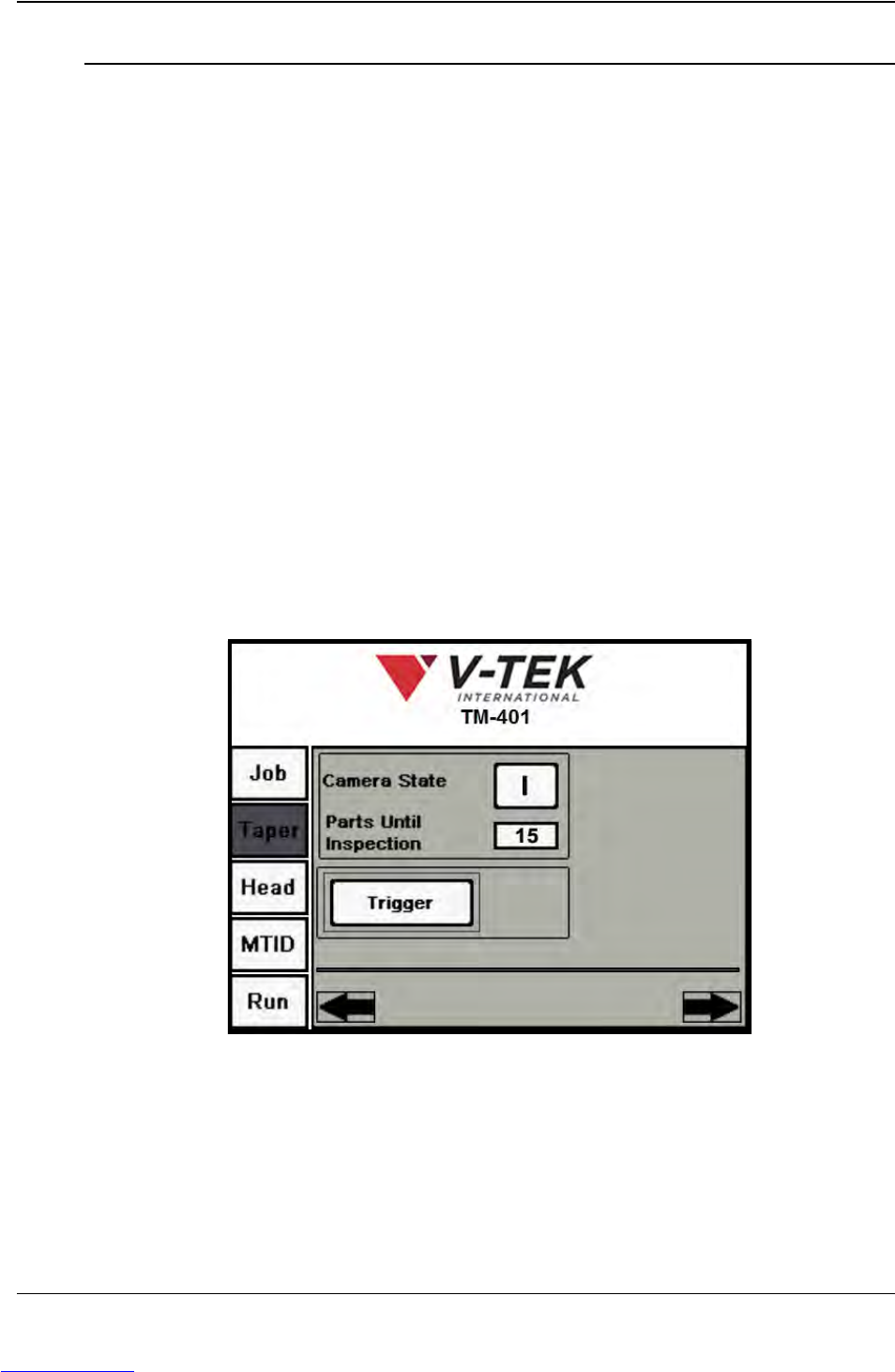
1. On the TM-401 HMI, open the Taper Tab. Press the right Arrow button to advance
to the second Taper screen. .Ensure the Camera State is set to ON ( I )
2. Using the M12 ethernet cable which was provided with the TM-401 system,
connect the vision computer to the Keyence camera.
Step 1:
Vision
Setup
CONNECT
Downloaded from www.Manualslib.com manuals search engine