编带机说明书-含图纸tm401.pdf - 第44页
3-2 TM-401 User’s Guide Introduction D292104.6.fm Intr oduction This chapter gives an ove rview of the TM-401 Human Machine Inte rface (HMI) , defining the but- tons, screens and setting options that allow the operator t…

Chapter 3: Human Machine Interface
Contents
Introduction . . . . . . . . . . . . . . . . . . . . . . . . . . . . . . . . . . . . . . . . . . . . . . . .3-2
Touch Screen. . . . . . . . . . . . . . . . . . . . . . . . . . . . . . . . . . . . . . . . . . . . . . . . . . 3-2
HMI Tabs . . . . . . . . . . . . . . . . . . . . . . . . . . . . . . . . . . . . . . . . . . . . . . . . . . . . . 3-2
Job Tab . . . . . . . . . . . . . . . . . . . . . . . . . . . . . . . . . . . . . . . . . . . . . . . . . . . .3-4
Job Wizard. . . . . . . . . . . . . . . . . . . . . . . . . . . . . . . . . . . . . . . . . . . . . . . . . . . . 3-7
Taper Tab . . . . . . . . . . . . . . . . . . . . . . . . . . . . . . . . . . . . . . . . . . . . . . . . . .3-18
Head Tab . . . . . . . . . . . . . . . . . . . . . . . . . . . . . . . . . . . . . . . . . . . . . . . . . . .3-22
MTID Tab . . . . . . . . . . . . . . . . . . . . . . . . . . . . . . . . . . . . . . . . . . . . . . . . . . .3-26
Run Tab. . . . . . . . . . . . . . . . . . . . . . . . . . . . . . . . . . . . . . . . . . . . . . . . . . . .3-29
Downloaded from www.Manualslib.com manuals search engine
3-2 TM-401 User’s Guide
Introduction D292104.6.fm
Introduction
This chapter gives an overview of the TM-401 Human Machine Interface (HMI), defining the but-
tons, screens and setting options that allow the operator to customize the TM-401’s performance
to their taping needs.
Note: Proceed to Chapter 4: Setup for instructions on how to configure the HMI and to
Chapter 5: Operation for instructions on how to run a job
Touch Screen
The user interacts with the TM-401 through a touch screen HMI which is located on the front of
the machine below the Taper. Touching the HMI screen has the same effect as a left click with the
mouse. Although only lightly touching the buttons or data fields is necessary for activation, the
action is referred to as “pressing” in this manual.
Note: Use care when operating the touch screen and do not use any objects other than a
finger to touch the screen. A stylus can also be used to click the various buttons.
HMI Tabs
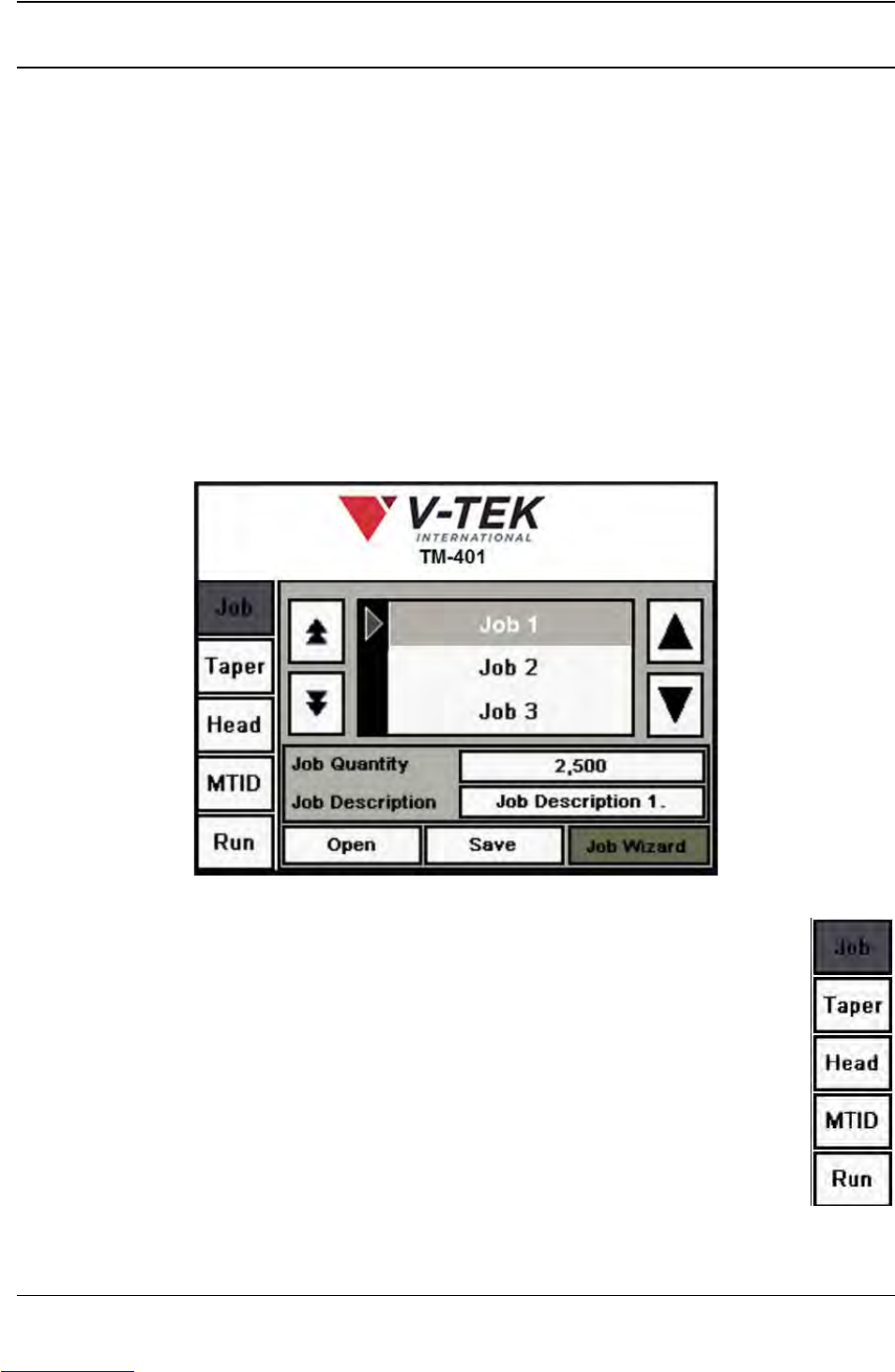
When the TM-401 is powered on, the user interface opens to the Job Tab. The Job
Tab is pictured above as it appears when the motors have been homed.
There are five tabs on the TM-401 HMI: Job, Taper, Head, MTID (Manual Tube Input
Device) and Run. These tabs allow the user to configure pick head, taper, tube
feeder and job settings and to run jobs.
The Tab Menu (pictured on the right) is located on the left side of all screens. To nav-
igate between tabs, press the desired tab name on the Tab Menu and the selected
tab will open.
Downloaded from www.Manualslib.com manuals search engine

D292104.6.fm Introduction
Chapter 3: Human Machine Interface 3-3
The active tab button is shaded grey. In the example on the right, the Job Tab is selected.
Each tab contains a variety of toggle buttons and open fields. Press any
field to open a numeric or alpha-numeric keypad and enter the appro-
priate information.
Downloaded from www.Manualslib.com manuals search engine