4OM-1625-004_w.pdf - 第104页
4OM-1603 1-51 4. Maintenance Method : Chap.1 4. Maintenance Method 4.1 Cleaning of V acuum Nozzles Periodically clean the vacuum nozzles to maintain reliable and stable component picks and placement. • It is advisable t…
4OM-1603
1-50
3. Maintenance Spots : Chap.1
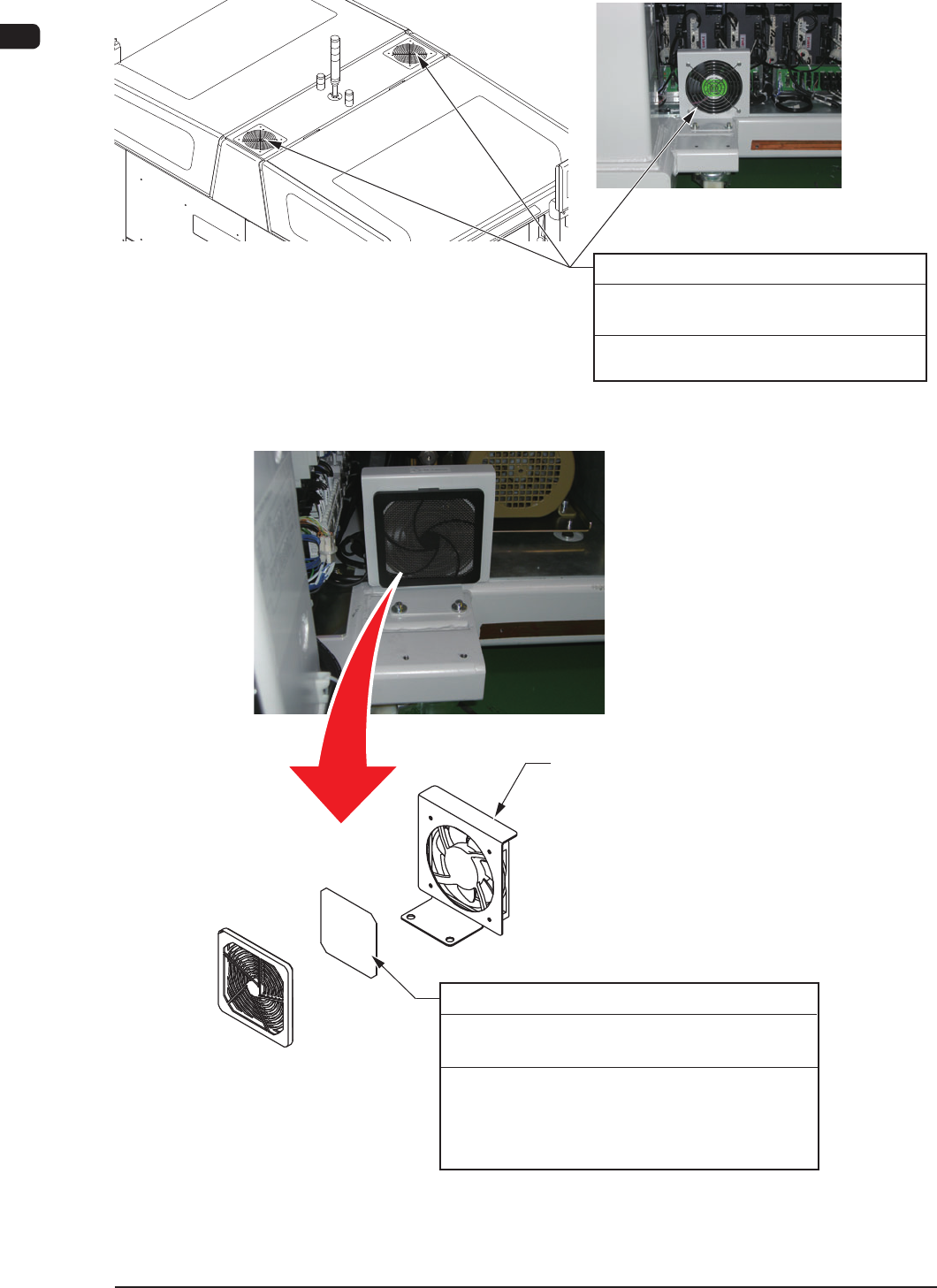
3.2.13 Fans Section
Every 3 Months Cleaning
Required Time: 10 minutes
Suck dirt and dust from the dust filters with
a vacuum cleaner.
Ventilating Fan (3 locations)
F4A38
Fan
Every 3 Months Cleaning
Required Time: 10 minutes
Air-Intake Fan (Filter)
Remove the screws (3 locations) fixing the fan
guard and remove the fan guard. Then, clean any
debris or dust in the filter using the vacuum
cleaner.
F4A39
1007-004
4OM-1603
1-51
4. Maintenance Method : Chap.1
4. Maintenance Method
4.1 Cleaning of Vacuum Nozzles
Periodically clean the vacuum nozzles to maintain reliable and stable component
picks and placement.
•
It is advisable that the nozzles be cleaned at least once a week.
•
Change cleaning frequency according to various frequency of use and
accumulation of debris along with certain environmental conditions.
•
When the vacuum suction force weakens or a nozzle constantly fails to pick or
place components, it is required to check the nozzle for debris and cleanliness.
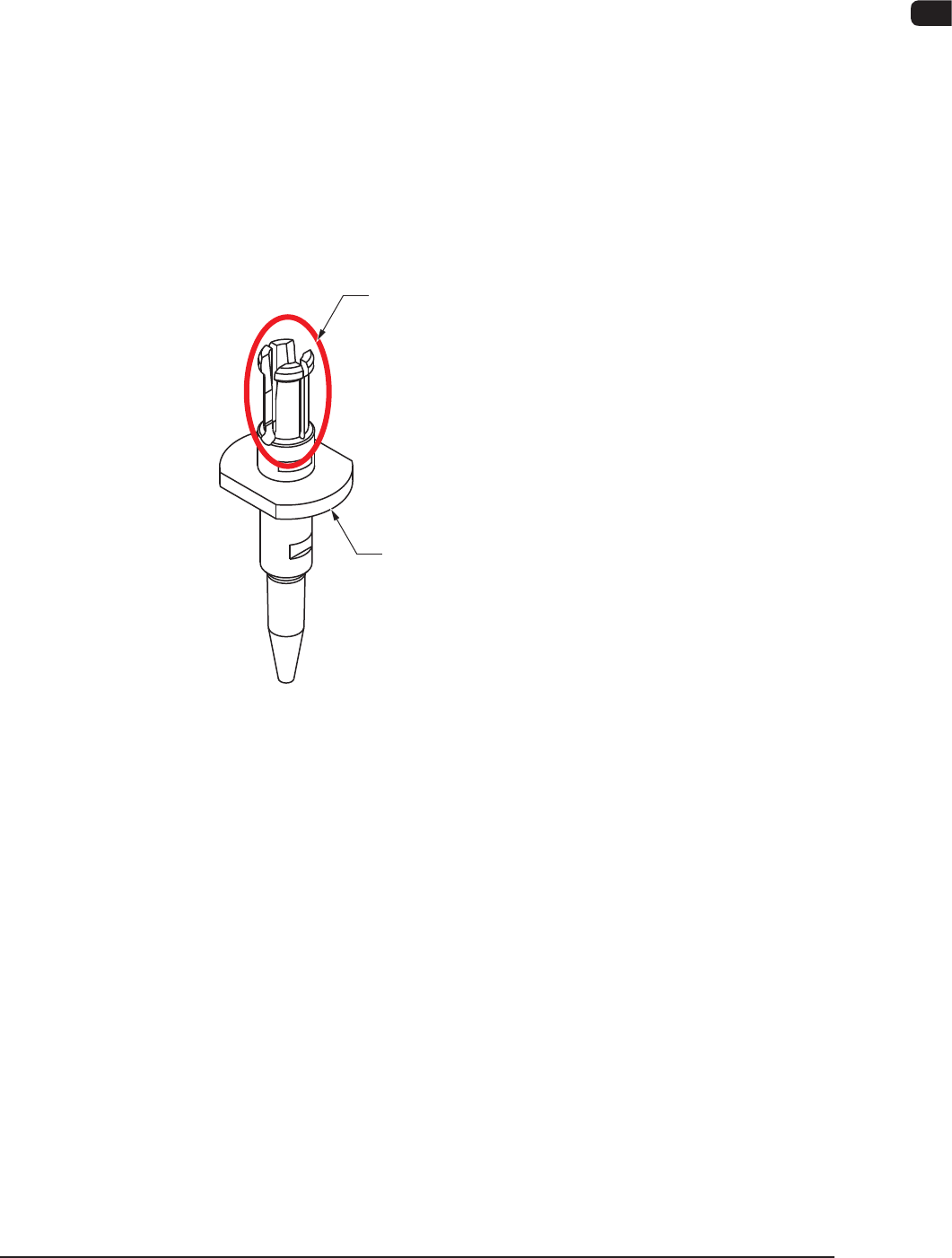
Do not grasp this part strongly during the
nozzle cleaning.
Otherwise, the nozzle may be damaged.
When it is necessary to hold the nozzle firmly,
try to grasp the collar portion.
When a recognition error occurs frequently,
rub the back of the collar approximately
20 times with a toothbrush.
F4A39-1
1003-001
4OM-1603
1-52
4. Maintenance Method : Chap.1
Cleaning Method
Procedure
(1) Store the nozzle in the nozzle stocker (housing) through window
navigations and take out the nozzle stocker (housing).
Notice
Do not take out a nozzle from the head by hand. Otherwise, the
nozzle does not conform to the nozzle data.
Reference
Refer to "5. Nozzle Change Window" in "Chapter 6 (Vol. 2)" for the
procedure of nozzle storage.
(2) Blow air to remove dust and dirt.
At this time, use clean, dry, and non-lubricated air.
Clean the tapered area of the nozzle with a lens cleaning cloth.
When the tapered area is extremely dirty, brush the nozzle end 20 to 30 times
with a toothbrush and then clean the nozzle in the water with an ultrasonic
cleaner.
When a recognition error occurs frequently, rub the back of the collar
approximately 20 times with a toothbrush.
Notice
(a) Do not blow air to the nozzle being attached to the head.
Doingotherwisemaycausetheltertopopoutofthehead.
Theltermaydamagethehead.
(b) When the ultrasonic cleaning operation is to be performed
underwater,removethenozzlelter.
Do not use anything other than water for the cleaning.
Note
Demagnetize the vacuum nozzle after the detachment.
Keep the head section free of any magnetic eld.
As an example,
•
Do not bring a magnet close to the head section.
•
Do not bring any demagnetizer to the head section.
1012-002