4OM-1625-004_w.pdf - 第152页
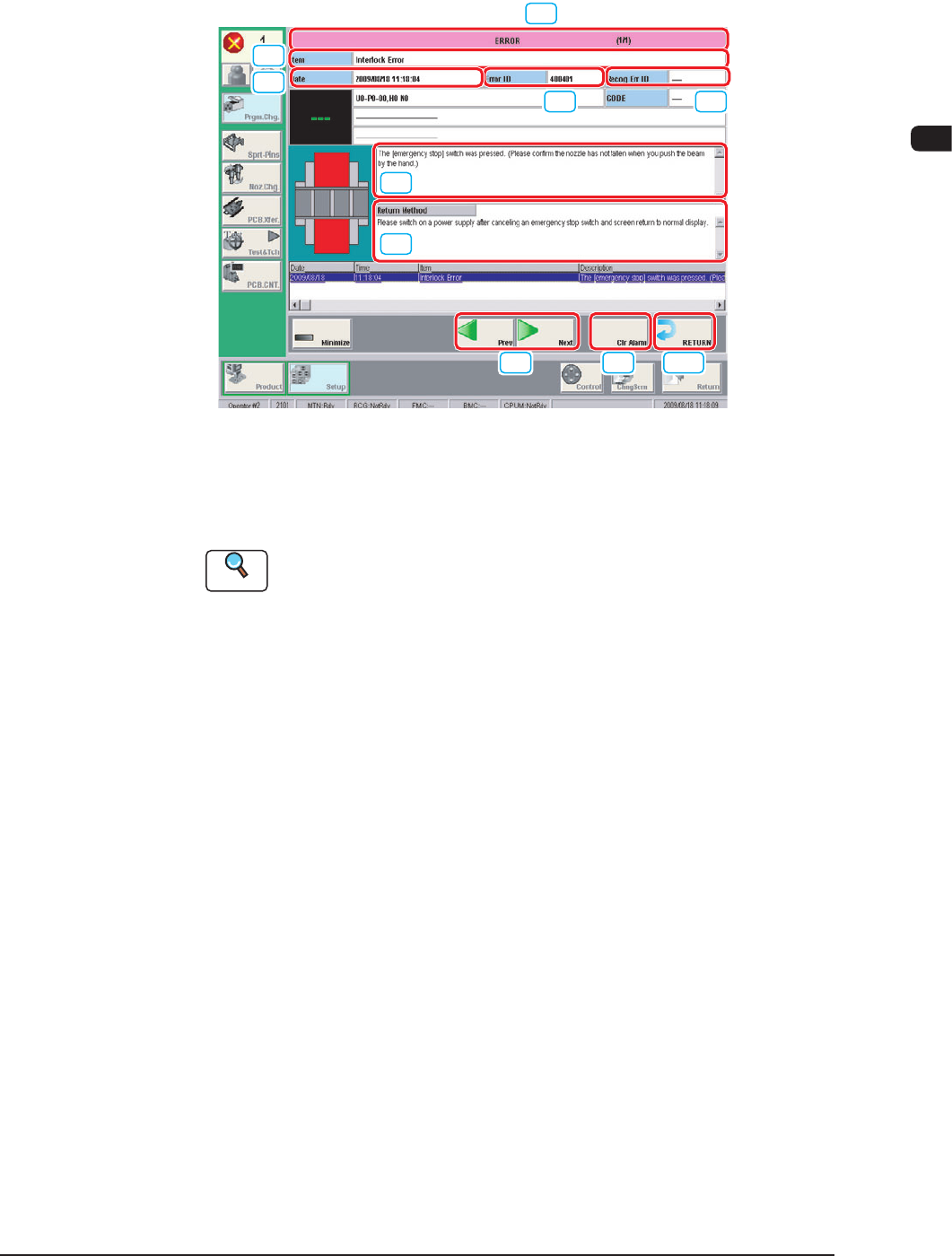
4OM-1603 2-33 4. "Error" Window : Chap.2 4. "Error" Window When the machine detects an error, the following error window appears. [7] [8] [9] [10] [1] [2] [3] [6] [4] [5] Example of Error Window F4B4 …
4OM-1603
2-32
3. Machine Information : Chap.2
1012-005
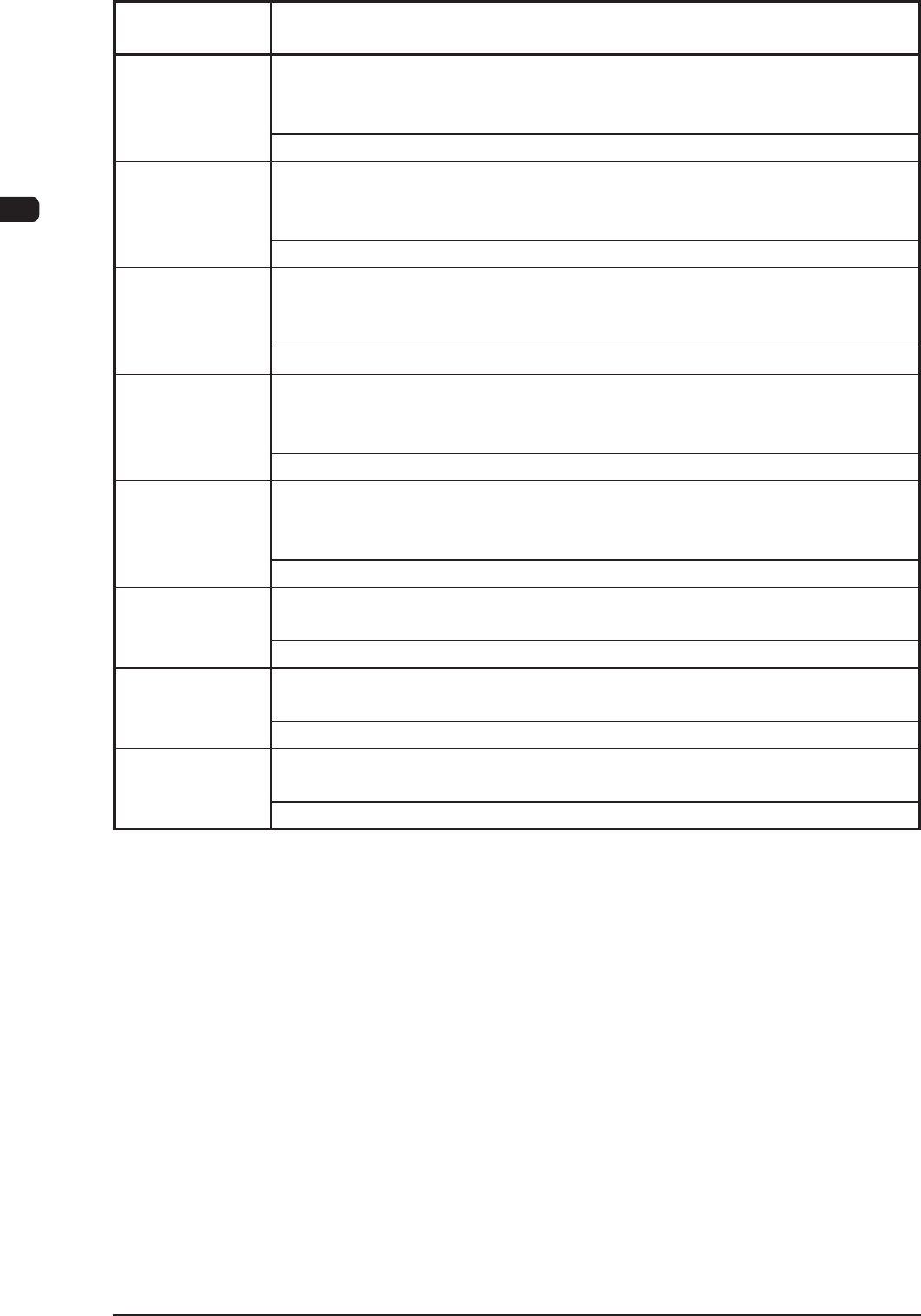
Machine
Information Code
Display Area A (The outline of the Machine Information)
Display Area B (The details of the Machine Information)
80f402 FF func. for Print Pos Correction
Standard PCB Mounting will be executed without Print Pos. Correction because
Global Recognition of PP Data does not have 2 points.
-----
80f403 FF func. for Print Pos Correction
Standard PCB Mounting will be executed without Print Pos. Correction because
Unit PCB Recog or Local PCB Recog of PP Data is being used.
-----
80f404 FF func. for Print Pos Correction
Standard PCB Mounting will be executed without Print Pos. Correction because
could not receive Print Pos. Correction values normally.
-----
80f405 FF func. for Print Pos Correction
Standard PCB Mounting will be executed without Print Pos. Correction because
of time-out of receiving Print Pos. Correction values.
-----
80f501 Auto Cover Locked Start
After Auto Cover locked, it is stopped because NG Items are found by Free Check
before
productopreation.Pleaseconrmthe
guideforstart-up.
-----
80f601 Feeder Base
Connector for Feeder Cart is not connected.
-----
80f602 Feeder Base
Not turned Feeder Cart on yet.
-----
80f603 Feeder Base
Communicating with Feeder.
-----
T4B2
4OM-1603
2-33
4. "Error" Window : Chap.2
4. "Error" Window
When the machine detects an error, the following error window appears.
[7]
[8] [9] [10]
[1] [2]
[3]
[6]
[4]
[5]
Example of Error Window F4B4
[1] Error ID
The error type is displayed using a 6-digit gure.
Reference
When an error has occurred, use this ID as an index and refer to "Chapter
3 Troubleshooting based Error ID" for details.
[2] Recognition Error ID
In this text box, the error type is displayed using an 8-digit gure.
[3] Error Name
In this text box, the error category is displayed.
[4] Description
In this text box, the error description is displayed.
[5] Remedy
In this text box, the error name, description, cause and remedial procedure
are described.
1012-005
4OM-1603
2-34
4. "Error" Window : Chap.2
[6] Date, Time
In this text box, the data and time when the error occurred are described.
[7] Error Description Page
The total pages for the error description and current page are displayed.
Example (3/5)
Total Pages
: 5
Current Page
: 3
[8] Page Change
[Previous error] Button : The previous page is displayed.
[Next error] Button : The next page is displayed.
[9] [Clear Alarm] Button
When this button is pressed, only the alarm buzzer is cancelled.
[10] [RETURN] Button
When this button is pressed, the alarm buzzer and error display are cancelled
and the previous window is returned.
•
Reset Procedure from "ERROR" Window
(1)
T
ake notes of the descriptions under "Error ID / Error Name / Description".
Notice
If you forget to make a note of the error description, refer to error
description saved in the "Recall" submenu in the "Product" menu.
(2) Press the [RETURN] button to resume the original window.
(3) Perform the correct remedial procedure referring to "Chapter 3
Troubleshooting based on Error ID" using the error ID as an index, or
referring to the remedial procedure in your note.
1012-005