4OM-1625-004_w.pdf - 第106页
4OM-1603 1-53 4. Maintenance Method : Chap.1 4.1.1 Ultrasonic Cleaning Method Note When the soft mounted nozzle is to be cleaned, refer to "4.1.2 Cleaning Procedure of Soft Mounted Nozzle ". • Set the nozzle on…
4OM-1603
1-52
4. Maintenance Method : Chap.1
Cleaning Method
Procedure
(1) Store the nozzle in the nozzle stocker (housing) through window
navigations and take out the nozzle stocker (housing).
Notice
Do not take out a nozzle from the head by hand. Otherwise, the
nozzle does not conform to the nozzle data.
Reference
Refer to "5. Nozzle Change Window" in "Chapter 6 (Vol. 2)" for the
procedure of nozzle storage.
(2) Blow air to remove dust and dirt.
At this time, use clean, dry, and non-lubricated air.
Clean the tapered area of the nozzle with a lens cleaning cloth.
When the tapered area is extremely dirty, brush the nozzle end 20 to 30 times
with a toothbrush and then clean the nozzle in the water with an ultrasonic
cleaner.
When a recognition error occurs frequently, rub the back of the collar
approximately 20 times with a toothbrush.
Notice
(a) Do not blow air to the nozzle being attached to the head.
Doingotherwisemaycausetheltertopopoutofthehead.
Theltermaydamagethehead.
(b) When the ultrasonic cleaning operation is to be performed
underwater,removethenozzlelter.
Do not use anything other than water for the cleaning.
Note
Demagnetize the vacuum nozzle after the detachment.
Keep the head section free of any magnetic eld.
As an example,
•
Do not bring a magnet close to the head section.
•
Do not bring any demagnetizer to the head section.
1012-002
4OM-1603
1-53
4. Maintenance Method : Chap.1
4.1.1 Ultrasonic Cleaning Method
Note
When the soft mounted nozzle is to be cleaned, refer to "4.1.2 Cleaning
Procedure of Soft Mounted Nozzle ".
•
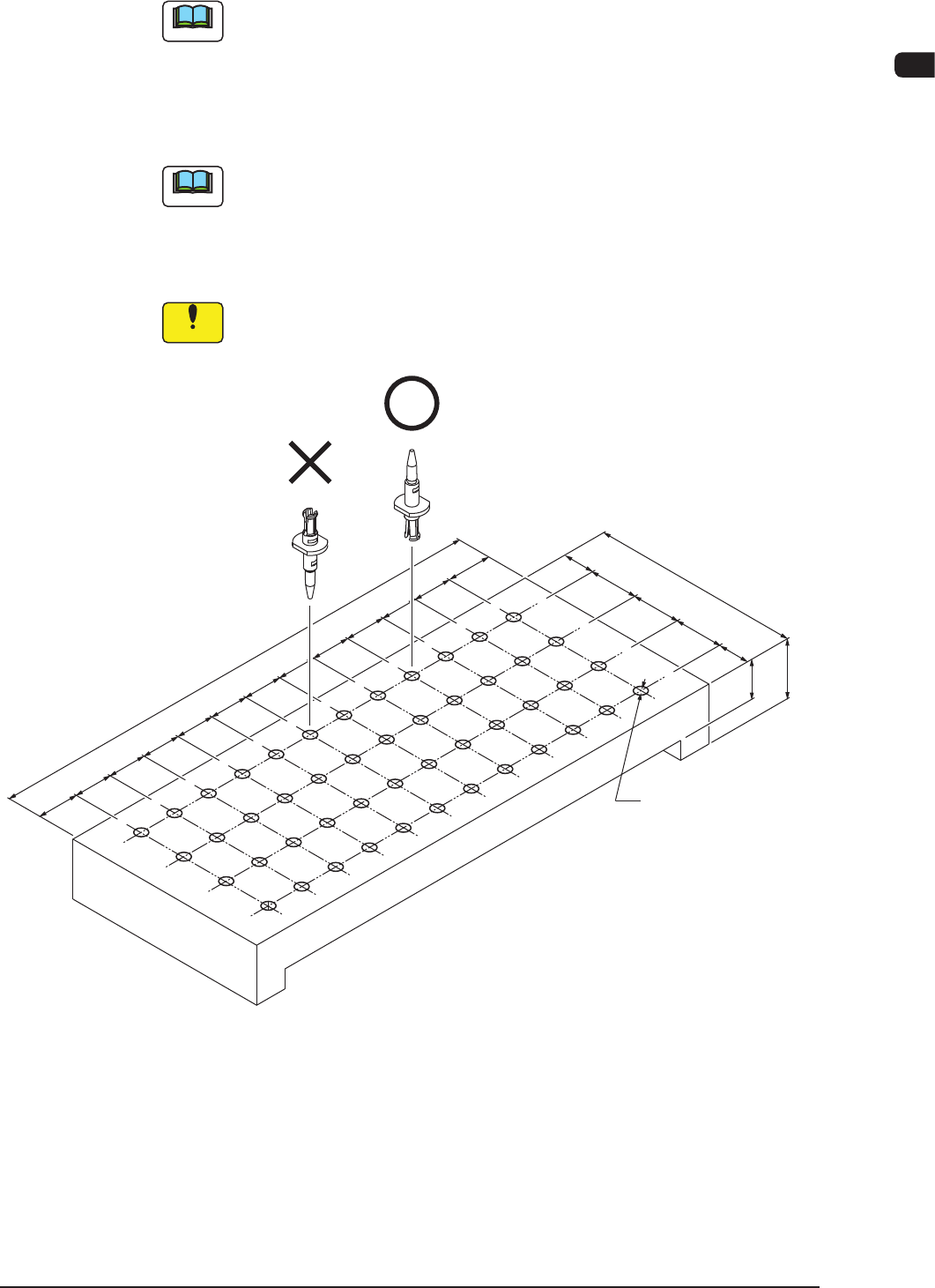
Set the nozzle onto the nozzle cleaning jig as shown in the following gure and
dip it in the ultrasonic cleaner lled with water, together with the jig.
Then, clean it for about 15 minutes.
Note
The nozzle cleaning jig must be prepared on the customer side.
•
After washing with the ultrasonic cleaner, blow air to the nozzles.
When the nozzles are not dry enough, wipe them with a rag.
Notice
When a nozzle is set in the jig, pay attention to the orientation of the
nozzle.
F3.5 (THRU)
(159)
12
12
12
12
12
12
12
12
12
12
12
13.5
15
10
15
15
(65)
10
15
13.5
10
Material: Duracon (POM)
Nozzle Cleaning Jig (Example) F4A39-2
1012-002
4OM-1603
1-54
4. Maintenance Method : Chap.1
1012-001
4.1.2 Cleaning Procedure of Soft Mounted Nozzle
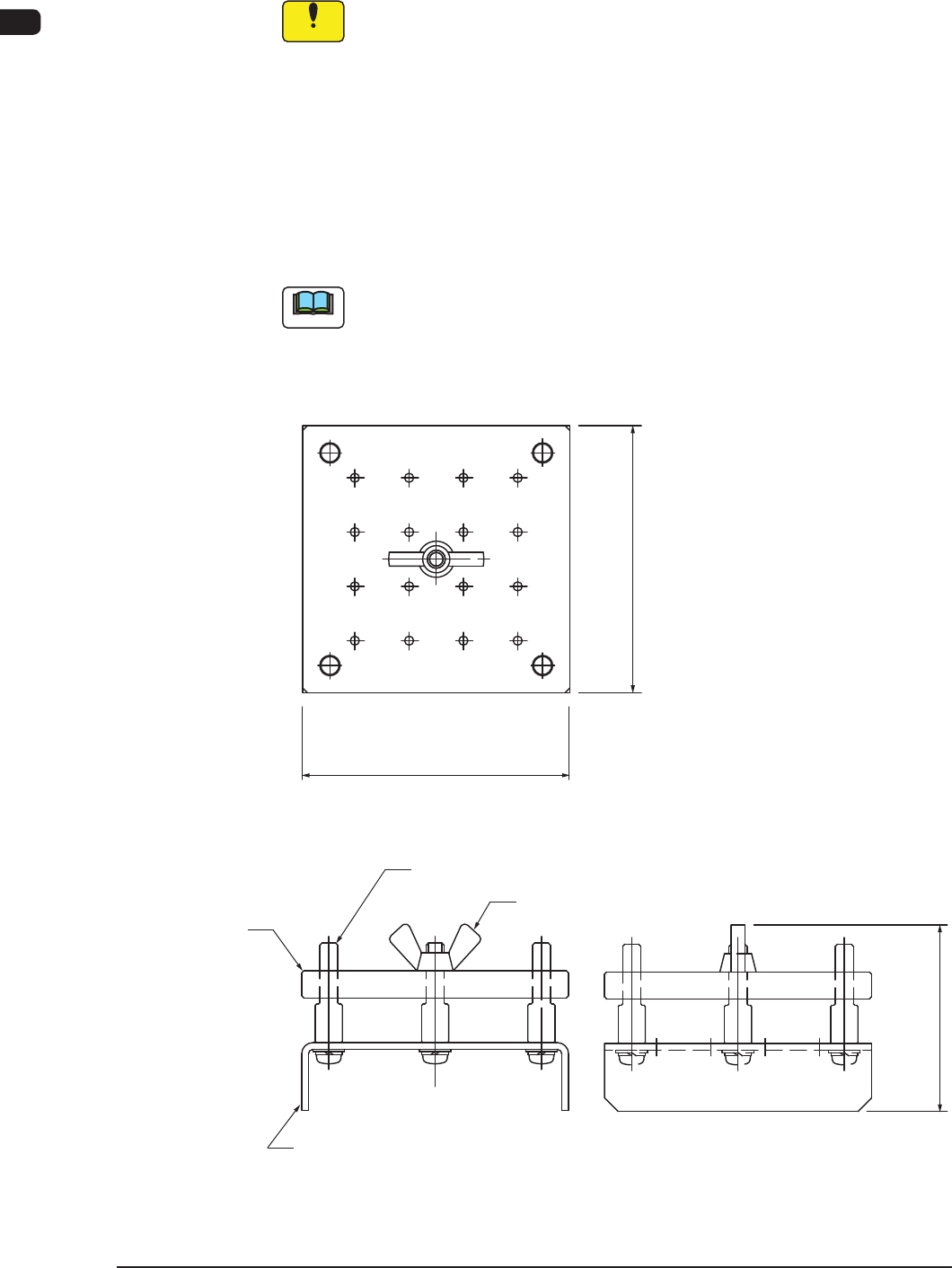
Clean the nozzle using the soft mounted nozzle cleaning jig.
Notice
(a) Change the vacuum nozzle cleaning frequency as required,
according to the use frequency and the surrounding environment
etc.
(b) Removethenozzlelterbeforecleaningthesoftmountednozzle.
•
Soft Mounted Nozzle Cleaning Jig (Attached to the Line Accessory)
Cleaning Jig Size
W :
Approx. 59 mm
L :
Approx. 59 mm
H :
Approx. 41.2 mm
Note
Use it after conrming your ultrasonic cleaning tank size.
No. of Housed Nozzles
No. of Housed Nozzles : Max. 16
1 2 3 4
8
12
5
9
6 7
16
15
14
13
W : Approx. 59 mm
L : Approx. 59 mm
Set Screw
Guide pin
Nozzle Stand
Nozzle Holding Plate
H : Approx. 41.2 mm
Rough View of Cleaning Jig F4A39-2a