EN 3.pdf - 第303页
Model DECAN Series Company SAMSUNG TECHWIN Module 3.17 Y -FRAME V ersion 01 Tit le FLA T CABLE ASSEMB L Y Page 3-17-7 Note [FLA T CABLE ASSEMBL Y] 1. Assemble in such a way that the mark ing line on the cable maintains p…
Model
DECAN Series
Company
SAMSUNG TECHWIN
Module
3.17 Y-FRAME
Version
01
Title
Y AXIS NOISE DECISION CRITERIA
Page
3-17-6
Note
[Y AXIS NOISE DECISION CRITERIA]
Low frequency noises
Collect the Torque Command Data on the Y axis.
① Connect oscilloscope CH1,CH2 to Motor Driver FY1 and FY2.
② Find the oscilloscope saved data, open the SM411Y_OSC_LF_ROO.set file.
③ Run the Excel program in oscilloscope and activate the <TekXL triggered Captures> windows.
④ On the equipment, run the Standard Running Program and include a region with abnormal noises
when you collect data by using the Excel program's <TekXL triggered Captures>.
Analyze the Torque Command Data on the Y axis.
① Run MATLAB.
② In oscilloscope, analyze the <TekXL triggered Captures> Data of the Excel program.
③ After the analysis, see if the following fourteen values are obtained.
max_a
max_af_A
max_af_B
max_af_C
max_af_D
max_af_E
max_af_F
rms_a
rms_a_A
rms_a_B
rms_a_C
rms_a_D
rms_a_E
rms_a_F
④ When determining noises, check the rms_af_B,rms_af_C,rms_af_E,rms_af_F value.
⑤ Criteria
rms_af_B(Y1 motor + Y2 motor) > 0.076V
rms_af_C(Y1 motor or Y2 motor) > 0.035V
rms_af_E(Y1 motor or Y2 motor) > 0.018V
rms_af_F(Y1 motor or Y2 motor) > 0.023V
High frequency noises
Using the Microphone Power Supply, measure the noises and analyze the waveforms on oscilloscope.
Reference(M1,M2,M3 Max value) : BAND H[4000~7000 ㎐] Peak value > 0.008V
Model
DECAN Series
Company
SAMSUNG TECHWIN
Module
3.17 Y-FRAME
Version
01
Title
FLAT CABLE ASSEMBLY
Page
3-17-7
Note
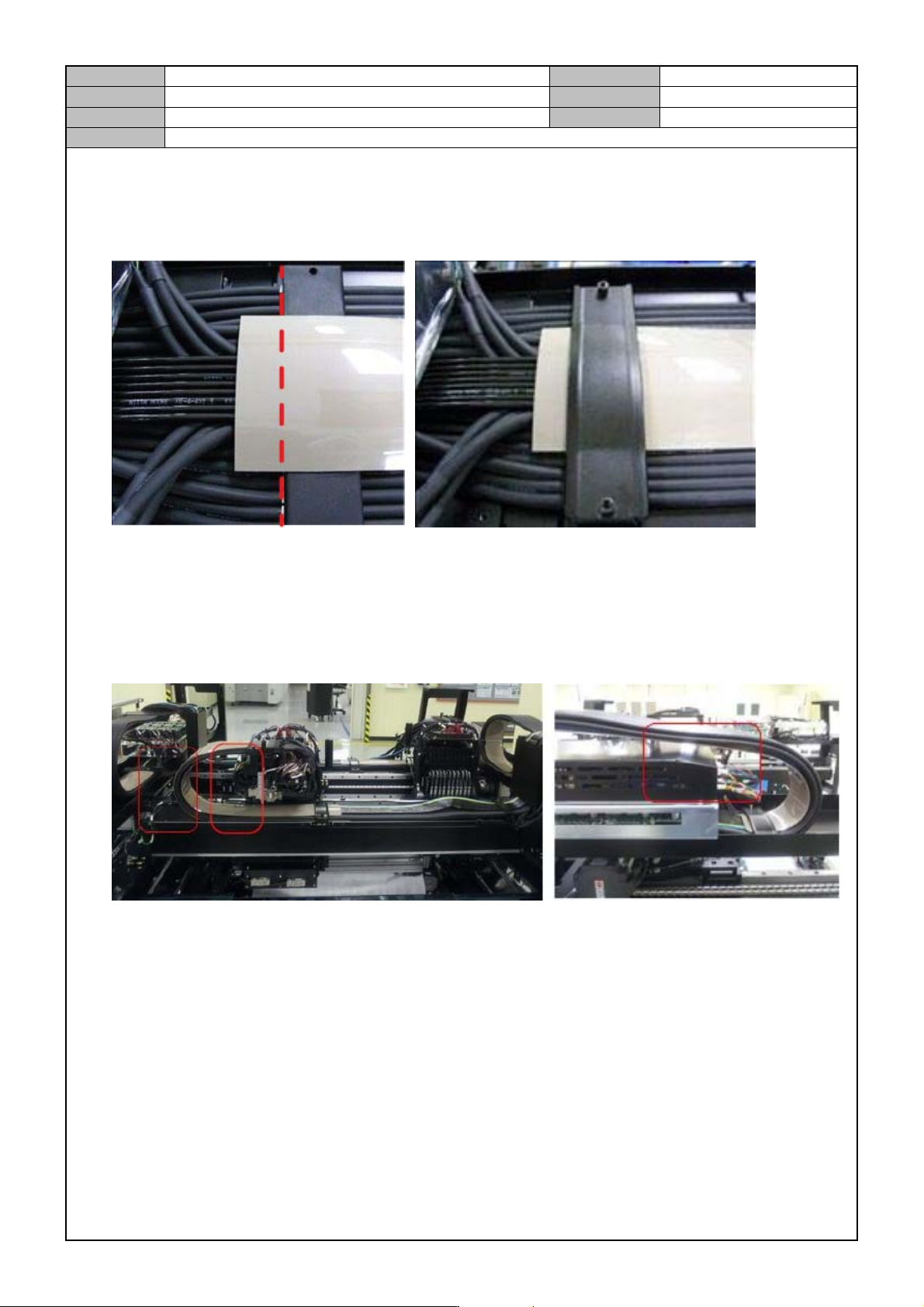
[FLAT CABLE ASSEMBLY]
1. Assemble in such a way that the marking line on the cable maintains parallel to the end of the Y Flat Cable
Guide Rubber.
*Assemble it so that the Flat Cable's number label is inside the rubber of the guide.
2. Push the Y axis Gantry to the end of - Limit and see if the Y axis Fl at Cable Mat and the Z AMP Cover
interfere with each other.
3. Push the X axis Head to the end of - Limit and see if the Flat Cable interferes with other modules.
4. Check if the left cable on the X axis head interferes with the guide mat of the XY duct.
Model
DECAN Series
Company
SAMSUNG TECHWIN
Module
3.17 Y-FRAME
Version
01
Title
XY DUCT I NSPECTION
Page
3-17-8
Note
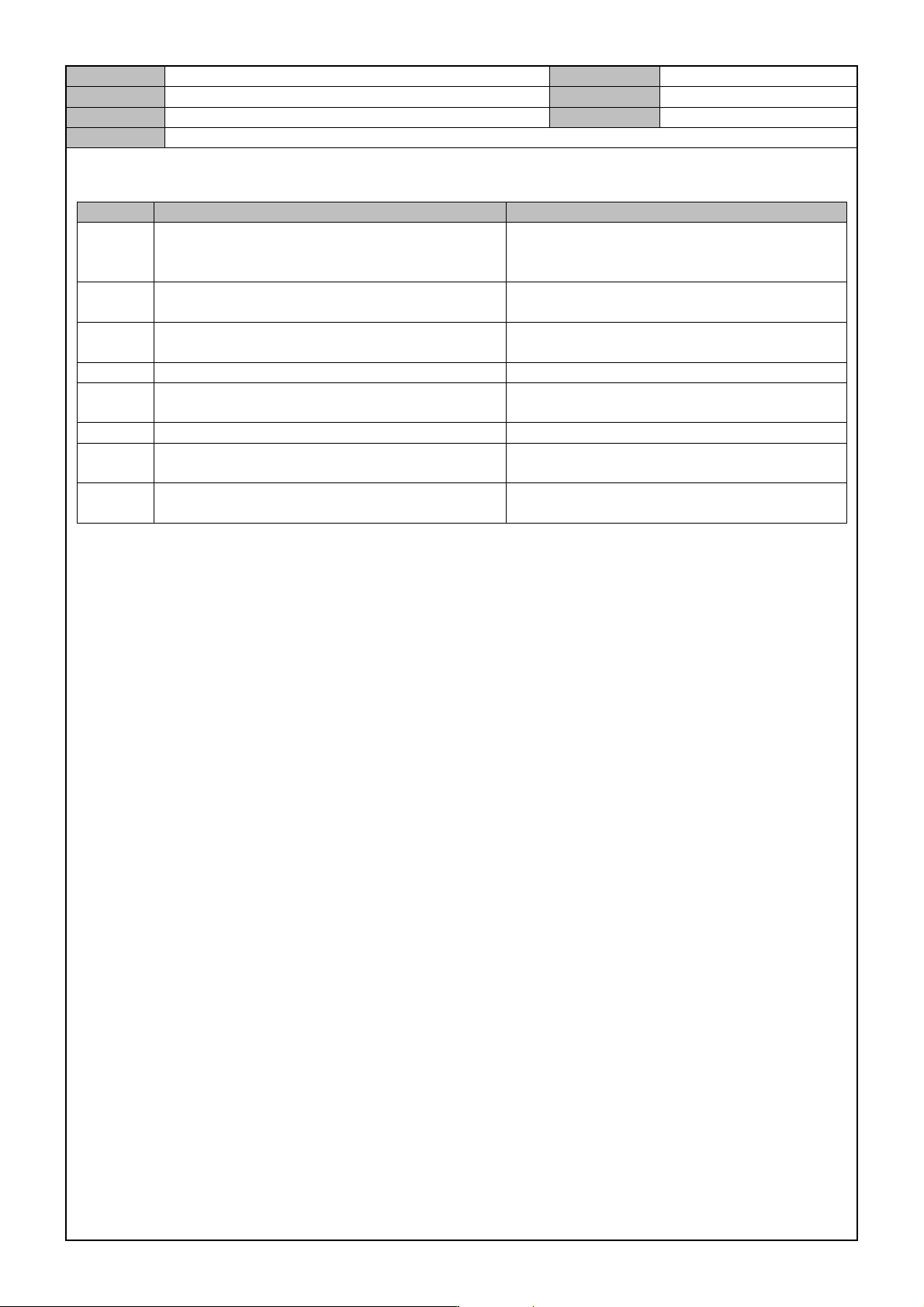
[XY DUCT INSPECTION]
No. Item Criteria
1
Make sure that the HEAD is as firmly pressed in
the X (-) direction as possible, and then check
for cable interferences.
10~15mm GAP should exist.
2
Check if the BKT CONNECTOR in the top is
properly fixed.
Fix 11 bolts.
3
Check the X frame and flat cable height where
the X frame intersects with the Y frame.
15mm or less
4 Check one marking in the air wiring joint. 18 units air wiring units I MARKING
5
Check the I MARKING after wiring the FLAT
CABLE.
14 units FLAT CABLE wiring units I
MARKING
6 Check for noises after wiring the flat cable. There should be no noises.
7
Check for interference between the Z motor
driver cover and the flat cable.
No interference.
8
Check if the X1-XY-CABLE-DUCT SERIAL
NUMBER is filled out.
Write the SERIAL NUMBER.