EN 3.pdf - 第309页
Model DECAN Series Company SAMSUNG TECHWIN Module 3.18 V ACUUM DEVICE T otal Pages 18 T able of Contents [CYLINDER SPEED CHECK] .............................................................................. 2 [IO CHECK ]…
Model
DECAN Series
Company
SAMSUNG TECHWIN
Module
3.17 Y-FRAME
Version
01
Title
LIMIT SENSOR REPLACEMENT
Page
3-17-12
Note
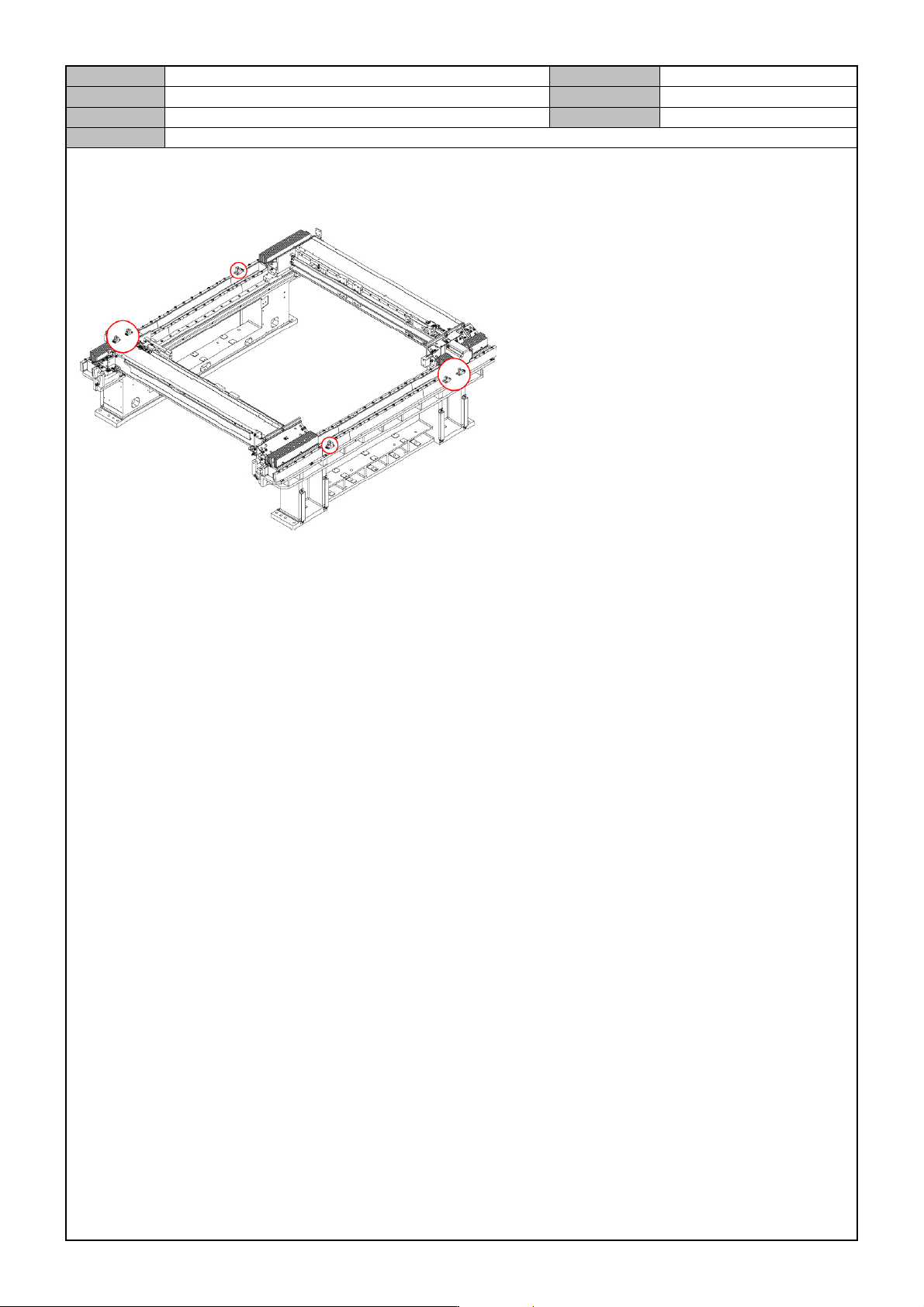
[LIMIT SENSOR REPLACEMENT]
1. Turn off the PC and turn off the Main Switch in the front of the equipment.
2. Separate the cable for the sensor you want to replace.
3. Remove the fixing bolts from the sensor.
4. Replace with a new sensor.

Model
DECAN Series
Company
SAMSUNG TECHWIN
Module
3.18 VACUUM DEVICE
Total Pages
18
Table of Contents
[CYLINDER SPEED CHECK] .............................................................................. 2
[IO CHECK] ......................................................................................................... 3
[MAIN AIR & BLOW REGULATOR CHECK] ....................................................... 4
[FRONT SOL ASSY SUB ASSEMBLY] ............................................................... 5
[REAR SOL ASSY SUB ASSEMBLY] ................................................................. 7
[VACUUM PUMP & AIR PRESSURE CHECK] ................................................... 9
[MAIN AIR REGULATOR REPLACEMENT] ...................................................... 10
[MAIN AIR PRESSURE SETTING] .................................................................... 11
[MAIN MANIFOLD AIR PRESSURE CONNECTION] ........................................ 12
[MAIN AIR FILTER REPLACEMENT] ................................................................ 14
[VACUUM PUMP REPLACEMENT] .................................................................. 15
[VACUUM PUMP(OPTION) REPLACEMENT] .................................................. 17
[SOLENOIDE VALVE CHECK] .......................................................................... 18
Model
DECAN Series
Company
SAMSUNG TECHWIN
Module
3.18 VACUUM DEVICE
Version
01
Title
CYLINDER SPEED CHECK
Page
3-18-2
Note
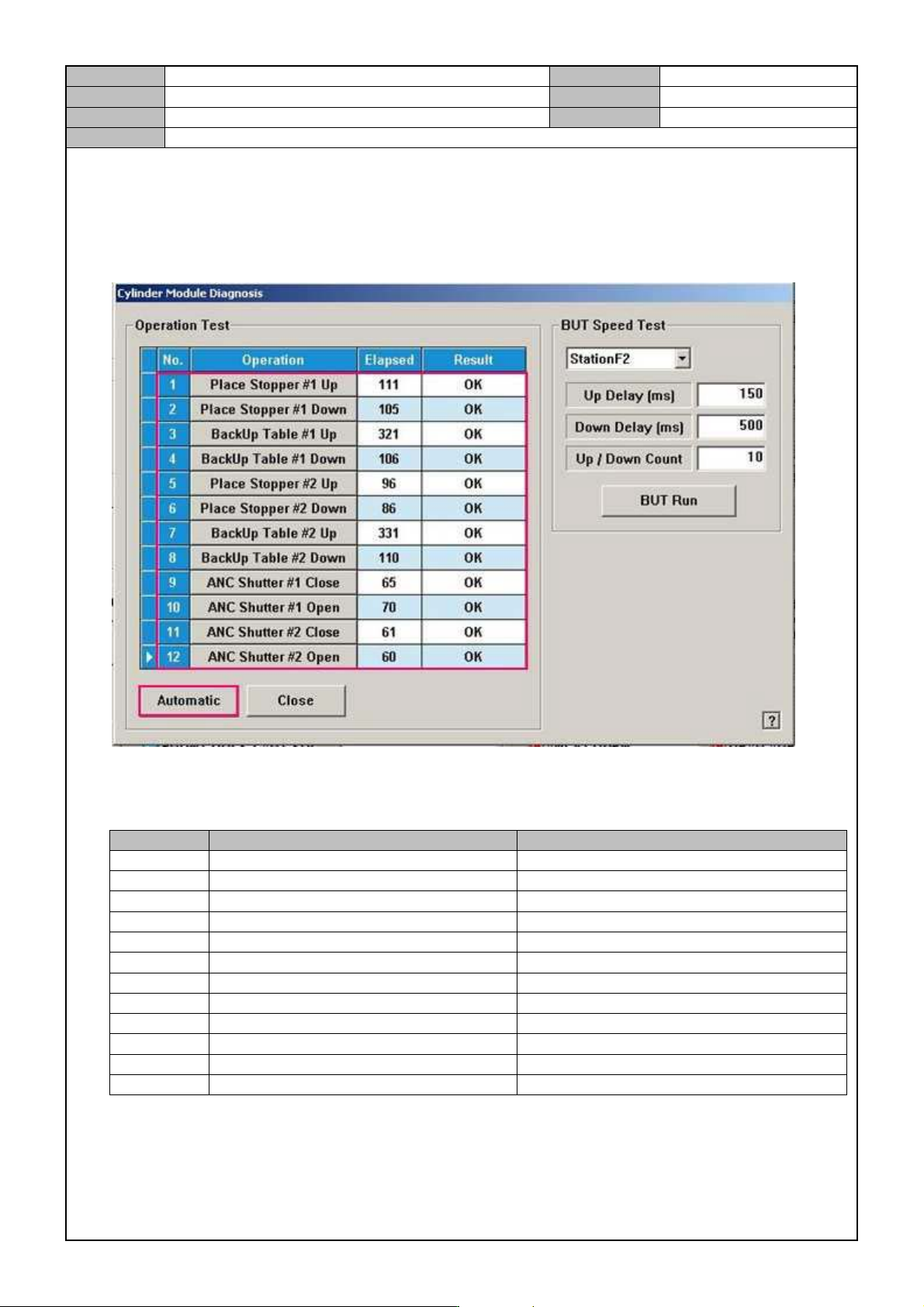
[CYLINDER SPEED CHECK]
1. In the MMI menu, switch the user privilege to the service level.
2. In the MMI menu, select <Diagnosis>→<F2(I/O)>→<Cylinder Check>.
3. Click on ‘Automatic’ to check the operational speed of cylinder.
4. While referring to the reference values, see if it operates properly.
NO. Item Inspection criteria
1 PLACE STOPPER #1 UP 100 ~ 130ms
2 PLACE STOPPER #1 DOWN 100 ~ 130ms
3 BACKUP TABLE #1 UP 310 ~ 330ms
4 BACKUP TABLE #1 DOWN 70 ~ 120ms
5 PLACE STOPPER #2 UP 80 ~ 110ms
6 PLACE STOPPER #2 DOWN 80 ~ 110ms
7 BACKUP TABLE #2 UP 310 ~ 330ms
8 BACKUP TABLE #2 DOWN 70 ~ 120ms
9 ANC SHUTTER #1 CLOSE 50 ~ 70ms
10 ANC SHUTTER #1 OPEN 40 ~ 50ms
11 ANC SHUTTER #2 CLOSE 50 ~ 70ms
12 ANC SHUTTER #2 OPEN 40 ~ 50ms
*When the Backup Table goes Up/Down, there should be no friction or interfering noises.