1OM-1626-001_w.pdf - 第169页
1OM-1610 4-12 3. Program Change Operation : Chap.4 091 1-001 3.4 Preparation for V acuum Nozzles Set the vacuum nozzles registered in the placement head / nozzle data of the pattern program (for the production model). No…
1OM-1610
4-11
3. Program Change Operation : Chap.4
0911-001
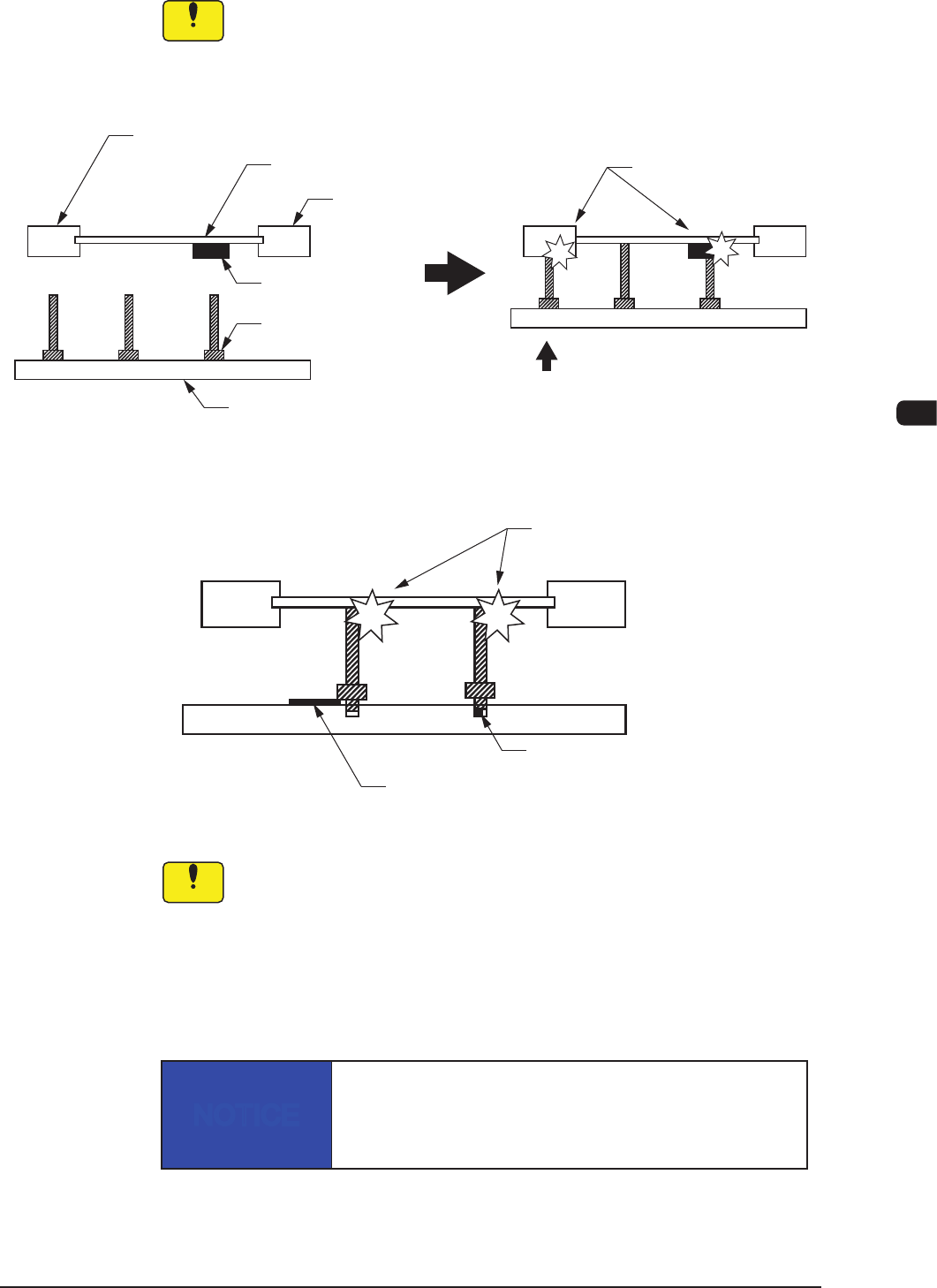
3.3.3 Notes on Attachment / Detachment of PCB Support Pins
Notice
Be sure to insert the PCB support pins at right angles.
•
When a PCB support pin is inserted at the bottom side of the chute, it
may collide
with the backup table while the backup table is moving up.
•
If the pins are inserted improperly, the machine will break down.
Chute
PCB
Previously-Placed
Component
Chute
PCB Support Pin
Backup Table
Collision!
Backup Table Up Movement
Improper Pin Insertion
F1D12
Collision!
Foreign Substance on Backup Table
Foreign Substance such
as a component trapped in the hole
F1D13
Notice
(a) When a component is trapped or dust has accumulated on the
backup table, the PCB support pins cannot be set correctly.
In this case, remove the component or the dust with a vacuum
cleaner, etc. (Air Blowing Prohibited).
(b) Do not put your hand or any heavy object on the backup table while
working with the backup table. Otherwise, the backup table may
become deformed due to an excessive load.
NOTICE
When some components are previously placed on the back
of the PCB, the PCB support pins must be inserted such
that they do not touch any component.
1OM-1610
4-12
3. Program Change Operation : Chap.4
0911-001
3.4 Preparation for Vacuum Nozzles
Set the vacuum nozzles registered in the placement head / nozzle data of the
pattern program (for the production model).
Note
(a) When the total number of vacuum nozzles exceeds "15" before or after a
program change operation, perform the "Nozzle Reset" operation and then
the "Nozzle Change (Attachment)" operation.
(b) The original nozzle stocker addresses (from which the vacuum nozzles are
attached) are stored in memory of the machine. Therefore, each vacuum
nozzle is stored back in the original stocker address.
Notice
•
Be sure to attach the vacuum nozzles correctly in place.
When a vacuum nozzle is attached incorrectly (not to the place
speciedintheplacementhead/nozzledata),itmaycause
undesirable interference.
•
Do not put any foreign object in the nozzle stocker section.
Otherwise, the machine will break down.
NOTICE
Do not bring any magnetized object such as a
magnet close to the vacuum nozzles.
Otherwise, an error may occur during component picks
and placement.
1OM-1610
4-13
3. Program Change Operation : Chap.4
3.4.1 Procedure of Vacuum Nozzles Replacement
Procedure
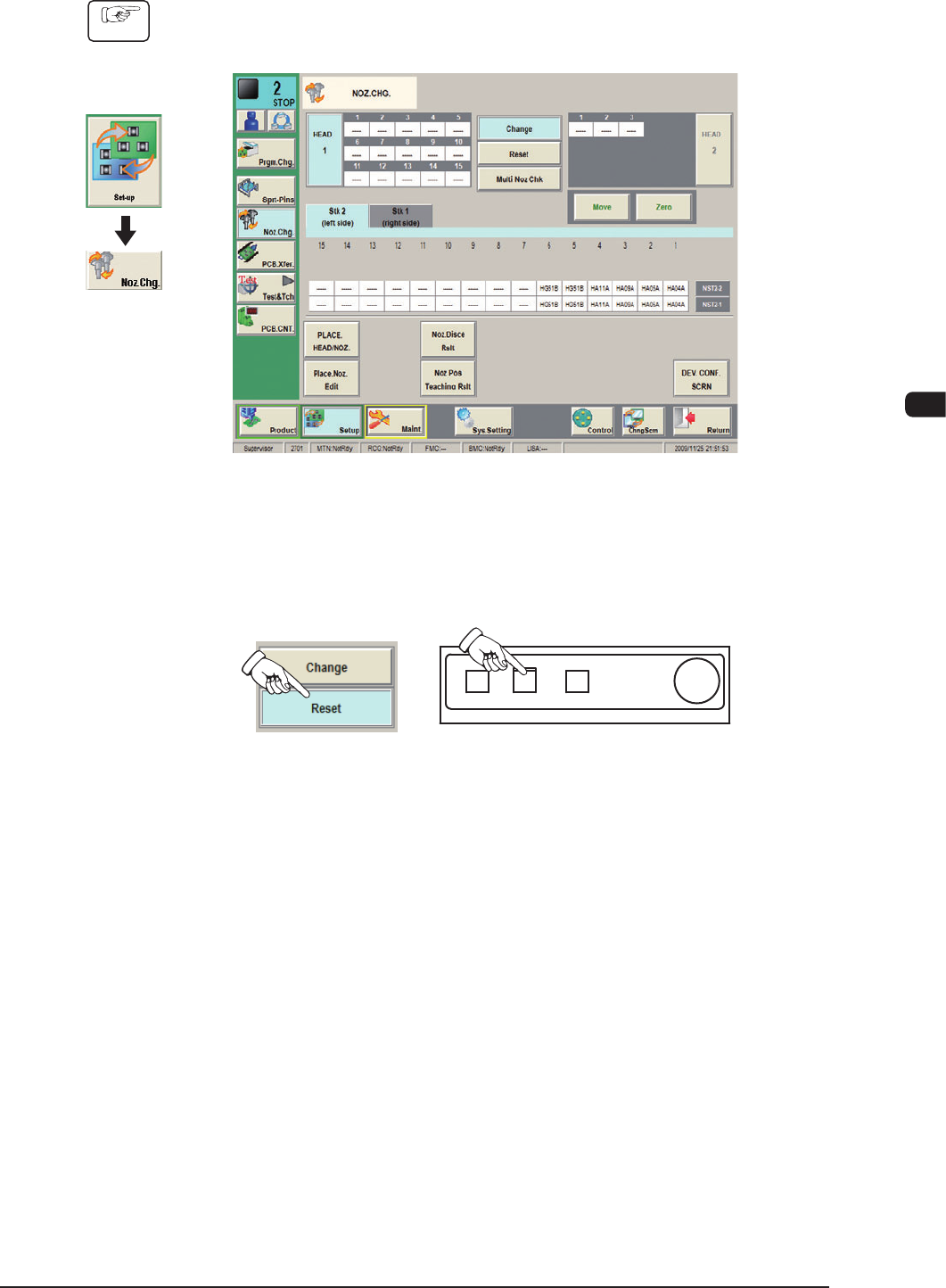
(1) Display the "NOZ.CHG" window using the following icon procedure.
F1D14
(2) Press the [Reset] button in the "NOZ.CHG." window.
In 10 seconds, press the [START] button to store the vacuum nozzles on the
placement heads in the nozzle stocker.
F1D15
Graphic
Development
0911-001