TR7500E_Manual_en_v28.pdf - 第123页
C h a p t e r 2 M a nu a l B a r i n t r o d u ce T R 7500 U S E R M A N U AL 1 16 l E n a b l e – C h e c k t o s t a r t t h e f u n c t i o n . Y o u c a n l o a d tw o p r o j e c t s a t t h e s a m e t i m e a n d …
Chapter 2 Manual Bar introduce
TR7500 USER MANUAL
115
“Year-Month-Date-Time”.
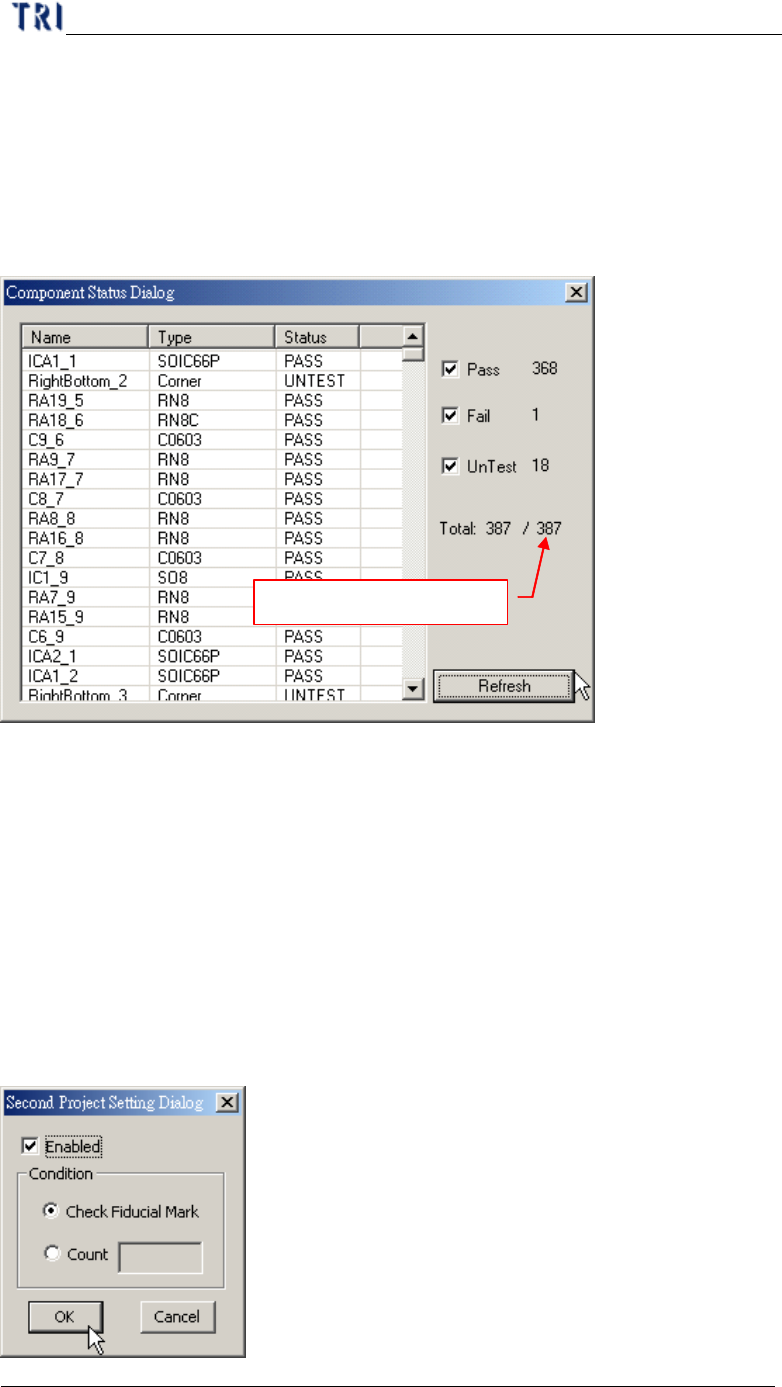
7.13. Component Status
l It can be only selected in train dialog.
l After selecting [Pass], [Fail] and [Untest] you can press [Refresh]. The system
will display the number of components which is passing, fail or untest.
Number of components
7.14. Generate Real Image Data
l Generate the image to ICT or ATE machine.
7.15. Inline Component Data Output to SPC
l Out put the [Cpk Data Collection] to SPC system.
7.16. Second Project Setting
l Select two projects to be open in turn automatically. The function is under
construction.
Chapter 2 Manual Bar introduce
TR7500 USER MANUAL
116
l Enable – Check to start the function. You can load two projects at the same time
and the system will change the project to inspect according to the conditions.
l Check Fiducial Mark – When it can’t find fiducial mark it will change to use
second project.
l Count – Select and input number. When it inspect with first project for specified
times it will change to use second project.
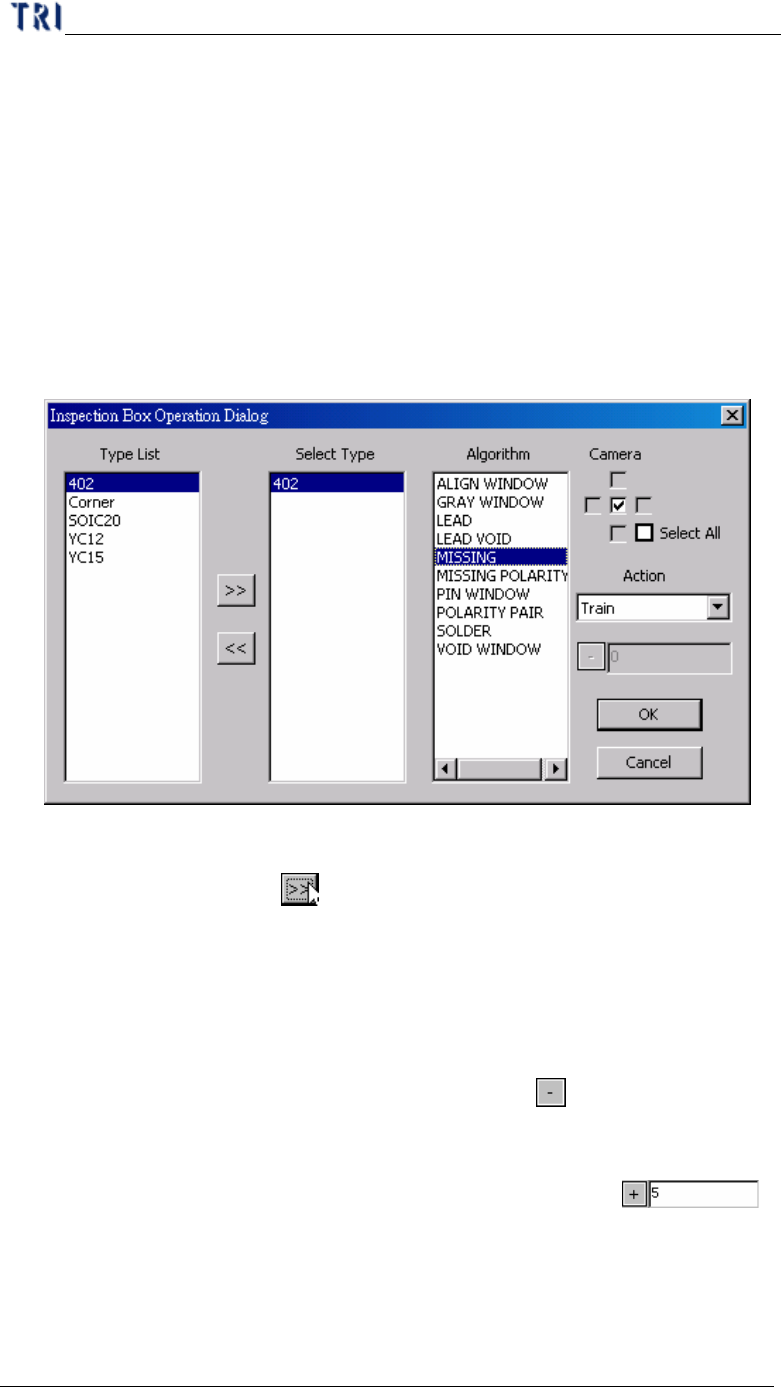
7.17. Inspection Box Operation
l Change the parameters for specific inspection window of specific component
type.
n Type List – System shows all the types in the project.
n Select Type – Select a type you want to change. Select a type in [Type List]
field first then press
to move the type to [Select Type] field.
n Algorithm – Select the inspection window types that you want to modify
here. Camera – Select the camera that you want to modify.
n Camera – Select the camera.
n Action – Select one action.
(1) Change Passlevel – Change pass level. When selecting this item, the
toolbar below will be enabled. Click on the
button to switch plus
or minus sign. Plus sign means to add the number that you input back
and the minus sign means to reduce the number that you input back.
For example, the original score is 60. If the setting is ,
the score will be changed to 65. If the number that you input is 0, the
parameter will be change to the original score. The corresponding
parameter is the followings.
Ø Missing, Missing_Polarity, Lead – Score
Chapter 2 Manual Bar introduce
TR7500 USER MANUAL
117
Ø Void, Lead Void – Bright Ratio
Ø Solder – Bridge Ratio
(2) Delete – Delete the selected inspection box
(3) Test – Set the selected box [test]
(4) Train – Train the selected inspection box.
(5) Untest –Set the selected box [Untest]
(6) Untrain – Untrain the selected inspection box.
n OK – Press this button to modify the inspection box according to the
conditions above.
n Cancel – Press this button to close the window and not to change
parameters.
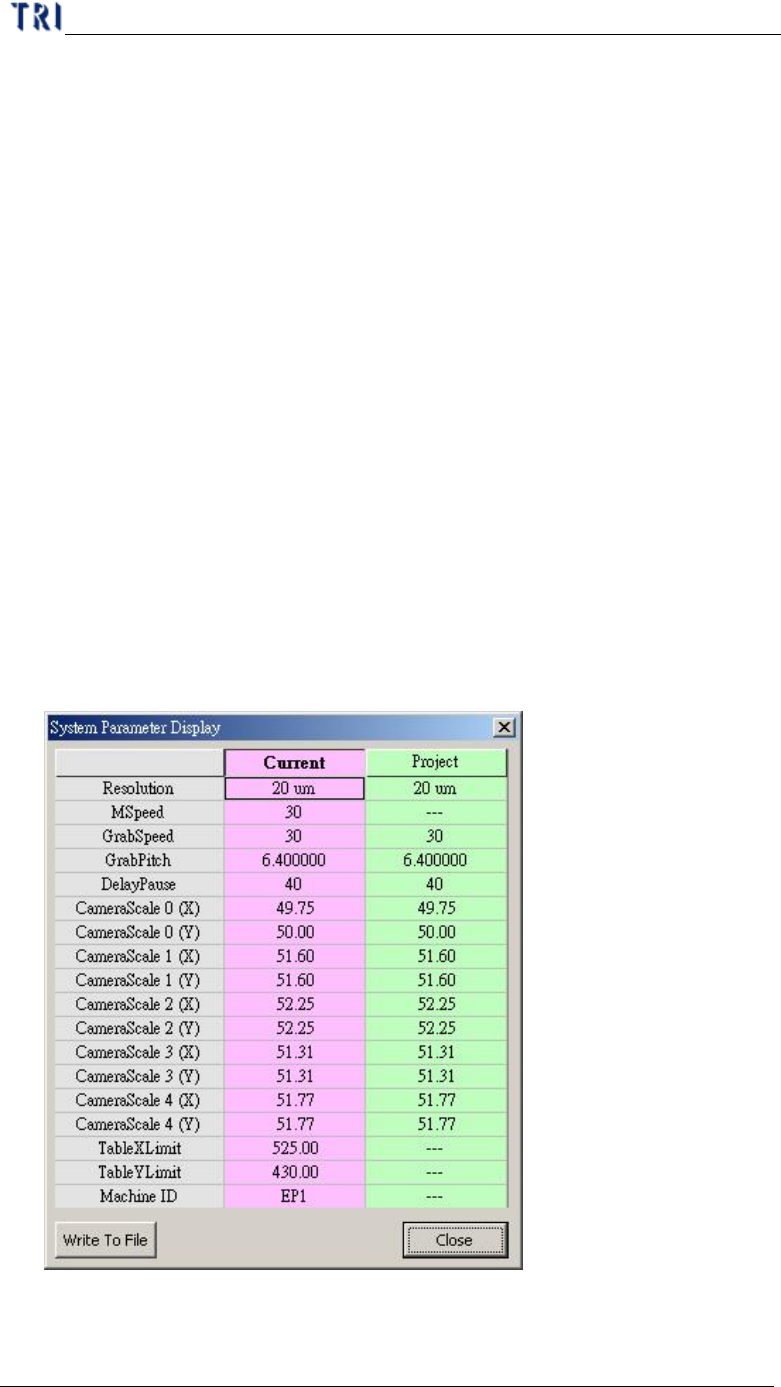
7.18. System Parameter Display
l You can press this item to review the system parameters and project parameters.
After pressing [Write To File], you can select a path to save the text file for these
parameters. If you want to change the inspection speed for this project, you can
key in “tspeed” and press [Enter] then modify the [Mspeed] field of [Project] to
set the speed. Note: If the speed you set is more than the default, the system may
retry and can’t inspect.
7.19. Bare board