FLEXLINE-CAD_INM.pdf - 第127页
C-7 T able Pana - 3: Panasonic . NCD Dat a Format NO N - MA TRIX section Dat a Item Lines Field Un i ts Scaling Circuit Position X The several beginning lines w ith the M command t agged wit h string “901,” “902,” “91 1,…
C-6
♦
.NCD Data File
.NCD Data Sample
Example 1 (MK2 data file):
N001/0G0M902T0X-18175Y-515Z1V1W1
N002/0G0M902T0X10750Y0Z1V1W1
N003/0G1M0T4X+Y+Z+V+W+
N004/0G0M4T0X6990Y6645Z20V1W1
N005/0G0M4T0X6990Y6420Z20V1W1
N006/0G0M4T0X6990Y6185Z20V1W1
N007/0G0M4T0X6990Y5505Z20V1W1
……
N051*
Example 2 (MV data file):
N0001/0G0M902T000X+000000Y+000000Z+00000V+00000W+00000+00000D
N0002/1G1M000T004X0000000Y0000000Z000000V000000W000000+00000D
N0003/0G0M001T000X+003001Y-008374Z+00001V+00090W+00090+00000D
N0004/0G0M001T000X+009876Y-008124Z+00001V+00000W+00000+00000D
N0005/0G0M001T000X-001549Y-018449Z+00001V+00090W+00090+00000D
N0006/0G0M001T000X-004374Y-024624Z+00002V+00090W+00090+00000D
N0007/0G0M001T000X-004399Y-025824Z+00003V+00090W+00090+00000D
………..
N0489/0G0M001T000X+012951Y-011099Z+00111V+00000W+00000+00000D
*
PCB Data
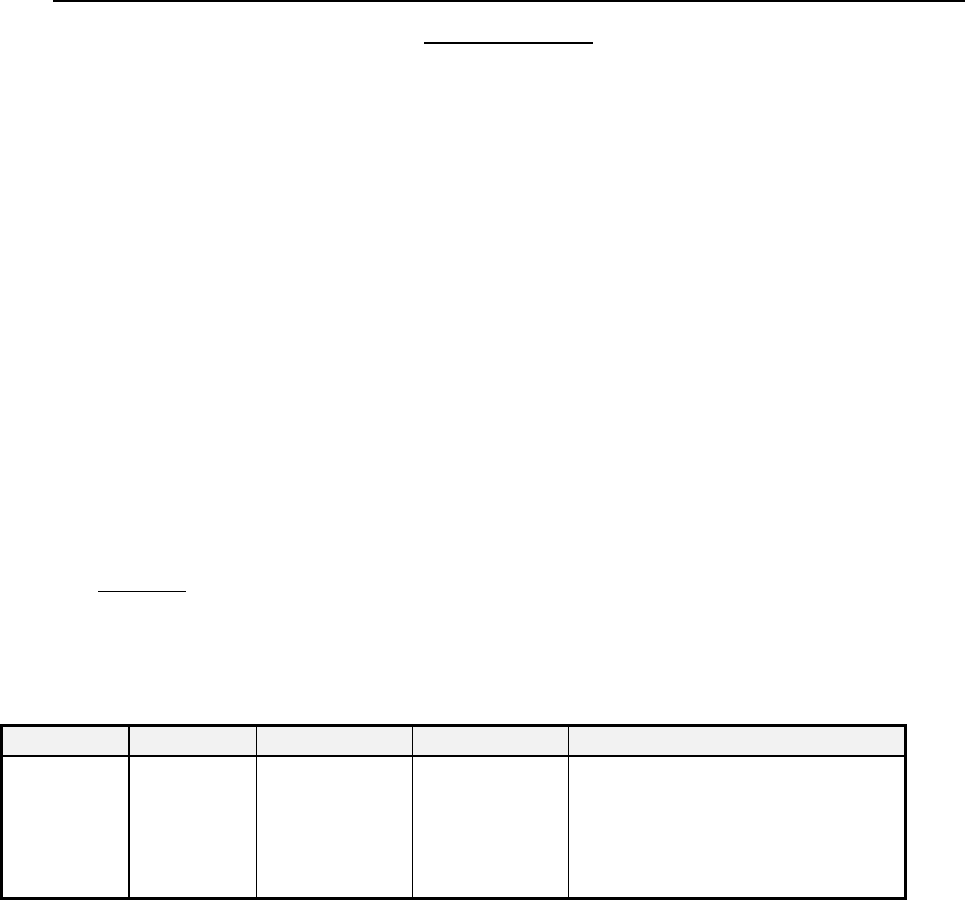
According to the placement data file, the field “PCB Board Type” is identified as shown in Table Pana-2
below:
Table Pana-2: Panasonic Data Format PCB Board Type
Data Item
Lines
Sections
Fields
Translation
PCB Board
Type
The first line
of the .NCD
data file
“SECTION_0” The field that is
tagged by the
keyword “M” in
the data line.
The string “901,” “902,” “911,” “912,”
“921,” “922,” “931,”or “932,” indicates
that the board is a “Non-Matrix Board."
Any other strings indicate that the
board is a “Single Board.”
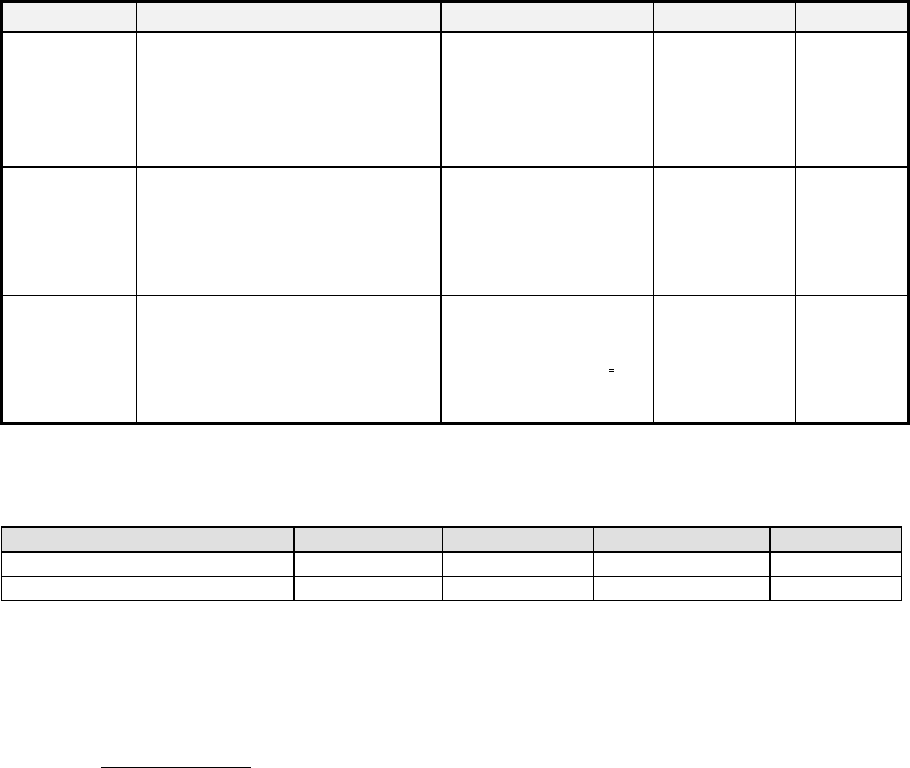
If the result of the PCB Board Type is “Non-Matrix," the software will search the whole .NCD file and
pick up all the data lines with the M command tagged with string “901,” “902,” “911,” “912,” “921,” “922,”
“931,”or “932.” These lines will be regarded as the Non-Matrix data lines and the software will extract
the circuit position X and Y and Angle in the way described in Table Pana-3 as shown below:
C-7
Table Pana-3: Panasonic .NCD Data Format NON-MATRIX section
Data Item
Lines
Field
Units
Scaling
Circuit
Position X
The several beginning lines with
the M command tagged with string
“901,” “902,” “911,” “912,” “921,”
“922,” “931,”or “932.”
The field that is tagged
with the keyword “X” in
the data line.
Millimeters 1/100
Circuit
Position Y
The several beginning lines with
the M command tagged with string
“901,” “902,” “911,” “912,” “921,”
“922,” “931,”or “932.”
The field that is tagged
with the keyword “Y” in
the data line.
Millimeters 1/100
Circuit
Position
Angle
The several beginning lines with
the M command tagged with string
“901,” “902,” “911,” “912,” “921,”
“922,” “931,”or “932.”
The middle number “x”
that is extracted from
string “9x1” or “9x2”.of
the keyword "M."
Degree **
** To understand the Circuit Position Angle, please see the table below:
Table Pana-4: Panasonic .NCD Data Format NON-MATRIX section Circuit Angle Code Number
M Command
901,902
911,912
921,922
931,932
Circuit Angle Code Number
0
1
2
3
Degree
0
90
180
270
Based on our understanding of the Panasonic data file, the first circuit’s position is with respect to
their machine’s origin. In HLC we do not need this data; therefore, we will set this position to
(0,0). The circuit layout offset X and Y must be manually entered into HLC.
Placement Data
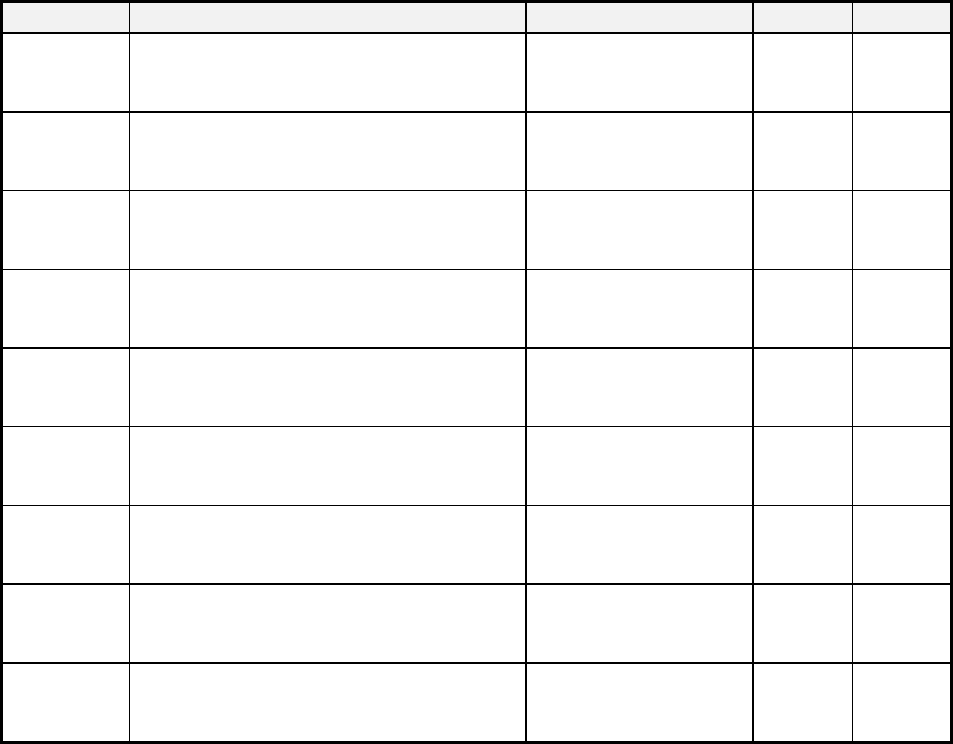
The PLACEMENT data lines for the Panasonic is determined by the “G” and “M” commands of
the data line in the NCD data file.
C-8
Table Pana-5: Panasonic NCD Data Format NON-MATRIX section
Data Item
Lines
Field
Units
Scaling
Placement
ID
Line with the G command tagged with string
“0” and or M command tagged as specified in
the following Table Pana-6.
The field that is tagged
with the keyword “N” in
the data line.
N/A N/A
TAG
Line with the G command tagged with string
“0” and or M command tagged as specified in
the following Table Pana-6.
The field that is tagged
with the keyword “G” in
the data line.
N/A N/A
VALID Line with the G command tagged with string
“0” and or M command tagged as specified in
the following Table Pana-6.
The field that is tagged
with the keyword “M” in
the data line
N/A N/A
INVALID
*1
Line with the G command tagged with string
“0” and or M command tagged as specified in
the following Table Pana-6.
The field that is tagged
with the keyword “M” in
the data line
N/A N/A
Placement
Position X
Line with the G command tagged with string
“0” and or M command tagged as specified in
the following Table Pana-6.
The field that is tagged
with the keyword “X” in
the data line.
mm 1/100
Placement
Position Y
Line with the G command tagged with string
“0” and or M command tagged as specified in
the following Table Pana-6.
The field that is tagged
with the keyword “Y” in
the data line.
mm 1/100
Placement
Angle
Line with the G command tagged with string
“0” and or M command tagged as specified in
the following Table Pana-6.
The field that is tagged
with the keyword “W” in
the data line.
degree *2
Component
Name
Line with the G command tagged with string
“0” and or M command tagged as specified in
the following Table Pana-6.
The field that is tagged
with the keyword “Z” in
the data line.
N/A N/A
Placement
Skip *3
Line with the G command tagged with string
“0” and or M command tagged as specified in
the following Table Pana-6.
The field that is tagged
with the keyword “/” in
the data line.
N/A N/A
*1 This INVALID field is reserved for the extension DLL peculiar to the Panasonic. Therefore, you are
not allowed to translate this field.
*2 If the angle is specified as a code from 1 to 8, please refer to the following Table Pana-6.
*3 Placement Skip = “7” indicates unconditional “Skip”; other value than “7” means “Don’t Skip.”