FLEXLINE-CAD_INM.pdf - 第83页
78 D efault Folder For the input folder , set the initial folder for referring to the input file. For the output folder , set the initial folder for creating an output folder . Figur e 9.1.1 - 3 Default Folder The &quo…
77
Chapter 9 Environment Setup
Set the defaults of Flexline CAD, set the output file format and conversion, and set display
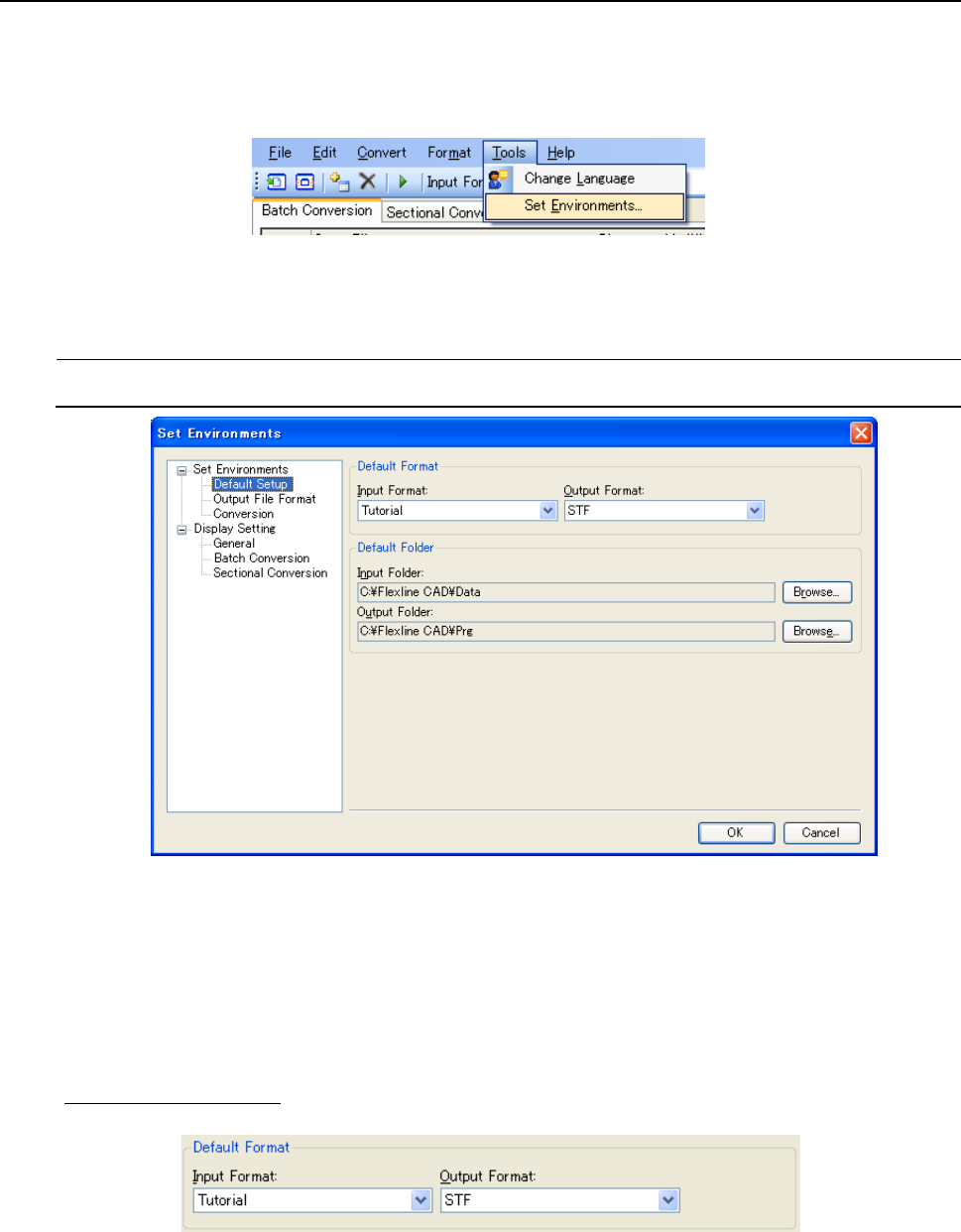
items. Display the Set environments screen by selecting the "Tools" - "Set Environments"
command.
When you select the "Conversion/Options" from the menu bar, this screen appears.
Figure 9-1 "Tool" - "Set environments" menu
9.1 Set Environments screen *1
9.1.1 Default Format/Folder setting screen
Figure 9.1.1-1 "Set Environments" - "Default Setup"
*1 The screen displayed with the Version 5.10 or earlier is different from that with the Version
6.00 or later.
Default Format
Specify the initial values for the input format and output format. In the input format, the format
created by user-defined wizard is displayed. For the input format and output format, refer to
"10.1 Standard format."
Figure 9.1.1-2 Default format
78
Default Folder
For the input folder, set the initial folder for referring to the input file. For the output folder, set the
initial folder for creating an output folder.
Figure 9.1.1-3 Default Folder
The " Browse For Folder" dialog box is displayed by pressing the " Browse" button provided by
the side of the text box. Then, select a folder and click the "OK" button. The path of the selected
folder is displayed in the text box. It is also possible to enter the path directly into each text box.
9.1.2 Output file format setting screen after conversion
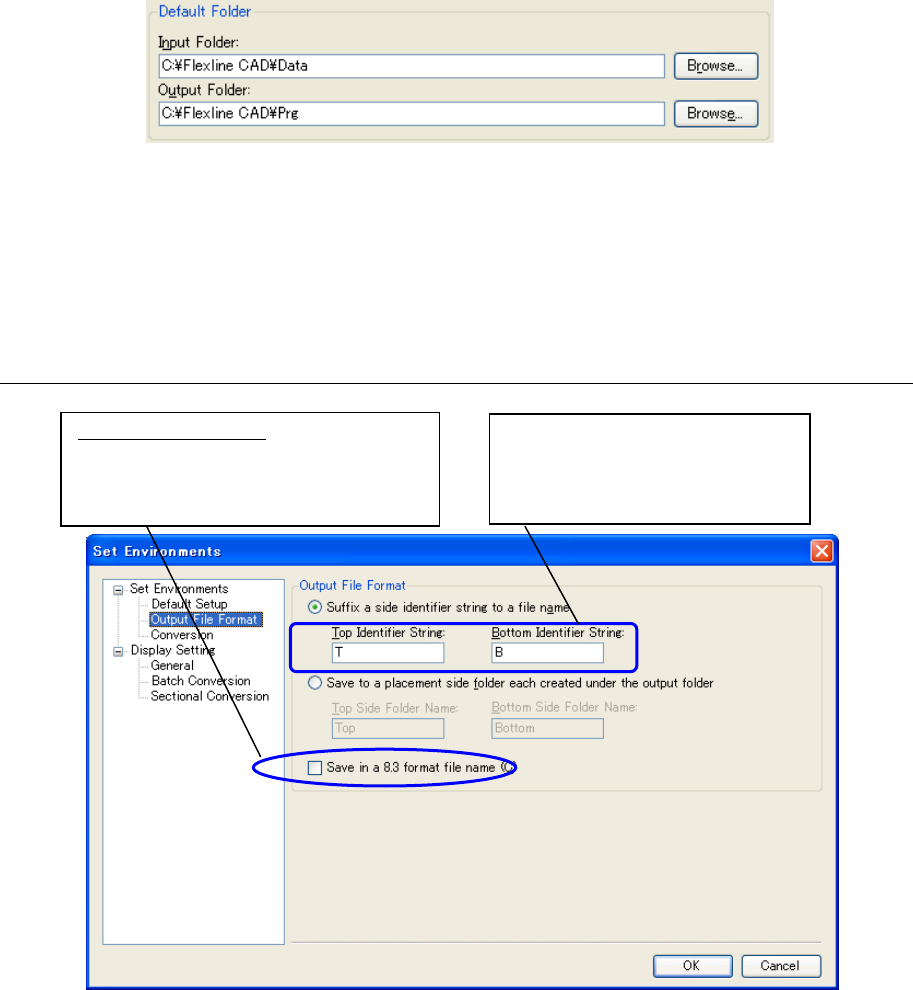
Figure 9.1.2-1 "Set Environments" - "Output File Format"
When "Save in an 8.3 format file name" is checked off, the output file name is saved in the 8.3
format. In this case, the characters added as top identifier characters and bottom identifier
characters are not omitted but only the original file name is omitted.
(Example)
Input file name: SampleData.txt
Output folder: C\FlexlineCAD\Prg
Output format: IS,IS Lite
The number of characters that can
be entered is up to 7 characters. *
The same character string cannot
be entered.
What is the 8.3 format?
In this format, the file name is represented
by 8 characters (bytes) and the extension
is represented by 3 characters (bytes).

79
(1) When "Suffix a side identifier string to a file name" is selected and the top identifier string is
T and the bottom identifier string is B
Top side: C:\FlexlineCAD\Prg\SampleDataT.iss
Bottom side: C:\FlexlineCAD\Prg\SampleDataB.iss
When "Save in an 8.3 format file name" is checked off
Top side: C:\FlexlineCAD\Prg\SampleDT.iss
Bottom side: C:\FlexlineCAD\Prg\SampleDB.iss
(2) "Save to a placement side folder each created under the output folder" is selected and the
top folder name is Top and the bottom folder name is Bottom
Top side: C:\FlexlineCAD\Prg\Top\SampleData.iss
Bottom side: C:\FlexlineCAD\Prg\Bottom\SampleData.iss
When "Save in an 8.3 format file name" is checked off
Top side: C:\FlexlineCAD\Prg\Top\SampleDa.iss
Bottom side: C:\FlexlineCAD\Prg\Bottom\SampleDa.iss
In this format, the fine name is
represented by 8 characters
and the extension is
represented by 3 characters.
In this format, the fine name is
represented by 8 characters
and the extension is
represented by 3 characters.