FLEXLINE-CAD_INM.pdf - 第134页
C- 14 ♦ "FUJI" PCB Data FUJI PCB Data Sample ( PCB_dat a *------------------------- ( attr value ) *------------------------- ( PCB_x 32893 ) ( PCB_y 29403 ) ( Pin_pitch 0 ) ( PCB_thickness 160 ) ( XA_global_…

C-13
“Tagged Field” Field Layout Method
“Tagged Field” is a new functionality that supports both .NCD and .POS data of the Panasonic.
Note that the UDF Wizard does not yet support the "Tagged Field" functionality and you can only
manually create the INI file.
“Tagged Field” is a field layout method in which each data field is tagged by a unique field
keyword in the data line.
• A valid field tag or keyword shall be an unique sequence of characters that occurs at the
beginning of the data field. The field tag is not case sensitive.
• Valid Data Field:
(1) Numeric numbers, and sometimes that include a positive sign “
+
” or a negative
“
−
“ sign.
(2) If the field includes characters, it should always be enclosed by a left parenthesis
“(“ and a right parenthesis “)”.
The following is an example of an INI file using the “Tagged Field” format. This section’s layout
is “Tag” and field layout is “Tagged Field.” The only unique part is “[FORMAT_2]” compared to
the other field layout alternatives.
In the future Flexline CAD version, the UDF will automatically generate this format.
[SECTION_2]
READLASTLINE="0"
READFIRSTLINE="1"
LABEL="PLA"
STOREAS="ARRAY"
SCHEMA=%PLA_ID(),$PLA_SKIP(),TAG,VALID,INVALID,%PLA_POS(X),%PLA_POS(Y),%PLA_C
MP(),%PLA_POS(D)
[FORMAT_2]
FIELDNUMBER="9"
FORMAT="TAGGEDFIELD"
COLUMNNUMBER="9"
DATAFILENAME="d:\dev5\FlexCAD\TestData\Panasonic\mv\CF000001.NCD"
FIELD_0=%PLA_ID(),N
FIELD_1=$PLA_SKIP(),/
FIELD_2=TAG,G
FIELD_3=VALID,M
FIELD_4=INVLID,M
FIELD_5=%PLA_POS(X),X
FIELD_6=%PLA_POS(Y),Y
FIELD_7=%PLA_CMP(),Z
FIELD_8=%PLA_POS(D),W
[TRANSLATE_2]
$PLA_SKIP()=7,"Y"
VALID=0,"VALID"
VALID=4,"VALID"
[TYPE_2]
TAG="0"
TYPE= TAGGED"
C-14
♦
"FUJI"
PCB Data
FUJI PCB Data Sample
( PCB_data
*-------------------------
( attr value )
*-------------------------
( PCB_x 32893 )
( PCB_y 29403 )
( Pin_pitch 0 )
( PCB_thickness 160 )
( XA_global_ofst 0 )
( YA_global_ofst 0 )
( XB 0 )
( YB 0 )
( Xi_trial_area 0 )
( Yi_trial_area 0 )
( Xj_trial_area 0 )
( Yj_trial_area 0 )
( Mark_area_tolerance 0 )
( Mark_pitch_tolerance 0 )
( Softlanding_speed 0 )
( Softlanding_acc_time 0 )
)
The PCB data section in FUJI data file starts with the line which is labeled as “( PCB_data” and
ends up with the first closing “)” located in column 1.
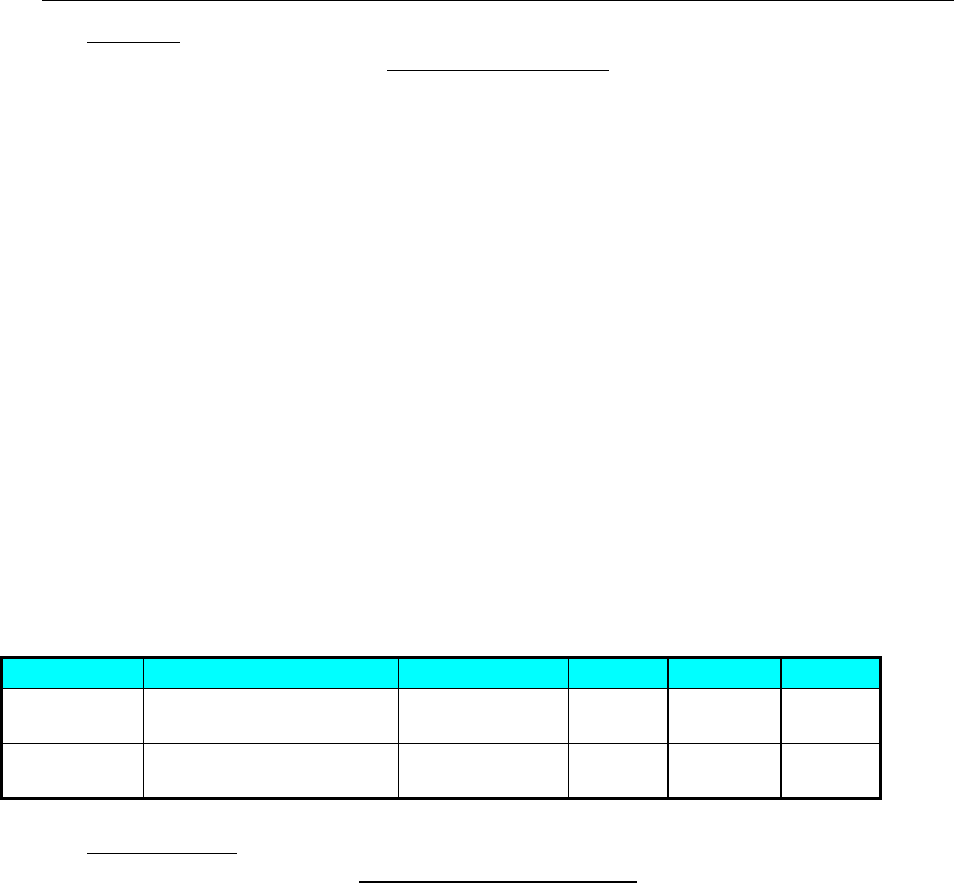
Table Fuji-1: FUJI Data Format PCB section
Data Item
Lines
Sections
Fields
Units
Scaling
PCB
Dimension X
Line tagged with string
“PCB_x” in second field
“SECTION_0” Third mm 1/100
PCB
Dimension Y
Line tagged with string
“PCB_y” in second field
“SECTION_1” Third mm 1/100
Placement Data
FUJI Placement Data Sample
( Sequence_data
*----------------------------------------------------------------------------------------------------------------------------------------------------
-----------------------------------------------------------------------------------------------------------------------
( Sequence_# Block_# Working_mode Device_# X Y Q Main_mark_# Sub_mark_# Head_# Gluing_time
Sequence_comment Sequence_skip Device_skip Block_skip End_mark Holder_# Carrying_mode Id_code MN
Pallet_# Reflow_pass Terminate_seq Reflow_temp Reflow_time Cleaning_seq U U2 )
*----------------------------------------------------------------------------------------------------------------------------------------------------
-----------------------------------------------------------------------------------------------------------------------
( 1 0 "F" 1 -1458 10895 0 0 0 1 0 "MARK" "" "" "" "" 0 0 0 1 0 0 0 0 0 0 0 "" )
( 2 0 "F" 1 -19690 255 0 0 0 1 0 "MARK" "" "" "" "" 0 0 0 2 0 0 0 0 0 0 0 "" )
( 3 1 "D" 123 -30274 5385 5400 1 2 0 0 "C107" "" "" "" "" 0 0 0 0 0 0 0 0 0 0 0 "" )
( 524 1 "D" 75 -24184 23041 0 1 2 0 0 "I4L" "" "" "" "" 0 0 0 0 0 0 0 0 0 0 0 "" )
……………
)
The PLACEMENT data section in FUJI data file starts with the line which is labeled as
“( Sequence_data” and ends up with the first closing “)” located in column 1.
C-15
There will always be three comment lines at the beginning of the PLACEMENT data section. The
first and third line will be dashed lines. The section schema line is located between the two
dashed lines and lists all the names of the data fields in the PLACEMENT data section . All data
fields and their order will both be determined by the schema line.
In Placement Data section, both BOC mark information and Placement data are defined.
Placement data are defined in the line with “Working_mode” = “D” or “DD.”
BOC mark information are defined in the line with “Working_mode” = “F” or “FD.”
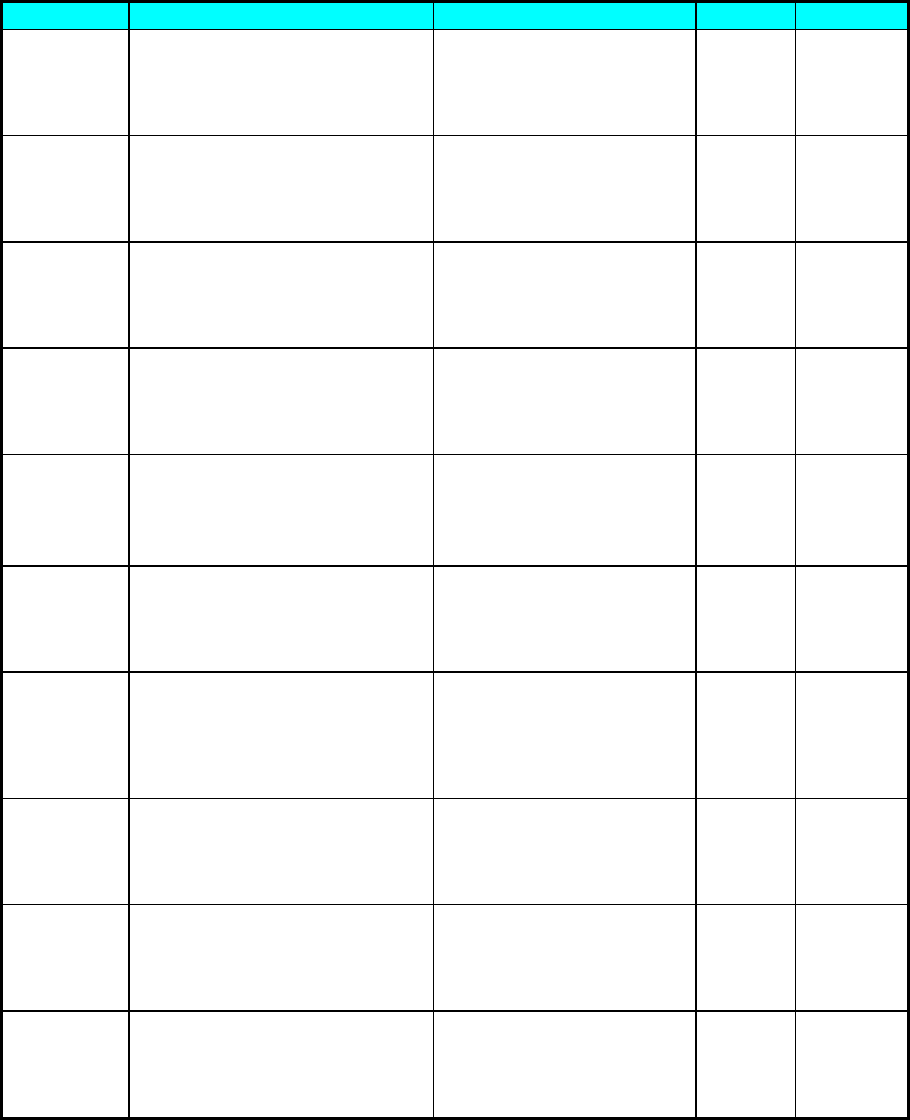
Table Fuji-2: Fuji Data Format PLA section
Data Item
Lines
Field
Units
Scaling
BOC mark
position 1X
The first line tagged with
string “F” or “FD” of the
“Working_mode” data field inside
the placement data section
except the three comment lines
Based on the order of the
section schema line which
lists all the data fields’
names. The keyword for this
field is “X”.
mm 1/100
BOC mark
position 1Y
The first line tagged with
string “F” or “FD” of the
“Working_mode” data field inside
the placement data section
except the three comment lines
Based on the order of the
section schema line which
lists all the data fields’
names. The keyword for this
field is “Y”.
mm 1/100
BOC mark
position 2X
The second line tagged with
string “F” or “FD” of the
“Working_mode” data field inside
the placement data section
except the three comment lines
Based on the order of the
section schema line, which
lists all the data fields’
names. The keyword for this
field is “X”.
mm
1/100
BOC mark
position 2Y
The second line tagged with
string “F” or “FD” of the
“Working_mode” data field inside
the placement data section
except the three comment lines
Based on the order of the
section schema line, which
lists all the data fields’
names. The keyword for this
field is “Y”.
mm
1/100
BOC mark
position 3X
The third line tagged with
string “F” or “FD” of the
“Working_mode” data field inside
the placement data section
except the three comment lines
Based on the order of the
section schema line, which
lists all the data fields’
names. The keyword for this
field is “X”.
mm
1/100
BOC mark
position 3Y
The third line tagged with
string “F” or “FD” of the
“Working_mode” data field inside
the placement data section
except the three comment lines
Based on the order of the
section schema line, which
lists all the data fields’
names. The keyword for this
field is “Y”.
mm
1/100
Placement
ID
Line tagged with string “D”or
“DD” of the “Working_mode” data
field inside the placement data
section except the three
comment lines
Based on the order of the
section schema line, which
lists all the data fields’
names. The keyword for this
field is
“Ysequqnce_comment”.
N/A
N/A
Placement
Position X
Line tagged with string “D” or
“DD” of the “Working_mode” data
field inside the placement data
section except the three
comment lines
Based on the order of the
section schema line, which
lists all the data fields’
names. The keyword for this
field is “X”.
mm
1/100
Placement
Position Y
Line tagged with string “D” or
“DD” of the “Working_mode” data
field inside the placement data
section except the three
comment lines
Based on the order of the
section schema line, which
lists all the data fields’
names. The keyword for this
field is “Y”.
mm 1/100N/A
Placement
Angle
Line tagged with string “D” or
“DD” of the “Working_mode” data
field inside the placement data
section except the three
comment lines
Based on the order of the
section schema line, which
lists all the data fields’
names. The keyword for this
field is “Q”.
Degree 0.016666
667