FLEXLINE-CAD_INM.pdf - 第143页
E-2 Figure E - 2 I nstal lation confirm ation screen Figure E - 3 When i nstal lation fini shes normally 1.3 T roubleshooting If an error occurs w hile any patch is being ins t alled, try t o perform the following operat…
E-1
Appendix E Patch Type Installation Tool
What is the patch type installation tool?
This tool allows you to install the software to which some minor changes have been made in
the current Flexline CAD software.
1. Operations
1.1 Start-up and termination
How to start up: Double-click PatchInstaller.exe located immediately after the Flexline CAD
installation folder.
* Before starting the tool, close all application programs related to Flexline CAD except for the
language switching tool.
* This tool does not support real-time language switching performed with the language
switching tool. When you switch the language to the desired one before starting up
PatchInstaller, the tool starts up in the desired language.
How to terminate: Click the “Cancel” button or the close (
) button.
1.2 Patch type installation screen
Execute the patch type installation process on the following wizard screen.
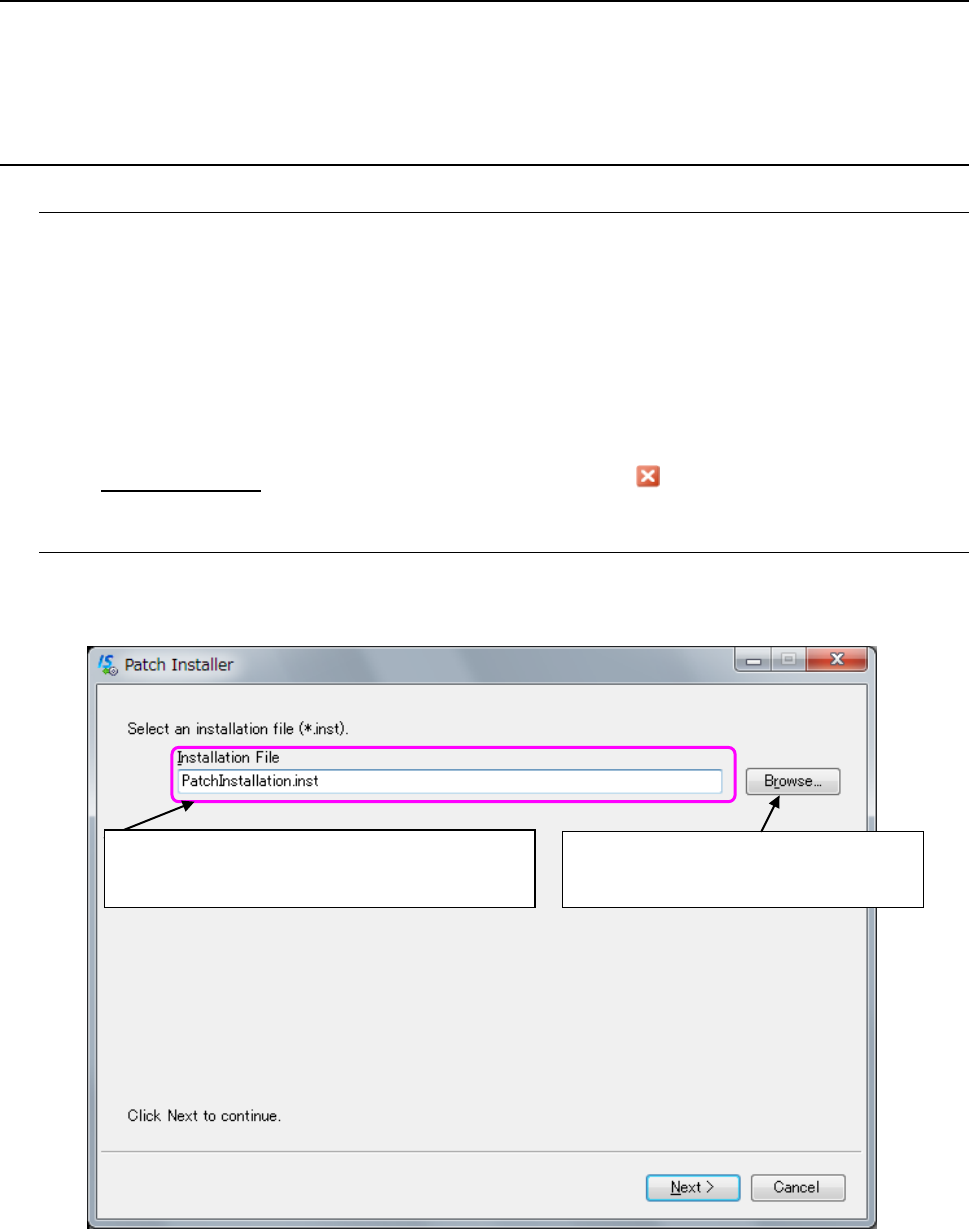
Select the desired installation file from the “Browse” button to perform the installation task.
Figure E-1 Screen for selecting an installation file
Browse: Starts up the dialog box for
selecting a file.
The name of the selected installation file is
displayed here.
E-2
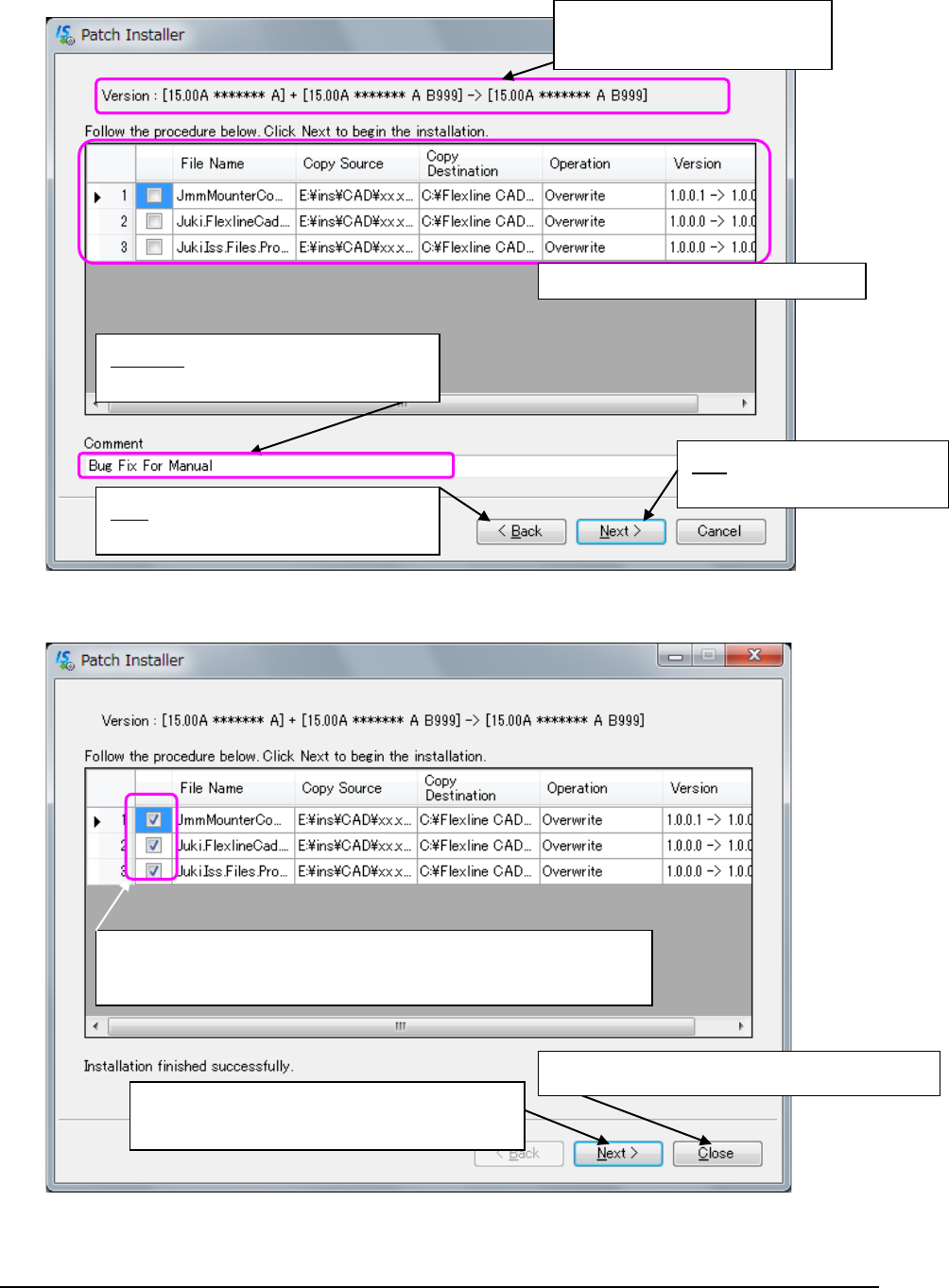
Figure E-2 Installation confirmation screen
Figure E-3 When installation finishes normally
1.3 Troubleshooting
If an error occurs while any patch is being installed, try to perform the following operation,
and then install the patch again.
- Delete the Install.xml file from the folder in which PatchInstaller.exe is located.
The system version changed
before or after installation is
displayed here.
Installation contents checking column
Back: Goes back to the dialog box for
selecting a file.
Next: Goes to the installation
screen.
Comment: automatically entered when
you select installation from the
Check mark ✓:
A check mark ✓is displayed for a file that has been installed
Close: Terminates the patch type installation
Next: Goes back to the installation file selecting
screen.

◆
Revision record
Rev.
Date
Revised locations
Revision contents
Remarks
00
1998.09
First Edition
01
1998.11
02
1999.02
03
2001.03
04
2001.08
04a
2001.10
05
2001.12
06
2002.02
07
2002.12
08
2003.05
09
2004.01
09a
2004.02
10
2004.11
10a
2005.07
11
2006.02
12
2007.01
13
2008.04
14
2008.06
15 2008.12
Reflected the changes
for the IS system.
Supported Ver.6.00
Revised
16 2009.12
P2, 6,8~20,23~24,28,29、
33,36,51~54,58,59,
68~78 111,118~121
Appendix D
Updated the
descriptions
Added 6.4
Supported Ver.7.00
Revised
17 2010.08
P13
~
20,39,53,54,59,71,72
76,77,78,79
Supported Ver.8.00
(KE-3020/3020R)
Revised
18
2010.07
P2,5,8,22
~
,36,62,72
Supported Ver.9.00
Revised
19
2012.01
Revised all chapters.
Supported Ver10.0
Revised
20
2012.02
P57,59,82,84
Supported Ver11.0
Revised
21
2012.09
P26
Supported IS Ver8.00
Revised
22
2013.06
P7,45~47,57,59,82~84
Supported IS Ver9.00
Revised
23
2013.12
P4,24,57,59,64,75,83,84,86,A-15
Supported IS Ver9.20
Revised
24 2017.02
P7,9,22,32,37,38,40,42
~
44,
48,53~55,57~65,68~70,85,86,
88,89,A-3
~
A-14,A-17,E-1,E-2
Supported RS-1 and
Windows10
Revised
25 2017.05 Revised all chapters.
Supported JaNets
(Ver17.00A)
Revised