FLEXLINE-CAD_INM.pdf - 第62页
57 * When IC mar k ID data exist s in the input file, we recom mend that t he IC m ark coordinate data relat ed to the IC m ark ID should be in the same line and defined at the beginning of t he placem ent data. I f only…

56
To convert the IC mark coordinates into any output format other than the above, it is not
necessary to define the IC mark ID, IC mark type, and IC mark link.
The following is a data example of IC mark ID and IC mark coordinates provided in the
placement data section.
PLA ID
PLA Pos X
PLA Pos Y
PLA Angle
PLA Link ID
MARK Use
MARK Link
MARK ID MARK 1X MARK 1Y
MARK 2X MARK 2Y
1 0.11 0.22 0
Q1 Y
M001 11.11 11.22 11.33 11.44
2 11.11 11.22
90 R2
Y
Mark Two 22.11 22.22 22.33 22.44
3 22.11
22.22 180 D2 Y
Third Mark
33.11 33.22 33.33 33.44
4
33.11 33.22 270 UY Y Mark IV 44.11 44.22
44.33 44.44
5 44.11 44.22 180 BX Y MK V 55.11
55.22
55.33 55.44
6 55.11 55.22 90 VD
N
7 66.11 66.22 0
ZZ Y Mark Two
8 77.11
77.22
270 TO Y M001
9
88.11
88.22 180 P1 Y MK V
10 99.11 99.22 90 C3 Y Mark Two
11 110.11 110.22 0 PO
Y Third Mark
12 121.11 121.22
270 R5
N
13 132.11
132.22 90
D4
Y Mark IV
14 143.11 143.22 0 TH Y Third Mark
15 154.11 154.22 0 X1 Y Third Mark
16 165.11 165.22 90 13 Y
Mark Two
17 176.11 176.22 180
80 Y
Mark IV
18 187.11 187.22
180
PR Y M001
19 198.11
198.22
0 IS N
20 209.11 209.22 90 SA Y Mark IV
21 220.11 220.22 270 SA Y Mark IV
22 231.11 231.22 180 GI
N
23 242.11 242.22
0
RI Y Mark Two
24 253.11 253.22 0 BG Y MK V
25 264.11 264.22 90 C2 Y Mark IV
57
* When IC mark ID data exists in the input file, we recommend that the IC mark coordinate
data related to the IC mark ID should be in the same line and defined at the beginning of the
placement data. If only the mark ID exists in the subsequent data line, the mark coordinates
can be correctly converted even if no related IC mark coordinate data exists. This permits
saving the trouble of inputting every mark data at creation of mark data.
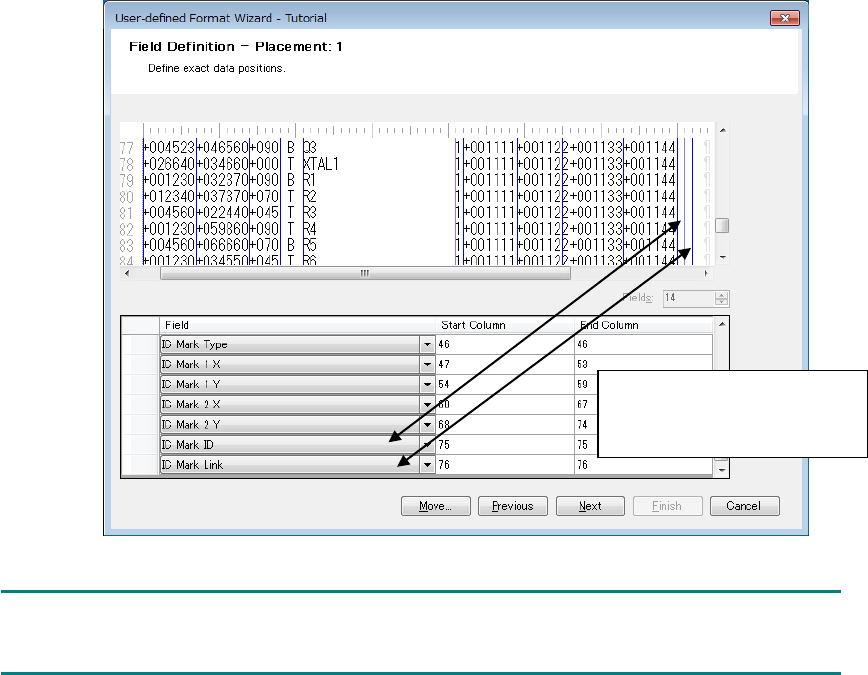
Figure 7.5.4-1 Definition of null IC mark ID and IC mark link
NOTE:
The IC mark ID field is not displayed in the data change dialog box.
(Example) Because no IC
mark ID and IC mark link data
are found in the input file, null
fields are defined.

58
7.5.5 Definition of IC mark 3 in the placement section
The formats applicable to IC mark 3 are as follows: Even if data conversion is performed with
the other format as an output format, IC mark 3 is not output. The IC mark 3 field is not
displayed in the data change dialog box.
• HLC Ver 6.0 to 12.0
• IS 2.00
• IS,IS Lite
• 2050 Ver 1.XX
• 2050R Ver 1.XX
• 2055R Ver 1.XX
• 2060 Ver 1.XX
• 2070 Ver 1.00/1.XX/2.1X
• 2060R Ver 1.XX
• 2080 Ver 1.00/1.XX/2.1X
• 2080R Ver 2.1X
• 3020 Ver 1.00
• 3020R Ver 1.00
• 3010 Ver 1.00
• 3020V Ver 1.00
• 3020VR Ver 1.00
• 3010A Ver 1.00
• 3020VA Ver 1.00
• 3020VRA Ver 1.00
• FX-1 Ver 1.XX
• FX-1R Ver 1.XX
• FX-2 Ver 1.00/1.XX
• FX-3 Ver 1.00/1.XX/3.50
• FX-3R Ver 4.XX
• FX-3RA Ver 1.00
• CX-1 Ver 1.00/1.XX
• RX-6 Ver1.00
• RX-6R Ver4.00
• RS-1 Vre1.00
• LC-01
NOTE:
Select the "IS, IS Lite" when you want to output in JaNets format.