YST15_Users_E.pdf - 第149页
Chapter 3 Y early maintenance items Contents Precautions 3-1 1. Machine main unit 3-3 1.1 Cleaning in the machine 3-3 1. 2 Cleaning reel detection sensors in loading/unloading area 3 -4 1.3 Check the cables in the main c…
2-2
2
Daily maintenance items
1.2 Dehumidifier operation
Check if dehumidifiers work properly.
1
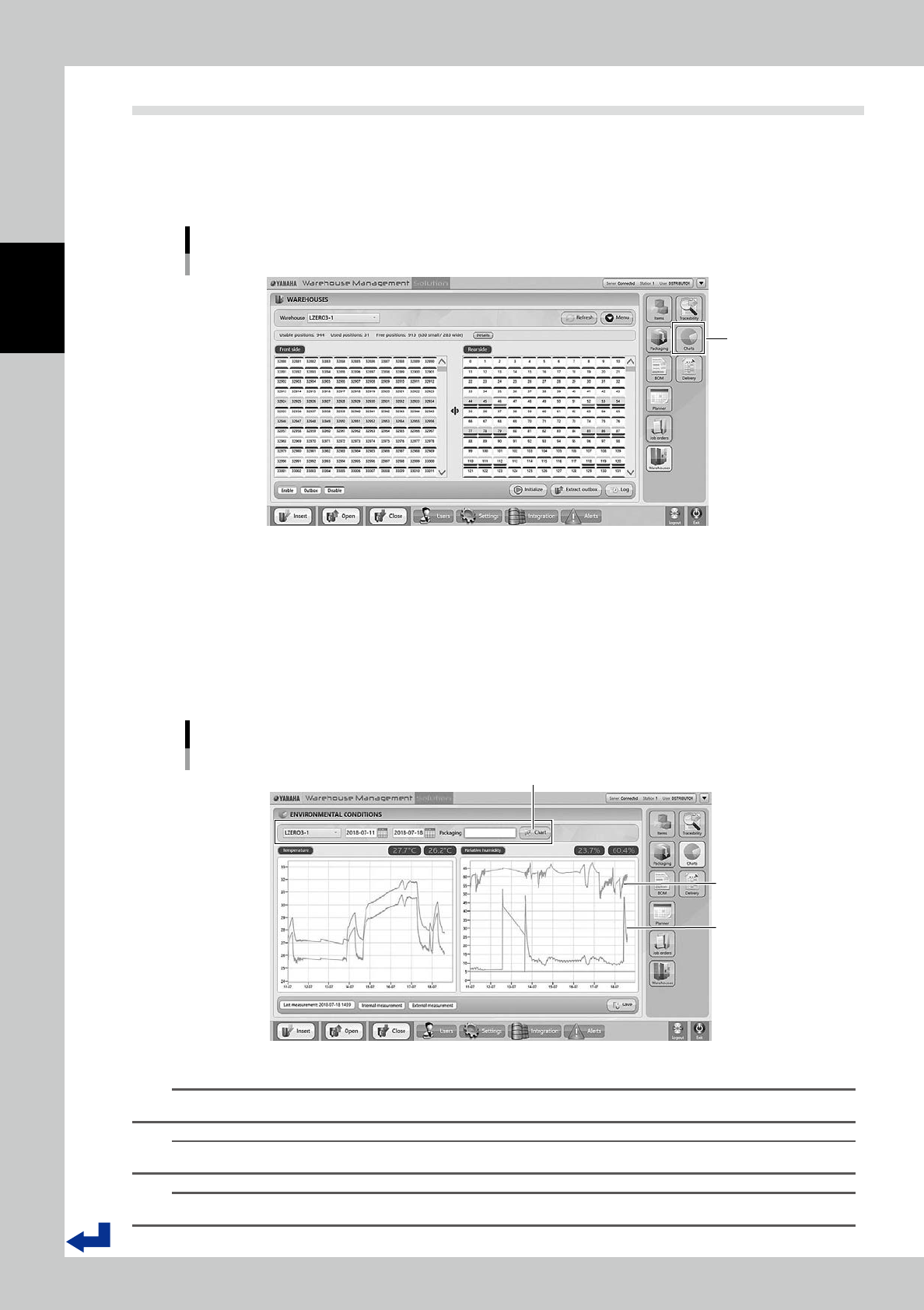
Press [Charts].
Press [Charts] in right of the screen to display "Environment Condition" screen.
Press [Charts]
[Charts] button
54201-KMS-00
2
Check "ENVIRONMENTAL CONDITIONS" screen.
The record of humidity monitored inside/outside the machine is displayed in right of "ENVIRONMENTAL
CONDITIONS" screen.
Select date on top of the screen and press [Chart], then the record of temperature and humidity during
the period appears.
Here the selected date is 11 to 18, July, 2018.
Check if the machine inside is dehumidified when the dehumidifiers work.
“ENVIRONMENTAL CONDITIONS” screen
[Chart] button
Humidity outside
Humidity inside
54202-KMS-00
n
NOTE
Dehumidifier monitoring works only while the operation switch is ON (Operation indicator lights green).
TIP
The performance of dehumidifiers depends on the environment such as the place where the machine is installed.
TIP
YST15 doesn't have the function to adjust temperature. The temperature record is just reference.

Chapter 3 Yearly maintenance items
Contents
Precautions 3-1
1. Machine main unit 3-3
1.1 Cleaning in the machine 3-3
1.2 Cleaning reel detection sensors in loading/unloading area 3-4
1.3 Check the cables in the main control panel 3-5
1.4 Check the side door interlocks 3-6
2. X-axis 3-7
2.1 Cleaning the stainless rail of X-axis 3-7
2.2 Cleaning the carrier wheels of X-axis. 3-8
2.3 Checking the tension of X-axis belt 3-9
2.4 Checking the horizontality of X-axis 3-10
2.5 Checking the cables of X-axis motor 3-12
3. Y-axis 3-13
3.1 Cleaning the stainless rails of Y-axis. 3-13
3.2 Cleaning the carrier wheels of Y-axis. 3-14
3.3 Checking Y-axis movement 3-15
3.4 Checking the white belt of Y-axis 3-17
3.5 Checking the tension of Y-axis drive belt 3-18
3.6 Checking the cables of Y-axis motor 3-20
4. Handler 3-21
4.1 Cleaning and greasing for the guide of Forward/Backward-axis 3-21
4.2 Checking the drive pulley of Forward/Backward-axis 3-23
4.3 Checking the tension of Forward/Backward-axis belt 3-24
4.4 Cleaning and greasing the ball screw and the guide of
Open/Close-axis 3-25
4.5 Checking the ball screw of Open/Close-axis 3-26
4.6 Cleaning and greasing Rotation-axis gear 3-27
4.7 Check the drive gear of Rotation-axis 3-28
4.8 Cleaning the reel sensors on the handler 3-29
4.9 Cables of the handler control board 3-30