YST15_Users_E.pdf - 第182页
User ’ s Manual Intelligent SMD storage system Version 1.00 April 2019
3-30
3
Yearly maintenance items
4.9 Cables of the handler control board
1
Turn the machine off.
2
Move the handler to the position
where it is easy to work.
1. Open a side door, then move the handler
a little upper from the middle on Y-axis so
that it is easy to work.
2. Move the handler to either end of X-axis
by hands.
3. Rotate the handler on Rotation-axis by
hands so that it is easy to see the handler
control board.
3
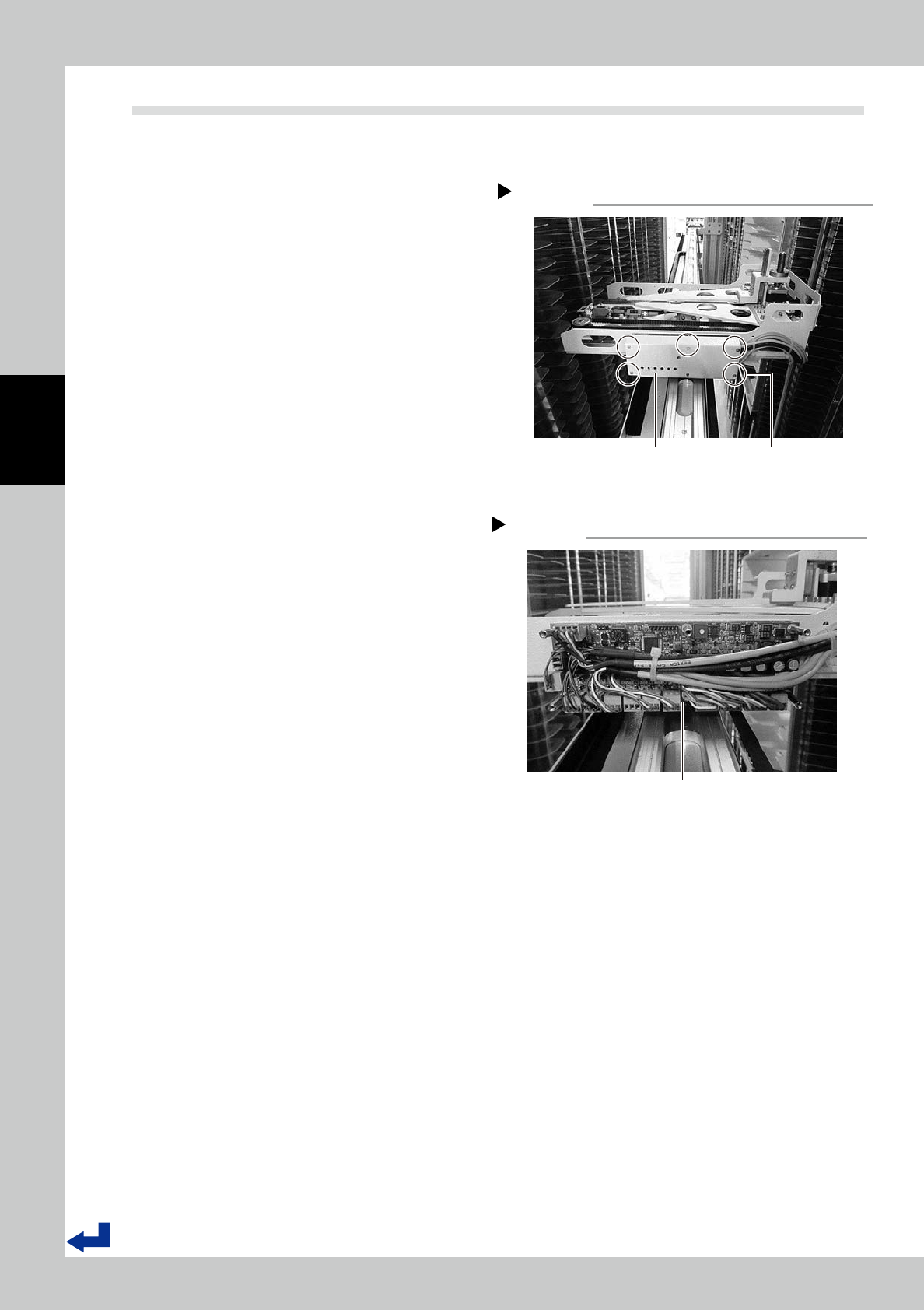
Detach the cover of the handler
control board.
Use a hex wrench (2 mm) to remove five
bolts fixing the cover to detach it.
4
Check if all cables of the handler
control board are connected
properly.
5
Reattach the cover of the handler
control board.
6
Move the handler to Initialization
standby position.
Move the handler to Initialization standby
position by hands.
Handler control board
Step 4
Handler control board
53340-KMS-00
Cover for the handler control board
Step 3
Cover
Five bolts fixing cover
53339-KMS-10
User’s Manual
Intelligent SMD storage system
Version 1.00
April 2019