YST15_Users_E.pdf - 第166页
3-16 3 Y early maintenance items n Adjustment procedure for the distance between Y -axis slider and its carrier wheels. T here are two types of carrier w heels, normal type and eccentric type. Changing the position of ec…
3-15
3
Yearly maintenance items
3.3 Checking Y-axis movement
1
T
ur
n
the
m
a
c
hi
n
e off
.
2
Move the handler on Y-axis to the
place where it is easy to work.
Open a side door, then move the handler a
little upper from the middle on Y-axis so that
it is easy to work.
3
Check if the Y-axis sliders don't
rattle.
Move the handler up and down on Y-axis.
If the Y-axis sliders rattle, or don't move
smoothly,adjust the distance between the
slider and its carrier wheels by the following
procedure.
4
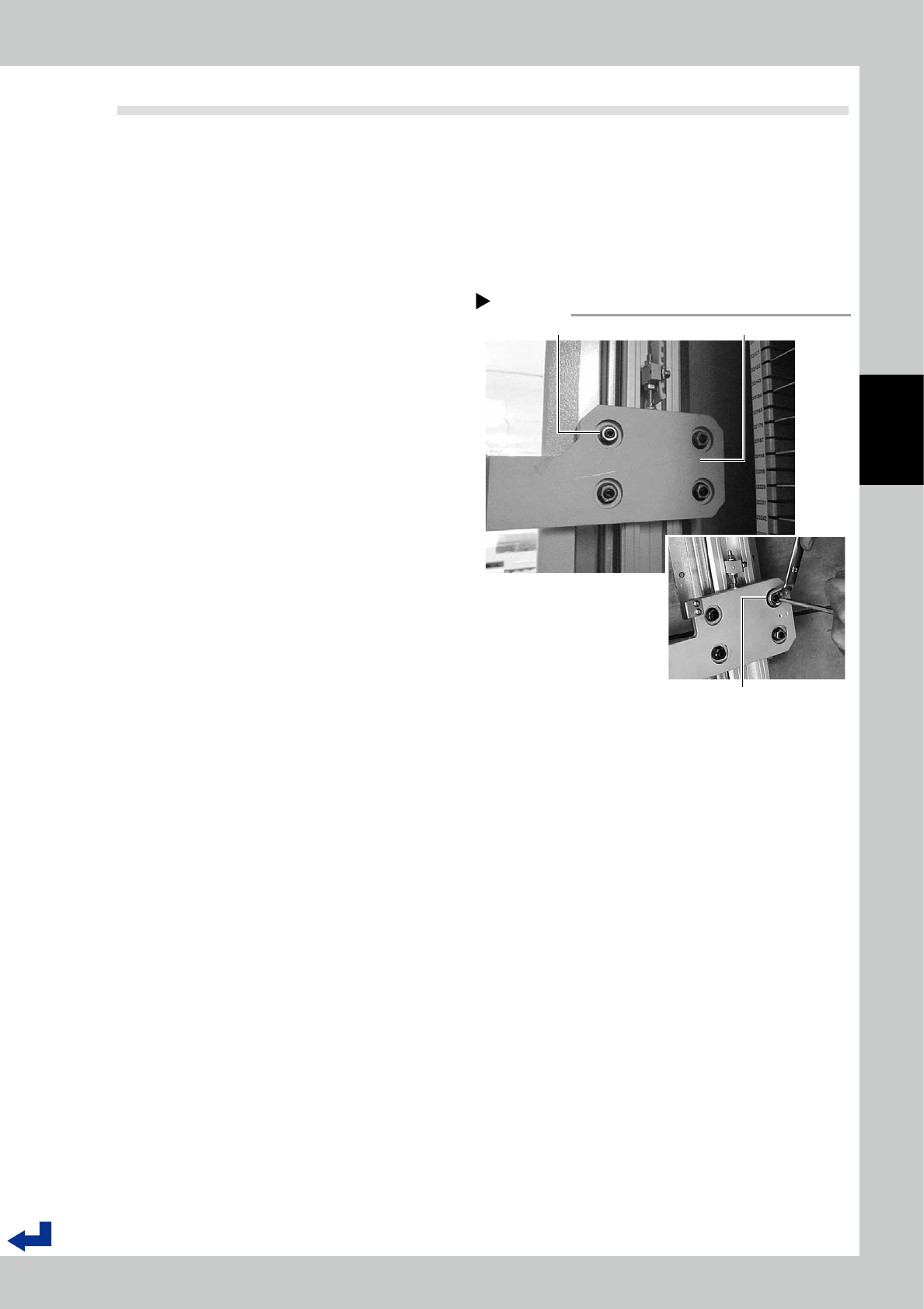
Check if the nuts fixing carrier
wheels are tightened securely.
Use a hex wrench (4 mm) and a wrench (13
mm) to check if the nuts fixing carrier wheels
are tighten securely.
If they are not tighten enough, use a wrench
to tighten nuts with holding carrier wheels
with a hex wrench.
Check the nuts fixing carrier wheels.
Step 4
Nuts fixing career wheel Y-axis slider
Use a wrench to tighten nuts
with holding career wheels
with a hex wrench.
53319-KMS-00
3-16
3
Yearly maintenance items
n
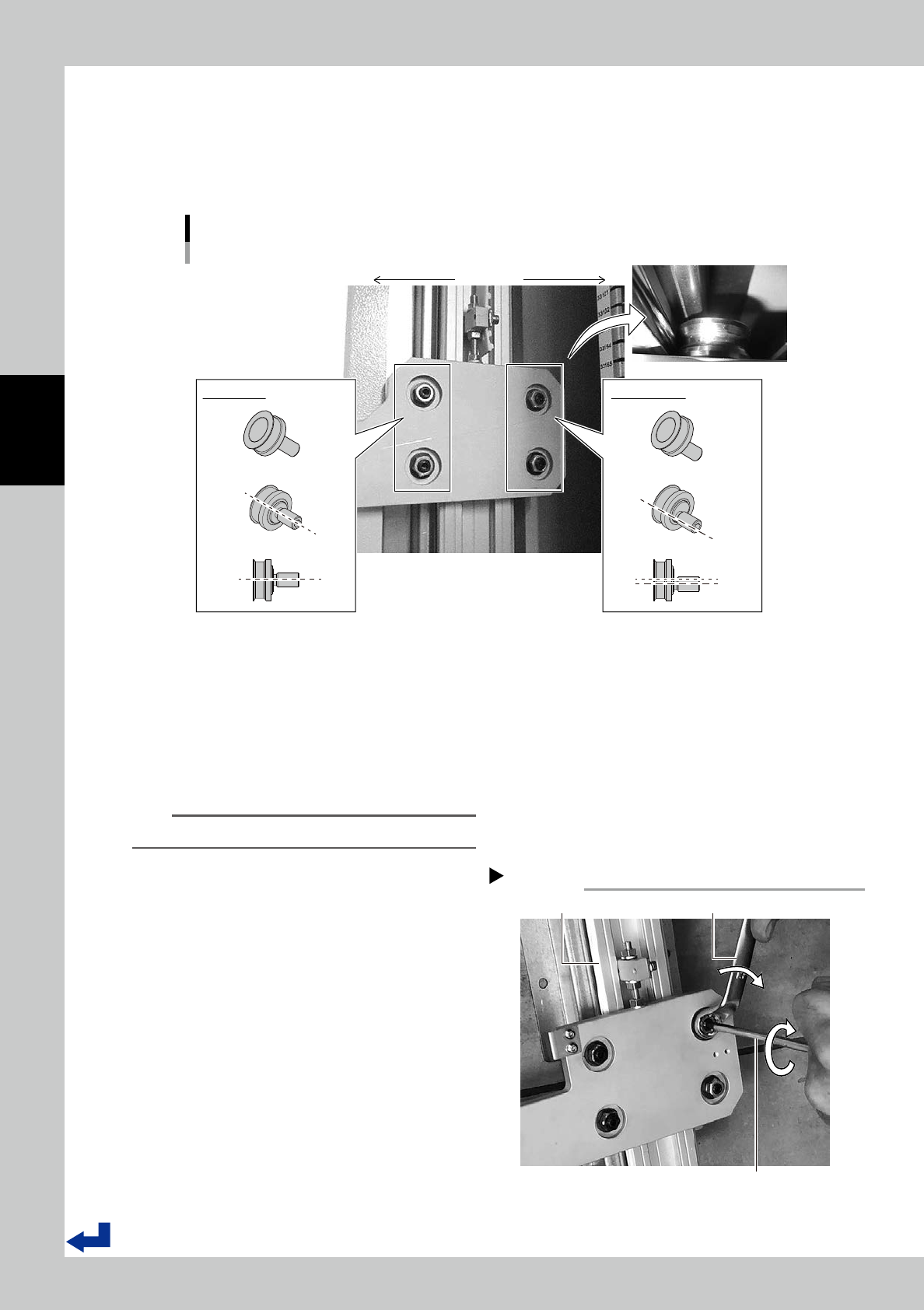
Adjustment procedure for the distance between Y-axis slider and its carrier wheels.
There are two types of carrier wheels, normal type and eccentric type.
Changing the position of eccentric type wheels can adjust the distance between the slider and it carrier wheels.
Normal type carrier wheels are positioned at rear side of the machine.
Eccentric type carrier wheels are positioned at front side of the machine.
2 types of carrier wheels
Front side
Rear side
Normal type Eccentric type
53320-KMS-00
1
Loosen nuts for eccentric type
carrier wheels.
Use a wrench (13 mm) to loosen two nuts of
the eccentric type carrier wheels with
holding the wheels with a hex wrench (4
mm).
n
NOTE
It is recommended that a wrench is a box wrench.
2
Adjust the position of the eccentric
type carrier wheels.
1. Rotate a wheel with a hex wrench to
push a wheel onto the stainless rail.
2. While keeping it, tighten the nut with a
wrench to fix the wheel.
3. Repeat for the other wheel to adjust it.
3
Check if Y-axis sliders don't rattle.
Move the handler up and down on Y-axis by
hands to check if Y-axis sliders don’t rattle or
they move smoothly.
Adjust eccentric carrier wheels
Step 2
Stainless rail of Y-axis
1. Use a hex wrench (6 mm) to push
the career wheel onto the rail.
2. Use a wrench (13 mm) to tighten nuts.
53321-KMS-00
3-17
3
Yearly maintenance items
3.4 Checking the white belt of Y-axis
1
Turn the machine off.
2
Move the handler on Y-axis to the
place where it is easy to work.
Open a side door, then move the handler a
little upper from the middle on Y-axis so that
it is easy to work.
3
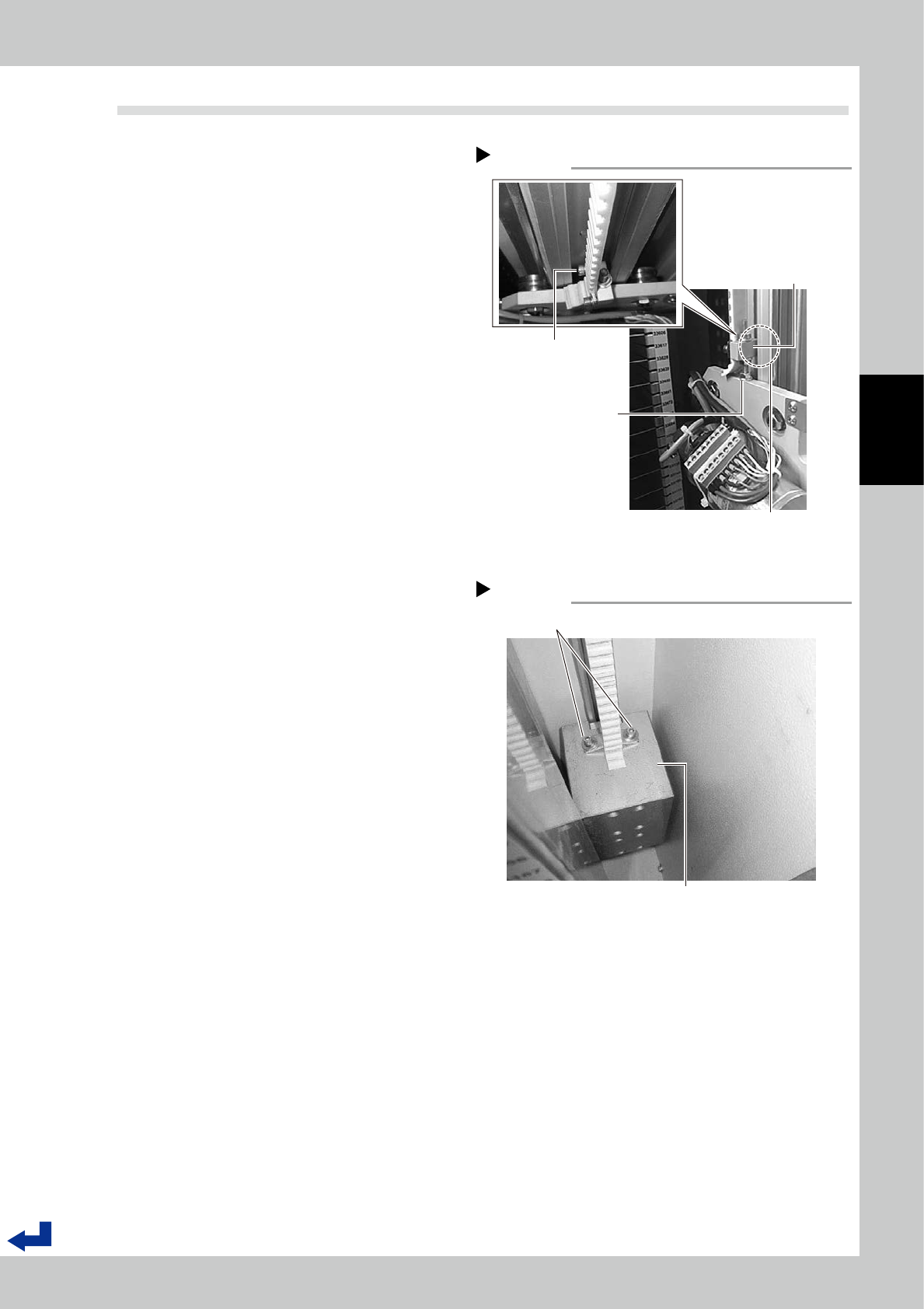
Check the block fixing Y-axis belt.
1. Use a hex wrench (3 mm) to check if the
nut, which fixes the slider, for the block
fixing Y-axis belt is tighten securely.
2. Check if the block fixing Y-axis belt
doesn't interfere with the rail.
3. Check if the bolt fixing Y-axis belt is
tighten securely.
4
Check if Y-axis belt is fixed
securely.
1. Move the handler to the place where it is
easy to see Y-axis weight on Y-axis by
hands.
2. Use a hex wrench (4 mm) to check if the
bolts fixing Y-axis belt are tighten secure-
ly.
5
Check Y-axis belt.
Move the handler up and down on Y-axis by
hands to check if there are contamination
or damage on the belt.
6
Check Y-axis belt on the other side.
Repeat Step2 to Step5 to check Y-axis belt
on the other side.
Y-axis weight
Step 4
Check if the fixing bolts are tighten securely.
Y-axis weight
53323-KMS-00
The block fixing Y-axis belt
Step 3
Check if the nut is tighten
securely
The block fixing
Y-axis belt
The bolt fixing Y-axis belt
is tighten securely.
Check if the block doesn't
interfere with the rail.
53322-KMS-00