00198829-01_SM_X-Series-S_Hxxxx_EN.pdf - 第252页
7 Conveyor 7.11 Mapping 252 Service Manual SIPLACE X-Series S (from Hxxxx) 01/2021 Fig.335: Service menu ► Click on this button . ► Select Single calibration . Fig.336: Calibrating the conveyor sides ► Click on this bu…
7 Conveyor
7.10 Conveyor sides
Service Manual SIPLACE X-Series S (from Hxxxx) 01/2021 251
► Tighten the fastening screw of the movable idler pulley.
► Check the parallelism of the adjustment units again and correct again if necessary.
► If the conveyor side clamps have loosened, fix these again.
► Set the tension of the toothed belt.
7.5.3.1 "Setting the belt tension (width adjustment)" [}183]
► Calibrate the width adjustment motor.
(The calibration is identical for the lifting table motor.)
► Use the software to move the fixed conveyor side. This ensures that the fixed conveyor side is
parallel to the flexible sides. Readjust the fixed conveyor side to its original value after that.
7.10.3 Calibrating the Conveyor Rails
NOTICE
This chapter is valid for machines with dual conveyor (DC) only.
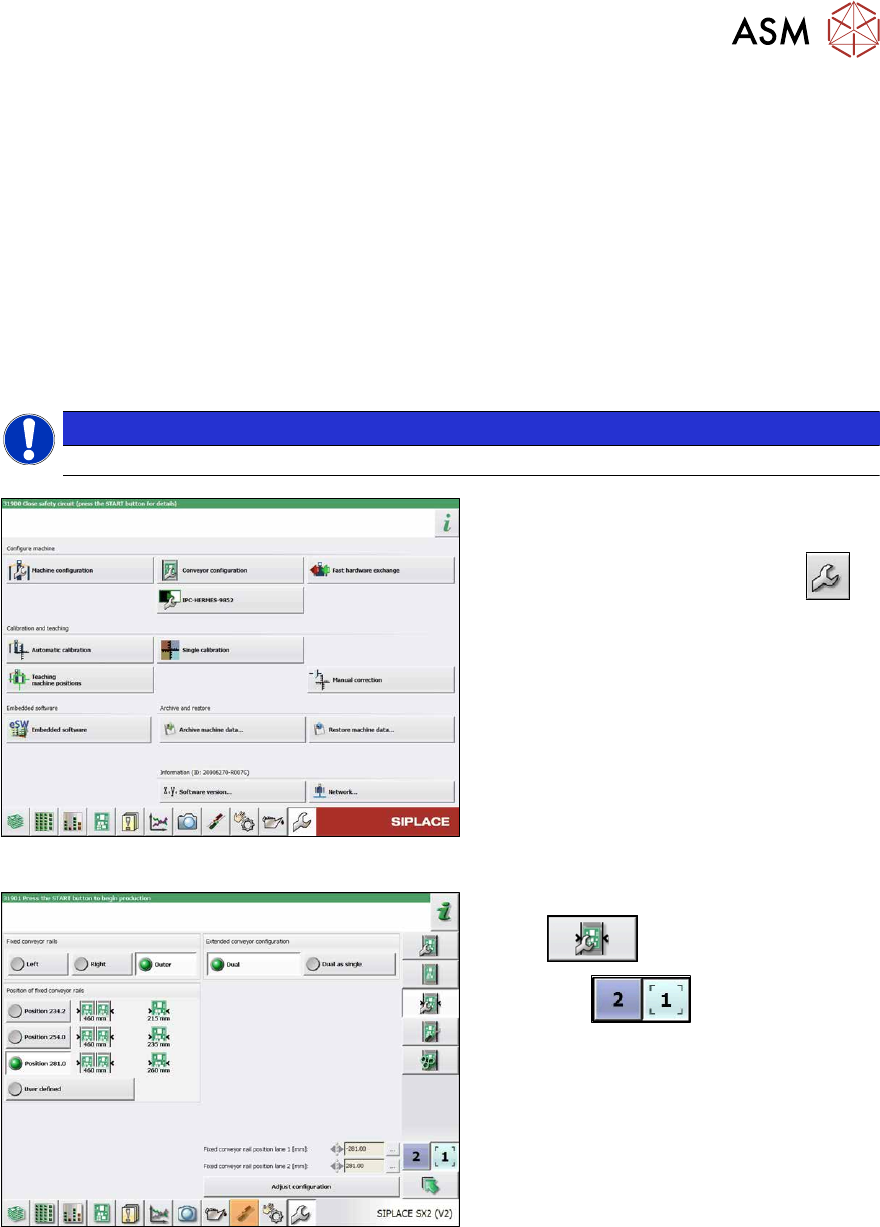
Fig.333: Service menu
► Switch over to the operator level Ma-
chine service.
► Switch over to the service menu .
► Select Conveyor configuration.
Fig.334: Setting the conveyor side
► Select Set options for conveyor fixed
rail .
► Use the button to select the
required conveyor lane.
► Set the conveyor position and confirm
with the Adjust configuration
button.
The fixed sides will later have their original
positions again.
7 Conveyor
7.11 Mapping
252 Service Manual SIPLACE X-Series S (from Hxxxx) 01/2021
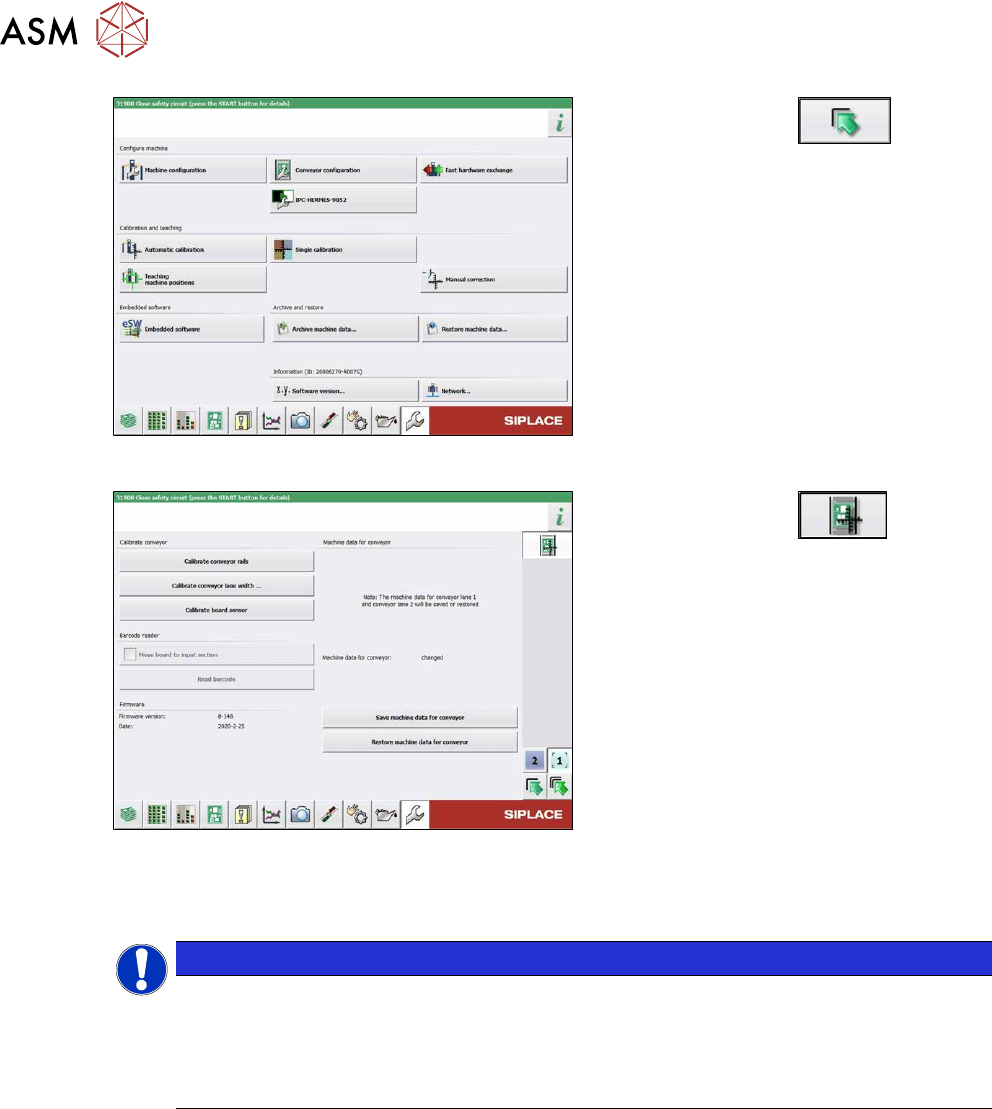
Fig.335: Service menu
► Click on this button .
► Select Single calibration.
Fig.336: Calibrating the conveyor sides
► Click on this button .
► Select Calibrate conveyor sides.
7.10.4 Fixed Side Right/Left
NOTICE
No conversion possible
The SIPLACE X-Series S single conveyor is available in the variants "fixed side right" and
"fixed side left".
Conversion from a fixed side right to a fixed side left or vice versa is not possible. In this
case, the conveyor must be replaced by your SIPLACE service team.
7.11 Mapping
For information about mapping, refer to the technical information "Overview of all mapping plates
and allocation to the machines" [DE:TI2017‑10D04] [EN:TI2017‑10E04].
8 Head exchange
8.1 Fast Hardware Exchange
Service Manual SIPLACE X-Series S (from Hxxxx) 01/2021 253
8 Head exchange
DANGER
Observe User Manual
► Please observe the safety instructions in the user manual for all work!
See also
2 8.2 "Differentiation of the SIPLACE C&P20 head variants" [}257]
8.1 Fast Hardware Exchange
Fast Hardware Exchange (FHE) enables you to change a placement head within 15minutes.
NOTICE
Only SIPLACE CPPx and SIPLACE C&P20x
FHE is only possible with SIPLACE CPPx and SIPLACE C&P20x.
SIPLACE Twin needs to be manually processed and calibrated.
Equipment and tools
The head exchange kits contain all the tools required for replacing the relevant head:
●
Head Exchange Kit option for SIPLACE CPx [03109694‑xx]
●
Head Exchange Kit option for SIPLACE CPP [03109570‑xx]
●
Head Exchange Kit option for SIPLACE C&P20P [03114808‑xx]
●
Head Exchange Kit option for SIPLACE C&P20P2 [03172724‑xx]
8.1.1 Preparing the FHE in the Software
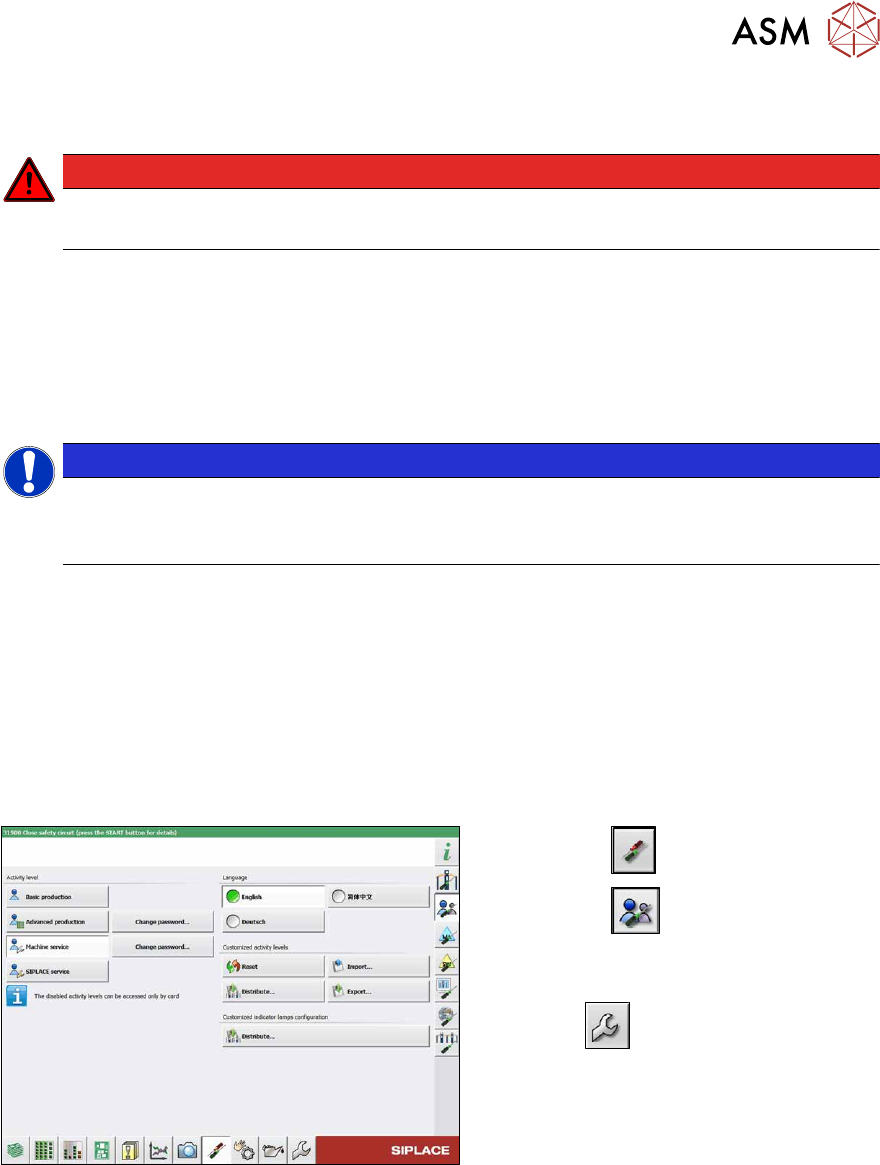
Fig.337: Select operator level
► Select the button.
► Select the button.
► Switch over to the operator level Ma-
chine service.
ð The button will be shown.