00198829-01_SM_X-Series-S_Hxxxx_EN.pdf - 第256页
8 Head exchange 8.1 Fast Hardware Exchange 256 Service Manual SIPLACE X-Series S (from Hxxxx) 01/2021 ► Follow the instructions on the screen for all further steps. NOTICE Nozzles In the event of repairs, it is not alway…
8 Head exchange
8.1 Fast Hardware Exchange
Service Manual SIPLACE X-Series S (from Hxxxx) 01/2021 255
8.1.2 Removing and Installing the Placement Head
► For actually removing and installing the placement head hardware, proceed as described in
the relevant chapter.
8.6 "Replacing the SIPLACE C&P20P2" [}265]
8.5 "Replacing the SIPLACE C&P20P/M2" [}260]
8.7 "Replacing the SIPLACE CPP/M" [}270]
8.1.3 Completing the FHE in the Software
► Switch the machine on.
After being switched on again the machine issues the message Changed heads detected and ex-
pects a calibration.
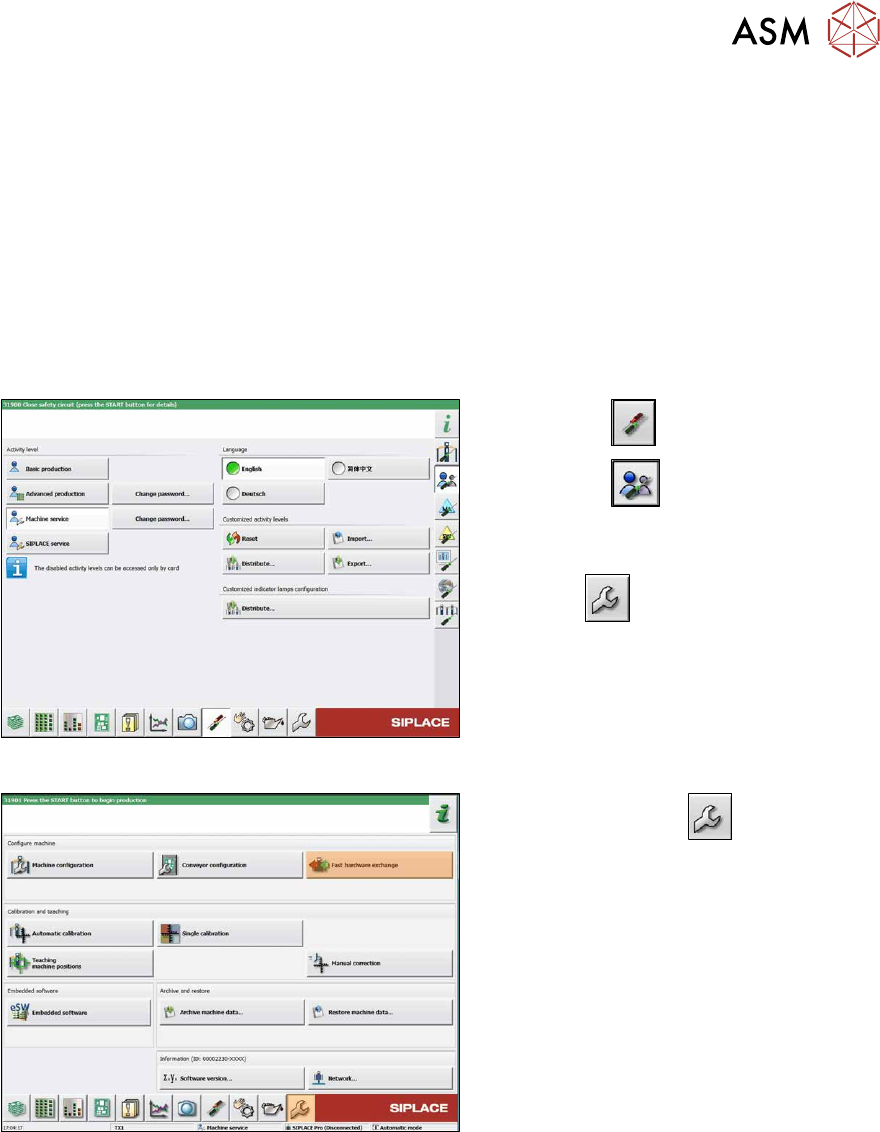
Fig.340: Select operator level
► Select the button.
► Select the button.
► Switch over to the operator level Ma-
chine service.
ð The button will be shown.
Fig.341: Service menu
► Select the Service button.
► Select the Fast hardware exchange
button.
8 Head exchange
8.1 Fast Hardware Exchange
256 Service Manual SIPLACE X-Series S (from Hxxxx) 01/2021
► Follow the instructions on the screen for all further steps.
NOTICE
Nozzles
In the event of repairs, it is not always possible to simply return the nozzles from a defective
head to the nozzle changer in order to achieve a defined state. It may not be possible at all
to achieve a defined state. After the head exchange the software stores the nozzle config-
uration of the defective head and the nozzle changer. You can then refill the garages to re-
store the same level as before the head failure.
If the newly fitted head is equipped with calibration nozzles, these will either be placed in
empty nozzle garages or rejected after the calibration. The nozzles required for the job can
then be picked up and the production can be started.
You can also skip refilling the garages. In this case you have to refill the nozzle changer
before the start of the production.
NOTICE
Not enough calibration tools
► If there is no calibration tool present for each head, click on the Cannot supply all
calibration tools at once button. Depending on your machine type you may be
prompted to provide the calibration tool for each head individually.
► Only one calibration tool is used per placement area for the SIPLACE X2 S, X3 S and
X4 S.
► Where possible, all four calibration tools should be used for the SIPLACE X4i S.
► If there is an empty magazine in the machine after the calibration has been completed, select
the Remove calibration nozzles
button.
► Select the Finish button.
► If there are any problems during the reference run (vacuum check), perform zero correction
for the pressure control valve.
The exchange has now been completed and production can be restarted.
8 Head exchange
8.2 Differentiation of the SIPLACE C&P20 head variants
Service Manual SIPLACE X-Series S (from Hxxxx) 01/2021 257
8.2 Differentiation of the SIPLACE C&P20 head variants
CAUTION
Do not confuse the different SIPLACE C&P20 head variants.
► As a rule, spare parts can only be used in the variant for which they are intended!
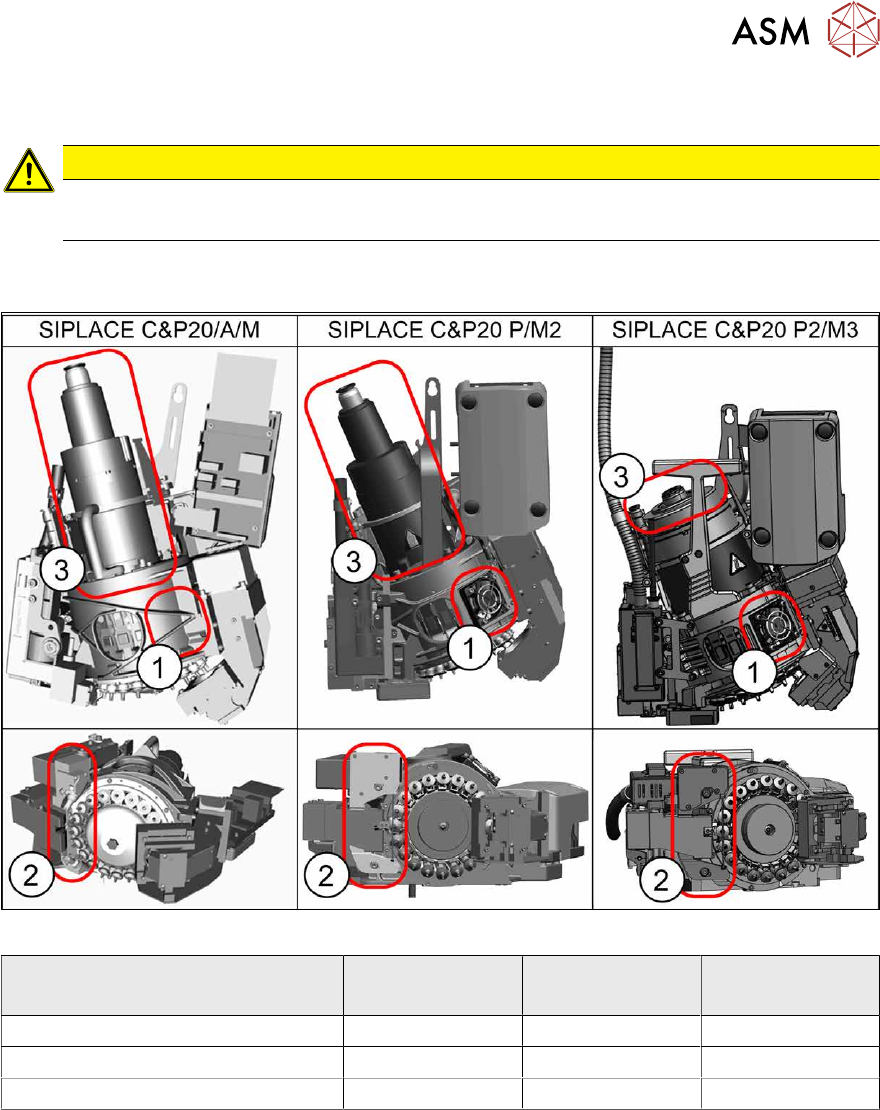
The various SIPLACE C&P20 variants vary in many details. The heads can be most easily differen-
tiated using these three features:
Fig.342: Differentiation of the SIPLACE C&P20 head variants
Head
Distinction criterium
SIPLACE
C&P20/A/M
SIPLACE
C&P20 P/M2
SIPLACE
C&P20 P2/M3
(1) Cooling fan Not present Present Present
(2) Component sensor design Narrow, high Wide, flat Wide, flat
(3) Holding circuit-connection design High High Flat