00198829-01_SM_X-Series-S_Hxxxx_EN.pdf - 第66页
4 Electrics and control system 4.2 BoxPC 66 Service Manual SIPLACE X-Series S (from Hxxxx) 01/2021 4.2 BoxPC 4.2.1 Replacing the Control Computer BoxPC NOTICE Microsoft Windows 10 / Microsoft Windows Server from 2012R2 F…
4 Electrics and control system
4.1 Electrical System
Service Manual SIPLACE X-Series S (from Hxxxx) 01/2021 65
4 Electrics and control system
DANGER
Observe User Manual
► Please observe the safety instructions in the user manual for all work!
4.1 Electrical System
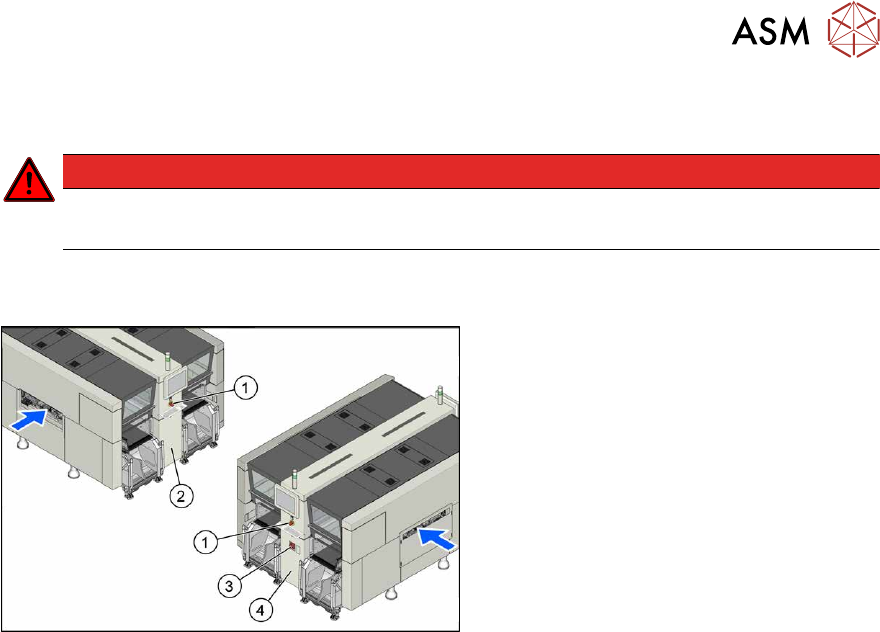
Fig.72: Electrics (example of X4i S shown)
1. Emergency stop button
2. MHCU, MGCU, BoxPC
(behind the cover)
3. Main switch
4. Power supply (behind the cover)
4 Electrics and control system
4.2 BoxPC
66 Service Manual SIPLACE X-Series S (from Hxxxx) 01/2021
4.2 BoxPC
4.2.1 Replacing the Control Computer BoxPC
NOTICE
Microsoft Windows 10 / Microsoft Windows Server from 2012R2
From R19-2, the ASM line software only supports Microsoft Windows 10 and Microsoft Win-
dows Server from 2012R2.
► For more information, read the technical information [DE:TI2019‑10D05]
[EN:TI2019‑10E05].
Parts, equipment and tools
PC type Spare part
Station computer Control computer BoxPC-427D i3 2xPCIe W10 [03114177-xx]
Option for 3D coplan BoxPC ABP402-A CPU1020E 2xPCI SSD (iBase) [03120423‑xx] (re-
places: BoxPC 627C [03094731‑xx])
CAUTION
Additional hardware for the BoxPC
The BoxPC is supplied without the following parts. If required, these must be removed from
the old BoxPC and fitted in the new one or ordered as new parts:
Spare part SIPLACE X-Series S from Hxxxx
GigE interface
(cameras)
GigE Ethernet adapter PCI-E I350T4V2BLK [03135985‑xx] (replaces:
[03105575‑xx])
RAM See Replacing the RAM in the BoxPC
Ethernet adapter Permanently installed.
If a 3D coplan or a barcode scanner is installed, you also need a LAN card
in the station computer:
●
LAN card PCI-Express 2x gigabit LAN [03198999‑xx] (replaces
[03118416‑xx])
●
Installation manual for the operating system
NOTICE
Removal/installation of coplanarity computer
To replace the coplanarity computer, read the assembly instructions:
► Assembly instructions "SIPLACE X‑Series S 3D-Sensor Coplanar-
ity" [DEEN:00197395‑xx]
4 Electrics and control system
4.2 BoxPC
Service Manual SIPLACE X-Series S (from Hxxxx) 01/2021 67
Overview
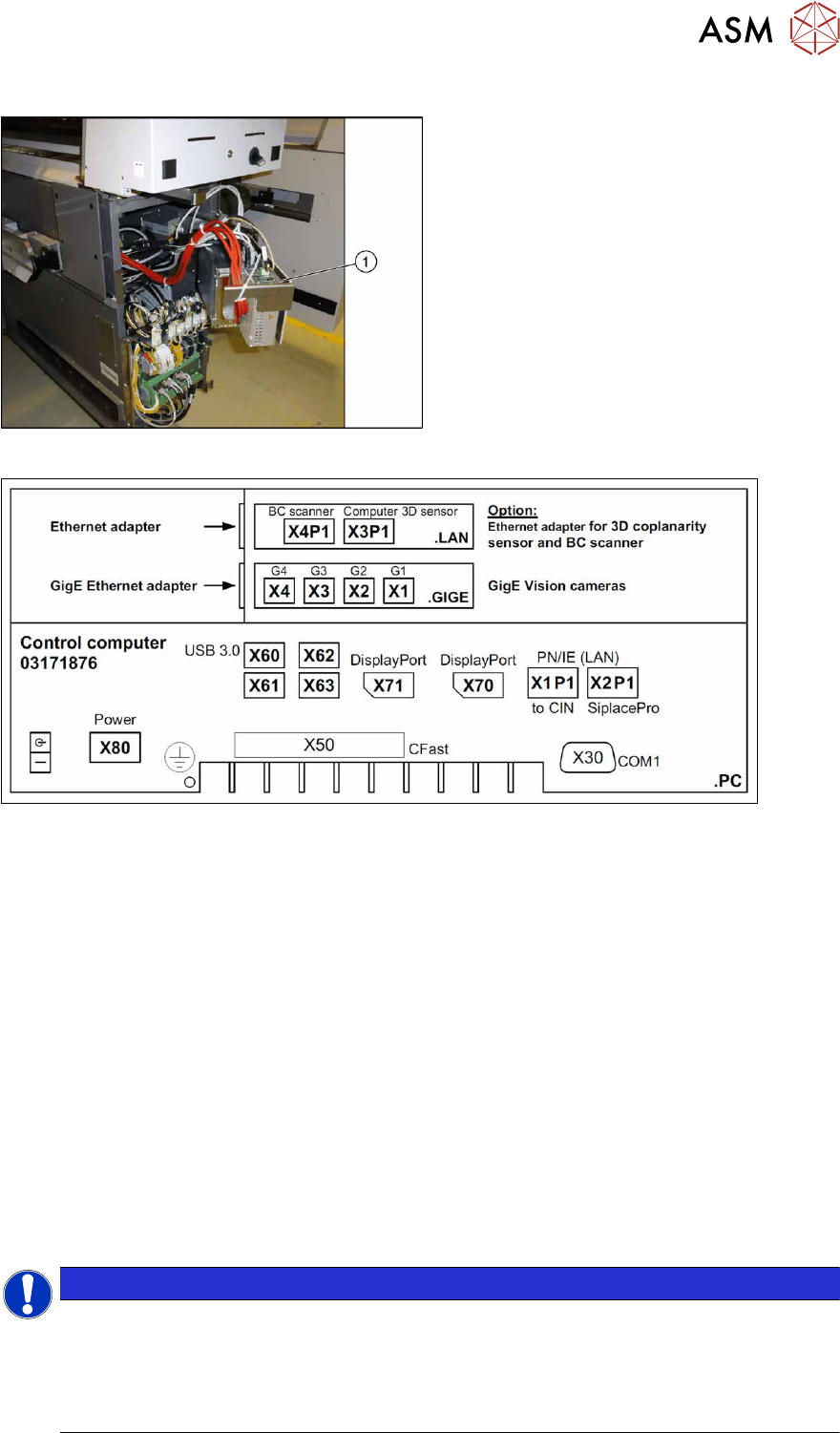
Fig.73: BoxPC in machine
1. BoxPC
The BoxPC is located behind the cover,
between locations 1 and 2.
Fig.74: BoxPC 427D – connections
Removal
► Back up the machine data.
► Switch off the machine, disconnect it from the power supply and secure it to prevent
unauthorized reactivation.
1.2 "Preparatory work..." [}16]
► Unplug all press-fit connections to the BoxPC. If necessary, mark their positions to make clear
assignment easier later on.
► Loosen the screws fastening the Box PC and remove it from the machine.
Installation
Follow the removal instructions in reverse order for installation. Also observe the following instructions:
► If parts are missing in the new BoxPC (e.g. ethernet adapter, memory extension), take these
from the old BoxPC and use them in the new one.
4.2.4 "Replacing the RAM in the BoxPC" [}70]
4.2.2 "Replacing the GigE Ethernet Adapter" [}68]
4.2.3 "Replacing the LAN card" [}69]
NOTICE
Installing the BoxPC
► The BoxPC needs to be installed after it has been fitted. Read the relevant installation guide.
► BIOS update and setting images are no longer included on the station software CD.
The CDs for the BIOS settings are only available via the SIPLACE Software Download
Center (SDC).