00198829-01_SM_X-Series-S_Hxxxx_EN.pdf - 第59页
3 Power supply 3.4 Power supply and transformer modules Service Manual SIPLACE X-Series S (from Hxxxx) 01/2021 59 3.4.7 Setting the Voltage on the AC/DC Converters Parts, equipment and tools ● Voltage measuring device Ov…
3 Power supply
3.4 Power supply and transformer modules
58 Service Manual SIPLACE X-Series S (from Hxxxx) 01/2021
3.4.6 Replacing the AC/DC Converter
Parts, equipment and tools
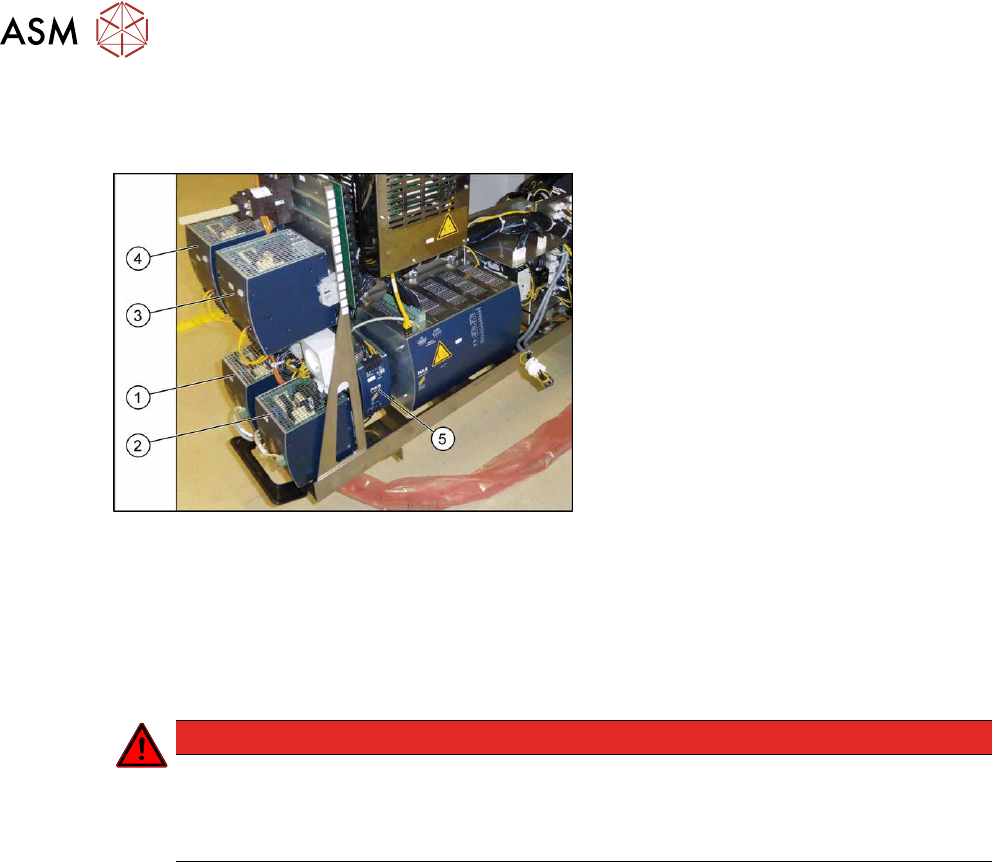
Fig.62: Overview of the AC/DC converter
1. PS1: AC-/DC converter DC300/150V
1.3kW 3 phase [03103087‑xx]
300/160 V for gantry 1/4
2. PS2: AC-/DC converter DC300/150V
1.3kW 3 phase [03103087‑xx]
300/160 V for gantry 2/3
3. PS3: AC/DC converter 36V 26.7A
960W 3 phase [03103331‑xx]
→ 42 V for Vision, head, conveyor mo-
tors
4. PS4: AC/DC converter DC24V/40A 3
phase [03102840‑xx]
→ 27 V for FCU
5. PS5: AC/DC converter DC24V/20A
3 phase [03055232‑xx]
→ 24V
Removal
► Switch off the machine, disconnect it from the power supply and secure it to prevent
unauthorized reactivation.
1.2 "Preparatory work..." [}16]
DANGER
Checking for absence of voltage!
► Before you start working check the power supply for absence of voltage and observe
the waiting times! For more information about this read section 3.4.3
"Checking For
Absence of Voltage" [}49].
► When replacing the AC/DC converter (PS5) fitted at the side:
Pull the power supply out of the machine a little.
► Unplug all electrical connections from the AC/DC converter. You may want to mark the posi-
tions of these connections to make clear assignment easier later on.
► Open the lock under the AC/DC converter. Tilt the AC/DC converter slightly upwards and then
take it up and off.
Installation
Follow the removal instructions in reverse order for installation. Also observe the following instruc-
tions:
► Set the AC/DC converter (see 3.4.7 "Setting the Voltage on the AC/DC Converters" [}59]).
3 Power supply
3.4 Power supply and transformer modules
Service Manual SIPLACE X-Series S (from Hxxxx) 01/2021 59
3.4.7 Setting the Voltage on the AC/DC Converters
Parts, equipment and tools
●
Voltage measuring device
Overview
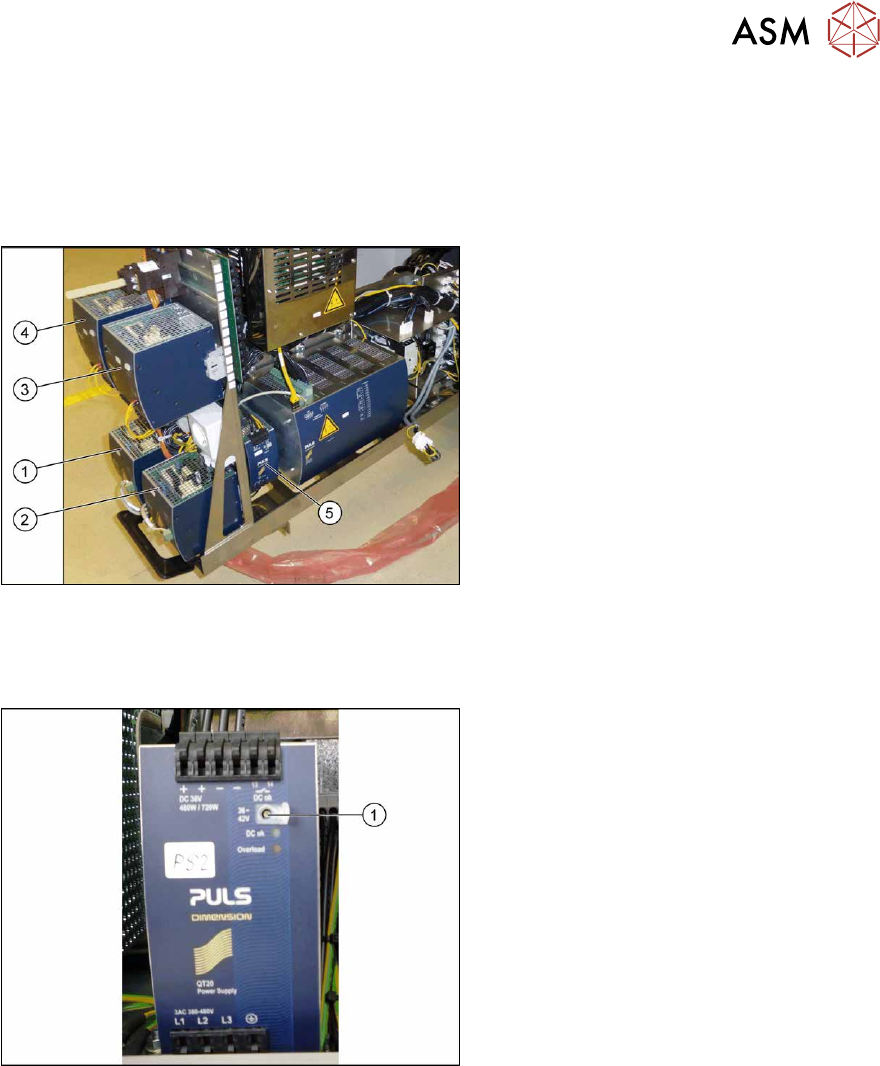
Fig.63: Overview of the AC/DC converter
1. PS1: AC-/DC converter DC300/150V
1.3kW 3 phase [03103087‑xx]
300/160 V for gantry 1/4
2. PS2: AC-/DC converter DC300/150V
1.3kW 3 phase [03103087‑xx]
300/160 V for gantry 2/3
3. PS3: AC/DC converter 36V 26.7A
960W 3 phase [03103331‑xx]
→ 42 V for Vision, head, conveyor mo-
tors
4. PS4: AC/DC converter DC24V/40A 3
phase [03102840‑xx]
→ 27 V for FCU
5. PS5: AC/DC converter DC24V/20A
3 phase [03055232‑xx]
→ 24V
Setting
Fig.64: Setting the AC-DC converter
► Open the protective cap on the setting
screw(1)
.
► Use a flat-bladed screwdriver to set the
correct voltage on the AC/DC con-
verter.
Check the voltage with a suitable
voltage measuring device between the
terminals +
and–.
3 Power supply
3.4 Power supply and transformer modules
60 Service Manual SIPLACE X-Series S (from Hxxxx) 01/2021
3.4.8 Replacing the main switch
Parts, equipment and tools
●
Main switch 3 pin 25A type P1-25/V/SVB [03114066-xx]
Overview
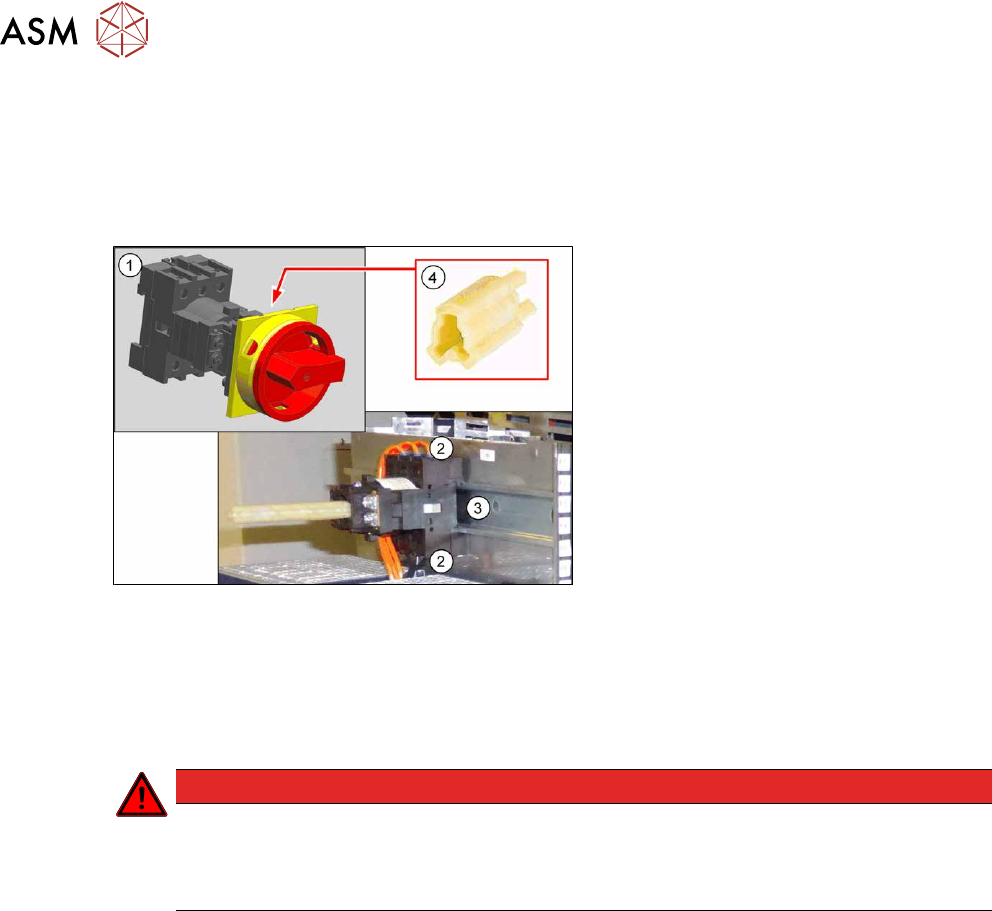
Fig.65: Main switch - overview
1. Main switch 3 pin 25A type P1-25/V/
SVB [03114066-xx]
2. Electrical connections (3 each on top
and bottom)
3. Mounting rail
4. Axis extension ZAV-T0 for T0, T1, P1
[03119456‑xx]
Removal
► Switch off the machine, disconnect it from the power supply and secure it to prevent
unauthorized reactivation.
1.2 "Preparatory work..." [}16]
DANGER
Checking for absence of voltage!
► Before you start working check the power supply for absence of voltage and observe
the waiting times! For more information about this read section 3.4.3
"Checking For
Absence of Voltage" [}49].
► Unplug the electrical connections on top and bottom of the main switch. You might like to
mark their positions to make clear assignment easier later on.
► Pull the main switch off the mounting rail.
Installation
Follow the removal instructions in reverse order for installation.