00198829-01_SM_X-Series-S_Hxxxx_EN.pdf - 第273页
8 Head exchange 8.7 Replacing the SIPLACE CPP/M Service Manual SIPLACE X-Series S (from Hxxxx) 01/2021 273 8.7.1 Preparing the SIPLACE CPP for the installation height CAUTION Different heights The placement head can be i…
8 Head exchange
8.7 Replacing the SIPLACE CPP/M
272 Service Manual SIPLACE X-Series S (from Hxxxx) 01/2021
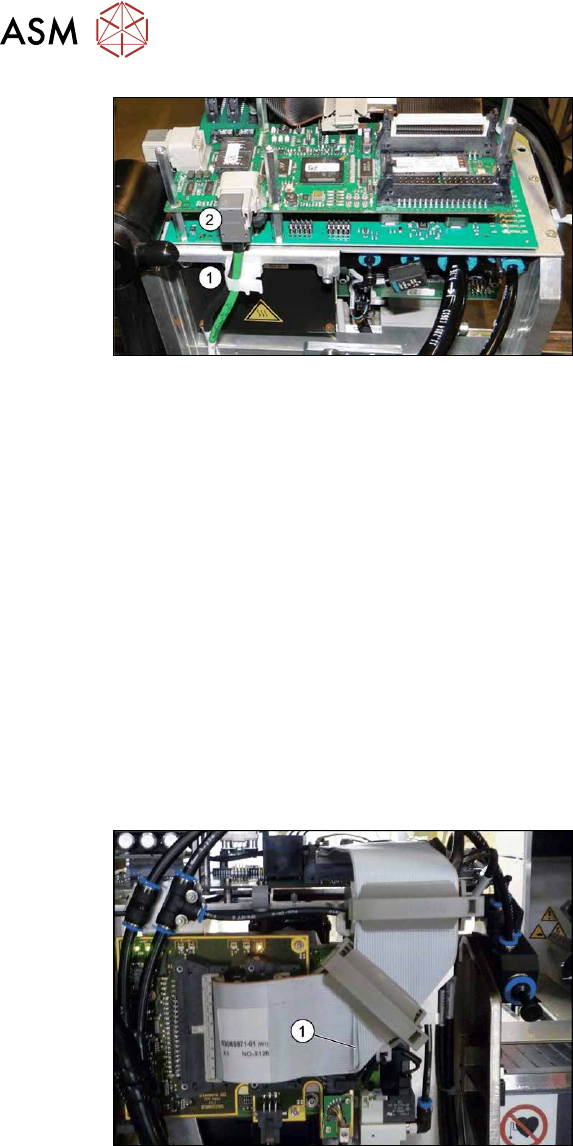
Fig.364: Cables (with GigE)
► Open the cable holder(1) and unplug
the component camera cable(2)
.
► Remove all four screws fastening the head with a long Torx screwdriver.
► Carefully lift the head out of the locating pins on the head plate and off the hook.
► Placing the head into the head transport box
► If you need to perform further work on this placement head (e.g. replacing spare parts), fit the
placement head to the head mount [03056231-xx].
Installation
► If you replace the head without the component camera, you will need to fit the old camera
onto the new head. Read the service manual for your placement head for more information.
► Observe the correct installation height of the head!
(for top and bottom installation position, see 8.7.1
"Preparing the SIPLACE CPP for the install-
ation height" [}273])
► Make sure that the assembly position on the head plate is correct.
► Tighten the four fastening screws with a torque of 2.7Nm.
► Make sure that the flat ribbon cable is run correctly to the head adaptor (see below).
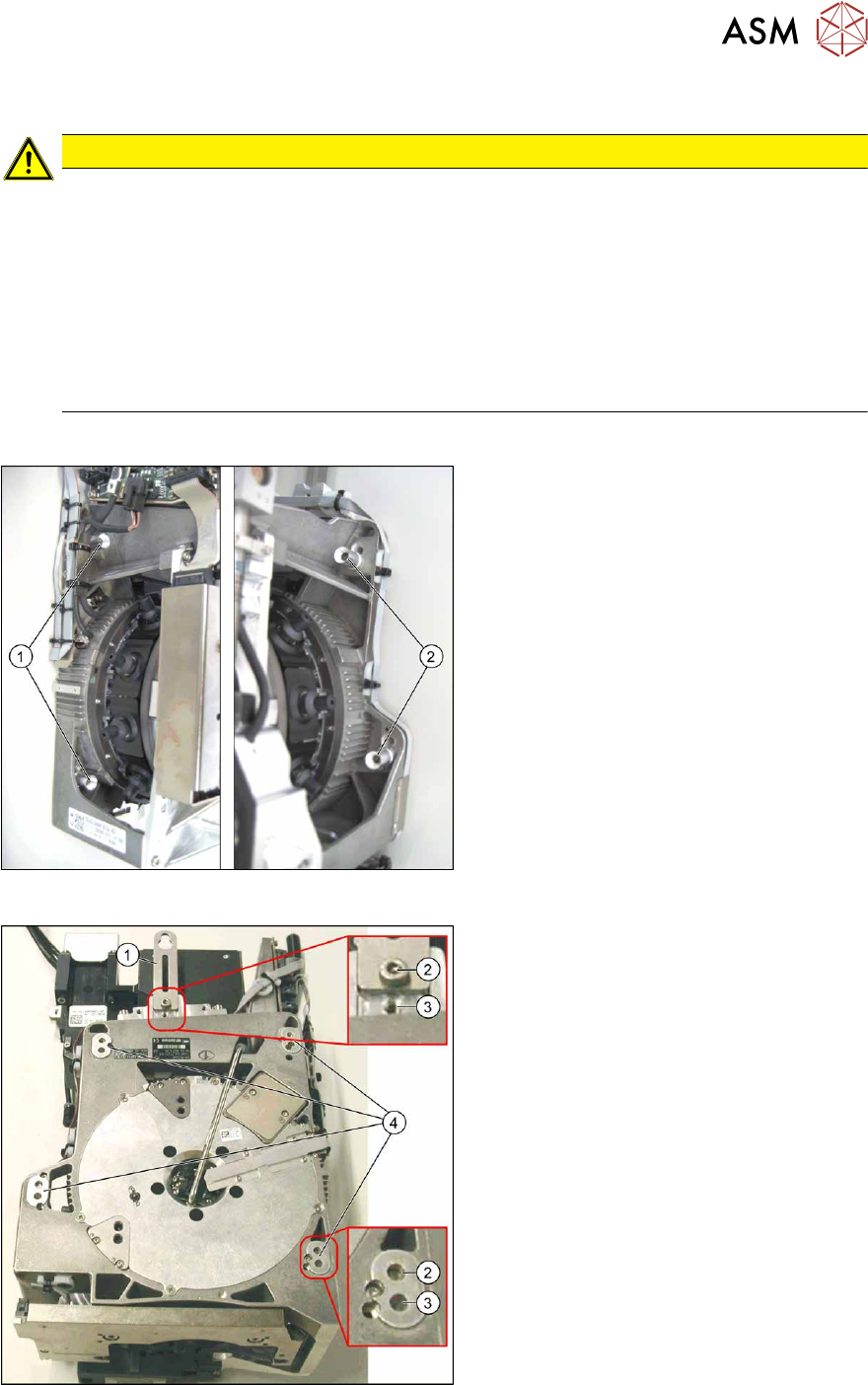
Fig.365: Flat ribbon cable
Correct running of flat ribbon cable to
head adaptor
► Make sure that the flat ribbon cable is
run correctly to the head adapter. In
particular, the cables must lie inside
one another at the 90 degrees turn(1)
and not on top of one another, other-
wise the connections on the head
adapter could be easily confused.
Follow the removal instructions in reverse order for further installation.
See also
2 8.9 "Installation Positions on the Head Plate" [}278]
8 Head exchange
8.7 Replacing the SIPLACE CPP/M
Service Manual SIPLACE X-Series S (from Hxxxx) 01/2021 273
8.7.1 Preparing the SIPLACE CPP for the installation height
CAUTION
Different heights
The placement head can be installed at two different heights.
Installation position low: CPP_L corresponds to a component height of six mm maximum.
Installation position high: CPP_H corresponds to a component height of 11.5 mm max-
imum.
► If the SIPLACE CPP is used in a placement area with stationary camera, SIPLACE
Twin or SIPLACE WPC, it may only be used in the upper position!
► If the SIPLACE CPP is operated in mixed mode with a SIPLACE C&P20P2, this will
need to be fitted in the bottom position!
Overview
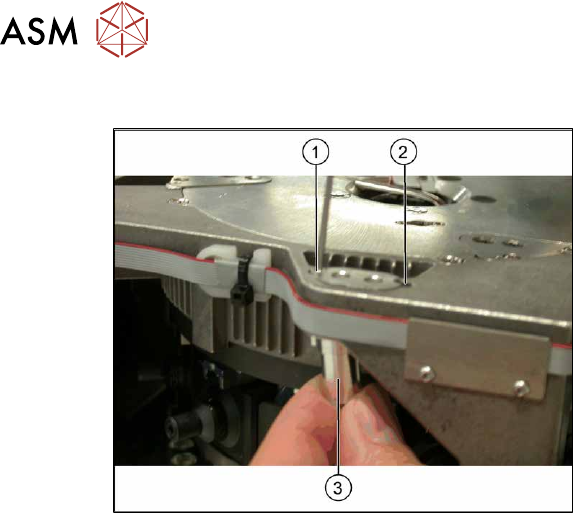
Fig.366: Fastening screws
1. Fastening screws on the left side
2. Fastening screws on the right side
This diagram shows the fastening screws in
the "head at top" position.
Fig.367: SIPLACE CPP – positions
1. Retaining plate
2. "Head at bottom" position
3. "Head at top" position
4. Fixture holes with bushings for the cap-
tive screws
8 Head exchange
8.8 Replacing the SIPLACE Twin
274 Service Manual SIPLACE X-Series S (from Hxxxx) 01/2021
Conversion to another installation height
Fig.368: Conversion
1. Hole for the fastening screw of the
bushing in "head at bottom" position
2. Hole for the fastening screw of the
bushing in "head at top" position
3. Bushing
All four bushings and the retaining plate
must either be fixed in top or bottom posi-
tion.
Proceed as follows when replacing the
bushings:
► Undo the fastening screws of the bush-
ings.
► Insert the bushings in the correct posi-
tion and re-tighten them.
► Perform these steps for all four fasten-
ing bushings and the retaining plate for
the head.
8.8 Replacing the SIPLACE Twin
Parts, equipment and tools
●
Select the relevant placement head:
– Twin Pick&Place module [03033628-xx]
– Twin Pick&Place module THK R2 [03097485-xx]
●
Torque screwdriver 1-5 Nm [03078400-xx]
●
Extension/straight TX20 [03073256-xx]
●
Extension/straight [03043440-xx]
●
Bit holder for Torque Vario-S screwdriver [03078706-xx]
●
Calibration tool version 3 [03010565-xx]
For additional work to the placement head:
●
Head mount [03056231‑xx]
●
Service manual "SIPLACE Twin" [DE:00197468‑xx] [EN:00197469‑xx]
●
Job Card "Preventive Maintenance Twin" [DE:00197604‑xx] [EN:00197603‑xx] (other lan-
guages available)