00198829-01_SM_X-Series-S_Hxxxx_EN.pdf - 第47页
3 Power supply 3.3 Pulling out the Power Supply Service Manual SIPLACE X-Series S (from Hxxxx) 01/2021 47 3.3 Pulling out the Power Supply CAUTION Risk of tipping If you pull out the power supply completely, there is a r…
3 Power supply
3.2 Electrical Checks
46 Service Manual SIPLACE X-Series S (from Hxxxx) 01/2021
Preparation
CAUTION
Take care not to damage the supply lines!
Make sure that the main power cable and supply cables in the machine are not trapped and
that the insulation is not damaged.
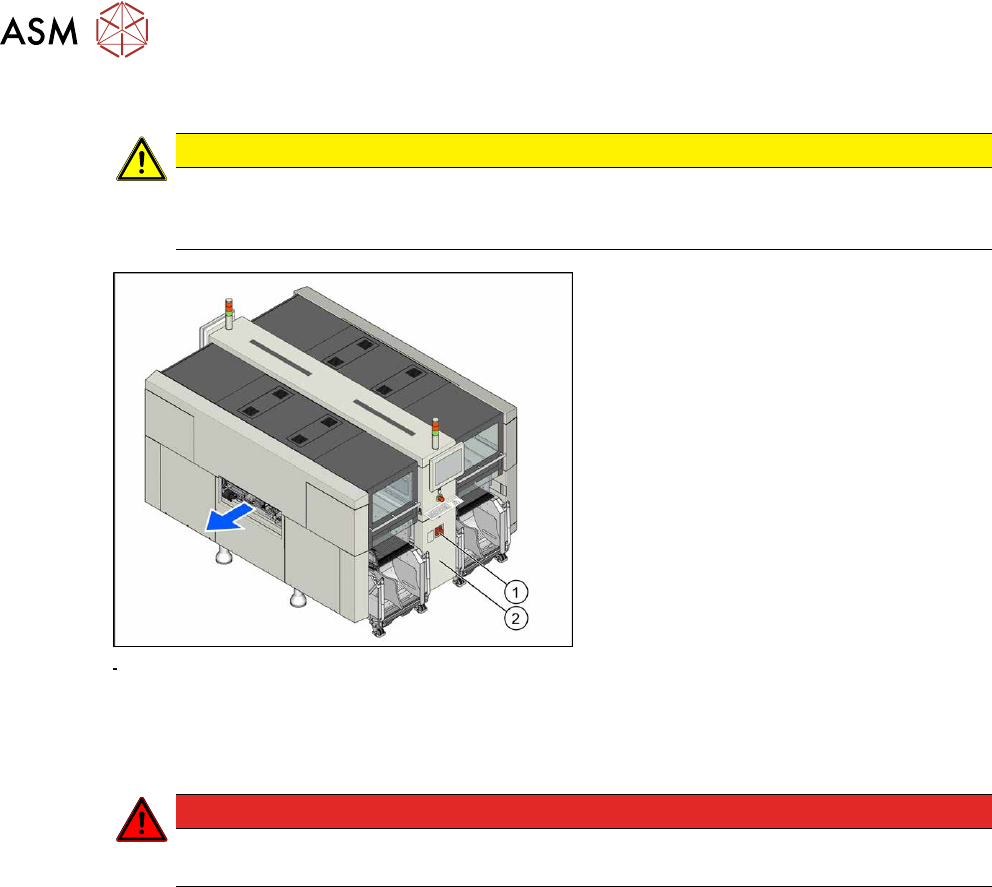
Fig.43: Main switch
► End all placement operations and
switch the machine off at the main
switch(1)
.
► Disconnect the machine from the main
power supply.
► Open the lock on the power supply
cover(2)
.
► Remove the power supply fastening screw and pull out the power supply.
► Reconnect the machine to the power supply.
DANGER
Touch voltages
Careful: there may be dangerous touch voltages in the vicinity of the open power supply!
► Switch the machine on again at the main switch and start it up.
Voltages
► Measure the required voltages.
Please refer to the relevant circuit diagram for your machine for details of the various voltages.
●
Detailed circuit diagrams folder for SIPLACE X-Series S (from Hxxxx) [DE+EN:00197920‑03]
●
Detailed circuit diagrams folder for SIPLACE X-Series S (from H1440) [DE EN: 00197920-04]
●
Detailed circuit diagrams folder for SIPLACE X-Series S (from H2500) [DE EN: 00198730-xx]
3 Power supply
3.3 Pulling out the Power Supply
Service Manual SIPLACE X-Series S (from Hxxxx) 01/2021 47
3.3 Pulling out the Power Supply
CAUTION
Risk of tipping
If you pull out the power supply completely, there is a risk of tipping.
► Support the power supply from below.
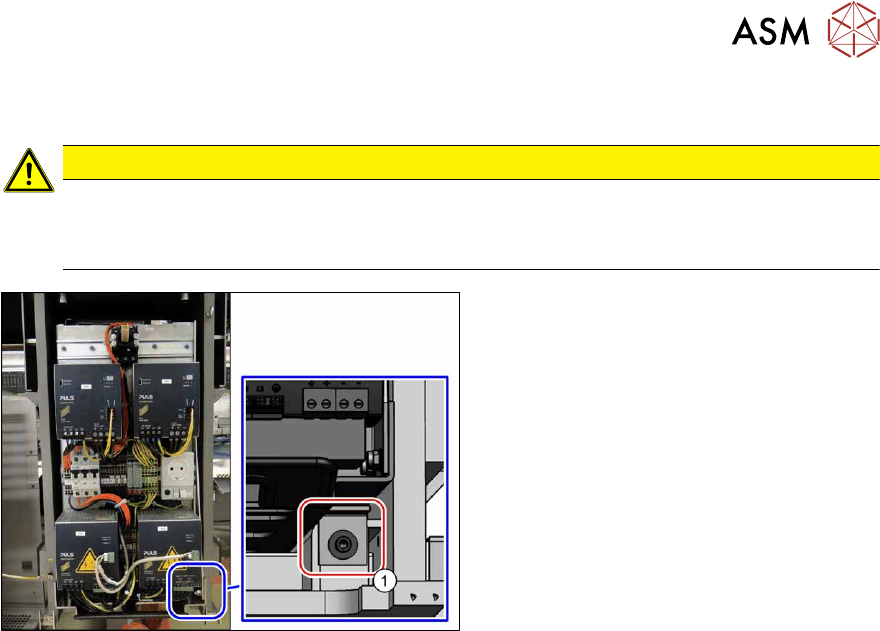
Fig.44: Screw fastening the power supply
For some service tasks it is necessary to pull
the power supply out of the machine.
► Remove the screw (1) fastening the
power supply.
► Pull the power supply out as far as ne-
cessary.
3 Power supply
3.4 Power supply and transformer modules
48 Service Manual SIPLACE X-Series S (from Hxxxx) 01/2021
3.4 Power supply and transformer modules
DANGER
Checking for absence of voltage!
► Before you start working, check the power supply for absence of voltage and observe
the waiting times!
See also
2 3.4.3 "Checking For Absence of Voltage" [}49]
3.4.1 Overview
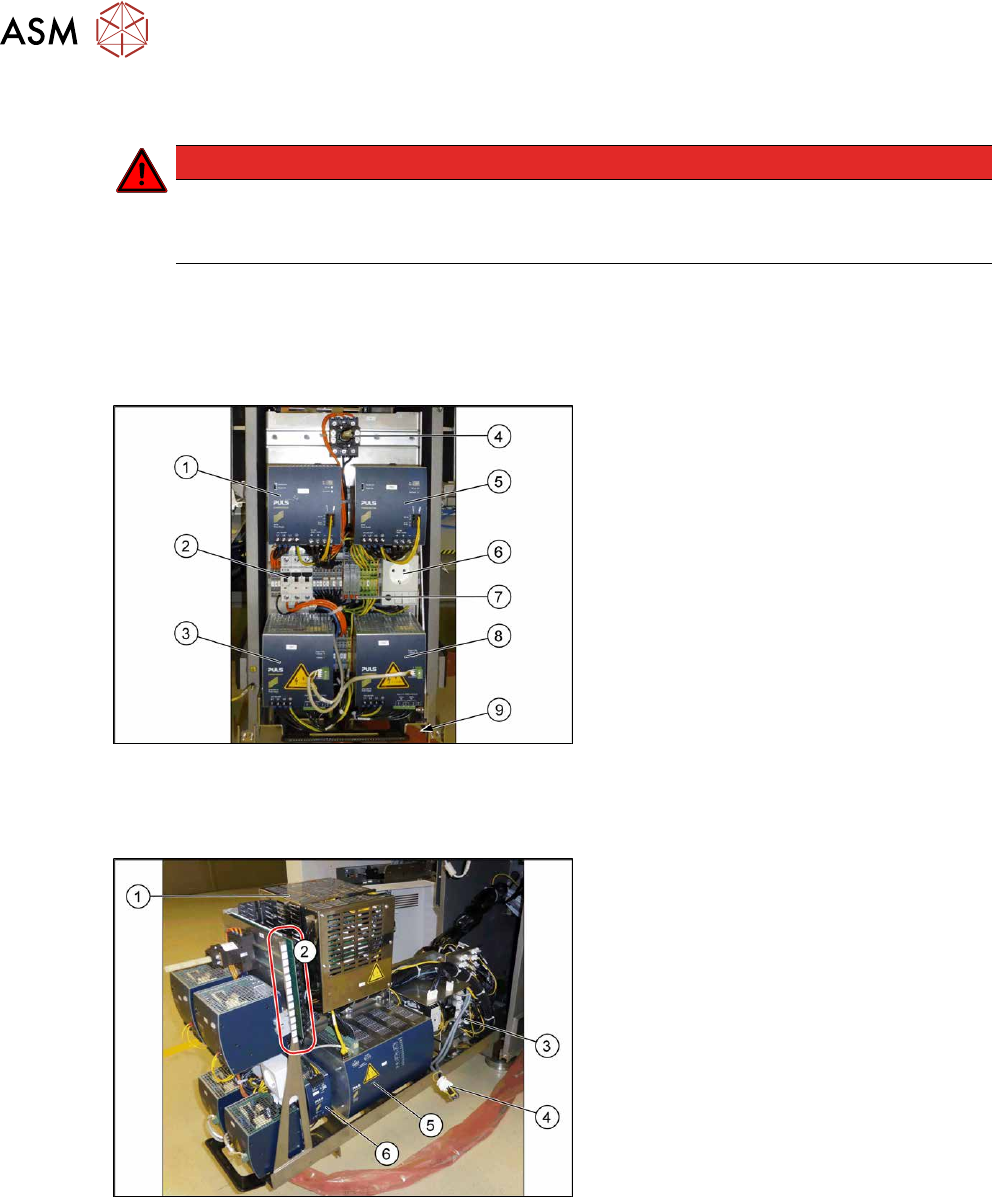
Fig.45: Overview of the power supply front
1. AC/DC-Converter DC24V/40A 3-
PHASE [03102840‑xx]
2. Circuit breaker FAZ-C16/3-NA 16A 3p
[03118366‑xx]
3. AC/DC converter DC300/150V 1.3kW 3
phase [03103087‑xx]
4. Main switch [03114066-xx]
5. AC-/DC converter 36V 26.7A 960W 3
phase [03103331‑xx]
6. Service socket (if present)
7. Measuring points for absence of
voltage
2x 300 V DC and ground
8. AC/DC converter DC300/150V 1.3kW 3
phase [03103087‑xx]
9. Locking screw for power supply
Fig.46: Overview of the power supply at the side
1. Contactor safety breaker [03112066‑xx]
2. Distribution and fusing assembly X-
SeriesS [03118289‑xx]
3. Connections for vacuum pump
4. Connection for 110 Volt option
5. Capacitor battery PCS417.771
[03106016‑xx]
6. AC/DC-Converter DC24V/20A 3-
PHASE [03055232‑xx]
3.4.2 Electrical and Control Settings
For more detailed information refer to the circuit diagrams folder of your machine.
●
Detailed circuit diagrams folder for SIPLACE X-Series S (from Hxxxx) [DE+EN:00197920‑03]
●
Detailed circuit diagrams folder for SIPLACE X-Series S (from H1440) [DE EN: 00197920-04]
●
Detailed circuit diagrams folder for SIPLACE X-Series S (from H2500) [DE EN: 00198730-xx]