LCX_UserManual_en_08_1.pdf - 第106页
Instrument functions R&S ® LCX Series 106 User Manual 1 179.2260.02 ─ 08 3. Select "Mode" > "Span". A selection editor opens. 4. Select "Span". 5. Confirm you selection. 6. T o set th…

Instrument functions
R&S
®
LCX Series
105User Manual 1179.2260.02 ─ 08
Remote command:
LOG:STIMe on page 221
8.8.3.2 Using the logging function
The logging function enables you to record the measurement readings. The R&S LCX
stores the data with a generically created filename either on the USB flash drive or in
the instrument internal memory directory.
To select the measurement parameter pairs:
► Proceed as described in "Selecting the parameters" on page 73
Remote commands:
FUNCtion:IMPedance[:TYPE][:PRIMary] on page 212
FUNCtion:IMPedance:TYPE:SECondary on page 213
Selecting the memory location
To determine the destination for saving the logging data file:
1. Press the [settings] key at the front panel.
2. In the "Functions" tab, select "Logging".
3. To determine the memory location, e.g., manually:
a) Select "Save Location".
The R&S LCX opens a selection editor.
b) In the selection editor, select "Manual".
c) Confirm your selection.
4. If you have connected an external USB memory device:
a) Select "Target Folder".
The R&S LCX opens a selection editor.
b) Select "USB1A".
c) Confirm with "Select".
Note: With no USB connected, the instrument displays a message and automati-
cally sets the internal partition, when confirmed.
The R&S LCX saves the logging file in the predefined logging folder on the
selected memory location.
Configuring logging settings
The example shows the settings for logging mode "Span", with the parameters "Inter-
val", "Duration" and "Start Time" defined.
To configure the settings and activate logging:
1. Press the [settings] key at the front panel.
2. In the "Functions" tab, select "Logging".
Specific instrument functions
Instrument functions
R&S
®
LCX Series
106User Manual 1179.2260.02 ─ 08
3. Select "Mode" > "Span".
A selection editor opens.
4. Select "Span".
5. Confirm you selection.
6. To set the time parameters for the selected mode:
a) Select "Interval"
b) In the on-screen keypad, enter time and unit, e.g. "0.1 s".
c)
Confirm with
.
d) Proceed the same way to set the duration and the start time.
Note: For the start time, the R&S LCX opens a selection editor, providing date set-
tings, and steps to a second editor for setting the start time at the selected date.
The R&S LCX starts logging at the defined date and time, and stops after the dura-
tion time has elapsed. It generates the filename and saves the logging data in the
specified memory location, see "Selecting the memory location" on page 105.
To configure the other logging modes, proceed the same way.
8.8.4 Dynamic impedance measurement
Option: R&S LCX-K106
The dynamic impedance measurement function allows you to acquire a measurement
series from the currently selected measurement pairs by sweeping the test signal.
The R&S LCX sweeps through the range of test signal parameter values and records
the acquired measurement data in a log file.
After completing a sweep cycle, the R&S LCX displays the recorded measurement
graphically in the logging chart viewer. See Section 8.8.2, "Logging chart viewer",
on page 97.
Interactions and characteristics
The R&S LCX calculates the dynamic impedance measurement parameters according
to the test signal settings. I.e., changing the frequency, range or voltage of the test sig-
nal impacts the sweep parameter values, ranges and limits.
8.8.4.1 Dynamic impedance measurement settings
Option: R&S LCX-K106
Access:
1. Press the [settings] key at the front panel.
Specific instrument functions
Instrument functions
R&S
®
LCX Series
107User Manual 1179.2260.02 ─ 08
2. In the "Functions" tab, select "Dynamic Impedance Measurement".
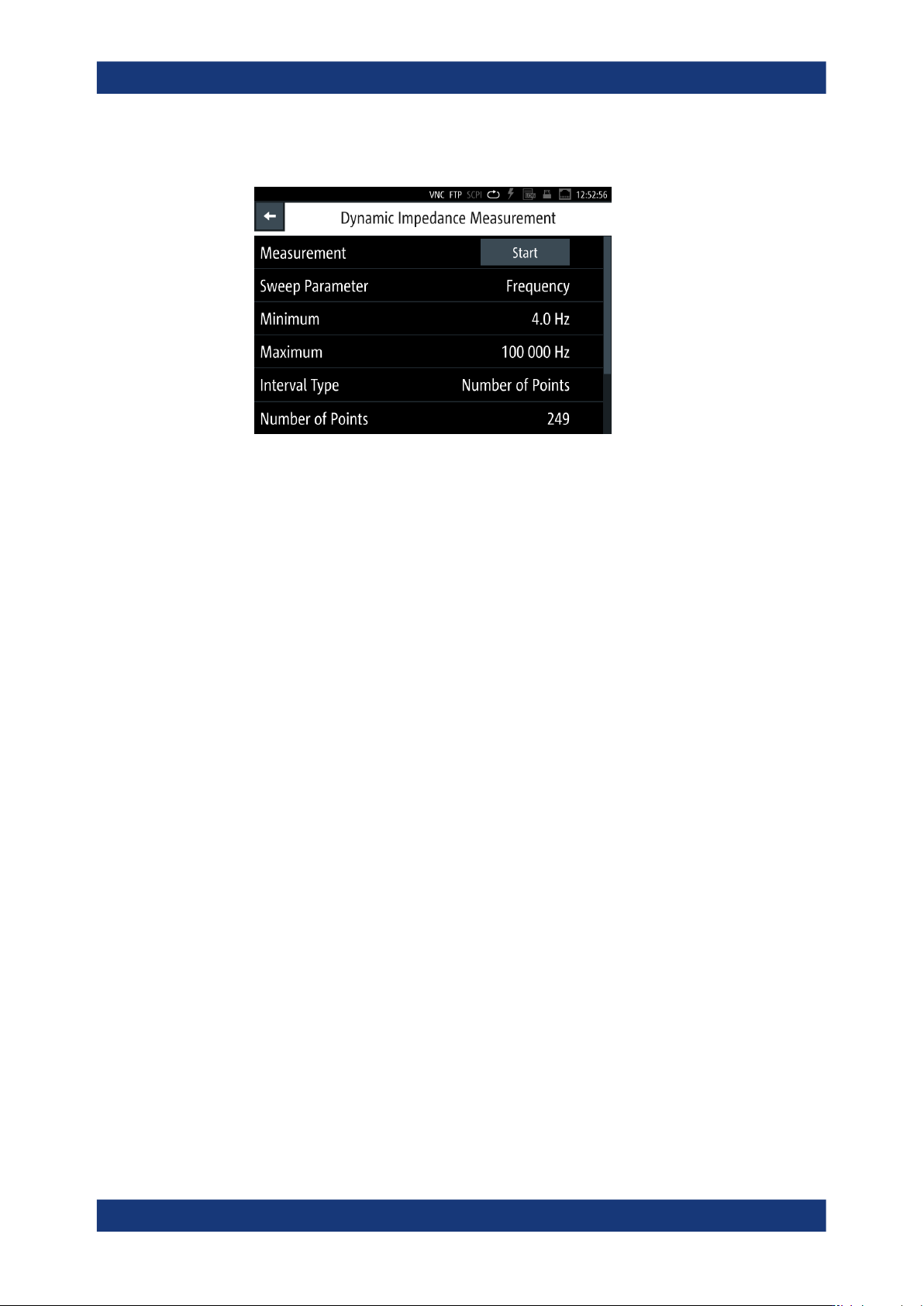
Figure 8-24: Dynamic impedance measurement menu
This menu provides the parameters to configure the test signal for dynamic impe-
dance measurement.
The required remote commands are described in Section 11.8, "DIMeasure subsys-
tem", on page 198.
How to: see Section 8.8.4.2, "Using the dynamic impedance measurement function",
on page 109
Measurement.............................................................................................................. 107
Sweep Parameter....................................................................................................... 107
Minimum......................................................................................................................108
Maximum.....................................................................................................................108
Interval Type................................................................................................................108
Step Size.....................................................................................................................108
Number of Points........................................................................................................ 108
Abort............................................................................................................................109
Measurement
Starts the dynamic impedance measurement sweep.
The R&S LCX displays a progress dialog until the measurement is complete, see
"Measuring in dynamic impedance measurement mode" on page 109.
Remote command:
DIMeasure:EXECute on page 200
Sweep Parameter
Opens a selection editor to determine the measurement signal parameter that changes
during the entire measurement process.
The R&S LCX varies this parameter within the range between Minimum and Maximum
in constant steps continuously. You can define the increment with the Interval type and
the corresponding settings parameter, either Step Size or "Number of Points"
on page 108.
Specific instrument functions