LCX_UserManual_en_08_1.pdf - 第80页
Instrument functions R&S ® LCX Series 80 User Manual 1 179.2260.02 ─ 08 Speed Selects the speed of the measurement repetitions per second. Note: The values below relate to test signal frequencies ≥ 1 kHz. See also &q…
Instrument functions
R&S
®
LCX Series
79User Manual 1179.2260.02 ─ 08
2. Select the "Measurement" tab.
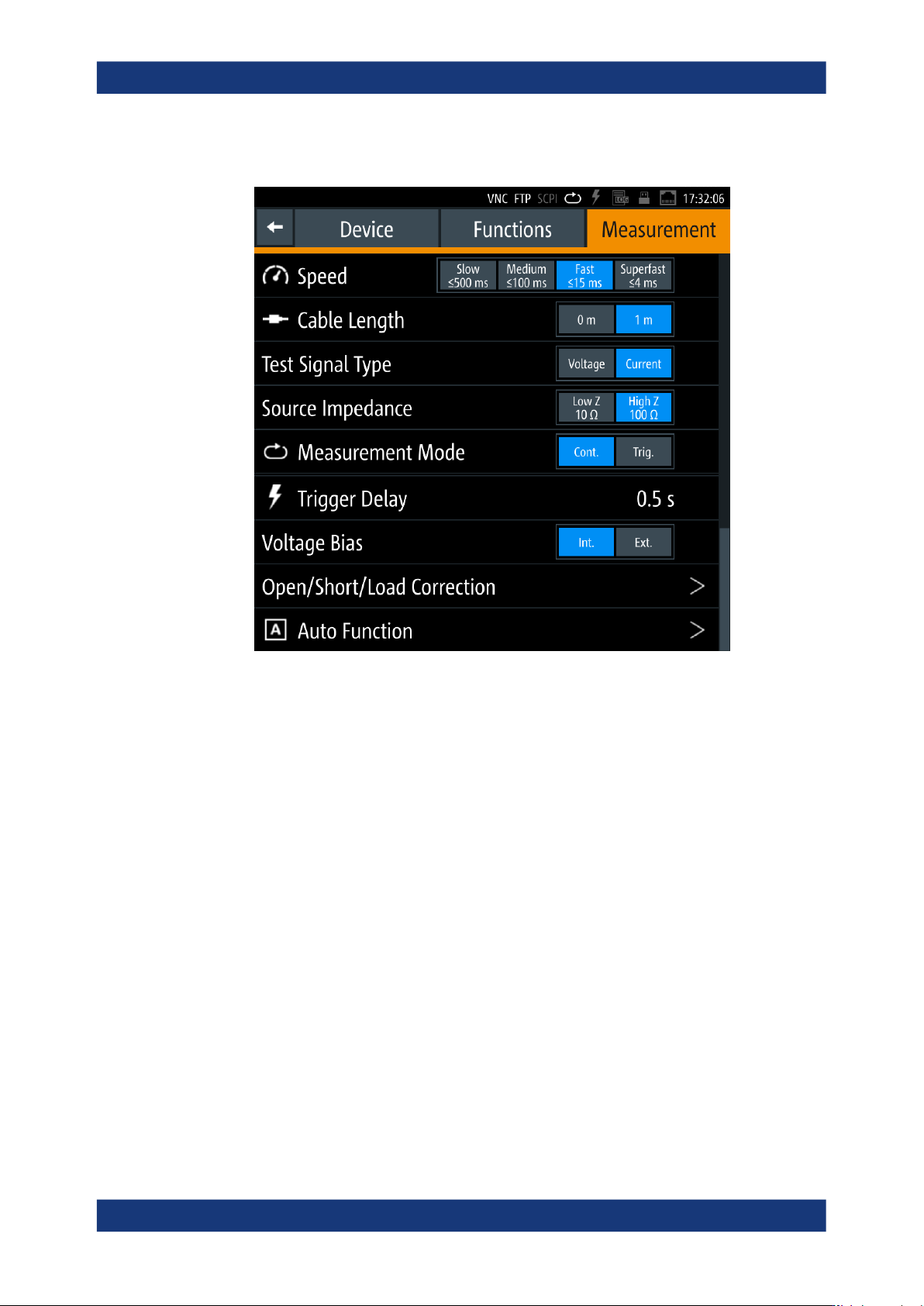
Figure 8-2: Measurement settings dialog
The dialog enables you to configure measurement conditions, e.g. cable length
from the connected test fixture, external bias of impedance measurement range.
The required remote commands are described in:
● Section 11.5, "BIAS subsystem", on page 188
● Section 11.6, "CORRection subsystem", on page 190
● Section 11.11, "FUNCtion subsystem", on page 209
● Section 11.19, "TRIGger subsystem", on page 241
How to: see Section 8.6, "Measurement parameters", on page 76
Speed............................................................................................................................80
Cable Length.................................................................................................................80
Test Signal Type............................................................................................................80
Source Impedance........................................................................................................80
Measurement Mode...................................................................................................... 81
Trigger Delay.................................................................................................................81
Voltage Bias.................................................................................................................. 81
Open/Short/Load Correction......................................................................................... 81
Auto Function................................................................................................................81
└ Purity Angle.....................................................................................................81
└ Serial/Parallel Separation Point...................................................................... 82
Measurement parameters

Instrument functions
R&S
®
LCX Series
80User Manual 1179.2260.02 ─ 08
Speed
Selects the speed of the measurement repetitions per second.
Note: The values below relate to test signal frequencies ≥1 kHz.
See also "About measurement parameters" on page 76 and the specifications docu-
ment, section "Measurment Accuracy".
"Superfast: ≤4 ms"
Number of measurements: ≈250 / s.
"Fast: ≤15 ms"
Number of measurements: ≈66 / s.
"Medium: ≤100 ms"
Number of measurements: ≈10 / s.
"Slow: ≤500 ms"
Number of measurements: ≈2 / s.
Remote command:
APERture on page 186
Cable Length
Selects the length of the leads to the connected test fixture, i.e. to the DUT.
"1 m"
Considers the cable losses of the leads from the test fixture to the
R&S LCX.
Required for the BNC-to-BNC extension (option R&S LCX-Z11), and
for test adapters with leads to the DUT. E.g., if you use other adapters
than the test adapters provided by Rohde & Schwarz.
"0 m"
The instrument does not consider cable losses.
Use this setting for test adapters that are directly connected to the
R&S LCX, i.e. the test fixtures R&S LCX-Z1/-Z2/-Z3/-Z4/-Z5.
Remote command:
CORRection:LENGth on page 192
Test Signal Type
Selects the parameter for the setting the test signal.
The setting parameter for the test signal level on the measurement window varies
according to the selection, see "Level: / [Level]" on page 74.
"Voltage"
Selects the signal level.
"Current"
Selects the signal current.
Source Impedance
Selects the output impedance for the measurement.
"Low Z 10
Ω"
Measures with 10 Ω output impedance.
"High Z 100 Ω"
(default)
Measures with 100 Ω output impedance.
Remote command:
FUNCtion:IMPedance:SOURce on page 212
Measurement parameters

Instrument functions
R&S
®
LCX Series
81User Manual 1179.2260.02 ─ 08
Measurement Mode
Enables or disables the continuous measurement mode.
The R&S LCX starts a measurement cycle initiated by a trigger signal.
"Cont."
Measures continuously, i.e. starts with the next measurement cycle
after a measurement has been completed.
"Trig."
Performs one measurement cycle. After a measurement has been
completed, the R&S LCX stops and waits for the next trigger signal.
Remote command:
TRIGger:CONTinuous on page 242
TRIGger[:IMMediate] on page 243
*TRG on page 185
Trigger Delay
Sets the delay between the trigger event and the actual start of the measurement.
You can increase or decrease the delay in steps of 1 ms increment.
Remote command:
TRIGger:DELay on page 242
Voltage Bias
Selects voltage bias to be used.
To set the value, see Section 6.3.2, "External voltage bias", on page 62.
"Int."
Enables the internal voltage bias.
"Ext."
Requires option: R&S LCX-K108
Uses an external voltage bias, if supplied.
Note: Make sure that the external DC voltage source supplies a con-
stant voltage bias to avoid distortion of the measurement results due
to interference.
Remote command:
BIAS:STATe on page 189
Open/Short/Load Correction
Opens the dialog for activating the correction functions, see Section 8.6.2, "Open/short/
load correction settings", on page 82.
Auto Function
Opens the dialog for configuring the auto function parameters.
During the measurement, the auto function refers to the purity angle that is set in the
instrument, and the measured value. Concerning the separation point, the function
determines the equivalent circuit based on the estimated absolute value of Z.
See also:
●
About measurement parameters > Auto function
●
Measurement basics > Figure 5-1
Purity Angle ← Auto Function
Sets the switching point of the phase angle.
Measurement parameters