LCX_UserManual_en_08_1.pdf - 第93页
Instrument functions R&S ® LCX Series 93 User Manual 1 179.2260.02 ─ 08 Creating user-defined configuration presets T o create and save a configuration preset: 1. Select the configuration preset memory slot, e.g. . 2…
Instrument functions
R&S
®
LCX Series
92User Manual 1179.2260.02 ─ 08
2
1
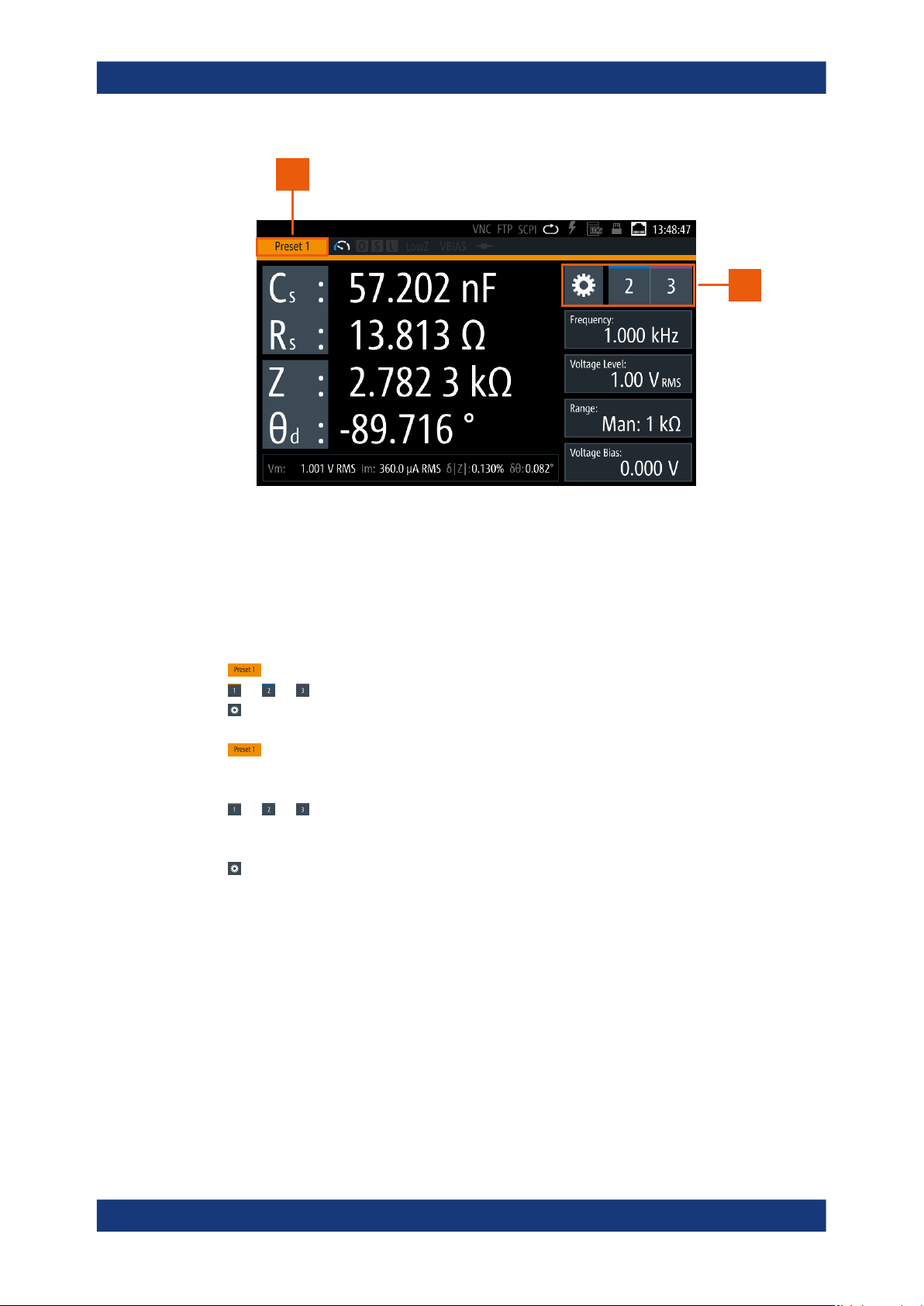
Figure 8-10: Configuration preset indication
1 = Configuration preset indicator
2 = Settings softkey and configuration preset softkeys
The configuration preset softkeys enable you to assign up to three different mea-
surement configurations for quick access.
How to: see Section 8.7.2, "Using the configuration preset function", on page 92
Preset 1, Preset 2, Preset 3..................................................................................92
1, 2, 3.................................................................................................................92
(measurement settings).............................................................................................92
Preset 1, Preset 2, Preset 3
Indicates the active configuration preset.
1, 2, 3
Selects one out of three configuration preset memory slots.
(measurement settings)
Opens a dialog for configuring the parameters that are relevant for the measurement.
See Section 8.6, "Measurement parameters", on page 76.
8.7.2 Using the configuration preset function
You can assign up to three configurations relevant for a measurement as favorites, to
skip quickly between different settings, or to repeat tests with the same settings.
Configuration preset

Instrument functions
R&S
®
LCX Series
93User Manual 1179.2260.02 ─ 08
Creating user-defined configuration presets
To create and save a configuration preset:
1.
Select the configuration preset memory slot, e.g. .
2.
Select to open the parameter settings dialog.
3. Set the corresponding parameters.
4. Press the home to return to the measurement window.
5.
To preset additional configurations, select another configuration preset slot, e.g.
or .
6. Repeat step 2 to step 5) until you have assigned all preset configurations.
Switching the configuration during a measurement
We assume that you have setup measurement and a DUT applied.
To execute a measurement with changing configuration:
1. Select the measurement function required for the measurement.
2. Set the test signal parameters.
3. Select the measurement parameters for results display.
4. Assign the configuration presets as described in "Creating user-defined configura-
tion presets" on page 93.
5.
Start the measurement, e.g. using a configuration preset
.
6.
Select, e.g. to continue the measurement with different settings.
While the measurement is running, you can switch between the preset configura-
tions arbitrarily.
8.8 Specific instrument functions
This secttion describes the features the instrument provides in addition to the basic
measurement functions. Some specific functions require that the corresponding
options are installed.
Access:
1. Press the [settings] key at the front panel.
2. Select the "Functions" tab.
Specific instrument functions
Instrument functions
R&S
®
LCX Series
94User Manual 1179.2260.02 ─ 08
Figure 8-11: Functions menu
3. Select the corresponding function in the list.
● Live chart viewer..................................................................................................... 94
● Logging chart viewer...............................................................................................97
● Logging................................................................................................................. 101
● Dynamic impedance measurement.......................................................................106
● Binning.................................................................................................................. 110
8.8.1 Live chart viewer
The live chart view enables you to evaluate and validate the current measurement
graphically.
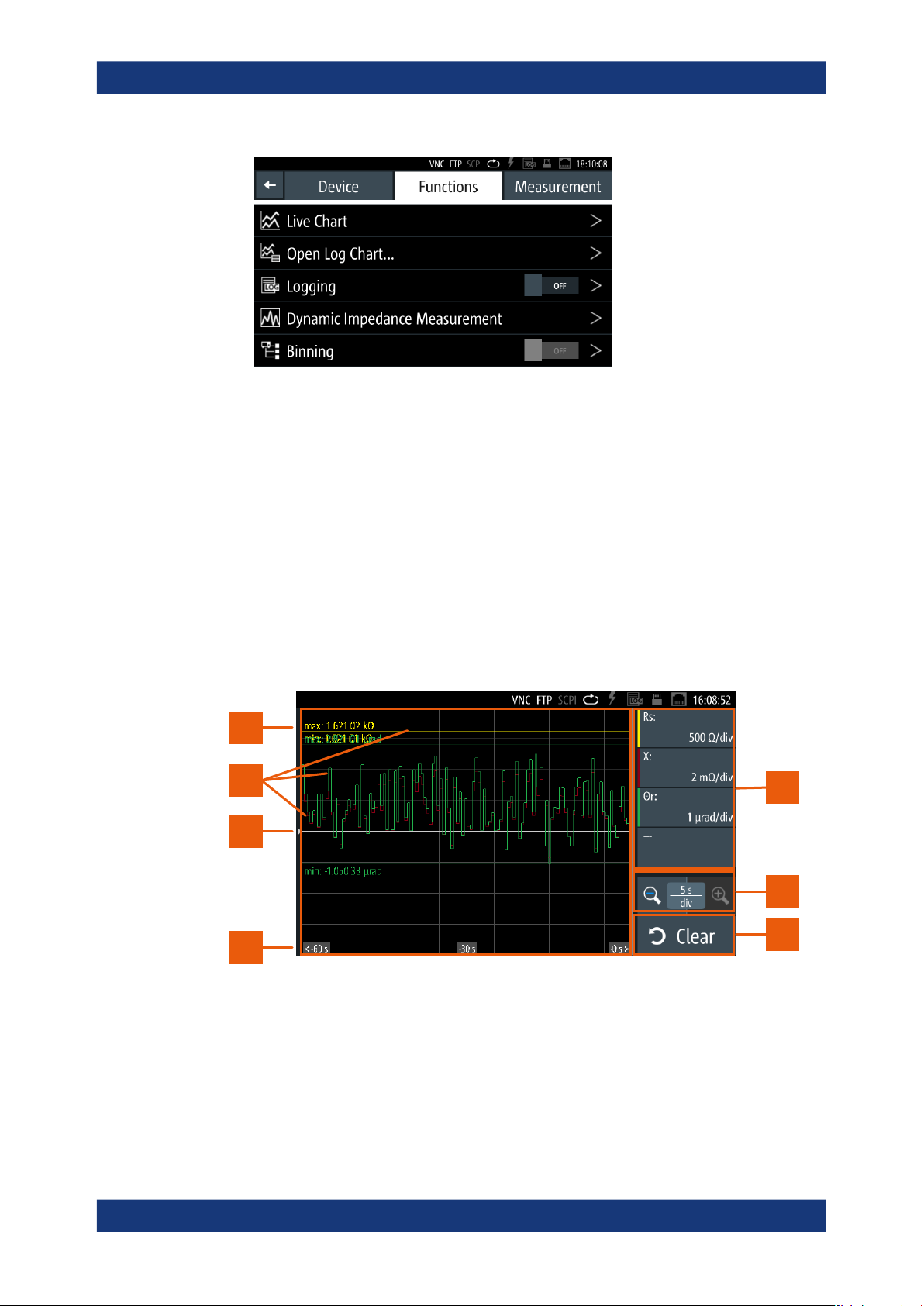
1
1
2
3
7
5
4
6
Figure 8-12: Live chart display and controls
1 = Parameter pair softkeys
2 = Time base scaling
3 = Reset softkey
4 = Time axis
Specific instrument functions