LCX_UserManual_en_08_1.pdf - 第117页
Instrument functions R&S ® LCX Series 1 17 User Manual 1 179.2260.02 ─ 08 Example: Binning configuration data for a resistor measurement The example defines a binning measurement that returns the measurement results …

Instrument functions
R&S
®
LCX Series
116User Manual 1179.2260.02 ─ 08
8.8.5.5 Configuring and using the binning function
Configuring a binning file
To specify the file for the binning measurement, proceed as follows:
1. On a PC, open an application that can store data in *.csv format, e.g. a spread-
sheet program.
2. Specify the required parameters and values in the given order:
a) #Signal: configures the control signals you can optionally assign for output at
the digital interface.
Possible values are:
● EOM: end of measurement
● OOB: out of bin
● BOTH: assigns both the EOM and the OOB signal
If you enable both signals, the R&S LCX assigns the OOB signal to pin 7, and
EOM on pin 8. If you have only one signal enabled, it is assigned to pin 8.
b) #Measurement: sets the measurement parameter pair, e.g. Rs-X
c) #PrimaryFormat, #SecondaryFormat: determines the format the bin limits are
defined.
Possible values are:
● ABS: specifies the limits as minimum and maximum values, i.e. 990 Ω to
1010 Ω.
● NOMABS: specifies the limits as nominal value +-deviation as absolute
value, i.e. 1000 Ω +- 10 Ω.
● NOMPCT: specifies the nominal value as absolute value, and the deviation
as percentage, i.e. 1000 Ω +- 1 %.
d) Pri0, Pri1, Sec0, Sec1: column headings of the following upper and lower limits
for the primary and secondary formats. In the following lines, you then specify
the upper and lower limits for each bin.
For an example, see Binning configuration data for a resistor measurement.
3. Save the file as a *.csv file type on the USB memory device.
Note: Consider that the filename must start with binning_*, otherwise the
R&S LCX does not display the file in the directory.
Specific instrument functions
Instrument functions
R&S
®
LCX Series
117User Manual 1179.2260.02 ─ 08
Example: Binning configuration data for a resistor measurement
The example defines a binning measurement that returns the measurement results for
the resistance and impedance parameter pair (Rs-X), specified for 4 measurement cat-
egories. The R&S LCX returns the nominal value as an absolute value, and the devia-
tion in percent (NOMPCT).
#Signal,BOTH
#Measurement,Rs-X
#PrimaryFormat,NOMPCT
#SecondaryFormat,ABS
Pri0,Pri1
1e3,0.1
1e3,1
1e3,5
1e3,10
Loading the binning file
To upload the binning, proceed as follows:
1. Connect the USB flash drive to the USB B connector at the front panel of the
instrument.
2. To access the binning settings dialog, select [settings] > "Functions" > "Binning".
3. Select "Load from File".
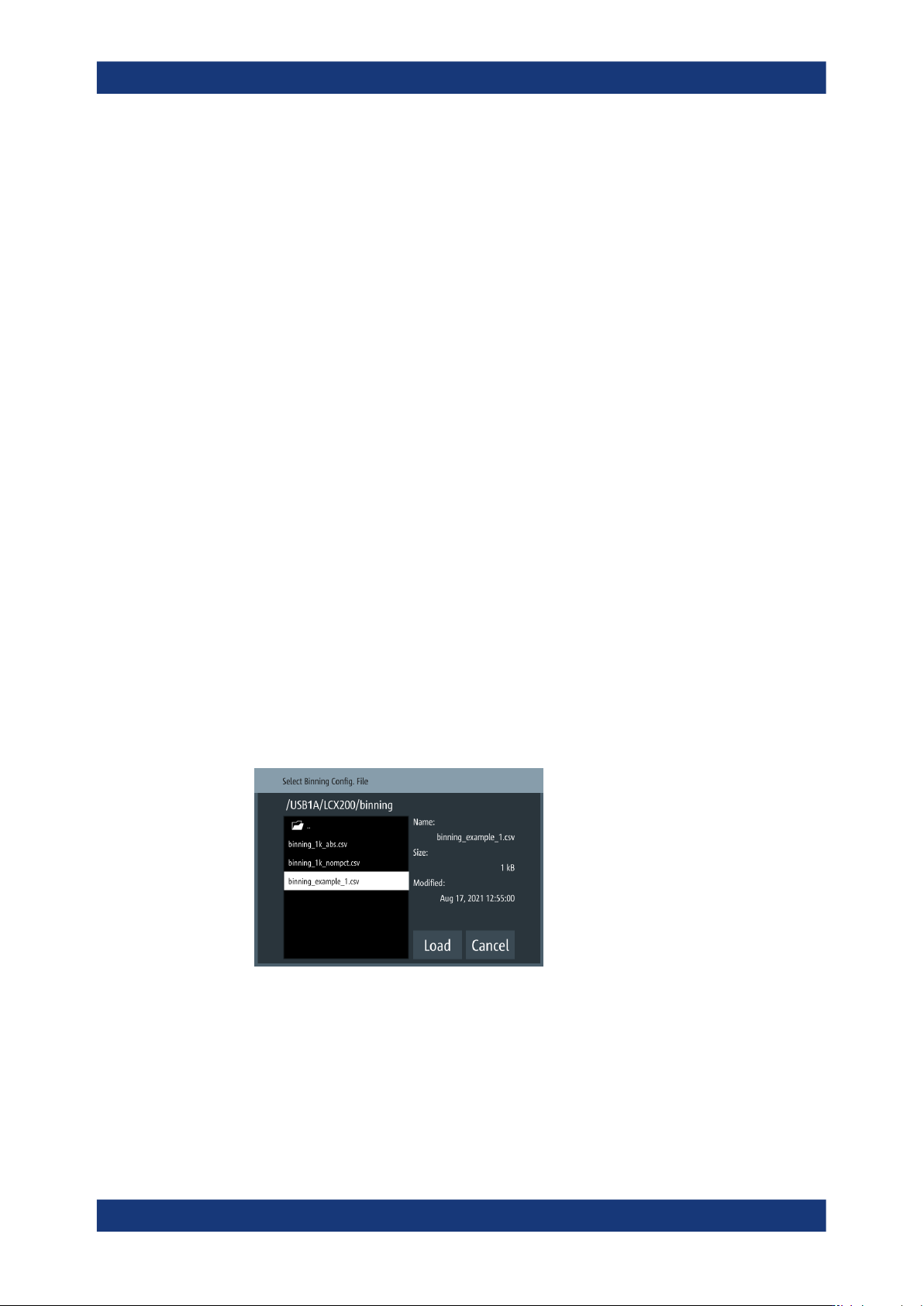
4. Select the partition "USB1A".
If a binning folder exists on the memory stick, the R&S LCX leads you to this direc-
tory automatically.
5. Select the corresponding *.csv binning file.
The R&S LCX indicates the file properties of the selected file on the right.
6. Confirm your selection with "Load".
Returned to the "Binning" dialog, the instrument indicates the selected file and
memory location.
Specific instrument functions
Instrument functions
R&S
®
LCX Series
118User Manual 1179.2260.02 ─ 08
Executing a binning measurement
A binning measurement requires that you configure the test signal and all settings nec-
essary for your measurement before. You cannot change a parameter while the mea-
surement is running.
In addition, you need a trigger event that you can initiate manually with the [Trig.] key
at the front, or by a trigger signal assigned to the [Trigger Input] connector at the back.
This example assumes that you have set up the measurement and aligned the instru-
ment, see e.g., "Basic measurement steps" on page 34 and Section 7, "Performing
measurements", on page 65.
To start the measurement:
1. Create the binning file, see "Configuring a binning file" on page 116.
2. Load the binning file according to "Loading the binning file" on page 117.
3.
To activate the binning function, turn
"Enable".
4. Press the [home] key.
The R&S LCX switches to measurement mode "triggered" automatically. The
[Meas. Mode] key lights up.
5. Connect a sample component to the terminals of the test fixture.
6. Start the first measurement with a trigger signal, e.g., press the [Trig.] key.
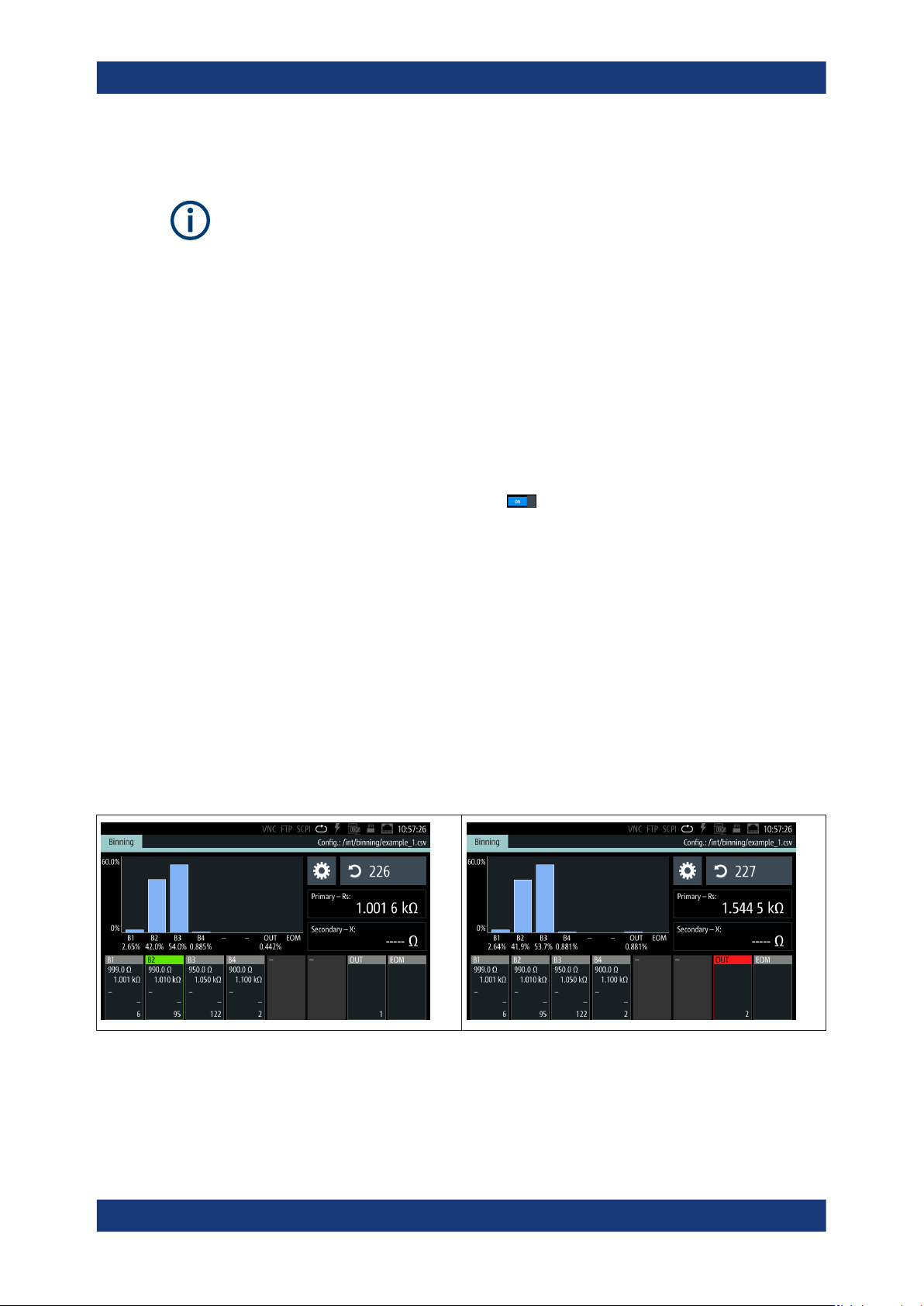
7. Wait until the measurement is complete.
When completed, and you have enabled the end of the measurement control sig-
nal, the R&S LCX highlights the EOM bin.
8. Remove the sample component.
9. Repeat step 5 to step 8 until you have measured all components.
According to the reading, the R&S LCX sorts a component into the corresponding
bin and highlights it. In addition, it indicates the summed number of components
sorted into it, and displays the distribution graphically in the histogram.
Specific instrument functions