LCX_UserManual_en_08_1.pdf - 第132页
General instrument functions R&S ® LCX Series 132 User Manual 1 179.2260.02 ─ 08 "Dot" Sets a decimal point. "Comma" Uses a comma. Error Designator Selects whether an empty cell is filled with 0. …
General instrument functions
R&S
®
LCX Series
131User Manual 1179.2260.02 ─ 08
9.5 CSV settings
The R&S LCX enables you to record measurement readings and save the data in a file
for subsequent evaluation and validation. Recorded data consists of character strings
that list general metadata, as, e.g., date, device name, etc., the parameter names and
the acquired measurement values.
The standard *.csv file format the R&S LCX saves the data, allows you to use a
spreadsheet program application for numerical or graphical analysis and evaluation.
A *.csv file saves tabular data (numbers and text) in plain text. Each line of the file is
a data record and each record consists of one or more fields, separated by a field
delimiter. In the "CSV Settings" dialog, you can set the special characters to set the
delimiters.
9.5.1 Settings for CSV data
Access:
1. Press the [settings] key at the front panel.
2. In the "Device" tab, select "CSV Settings".
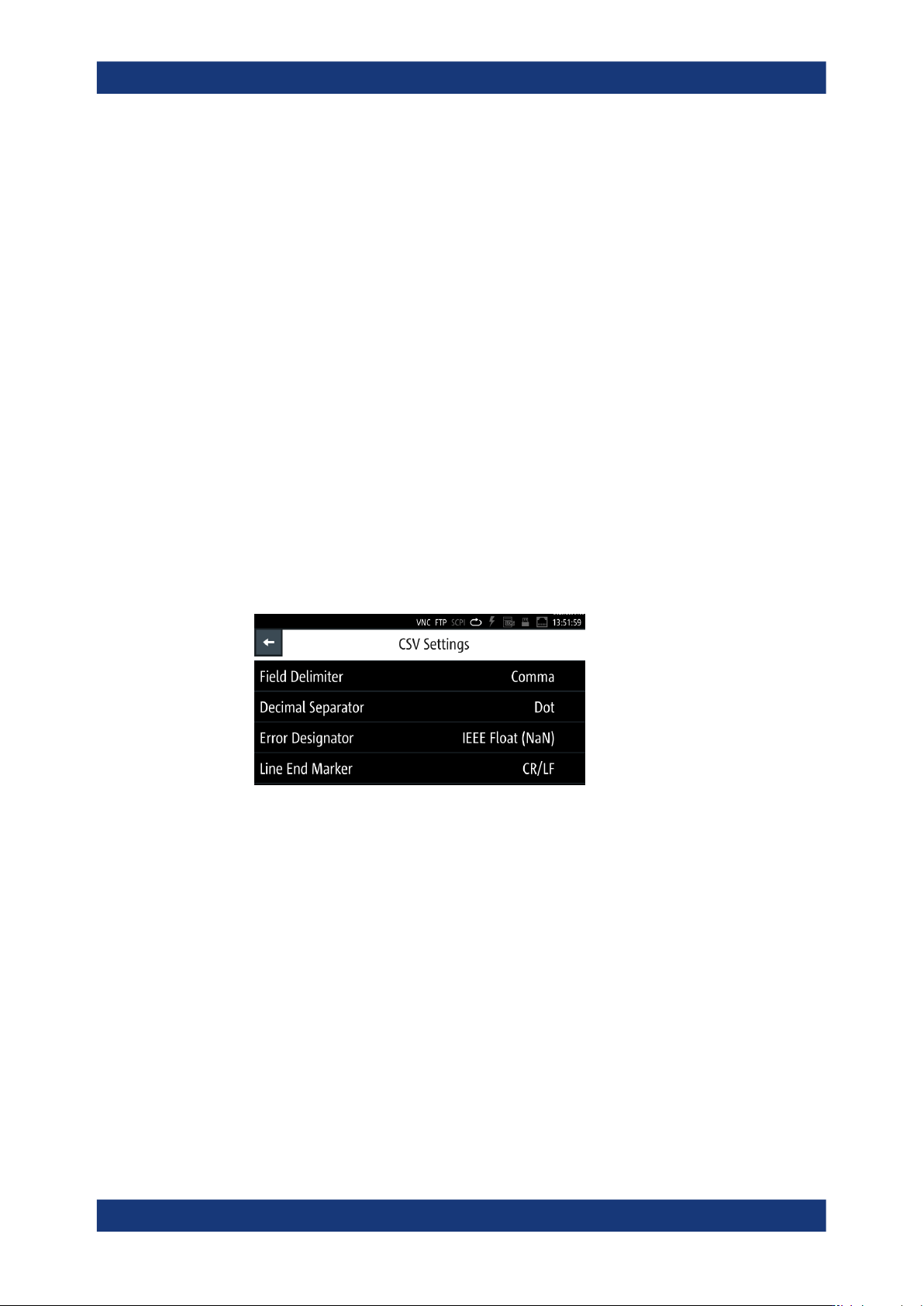
Figure 9-8: CSV settings menu
The dialog provides the parameters for setting the data separators in the *.csv
file. The error designator enables you to fill up empty cells.
Field Delimiter............................................................................................................. 131
Decimal Separator...................................................................................................... 131
Error Designator..........................................................................................................132
Line End Marker..........................................................................................................132
Field Delimiter
Selects the line separator between individual parameters or values.
"Semicolon"
Separates the data entries by a semicolon.
"Comma"
Uses a comma.
Decimal Separator
Selects the decimal separator for values.
CSV settings
General instrument functions
R&S
®
LCX Series
132User Manual 1179.2260.02 ─ 08
"Dot"
Sets a decimal point.
"Comma"
Uses a comma.
Error Designator
Selects whether an empty cell is filled with 0.
"IEE Float"
Fills empty cells with 0.
"Empty"
Leaves empty cells.
Line End Marker
Selects the character representing a line break.
"CR/LF"
Inserts a line break with both, either a CR or an LF.
"LF"
Inserts a line beak with an LF.
9.5.2 Configuring CSV data
For subsequent acquisition of logged data with a PC application, you can determine
the separators and designators of the measurement values accordingly.
Configuring csv data
To configure the format of data within the file:
1. Press the [settings] key at the front panel.
2. Select
3. To access the csv settings, select [settings] > "Device" > "CSV Settings".
4. Set the field and line separators, e.g:
a) Select "Field delimiter" > "Semicolon".
A selection dialog opens where you can set the delimiter.
b) Confirm the selection with "Set".
5. Repeat the configuration for each data separator and the error indicator.
9.6 Date & time
Using the "Date & Time" function, you can set a date and time.
The time is regarded as UTC. There is no timezone selectable.
The R&S LCX records the time during operation and creates a time stamp on printed
outputs or in saved data sets.
Date & time
General instrument functions
R&S
®
LCX Series
133User Manual 1179.2260.02 ─ 08
Access:
1. Press the [settings] key at the front panel.
2. In the "Device" tab, select "Date & Time".
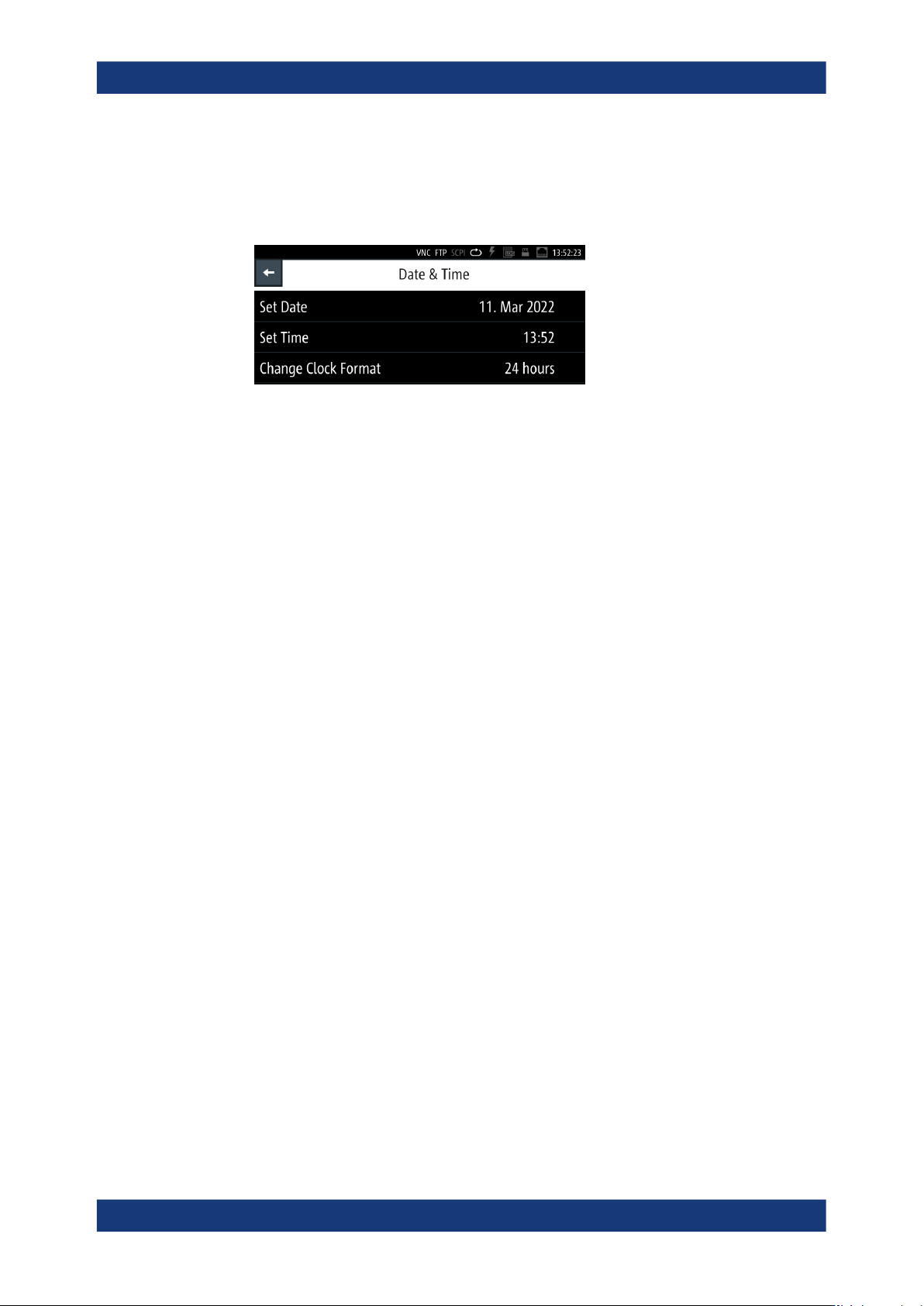
Figure 9-9: Date and time settings menu
The "Date & Time" menu provides access to dialogs and editors for setting the cor-
responding parameters. Initially, the R&S LCX indicates the date and time setting
of the operating system. You can update or modify this setting individually.
The required remote commands are described in Section 11.18, "SYSTem subsys-
tem", on page 231.
How to: see "Setting date and time" on page 146.
Set Date
Sets the date in the format [yyyy.mm.dd].
Remote command:
SYSTem:DATE on page 239
Set Time
Sets the time in the format [hh.mm.ss].
Remote command:
SYSTem:TIME on page 241
Change Clock Format
Sets the hour display of a day.
You can switch between "24 hours"and "48 hours" display.
9.7 Appearance
The R&S LCX enables you to customize the appearance of the screen and the front
panel keys.
Access:
1. Press the [settings] key at the front panel.
2. In the "Device" tab, select "Appearance".
Appearance