LCX_UserManual_en_08_1.pdf - 第18页
Getting started R&S ® LCX Series 18 User Manual 1 179.2260.02 ─ 08 4 Getting started This section contains the same information as the getting started manual. 4.1 Preparing for use Here, you can find basic informatio…

Documentation overview
R&S
®
LCX Series
17User Manual 1179.2260.02 ─ 08
The software uses several valuable open source software packages. An open source
acknowledgment document provides verbatim license texts of the used open source
software.
See www.rohde-schwarz.com/firmware/lcx.
3.11 Remote control driver
The instrument drivers enable remote control via the corresponding interfaces. The
drivers and installation instructions are available for download on the product page at
www.rohde-schwarz.com/driver/lcx.
Remote control driver

Getting started
R&S
®
LCX Series
18User Manual 1179.2260.02 ─ 08
4 Getting started
This section contains the same information as the getting started manual.
4.1 Preparing for use
Here, you can find basic information about setting up the product for the first time.
4.1.1 Lifting and carrying
See "Lifting and carrying the product" on page 10.
4.1.2 Unpacking and checking
1. Unpack the R&S LCX carefully.
2. Retain the original packing material. Use it when transporting or shipping the
R&S LCX later.
3. Using the delivery notes, check the equipment for completeness.
4. Check the equipment for damage.
If the delivery is incomplete or equipment is damaged, contact Rohde & Schwarz.
See also: Section 13, "Transporting", on page 246.
4.1.3 Choosing the operating site
Specific operating conditions ensure proper operation and avoid damage to the prod-
uct and connected devices. For information on environmental conditions such as ambi-
ent temperature and humidity, see the specifications document.
For safety information, see "Choosing the operating site" on page 10.
Electromagnetic compatibility classes
The electromagnetic compatibility (EMC) class indicates where you can operate the
product. The EMC class of the product is given in the specifications document.
●
Class B equipment is suitable for use in:
– Residential environments
– Environments that are directly connected to a low-voltage supply network that
supplies residential buildings
Preparing for use
Getting started
R&S
®
LCX Series
19User Manual 1179.2260.02 ─ 08
●
Class A equipment is intended for use in industrial environments. It can cause
radio disturbances in residential environments due to possible conducted and radi-
ated disturbances. It is therefore not suitable for class B environments.
If class A equipment causes radio disturbances, take appropriate measures to
eliminate them.
4.1.4 Setting up the R&S LCX
See also:
●
"Setting up the product" on page 10
●
"Intended use" on page 9
4.1.4.1 Placing the R&S LCX on a bench top
To place the product on a bench top
1. Place the product on a stable, flat and level surface. Ensure that the surface can
support the weight of the product. For information on the weight, see the specifica-
tions document.
2.
CAUTION! Foldable feet can collapse. For safety information, see "Setting up the
product" on page 10.
Always fold the feet completely in or out. With folded-out feet, do not place any-
thing on top or underneath the product.
3.
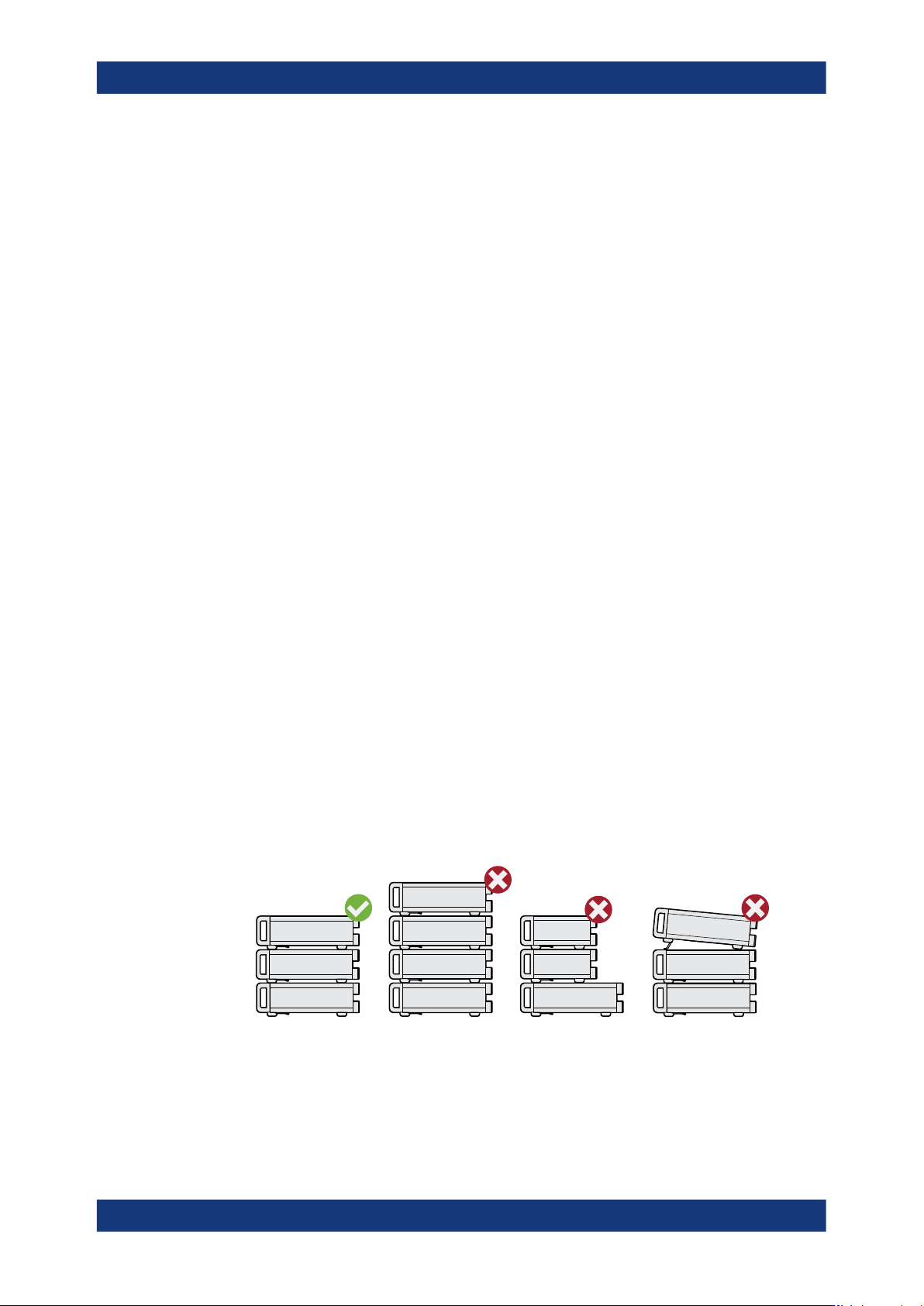
WARNING! A stack of products can fall over and cause injury. Never stack more
than three products on top of each other. Instead, mount them in a rack.
Stack as follows:
● If the products have foldable feet, fold them in completely.
● All products must have the same dimensions (width and length).
● Do not exceed a total load of 50 kg placed on the product at the bottom of the
stack.
Left
= Stacked correctly
Middle left = Stacked incorrectly, too many products
Middle right = Stacked incorrectly, different dimensions
Right = Stacked incorrectly, folded-out feet
4.
NOTICE! Overheating can damage the product.
Preparing for use