LCX_UserManual_en_08_1.pdf - 第180页
Network operation and remote control R&S ® LCX Series 180 User Manual 1 179.2260.02 ─ 08 W ait until an ongoing transfer process has finished. 2. Close the FTP client application. 3. T o reconnect, proceed as describ…
Network operation and remote control
R&S
®
LCX Series
179User Manual 1179.2260.02 ─ 08
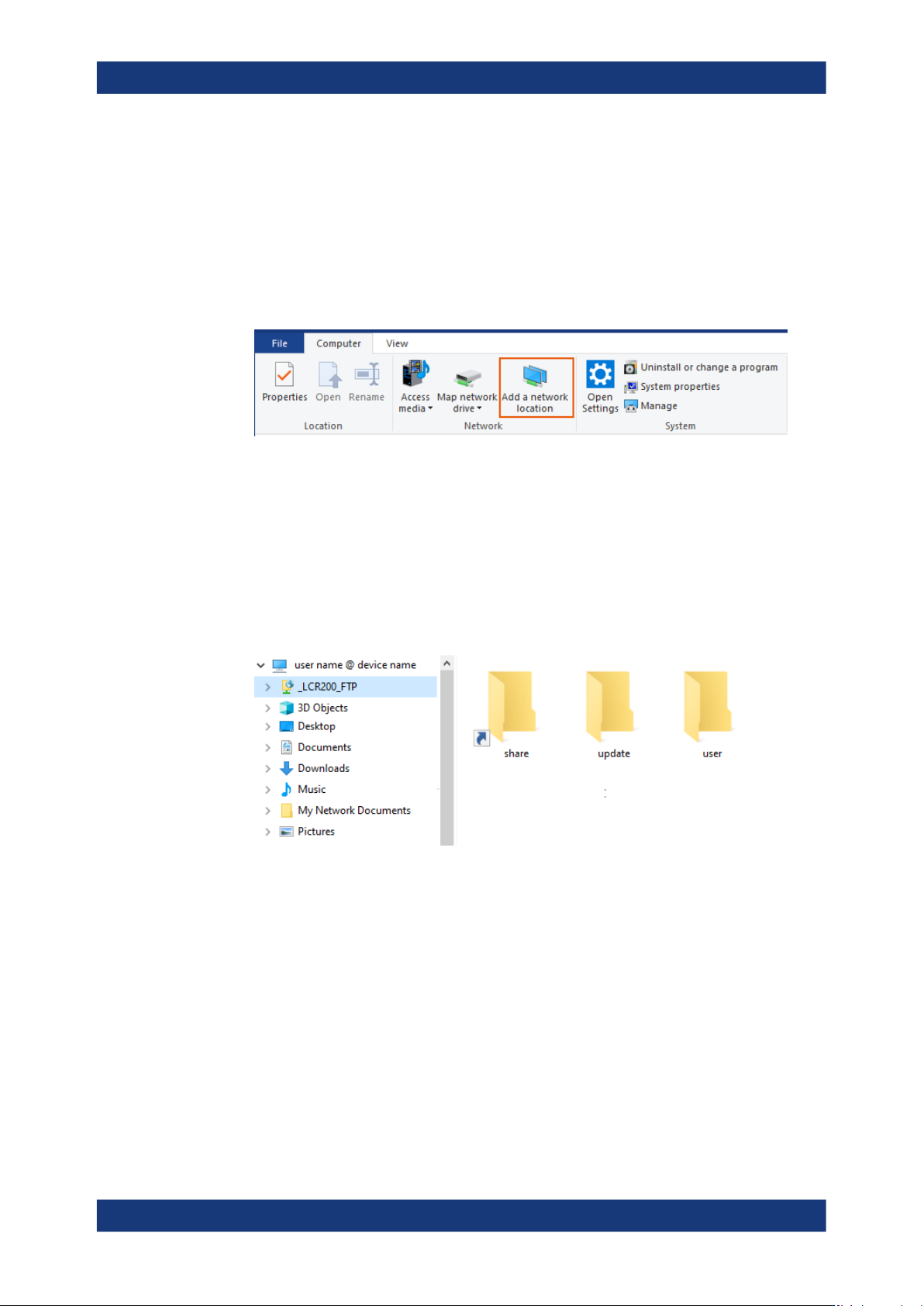
To mount the FTP network address string to the file explorer:
1. Open the file explorer on the controller PC.
2. Connect to the R&S LCX file system as described in Accessing the file system
remotely over a file explorer.
3. Select the computer name directory of your controller PC, e.g. "This PC".
4. In the ribbon bar of the "Computer" tab, select "Add a network location".
The "Add Network Location" wizard opens.
5. Follow the steps of the wizard:
a) Select "Choose a custom network location".
b) In step "Specify the location of your web site", enter the FTP address string,
e.g. ftp://LCR200:<password>@192.168.0.128:5678.
c) Assign a user name for the directory, e.g. _LCR200_FTP, if necessary.
d) For immediate access, enable the "Open this network location ...." checkbox.
e) Confirm with "Finish".
The available file directories of the instrument appear under the mounted directory
in the navigation tree. You can browse in the instruments file system and upload or
download files.
Note: The address string in the example contains the login credentials and thus
directly accesses the instrument's file system when reconnecting.
To protect the instrument from unauthorized access, you can also set up only the
FTP network address, and thus explicitly require the login for each connection.
Stopping the remote FTP file access
To terminate FTP file access:
1.
NOTICE! Risk of data loss. Terminating FTP file access during file transfer can
impact a file and lead to data loss. Also, when the connection to the controller PC
is interrupted accidentally.
Operating the R&S
LCX remotely

Network operation and remote control
R&S
®
LCX Series
180User Manual 1179.2260.02 ─ 08
Wait until an ongoing transfer process has finished.
2. Close the FTP client application.
3. To reconnect, proceed as described above.
Operating the R&S LCX remotely

Remote control commands
R&S
®
LCX Series
181User Manual 1179.2260.02 ─ 08
11 Remote control commands
In the following, all remote-control commands are presented in detail with their param-
eters and the ranges of numerical values.
For an introduction to remote control and the status registers, see:
●
Section 10, "Network operation and remote control", on page 149
●
Section 10.2.4, "Status reporting system", on page 156
See also the list of commands in alphabetical order at the end of this user manual.
11.1 Conventions used in SCPI command description
Note the following conventions used in the remote command descriptions:
●
Command usage
If not specified otherwise, commands can be used both for setting and for querying
parameters.
If a command can be used for setting or querying only, or if it initiates an event, the
usage is stated explicitly.
●
Parameter usage
If not specified otherwise, a parameter can be used to set a value and it is the
result of a query.
Parameters required only for setting are indicated as Setting parameters.
Parameters required only to refine a query are indicated as Query parameters.
Parameters that are only returned as the result of a query are indicated as Return
values.
●
Conformity
Commands that are taken from the SCPI standard are indicated as SCPI con-
firmed. All commands used by the R&S LCX follow the SCPI syntax rules.
●
Asynchronous commands
A command which does not automatically finish executing before the next com-
mand starts executing (overlapping command) is indicated as an Asynchronous
command.
●
Reset values (*RST)
Default parameter values that are used directly after resetting the instrument (*RST
command) are indicated as *RST values, if available.
●
Factory preset values
Default parameter values that are reset only by factory preset.
●
Default unit
The default unit is used for numeric values if no other unit is provided with the
parameter.
●
Manual operation
If the result of a remote command can also be achieved in manual operation, a link
to the description is inserted.
Conventions used in SCPI command description