LCX_UserManual_en_08_1.pdf - 第48页
Getting started R&S ® LCX Series 48 User Manual 1 179.2260.02 ─ 08 b) Press the [rotary knob]. The selection editor opens. c) T urn the knob to scroll within the list. d) Press the [rotary knob] again to confirm your…

Getting started
R&S
®
LCX Series
47User Manual 1179.2260.02 ─ 08
To complete the entry
To confirm the entry:
►
On the on-screen keyboard, select (confirm).
To abort the entry
► On the on-screen keypad, select "ESC".
The dialog closes without changing the settings.
Pressing the [rotary knob] also cancels the action and returns to the previous
screen.
Entering numeric parameters
To enter values with the on-screen keypad
For numeric settings, the instrument displays the numeric keypad. The units specified
correspond to the units of the parameter.
1. Enter the numeric value.
2. Select the unit button to complete the entry.
The unit is added to the entry.
3.
If the parameter does not require a unit, confirm the entered value with .
To enter values by using the front panel controls
You can also control the R&S LCX with the front panel controls, e.g. if you have locked
the touchscreen.
See Section 9.3.2, "Using the user button function", on page 128.
1. Select the corresponding settings hardkey at the front panel, e.g. select [Freq.].
The on-screen keypad opens.
2. Press the [rotary knob].
The R&S LCX changes to edit mode, and returns to the home screen.
3. Turn the [rotary knob] to select the corresponding entry field (framed orange).
4. To enter a value, e.g. the frequency, use the controls as follows:
a) Pressing the [rotary knob] enables the entry field for editing.
b) Turning the knob decreases or increases the currently selected digit (highligh-
ted in blue).
c) Pressing the button again switches to the next digit.
Alternatively, you can use the [◀] or [▶] keys.
5. To enter a selection editor, e.g. to change a measurement parameter indicated in
the result window:
a) Turn the [rotary knob] to select the parameter (softkey on the screen).
Instrument control

Getting started
R&S
®
LCX Series
48User Manual 1179.2260.02 ─ 08
b) Press the [rotary knob].
The selection editor opens.
c) Turn the knob to scroll within the list.
d) Press the [rotary knob] again to confirm your selection.
6. To access the main menus and subdialogs, use the functionality of the [rotary
knob] and the [◀] or [▶] keys the same way.
Entering alphanumeric parameters
If a field requires alphanumeric input, you can use the on-screen keyboard to enter let-
ters and (special) characters.
Access and control are similar as described above.
4.4.3 Remote control
In addition to operating the R&S LCX directly on the instrument, it is also possible to
operate and control it from a remote PC.
Remote control interfaces
The R&S LCX provides several interfaces for remote control:
●
Ethernet (LAN) interface
●
USB standard interface
●
IEE-488 bus interface (GPIB) (option: R&S NG-B105)
For detailed information on how to configure the remote control interfaces, see Sec-
tion 10, "Network operation and remote control", on page 149.
See Section 4.1.7, "Connecting to LAN", on page 24 for an example on how to set up a
LAN connection for remote control.
Instrument control
Measurement basics
R&S
®
LCX Series
49User Manual 1179.2260.02 ─ 08
5 Measurement basics
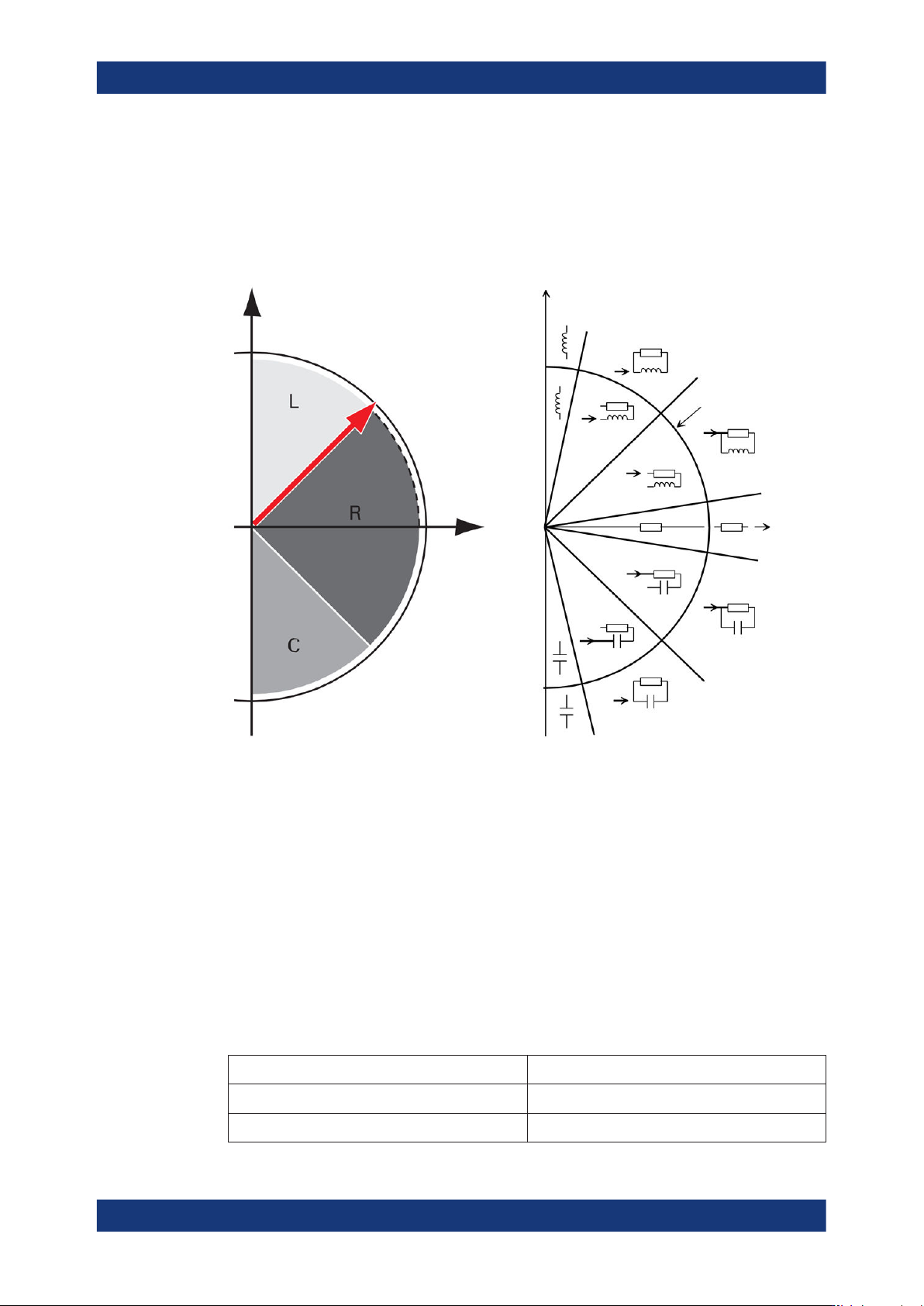
The following graph shows the capacitive and inductive parts of passive components
during impedance measurement in dependency on the frequency and the phase shift.
phase angle
above 45 ° = L
below -45 ° = C
Real axis
Imaginary axis jX
R
Q = D = 1
Q = D = 1
Q = 500
D = 0.002 Ω
|Z| = 1000 Ω
Q = 500
D = 0.002 Ω
Q = 500
D = 0.002 Ω
Q = 500
D = 0.002 Ω
Figure 5-1: Phase angle and integral sections
L = inductance
R = resistance
C = capacitance
|Z| = impedance
D = dissipation factor
Q = quality factor
5.1 Impedance measurement parameters in general
The following table outlines the basic parameters and their definitions:
Table 5-1: Basic parameters and definitions
Parameter (designation and [unit]) Definition
Z (Ω) Impedance
|Z| (Ω) Magnitude of Z
Impedance measurement parameters in general