LCX_UserManual_en_08_1.pdf - 第110页
Instrument functions R&S ® LCX Series 1 10 User Manual 1 179.2260.02 ─ 08 Canceling a dynamic impedance measurement Once you have started the process, you can cancel the measurement in the progress dialog displayed. …
Instrument functions
R&S
®
LCX Series
109User Manual 1179.2260.02 ─ 08
Abort
Aborts a running dynamic impedance measurement process.
Remote command:
DIMeasure:ABORt on page 200
8.8.4.2 Using the dynamic impedance measurement function
The dynamic impedance measurement function records the measurement readings
automatically. The R&S LCX stores the data in a log file with a generically created file-
name, either on the USB flash drive or in the instrument internal memory directory.
The dynamic impedance measurement function acquires the measurement values
from both the currently selected primary and from the secondary measurement pair.
To select the measurement parameter pairs:
► Proceed as described in "Selecting the parameters" on page 73
Remote commands:
FUNCtion:IMPedance[:TYPE][:PRIMary] on page 212
FUNCtion:IMPedance:TYPE:SECondary on page 213
Selecting the memory location
To determine the destination for saving the data file:
► Follow the steps described in "Selecting the memory location" on page 105.
Measuring in dynamic impedance measurement mode
1. Press the [settings] key at the front panel.
2. In the "Functions" tab, select "Dynamic Impedance Measurement".
3. Configure the required settings.
4. Depending on the selected interval type, configure the value for the step size or the
number of points to set the values of the sweep parameter within the range.
5.
To start the dynamic impedance measurement process, turn
"Enabled".
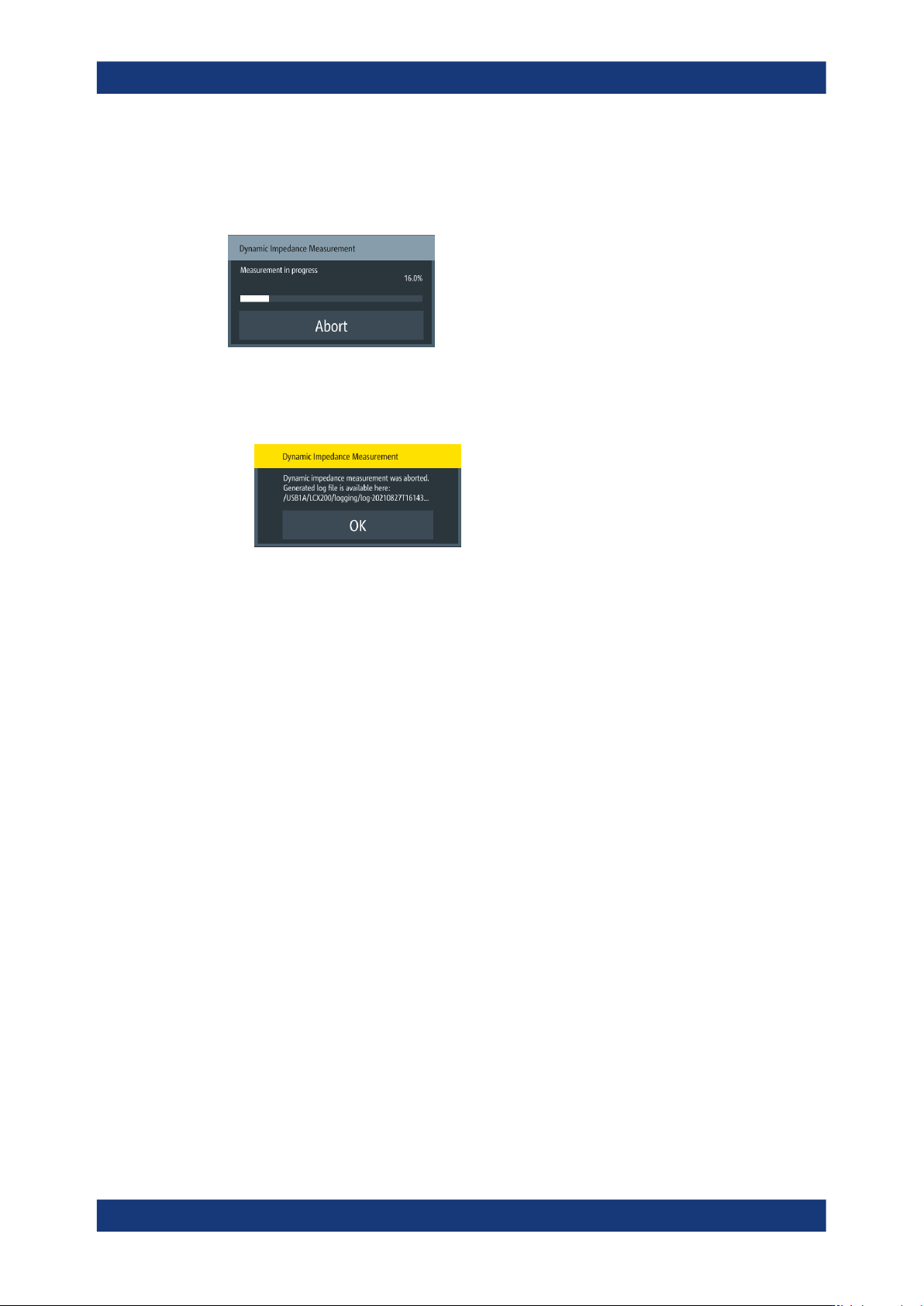
A dialog box appears that shows the progress of the dynamic impedance measure-
ment.
Note: Do not press any buttons on the instrument while the process is running. As
a dynamic impedance process can take a long time, you can abort the measure-
ment with "Abort" on page 109.
When completed, the R&S LCX displays a graphical view of the acquired measure-
ment data. It saves the generated log file with the filename indicated on the upper
left side of the screen.
Specific instrument functions
Instrument functions
R&S
®
LCX Series
110User Manual 1179.2260.02 ─ 08
Canceling a dynamic impedance measurement
Once you have started the process, you can cancel the measurement in the progress
dialog displayed.
1. Select "Abort".
The R&S LCX displays a message informing you on the recorded log file and its
storage location.
2. Confirm with "OK".
3. To evaluate the report in the log file:
a) If necessary, connect a USB memory device at the front panel "USB" connec-
tor.
b) Use the file manager to copy the log file to the memory device, see Sec-
tion 9.1.3, "File manager settings", on page 122.
c) Upload the file on a PC.
For evaluation, you can use any application that supports *.csv file format.
8.8.5 Binning
Option: R&S LCX-K107
The binning function enables you to sort a set of electrical components according to
the measured characteristics. The R&S LCX measures a connected component and
categorizes it based on a predefined bin configuration. You can see the corresponding
result on the screen, and also get the category assigned at one of the digital outputs of
the interface I/O port.
Specific instrument functions
Instrument functions
R&S
®
LCX Series
111User Manual 1179.2260.02 ─ 08
9
4
6
10
21 3
5
78
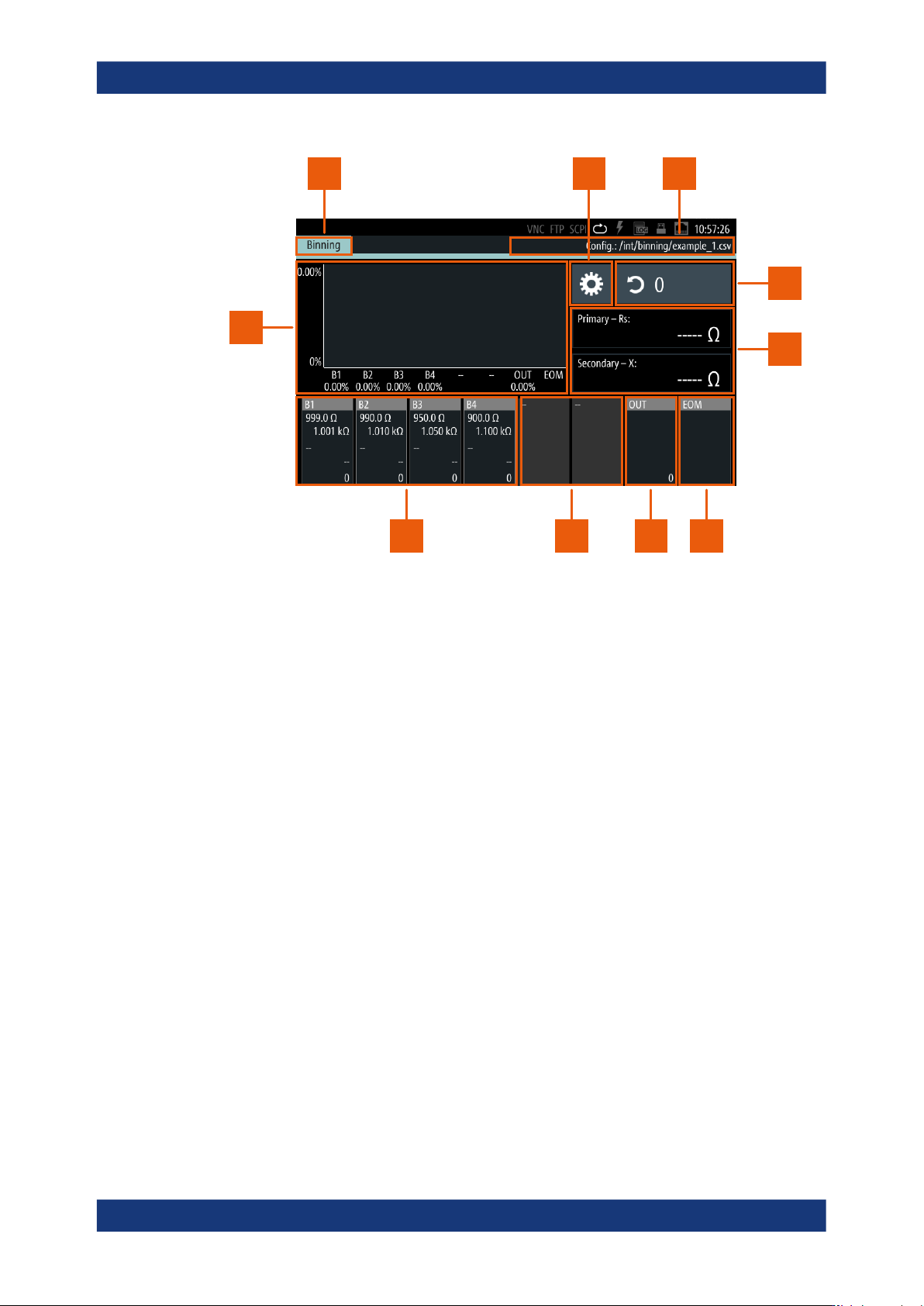
Figure 8-25: Binning measurement display and controls
1 = Measurement function indicator
2 = Settings softkey
3 = CSV file
4 = Counter
5 = Sorting characteristics
6 = End of measurement bin
7 = Out bin
8 = Unconfigured bin
9 = User-specified bins
10 = Histogram
8.8.5.1 About binning
To perform binning, the R&S LCX requires the bin configuration you must define and
upload in advance. In addition, you must configure the test signal (i.e. level and fre-
quency) and bias, compensation and measurement range settings before. Changing
these settings is not possible during a binning session.
To specify the bin configuration, you can define up to 8 categories according to 2 mea-
surement characteristics in a *.csv file, e.g. using a suitable application. Optionally,
you can configure the last bin to denote the end of each measurement, independently
of the result. Another control signal denotes if a component exceeds the specified lim-
its. You can assign these results to a bin also.
To upload the file, use a USB flash drive. When the binning function is enabled, the
R&S LCX measures the connected component initiated by a trigger signal. It indicates
the result, i.e. the corresponding bin on the screen, and also assigns a signal at one of
the 8 digital bin outputs.
Specific instrument functions