LCX_UserManual_en_08_1.pdf - 第20页
Getting started R&S ® LCX Series 20 User Manual 1 179.2260.02 ─ 08 Prevent overheating as follows: ● Keep a minimum distance of 10 cm between the fan openings of the product and any object in the vicinity to provide …
Getting started
R&S
®
LCX Series
19User Manual 1179.2260.02 ─ 08
●
Class A equipment is intended for use in industrial environments. It can cause
radio disturbances in residential environments due to possible conducted and radi-
ated disturbances. It is therefore not suitable for class B environments.
If class A equipment causes radio disturbances, take appropriate measures to
eliminate them.
4.1.4 Setting up the R&S LCX
See also:
●
"Setting up the product" on page 10
●
"Intended use" on page 9
4.1.4.1 Placing the R&S LCX on a bench top
To place the product on a bench top
1. Place the product on a stable, flat and level surface. Ensure that the surface can
support the weight of the product. For information on the weight, see the specifica-
tions document.
2.
CAUTION! Foldable feet can collapse. For safety information, see "Setting up the
product" on page 10.
Always fold the feet completely in or out. With folded-out feet, do not place any-
thing on top or underneath the product.
3.
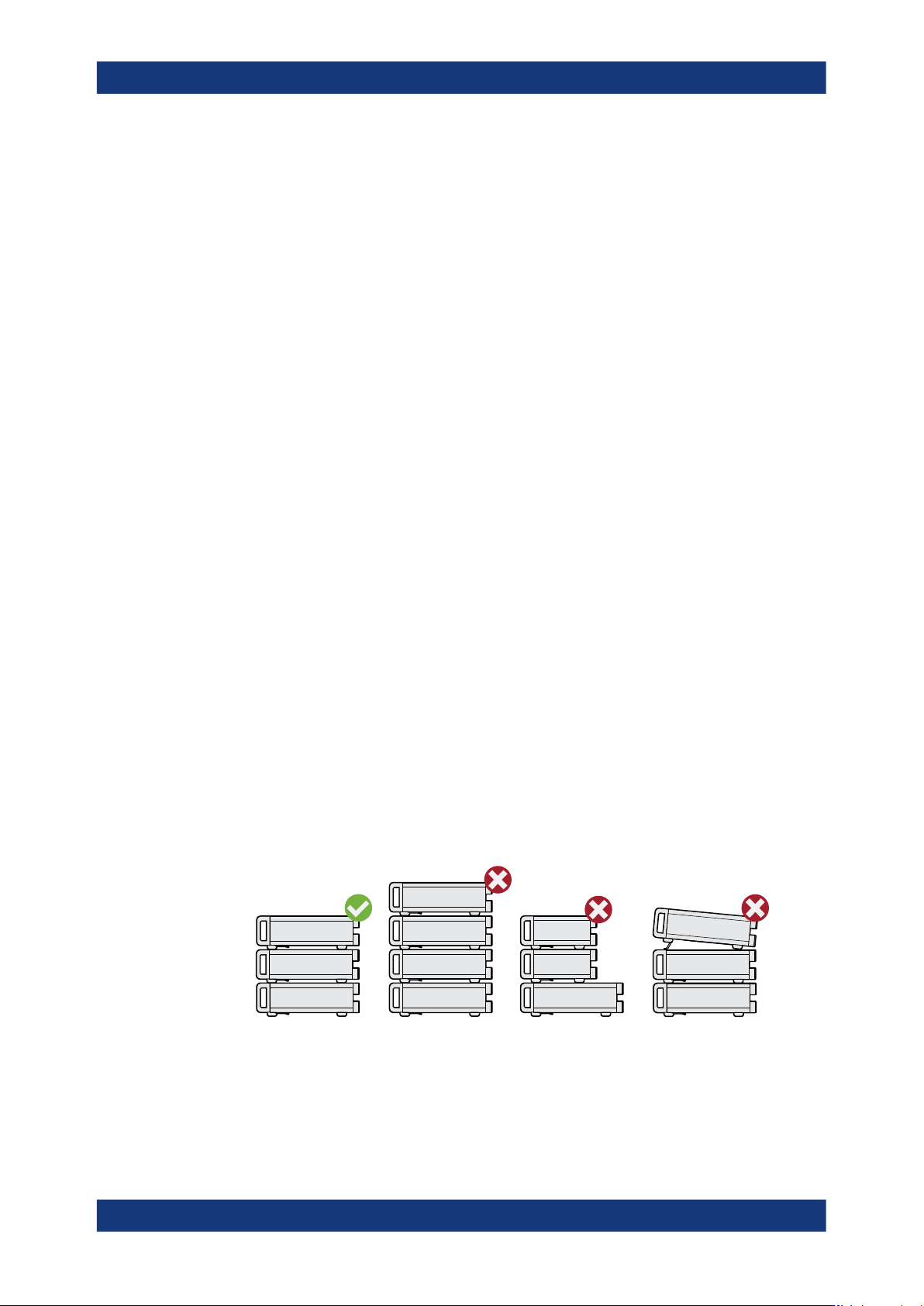
WARNING! A stack of products can fall over and cause injury. Never stack more
than three products on top of each other. Instead, mount them in a rack.
Stack as follows:
● If the products have foldable feet, fold them in completely.
● All products must have the same dimensions (width and length).
● Do not exceed a total load of 50 kg placed on the product at the bottom of the
stack.
Left
= Stacked correctly
Middle left = Stacked incorrectly, too many products
Middle right = Stacked incorrectly, different dimensions
Right = Stacked incorrectly, folded-out feet
4.
NOTICE! Overheating can damage the product.
Preparing for use

Getting started
R&S
®
LCX Series
20User Manual 1179.2260.02 ─ 08
Prevent overheating as follows:
● Keep a minimum distance of 10 cm between the fan openings of the product
and any object in the vicinity to provide sufficient airflow and ventilation.
● Do not place the product next to heat-generating equipment such as radiators
or other products.
4.1.4.2 Mounting the R&S LCX in a rack
To prepare the rack
1. Observe the requirements and instructions in "Setting up the product" on page 10.
2.
NOTICE! Insufficient airflow can cause overheating and damage the product.
Design and implement an efficient ventilation concept for the rack.
Mounting the R&S LCX in a rack
To mount the R&S LCX in a rack:
1. Use an adapter kit that fits the dimensions of the R&S LCX to prepare the
R&S LCX for rack mounting.
a) Order the rack adapter kit designed for the R&S LCX. For the order number,
see the specifications document.
b) Mount the adapter kit. Follow the assembly instructions provided with the
adapter kit.
2. Lift the R&S LCX to shelf height.
3. Push the R&S LCX onto the shelf until the rack brackets fit closely to the rack.
4. Tighten all screws at the rack brackets with a tightening torque of 1.2 Nm to secure
the R&S LCX at the rack.
Unmounting the R&S LCX from a rack
To unmount the R&S LCX from a rack:
1. Loosen the screws at the rack brackets.
2. Bring the lifting equipment to shelf height.
3. Remove the R&S LCX from the rack.
4. If placing the R&S LCX on a bench top again, unmount the adapter kit from the
R&S LCX. Follow the instructions provided with the adapter kit.
Preparing for use

Getting started
R&S
®
LCX Series
21User Manual 1179.2260.02 ─ 08
4.1.5 Considerations for test setup
Cable selection and electromagnetic interference (EMI)
Electromagnetic interference (EMI) can affect the measurement results.
To suppress electromagnetic radiation during operation:
●
Use high-quality shielded cables, especially for the following connector types:
– Connectors for external devices
Double-shielded data cables. The length of data cables must not exceed 3 m.
– Connectors for signal transmission
Shielded coaxial cables. The length of signal cables must not exceed 1 m.
We recommend that you use the R&S LCX-Z11 BNC-to-BNC extension (1 m)
from Rohde & Schwarz.
– BNC
Double-shielded BNC cables.
– USB
Double-shielded USB cables. The length of passive USB cables must not
exceed 1 m.
– LAN
At least CAT6+ cables
– IEEE-488 (GPIB)
Double-shielded cables. We recommend that you use the double-shielded
cable "R&S HZ72" from Rohde & Schwarz.
●
Always terminate open cable ends.
●
Ensure that connected external devices comply with EMC regulations.
Signal input and output levels
Information on signal levels is provided in the specifications document. Keep the signal
levels within the specified ranges to avoid damage to the product and connected devi-
ces.
4.1.6 Connecting to power
For safety information, see "Connecting to power" on page 11.
When using the R&S LCX the first time, you can skip Replacing the external bias fuse
and Replacing the line fuse.
If there are any problems during power-on or malfunction of the bias, check the condi-
tion of the mains fuse. Also check the fuse for the external bias input as described in
these instructions. They explain how to check and change the protective fuses, if nec-
essary.
Preparing for use