LCX_UserManual_en_08_1.pdf - 第92页
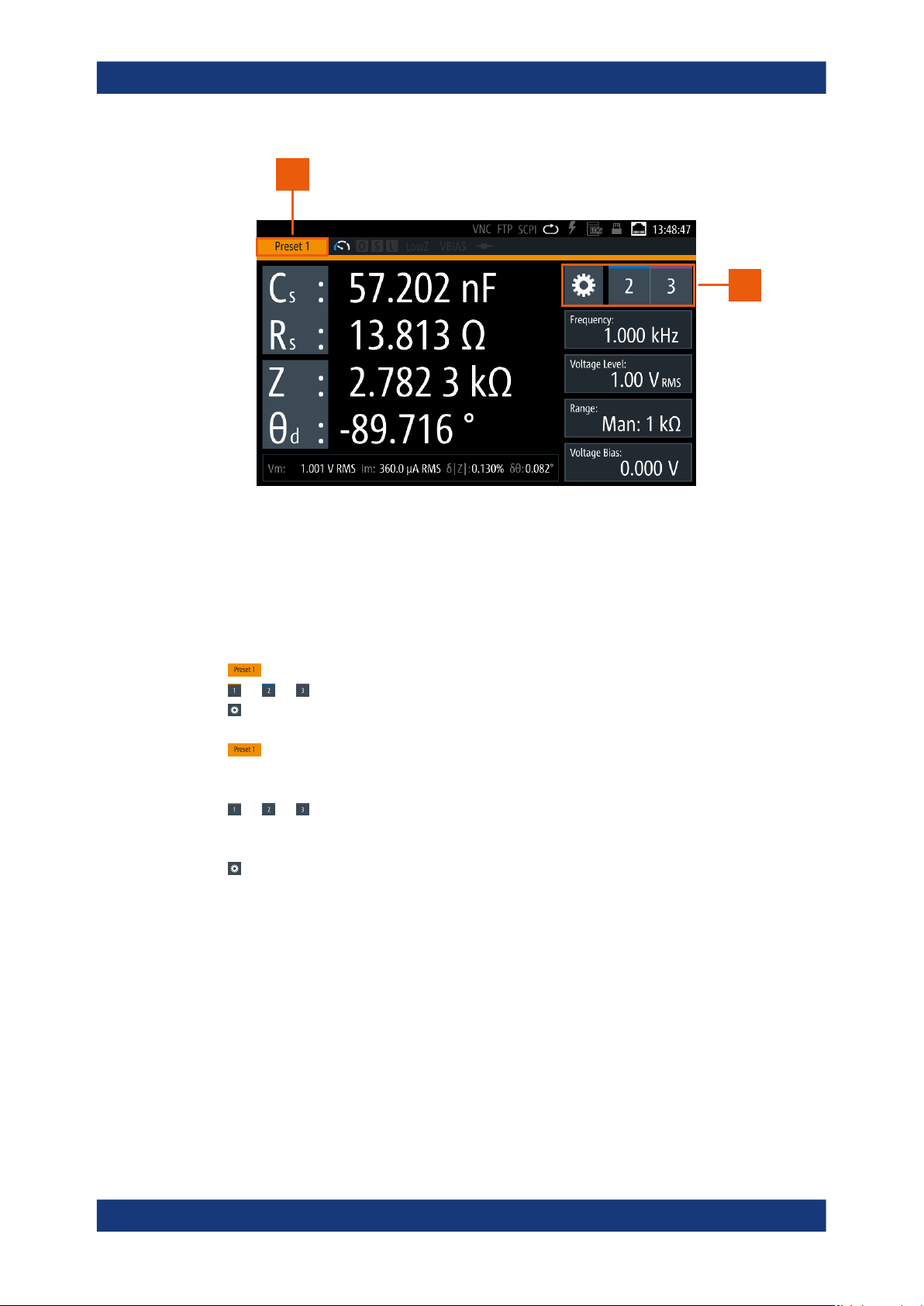
Instrument functions R&S ® LCX Series 92 User Manual 1 179.2260.02 ─ 08 2 1 Figure 8-10: Configuration preset indication 1 = Configuration preset indicator 2 = Settings softkey and configuration preset softkeys The c…

Instrument functions
R&S
®
LCX Series
91User Manual 1179.2260.02 ─ 08
The configuration preset excludes measurement range, value and bias settings.
●
Indication and selection of a configuration presets
One of the three presets is always active, while the other two are inactive, as
shown on the screen:
– Indication
The
(configuration preset) indicator displays the currently active configu-
ration preset.
The different colors of each preset emphasize the display.
– Selection
The
(preset configuration) softkeys on the screen enable you to activate a
preset directly.
The R&S LCX provides always the two selectable, i.e. the currently inactive
preset softkeys. When you switch to another configuration preset, it adjusts the
labels of the keys and the indicator according to the selection.
When switching to another preset or changing setting parameters, consider
that it can last up to 10 seconds to be sure that all settings are saved.
●
Persistency of configuration presets
The R&S LCX saves a configuration in the selected, i.e. active configuration pre-
set. It saves the settings on the internal file system, which is not accessible. After
power off, the instrument reboots with the recently active configuration preset.
●
Saving options
The settings of the active configuration preset are also included in the "Save/
Recall" function and saved in the *.rds file. When you recall a settings file, the
R&S LCX restores the configuration preset from the file to the same memory slot
("Preset 1, 2 or 3") it was created on. It is not possible to assign it to another slot.
8.7.1 Configuration preset settings
Access:
► Press the [home] key at the front panel.
Configuration preset
Instrument functions
R&S
®
LCX Series
92User Manual 1179.2260.02 ─ 08
2
1
Figure 8-10: Configuration preset indication
1 = Configuration preset indicator
2 = Settings softkey and configuration preset softkeys
The configuration preset softkeys enable you to assign up to three different mea-
surement configurations for quick access.
How to: see Section 8.7.2, "Using the configuration preset function", on page 92
Preset 1, Preset 2, Preset 3..................................................................................92
1, 2, 3.................................................................................................................92
(measurement settings).............................................................................................92
Preset 1, Preset 2, Preset 3
Indicates the active configuration preset.
1, 2, 3
Selects one out of three configuration preset memory slots.
(measurement settings)
Opens a dialog for configuring the parameters that are relevant for the measurement.
See Section 8.6, "Measurement parameters", on page 76.
8.7.2 Using the configuration preset function
You can assign up to three configurations relevant for a measurement as favorites, to
skip quickly between different settings, or to repeat tests with the same settings.
Configuration preset

Instrument functions
R&S
®
LCX Series
93User Manual 1179.2260.02 ─ 08
Creating user-defined configuration presets
To create and save a configuration preset:
1.
Select the configuration preset memory slot, e.g. .
2.
Select to open the parameter settings dialog.
3. Set the corresponding parameters.
4. Press the home to return to the measurement window.
5.
To preset additional configurations, select another configuration preset slot, e.g.
or .
6. Repeat step 2 to step 5) until you have assigned all preset configurations.
Switching the configuration during a measurement
We assume that you have setup measurement and a DUT applied.
To execute a measurement with changing configuration:
1. Select the measurement function required for the measurement.
2. Set the test signal parameters.
3. Select the measurement parameters for results display.
4. Assign the configuration presets as described in "Creating user-defined configura-
tion presets" on page 93.
5.
Start the measurement, e.g. using a configuration preset
.
6.
Select, e.g. to continue the measurement with different settings.
While the measurement is running, you can switch between the preset configura-
tions arbitrarily.
8.8 Specific instrument functions
This secttion describes the features the instrument provides in addition to the basic
measurement functions. Some specific functions require that the corresponding
options are installed.
Access:
1. Press the [settings] key at the front panel.
2. Select the "Functions" tab.
Specific instrument functions