LCX_UserManual_en_08_1.pdf - 第161页
Network operation and remote control R&S ® LCX Series 161 User Manual 1 179.2260.02 ─ 08 Remote command: "SCPI Raw Port" on page 160 Desired Hostname Displays the hostname. Each instrument is delivered with…
Network operation and remote control
R&S
®
LCX Series
160User Manual 1179.2260.02 ─ 08
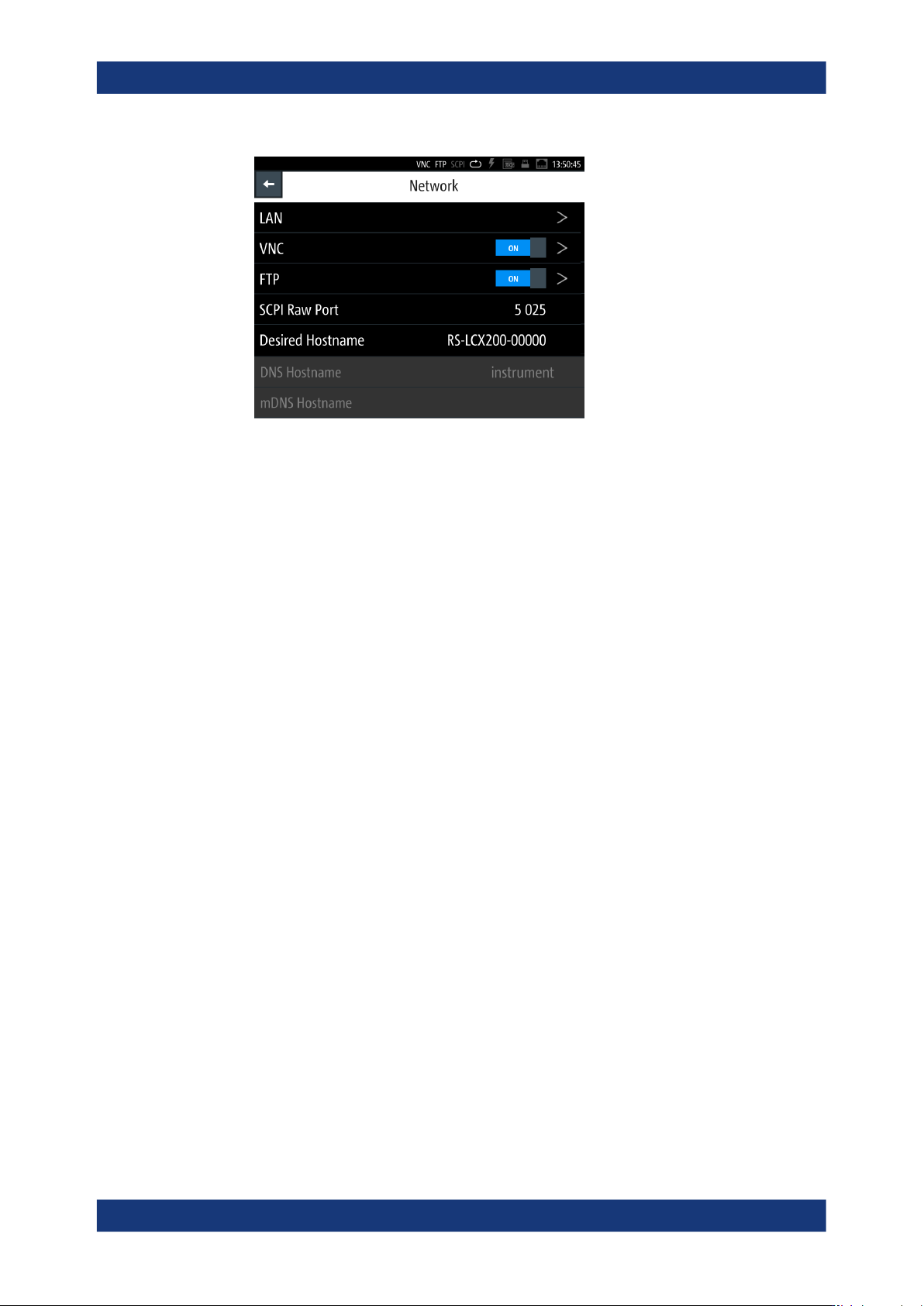
Figure 10-3: Network settings dialog
In the "Network" dialog, you can access the LAN and VNC interface addresses,
assign the port for raw socket communication and a hostname for the instrument.
The remote commands required to configure the network remotely are described in
Section 11.18, "SYSTem subsystem", on page 231.
LAN............................................................................................................................. 160
VNC.............................................................................................................................160
FTP............................................................................................................................. 160
SCPI Raw Port............................................................................................................160
Desired Hostname...................................................................................................... 161
DNS Hostname........................................................................................................... 161
DNS Hostname........................................................................................................... 161
LAN
Opens the "LAN" dialog for setting the interface parameters, see Section 10.3.2, "LAN
settings", on page 161.
VNC
Accesses the VNC dialog for configuring the VNC port address, see Section 10.3.3,
"VNC settings", on page 163.
FTP
Accesses the FTP dialog for configuring the FTP port address, see Section 10.3.4,
"FTP settings", on page 164.
SCPI Raw Port
Sets the port number for remote control over LAN, using TCP/IP socket protocol.
The socket address is a combination of the IP address or the host name of the instru-
ment and the number of the port configured for remote control.
To assign the socket port manually, set DHCP & Auto-IP > Off.
How to: see "Assigning the LAN interface addresses manually" on page 169.
Remote access settings

Network operation and remote control
R&S
®
LCX Series
161User Manual 1179.2260.02 ─ 08
Remote command:
"SCPI Raw Port" on page 160
Desired Hostname
Displays the hostname.
Each instrument is delivered with an assigned hostname, a logical name you can use
instead of the IP address.
With the default network settings, the IP address is allocated by the DHCP server. This
address can change each time the instrument is reconnected. Unlike the IP address,
the hostname name does not change.
Note: We recommend that you do not change the hostname to avoid problems with
the network connection. If you change the hostname, be sure to use a unique name.
How to: see "Assigning the SCPI raw port and hostname manually" on page 172.
Remote command:
SYSTem:COMMunicate:LAN:HOSTname on page 238
DNS Hostname
Displays the DNS hostname.
The DNS host name is a unique designation for an instrument, composed of the host-
specific name and the domain name, separated by a "." (dot).
DNS Hostname
Displays the mDNS hostname.
10.3.2 LAN settings
Access:
1. Press the [settings] key at the front panel.
2. In the device settings menu, select "Interfaces".
3. Select "Network".
4. Select "LAN".
Remote access settings
Network operation and remote control
R&S
®
LCX Series
162User Manual 1179.2260.02 ─ 08
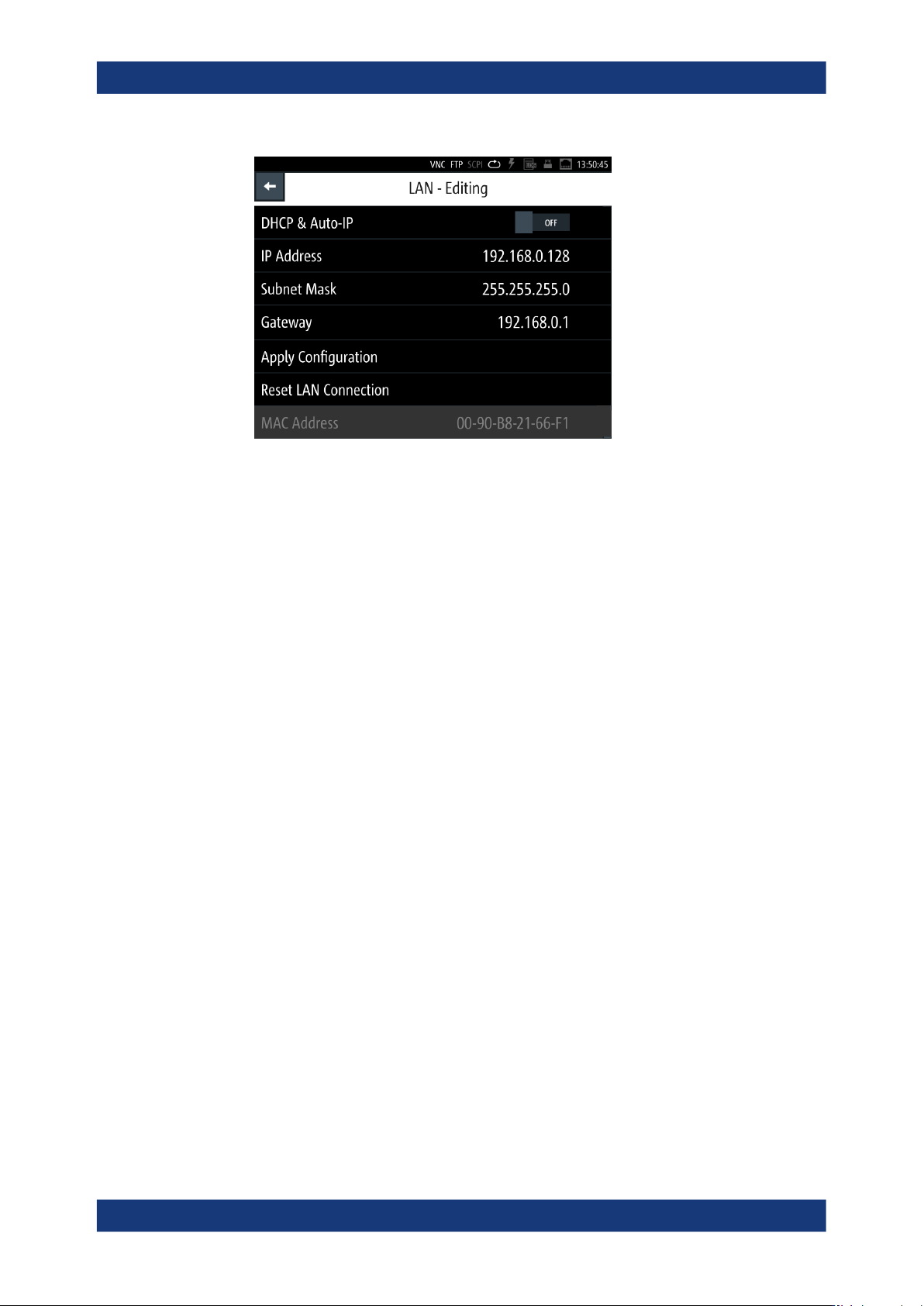
Figure 10-4: LAN settings dialog
In this dialog, you can configure the settings of the general network environment
and specific identification parameters of the instrument in the network. The
R&S LCX displays the VISA resource strings and additional parameters for infor-
mation on the LAN interface, and the status of the connection.
By default, the R&S LCX is configured to use dynamic TCP/IP configuration and to
obtain the whole address information automatically. If the network does not support
DHCP, you can assign the IP address manually.
The remote commands required to configure the network remotely are described in
Section 11.18, "SYSTem subsystem", on page 231.
How to: "Assigning the LAN interface addresses manually" on page 169.
Settings
DCHP & Auto-IP
Sets the mode for assigning the IP address.
"OFF"
Assigns the IP address automatically, provided the network supports
DHCP.
"ON"
Enables you to assign the IP address manually.
Remote command:
SYSTem:COMMunicate:LAN:DHCP on page 237
IP Address
Displays the IP address of the instrument in the network. By default, the R&S LCX is
configured to use dynamic TCP/IP configuration and to obtain the whole address infor-
mation automatically.
To assign the socket port manually, set DHCP & Auto-IP > Off.
How to: see "Assigning the LAN interface addresses manually" on page 169 for the
steps to be taken for assign the address manually.
Remote access settings